Does a VPN Hide Your Location? (2026)
Does a VPN hide your location? Yes for IP-based location, but not GPS, logged-in accounts, or browser permissions. Here is exactly what a VPN hides and what it doesn't.
It’s one of the main reasons people install a VPN in the first place: to hide where they are. Whether you want to access content from another country, keep websites from knowing your city, or simply stay private online, the promise of a VPN is that it masks your location. But does it actually work, and does it hide all of your location, or just part of it?
The truth is more nuanced than the marketing suggests. A VPN is genuinely effective at hiding one specific kind of location, your IP-based location, and it does that very well. But your device can reveal where you are in several other ways that a VPN doesn’t touch at all, from GPS to the accounts you’re logged into. Understanding the difference is the key to real privacy.
This guide explains exactly what a VPN hides about your location, what it doesn’t, the leaks that can expose your real position, and how to fully hide your location when it really matters. Let’s clear it up.
The Short Answer
Yes, a VPN hides your IP-based location. When you connect, websites and services see the IP address (and therefore the location) of the VPN server you chose, not your real one. Pick a server in another country and you appear to be there. However, a VPN does not hide your GPS location on mobile, the location tied to accounts you’re logged into (like Google), or your position if you grant a website permission to access it directly. So a VPN changes your apparent location for most websites, but it isn’t a complete invisibility cloak.
How a VPN Hides Your Location
To understand what a VPN hides, you first need to know how websites figure out where you are in the first place. The most common method is IP geolocation. Every internet connection has an IP address, and that address is registered to an ISP in a particular region, so websites can map it to your approximate country, state, and city.
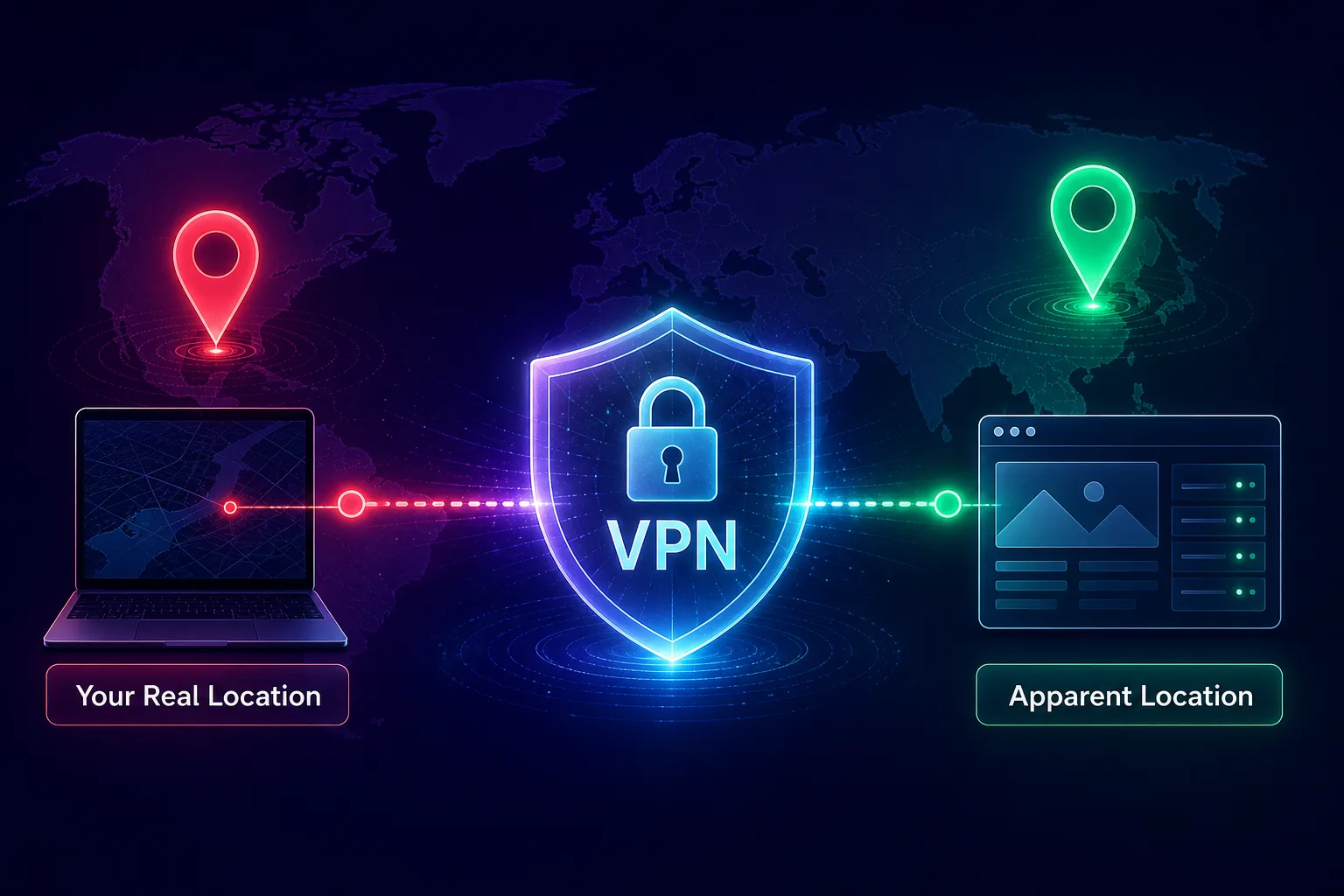
A VPN works by routing your traffic through one of its servers and replacing your real IP address with the server’s IP. So if you’re in London but connect to a VPN server in New York, websites performing IP geolocation will place you in New York. Your real IP, and the location it reveals, stays hidden behind the VPN. To see what your address exposes right now, try our what is my IP address tool, and read more on how websites use it in can websites see your IP address.
What "Location" Actually Means Online
Here’s the crucial insight: "your location" isn’t a single thing online. There are several independent ways your whereabouts can be determined, and a VPN only addresses one of them.
- IP geolocation: your approximate location from your IP address. A VPN hides this.
- GPS: precise satellite positioning on phones and tablets. A VPN does not touch this.
- Browser location: the geolocation permission websites can request. A VPN doesn’t stop this if you allow it.
- Account and behavioral data: location inferred from logins, saved addresses, and history. A VPN doesn’t hide this.
Because these are separate systems, hiding one doesn’t hide the others. That’s why a VPN alone can leave your true location exposed through a channel you didn’t think about.
What a VPN Does NOT Hide
This is where most people misunderstand VPNs. Here are the location signals a VPN leaves completely untouched.
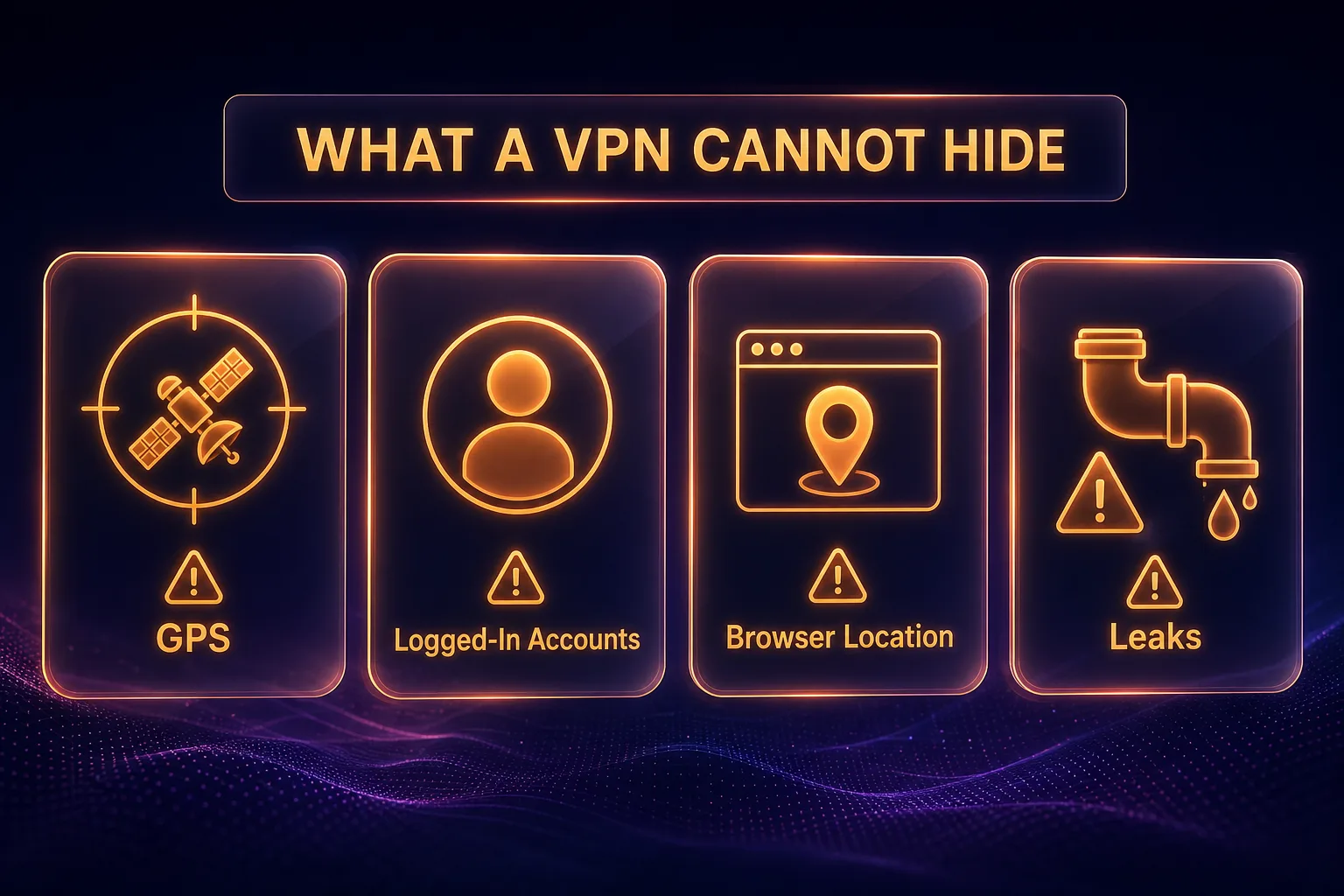
1Your GPS Location
On a phone or tablet, GPS pinpoints you within a few meters using satellites, completely independent of your internet connection. Any app you’ve granted location permission reads GPS directly, so a VPN does nothing to hide it. A ride-share or maps app will still know exactly where you are with a VPN running.
2Websites You Give Location Permission To
Browsers have a geolocation feature that websites can request. If you click "Allow," the site gets your precise location (often from GPS or nearby Wi-Fi), bypassing your IP entirely. A VPN can’t override a permission you granted, so deny location requests when you want to stay hidden.
3Accounts You’re Logged Into
If you’re signed into Google, Facebook, or similar, they already know a great deal about where you are from your history, saved home and work addresses, and device signals. A VPN changes your IP, but it doesn’t log you out or erase what these accounts already know about your location.
4Cookies and Fingerprinting
Websites can store location hints in cookies or infer your identity through browser fingerprinting, then correlate you with a previously known location. A VPN doesn’t clear cookies or change your fingerprint. Our guide on how to stop apps and websites from tracking you covers this in depth.
Leaks That Can Reveal Your Real Location
Even for the IP location a VPN is supposed to hide, technical leaks can accidentally expose your real one. A quality VPN protects against these, but it’s worth knowing them.
1WebRTC Leaks
WebRTC is a browser feature for real-time communication that can reveal your true IP address even while a VPN is active. Good VPNs block this, and you can also disable WebRTC in your browser for extra safety.
2DNS Leaks
If your DNS requests travel outside the VPN tunnel to your ISP’s servers, they can expose the sites you visit and hint at your location. Reputable VPNs route DNS through their own encrypted servers to prevent this, and you can test for leaks with online tools.
3IPv6 Leaks and Dropped Connections
Some VPNs don’t fully handle IPv6 traffic, which can leak your real address, and if the VPN connection drops for a moment, your real IP is briefly exposed. This is exactly why a VPN kill switch matters: it cuts your internet instantly if the VPN fails, so your location never leaks. Choose a VPN with built-in leak protection and a kill switch.
Does a VPN Hide Your Location on Your Phone?
Partly, and this trips a lot of people up. On your phone, a VPN hides your IP-based location just like on a computer, so websites and apps relying on your IP will see the VPN server’s location. But your phone also has GPS, and any app with location permission reads that GPS directly, bypassing the VPN entirely.
So with a VPN on your phone, a website checking your IP thinks you’re in the VPN’s country, while a maps or weather app using GPS still knows your real spot. To hide your location from GPS-based apps, you’d need to disable location services or use a separate GPS-spoofing method, which is beyond what any VPN does. The takeaway: a phone VPN handles IP location, not physical GPS location.
Does a VPN Hide Your Location From Google and Websites?
From a random website that only checks your IP, yes, a VPN convincingly changes your apparent location. From Google and other accounts you’re logged into, not really. Google determines your location from many signals beyond IP, including your account history, GPS on your devices, saved addresses, and even nearby Wi-Fi networks. Changing your IP with a VPN doesn’t undo any of that.
If your goal is to appear in another country for content or shopping, a VPN usually works for the site itself. But if you want to be truly invisible to a platform that knows you, you also need to log out, use private browsing, and deny location permissions. A VPN is one important layer, not the whole solution. For more realistic expectations, see our guide to VPN myths you still believe.
How to Fully Hide Your Location
To genuinely conceal where you are, combine a VPN with a few other steps. Together they close the gaps a VPN leaves open.
1Use a Reliable VPN With Leak Protection
Start with a reputable VPN that includes DNS leak protection, WebRTC protection, and a kill switch, so your IP location is hidden and never leaks. This is the foundation.
2Turn Off Location Services
On your phone and browser, disable GPS location services or restrict them per app. This stops apps and sites from reading your precise position directly.
3Deny Browser Location Requests
When a website asks for your location, click "Block" or "Don’t Allow." This prevents the browser geolocation feature from handing over your real position.
4Log Out and Use Private Browsing
Sign out of accounts that track you, and use a private or hardened browser to limit cookies and fingerprinting that could tie you to a known location.
5Test for Leaks
After connecting, use an IP and DNS leak testing site to confirm your real location isn’t showing. If it is, switch on your VPN’s leak protection or choose a better provider. It takes only a minute and confirms your setup is actually working as intended.
VPN vs GPS Spoofing: Which Changes Your Location?
Because a VPN only handles IP location, people often confuse it with GPS spoofing, which is a different tool for a different job. A VPN changes the location that websites and services infer from your IP address, ideal for accessing region-locked sites or hiding your city. GPS spoofing, on the other hand, fakes the physical coordinates your phone reports to apps, which is what location-based games and mapping apps rely on.
If you want to appear in another country for a website, a VPN is all you need. But if an app reads your GPS directly, such as a location-based game or a dating app, a VPN won’t change what it sees, and you’d need a separate GPS-spoofing method. For complete location control on mobile, the two work together: a VPN for the network layer and GPS settings for the physical layer. For everyday privacy and content access, though, a good VPN is usually all most people require.
Best VPNs to Hide Your Location
A trustworthy, leak-proof VPN is the foundation of hiding your location. These three are our top recommendations for reliable IP masking and strong leak protection.

NordVPN is the best all-round choice, with a huge network of servers across the globe so you can appear almost anywhere, plus built-in DNS leak protection, a reliable kill switch, and an audited no-logs policy. Its fast NordLynx protocol makes changing your apparent location seamless for streaming, browsing, and everyday privacy.

Surfshark delivers premium location-masking at a budget price, with unlimited simultaneous connections so you can hide the location of every device you own. It includes leak protection and a kill switch, and its large server network gives you plenty of countries to appear from, all backed by a clean no-logs record.

ExpressVPN is the premium pick for consistent, reliable location changing, with servers in a wide range of countries and excellent unblocking. Its Lightway protocol, strong leak protection, and trusted privacy record make it a dependable choice when you need your apparent location to just work. Compare more options in our best VPN services for privacy guide or the full VPN directory.
Frequently Asked Questions
The Bottom Line
So, does a VPN hide your location? Yes, it reliably hides your IP-based location, making websites see the country and city of your VPN server instead of your real one. That’s enough to access region-locked content and keep ordinary sites from pinpointing your city. But it does not hide your GPS location, the whereabouts your logged-in accounts already know, or a location you hand over through a browser permission, and technical leaks can expose your real IP if your VPN lacks proper protection.
For real location privacy, pair a leak-proof VPN with disabled location services, denied browser permissions, and logging out of accounts you don’t need. For most people, NordVPN is the best all-round choice, with Surfshark for value and ExpressVPN for premium reliability. To understand the bigger picture, read what a VPN is and how it works, or compare providers in our full VPN directory.