What Are Mobile Proxies? How 4G/5G IPs Work (2026)
Mobile proxies borrow a carrier IP that many real phone users share. Here’s how carrier-grade NAT, sourcing and rotation work, and when the price premium is worth paying.
A mobile proxy borrows the IP address of a phone on a cellular network.
That sounds like a small detail. It isn’t. Mobile carriers squeeze huge numbers of subscribers behind a small set of shared public addresses, so one mobile IP can stand for hundreds of real people at once.
Block that address and a website risks locking out a crowd of paying customers. That’s the whole reason mobile proxies cost more than any other proxy type, and why they survive on targets that ban datacenter IPs on sight.
It’s also why they aren’t magic. Here’s how 4G and 5G proxy IPs actually work, where they come from, and when the price premium is worth paying.
- A mobile proxy sends your traffic out through a phone or cellular modem on a 3G, 4G or 5G network.
- Carriers share each public IP among many subscribers, so banning one can lock out real customers.
- Shared IPs still get rate-limited, and rotation means asking the carrier for a new address.
- Worth the premium for mobile-first apps and hard targets, wasteful for bulk scraping.
What a Mobile Proxy Actually Is
A mobile proxy is a proxy server that sends your requests out through a device connected to a 3G, 4G or 5G carrier network, so websites see a mobile carrier’s IP address instead of yours.
The device can be a real smartphone, a tablet or a cellular USB modem. What matters is the exit point: your traffic leaves the internet through the carrier’s network, the same way a person scrolling on their phone does.
Compare that with the other main types. A residential proxy exits through a home broadband connection. A datacenter proxy exits from a hosting company’s server. An ISP proxy sits in between, with a home-provider IP running on a server.
Setup is the same as any other proxy. Decodo and IPRoyal both support HTTP(S) and SOCKS5, so a mobile proxy plugs into the same scrapers, browsers and automation tools you already use.
In plain English: a mobile proxy makes your request look like it came from someone’s phone on a cellular plan.
Carrier-Grade NAT: Why One Mobile IP Is Many People
The internet ran short of IPv4 addresses years ago. Carriers responded with carrier-grade NAT (CGNAT): instead of giving every subscriber a public address, they put many subscribers behind one shared address and translate the traffic at the edge of their network.
It’s official plumbing, not a hack. The IETF’s RFC 6598 reserved a dedicated address block, 100.64.0.0/10, so providers could run carrier-grade NAT at scale. The same document warns that some banking and social sites limit simultaneous logins per public IP, and that geolocation can end up pointing at the carrier’s NAT equipment rather than the actual phone.
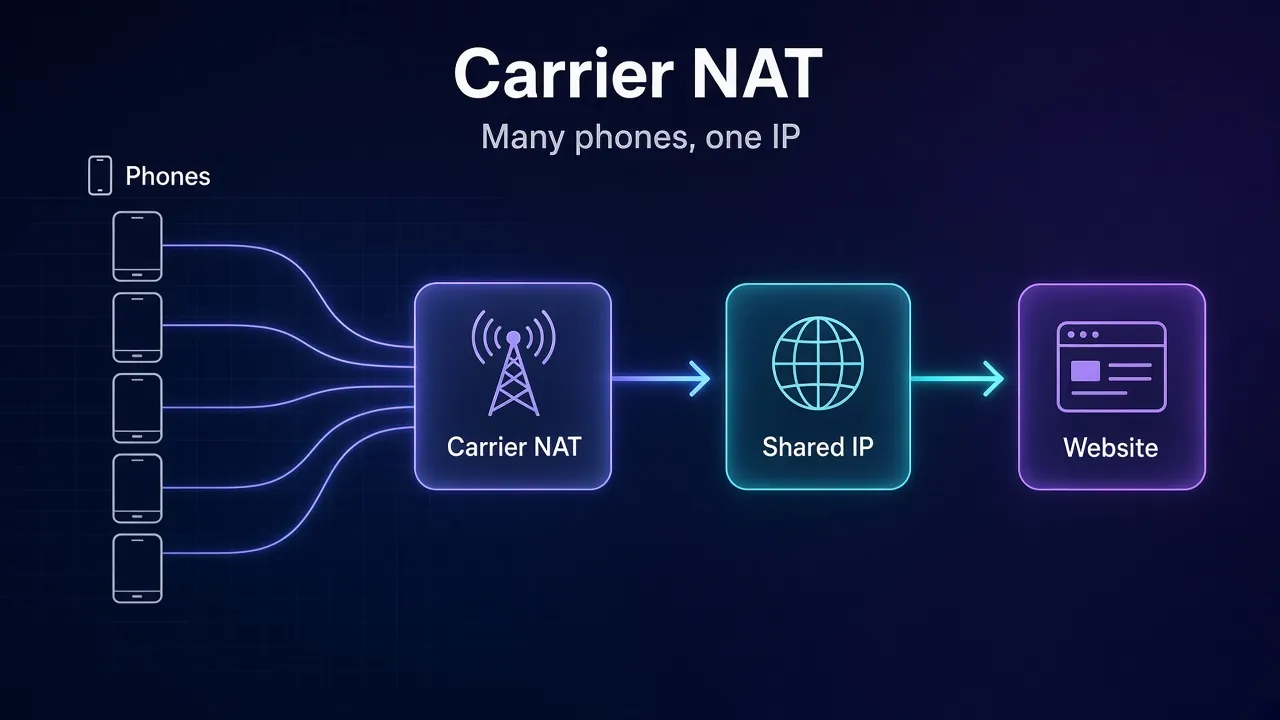
Cloudflare put the scale in plain terms in an October 2025 research post: a single IPv4 address may now represent hundreds or even thousands of users, and CGNAT is common in mobile networks.
That’s the property mobile proxies sell. When you rent a mobile IP, you blend into the crowd already sharing it.
Why Websites Go Easy on Mobile IPs, and When They Don’t
An IP block is a blunt tool. On a home connection it hits one household. On a datacenter range it hits bots nobody will miss. On a carrier IP, it can hit everyone in a neighbourhood who happens to share that address.
Cloudflare’s researchers say this directly: blocking a shared IP penalizes many innocent users along with the abuser. So careful anti-bot systems lean on other signals before banning a carrier address outright.
Here’s the part most mobile proxy pages skip. In the same post, Cloudflare reports that CGNAT addresses were rate-limited three times more often than non-CGNAT addresses, even though their traffic looked more human. Shared IPs collect more friction, not less, because everyone’s traffic adds up on one address.
Our take: a mobile IP makes a hard ban less likely. It doesn’t stop rate limits, CAPTCHAs or account-level checks. Big platforms are also building classifiers to tell real CGNAT traffic apart from VPNs and proxies, which is exactly what Cloudflare describes doing.
IP databases make the label easy to read. IP2Location tags carrier networks with the usage type MOB (mobile ISP), and MaxMind’s Insights service has a cellular user type. If a site checks, it knows your request came from a phone network. Our guide to proxy IP reputation covers what else gets scored.
Where Mobile Proxy IPs Come From
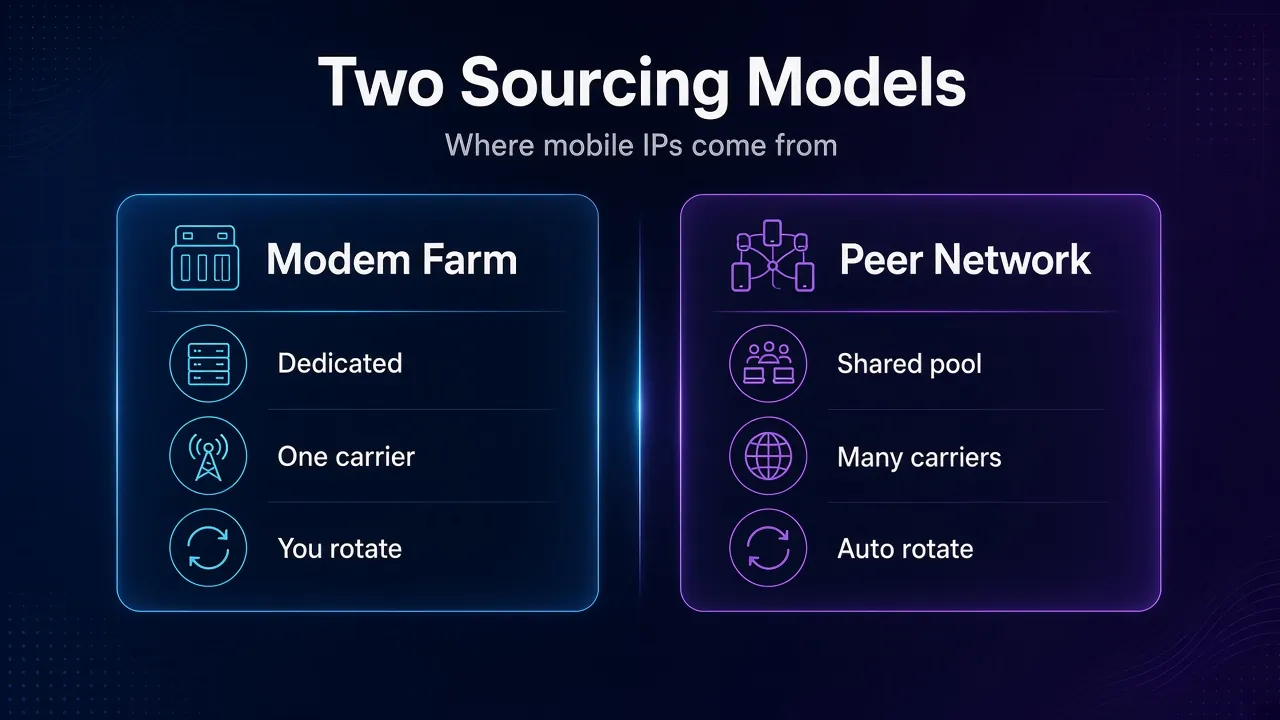
Two very different setups hide behind the same “mobile proxy” label, and the difference changes what you’re buying.
1Modem Farms
Some providers run racks of SIM-equipped USB modems or Android phones and rent each device to one customer. Proxidize, which sells this kind of setup, says its rotation works on both USB modems and Android phones.
You usually get a dedicated device on one carrier in one location, and you control when it changes IP. The trade-off is a small pool: you see whatever addresses that one carrier hands that one modem.
2Peer Networks
Large providers route traffic through apps on real users’ devices instead. Decodo says its 10M+ mobile IPs come from consenting users across 700+ carriers, and IPRoyal says it sources mobile IPs from users with unlimited mobile data plans (both checked October 18, 2026).
You get a huge, shared pool with country, city and carrier targeting, and the provider handles rotation. The trade-off is less control: a peer device can go offline, and other customers share the same network.
Check before you buy: ask how the IPs are sourced and whether device owners consented. A provider that can’t answer that cleanly is a risk to you, not just to them.
How Rotation Works on a Mobile Network
Mobile proxies don’t pick a new IP from a list the way a rotating residential gateway does. They ask the carrier for one.
Coronium’s documentation describes the mechanism plainly: the device is briefly disconnected from the network and reconnected, and the carrier assigns a fresh address from its pool for that location. It even suggests trying it yourself by toggling airplane mode on your own phone for a few seconds.
A few practical consequences follow:
- Rotation takes seconds, not milliseconds. Proxidize quotes 4 to 7 seconds for a new IP, and Coronium warns of 10 to 20 seconds of downtime and caps rotation at once per 60 seconds.
- A new IP isn’t promised. OnProxy’s FAQ notes that the carrier decides which address you get and can hand back the same one.
- Sticky isn’t forever. Even when you don’t rotate, a carrier can change the address on its own schedule.
Plan for those pauses in your code. Retry requests that fail during a rotation, and never rotate in the middle of a login or checkout.
Peer-network providers hide most of this. Decodo, for example, offers a new IP per request or a sticky session that holds one IP for a set time. Our guide to rotating proxies explains when each mode makes sense.
Mobile vs Residential vs ISP vs Datacenter Proxies
Mobile proxies sit at the expensive, high-trust end of the range. This table sums up the trade-offs. For the full family tree, see our guide to types of proxies.
| Trait | Mobile | Rotating residential | ISP (static residential) | Datacenter |
|---|---|---|---|---|
| IP registered to | Mobile carrier | Home broadband ISP | Home broadband ISP | Hosting company |
| Traffic exits from | A phone or cellular modem | A household device | A server | A server |
| Users behind one IP | Often many (CGNAT) | Usually one household | One customer (dedicated) | One customer or shared |
| How it rotates | Carrier reassigns on reconnect | Gateway picks from pool | Doesn’t, unless replaced | Doesn’t |
| Speed | Carrier-dependent | Variable | High | Highest |
| Usual billing | Per GB, or per device per day | Per GB | Per IP | Per IP |
The row that matters most is “users behind one IP”. It’s the reason a mobile address is hard to ban, and also the reason it collects rate limits.
What Mobile Proxies Cost
Mobile bandwidth is the priciest proxy traffic you can buy. Two common pricing models show up:
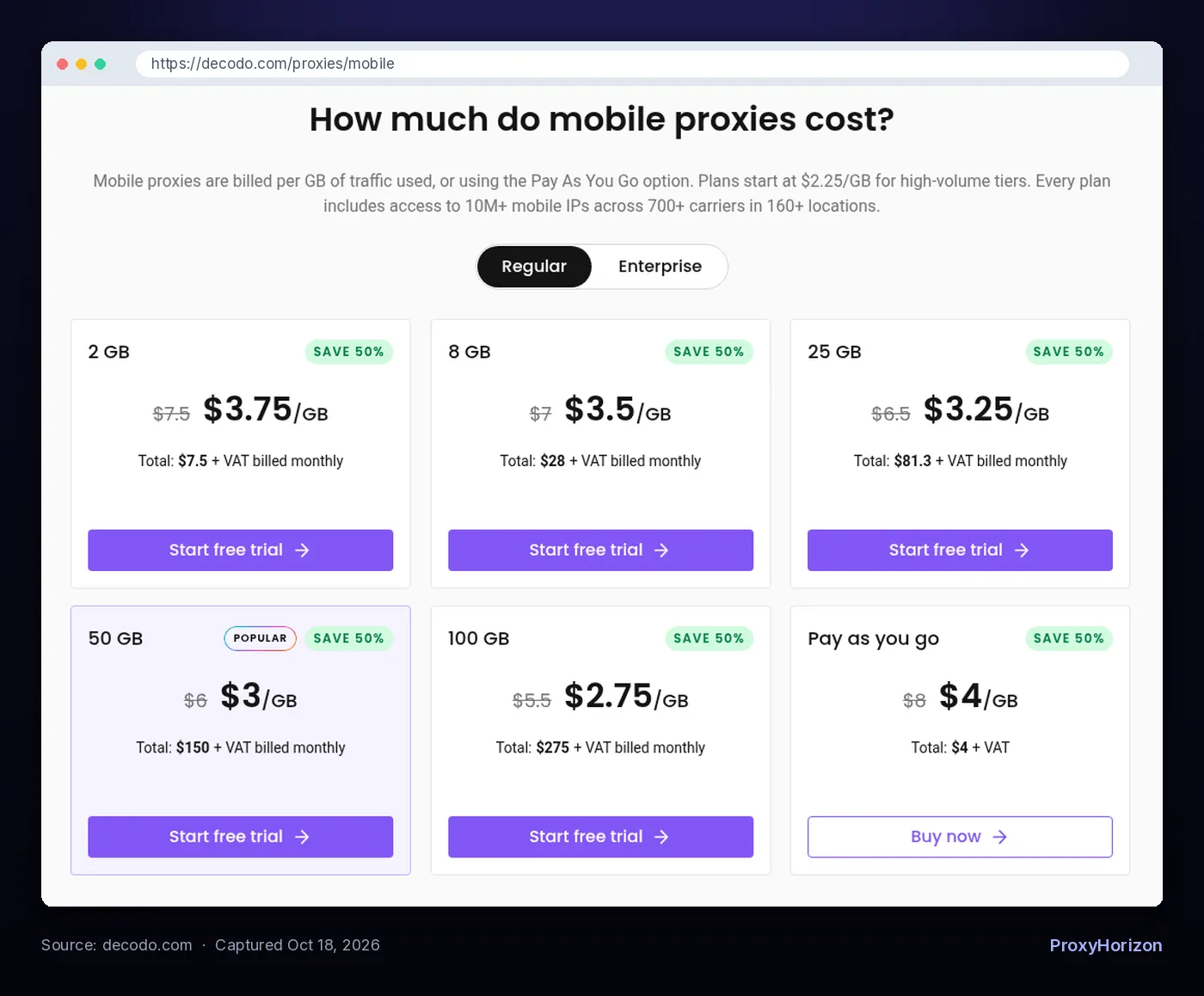
- Per GB, shared pool. Decodo lists $3.75/GB on its 2 GB plan and $4/GB pay as you go, both shown at half the regular $7.50 and $8 list prices during a sale. IPRoyal’s rotating mobile plans run from $6.80/GB at 2 GB down to $5.20/GB at 100 GB.
- Per device, per day. IPRoyal’s dedicated mobile proxies start at $10.11 for 24 hours, with a 30 GB daily data limit per proxy (all checked October 18, 2026).
The maths decides the model. Say you run five social accounts that move about 1 GB a month in total. On a per-GB plan at IPRoyal’s $6.80 rate, that’s $6.80 of traffic. A dedicated device is cheaper only when you push a lot of data through one IP in a short window, like a day of heavy app testing.
Watch out for: sale prices. Mobile proxy discounts come and go, so compare list prices and per-GB rates at the volume you’ll actually use.
When the Mobile Premium Is Worth It
Mobile proxies earn their price when the target treats phones differently or punishes everything else.
1Mobile-First Apps and Platforms
Social and short-video apps are built around phones. Accounts that always appear from a carrier network fit the pattern those platforms expect. Our guide to proxies for TikTok automation walks through that setup.
2Checking What Mobile Users See
Ads, search results and prices can differ on mobile networks. If you verify ad placements or app store listings, a carrier IP in the right city shows you the real mobile view.
3Targets That Block Everything Else
When datacenter IPs fail and residential IPs keep getting challenged, a mobile IP is the last rung on the trust ladder. Use it for the hard targets only, not the whole crawl.
Best for: low-volume, high-value requests where getting blocked costs more than the bandwidth.
When to Skip Mobile Proxies
Here’s the uncomfortable truth: plenty of people pay mobile prices for work a cheaper proxy handles fine.
- Bulk scraping of easy targets. If datacenter or residential IPs already work, mobile traffic just multiplies your bill.
- A fixed identity for weeks. Carrier addresses drift. A dedicated ISP proxy holds the same IP far more reliably.
- Speed-sensitive jobs. Cellular latency varies with congestion, and rotation pauses for seconds.
- Privacy on its own. A proxy hides your IP but doesn’t encrypt your traffic, a point Decodo’s own FAQ makes. Use HTTPS, or a VPN when privacy is the goal.
Better alternative if you need volume, not trust: rotating residential proxies for strict sites, datacenter proxies for permissive ones.
How to Sanity-Check a Mobile Proxy
Don’t trust the label. Run a few checks before you put an account or a paid job on a new mobile proxy.
- Look up the network. The ASN owner should be a mobile carrier, and an IP database should label it mobile or cellular, not hosting.
- Confirm the location and carrier. Country, city and carrier should match what you paid for. Remember that carrier geolocation can be fuzzy, since it may point at NAT equipment.
- Rotate and re-check. Trigger a rotation, then look up the IP again. Note how long it takes and how often you get a repeat.
- Match the browser to the story. Timezone and language should fit the IP’s location. A carrier IP with a mismatched setup still looks odd.
- Test on the real target. Browse or log in at a human pace and watch for CAPTCHAs before you scale up.
Frequently Asked Questions
Pay for the Crowd, Not the Label
Mobile proxies work because carriers share each public address among many real subscribers. That makes websites cautious about banning them and makes them the strongest option on mobile-first and heavily defended targets.
They’re also the most expensive traffic you can buy, slower to rotate than residential pools, and far from invisible. Shared addresses still collect rate limits, and big platforms are getting better at spotting proxies inside carrier ranges.
Our take: use mobile proxies for the few jobs where trust decides success, and cheaper proxies for everything else. When you’re ready to shop, our best mobile proxy providers roundup compares the options, and the proxy directory lists the rest.
Keep Reading
More articles you might enjoy