What Are Rotating Proxies? Setup Guide & Benefits
Rotating proxies give you a fresh IP automatically from a pool. Here is what they are, how to set one up in minutes, the real benefits, and when not to use them.
Send a hundred requests from one IP address and most serious websites will notice. Send a thousand and you're blocked. That single problem is why rotating proxies exist, and why nearly every web scraping, market research, and multi-account operation runs on them.
A rotating proxy gives you a new IP address automatically, either on every request or on a timer, drawing from a pool of thousands or millions. Instead of one address doing all the work and drawing all the heat, your traffic spreads out and looks like many different users going about their business.
This guide keeps it practical. You'll learn what rotating proxies actually are, how they differ from static ones, the real benefits, a step-by-step setup you can follow in minutes, and the honest cases where rotation is the wrong choice. Let's start with the core idea.
What Is a Rotating Proxy?
A rotating proxy is a proxy service that changes your IP address automatically from a shared pool. You connect to a single entry point, and the provider assigns you a different IP behind the scenes according to your settings.
Compare that to a static proxy, where you get one fixed IP that stays yours for the session or the subscription. Static is right when you need a consistent identity. Rotating is right when you need volume and variety. If you want the mechanics of the whole request path, our guide on how proxies work covers it, and what proxies are covers the basics.
The key thing to understand: you never manage the individual IPs yourself. You talk to one gateway address, and rotation happens on the provider's side. That's what makes it so easy to scale.
How Rotation Actually Works
Behind that single gateway sits a large pool of IPs. When your request arrives, the provider picks one and routes your traffic through it. Your setting decides what happens next.
With per-request rotation, every single request gets a fresh IP. Fire a thousand requests and they can come from a thousand different addresses. With timed rotation, sometimes called a sticky session, you keep the same IP for a set window, say ten minutes, before it changes. You control the behaviour through the endpoint or by adding a session parameter to your username, so switching modes is usually a one-line change.
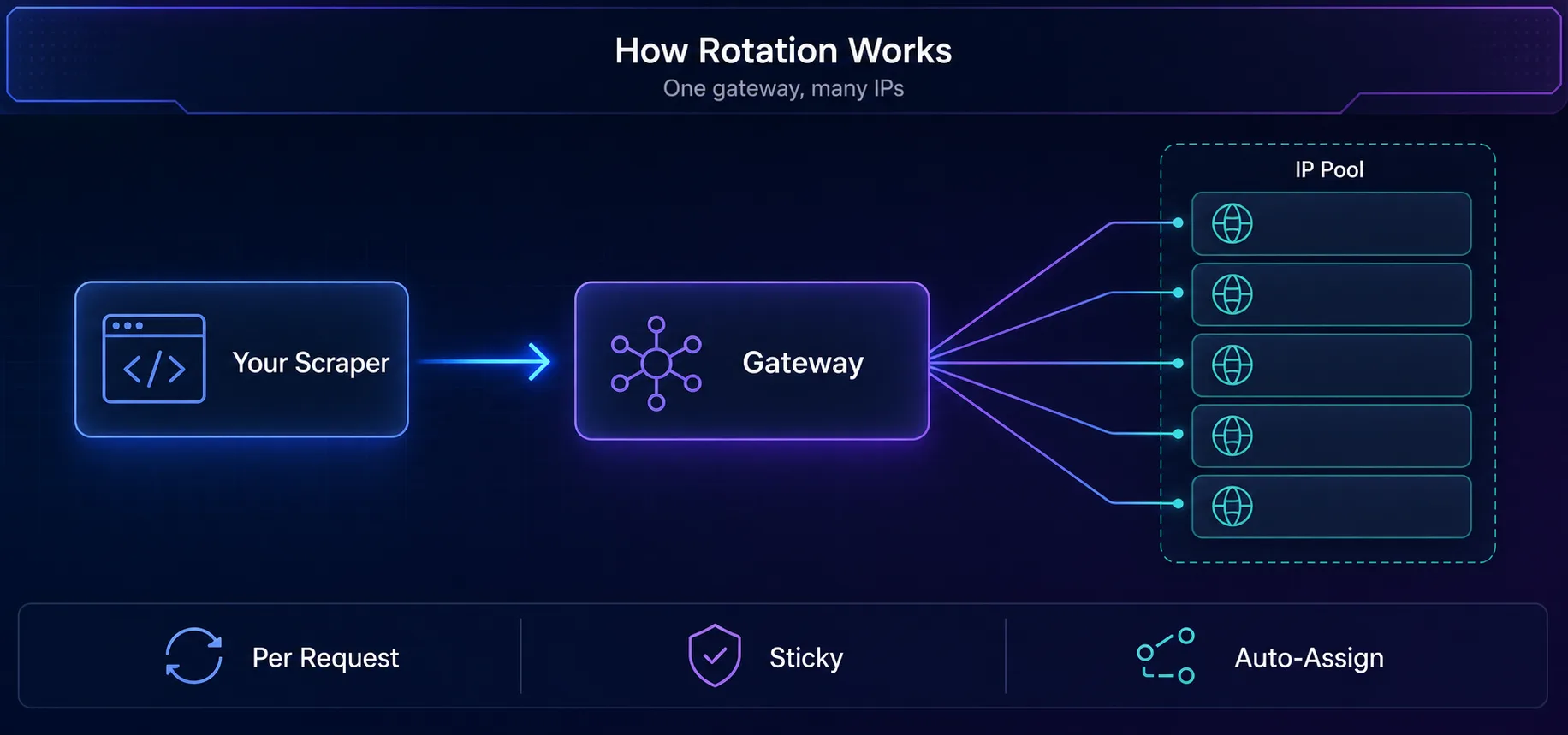
You connect to one gateway; it assigns a fresh IP from the pool behind it.
Rotating vs Static Proxies
Neither is better in the abstract. They solve different problems, and picking wrong is a common, expensive mistake.
Factor | Rotating Proxy | Static Proxy |
|---|---|---|
IP behaviour | Changes automatically from a pool | One fixed IP |
Best for | Scraping, research, high volume | Accounts, logins, checkouts |
Block resistance | High, spreads the load | Lower, one IP takes all traffic |
Session stability | Breaks logged-in flows | Holds a session cleanly |
Setup effort | Connect once, done | Manage each IP |
The short version: rotate for data collection, stay static for anything you log into. More on that split later, because it's where people get burned.
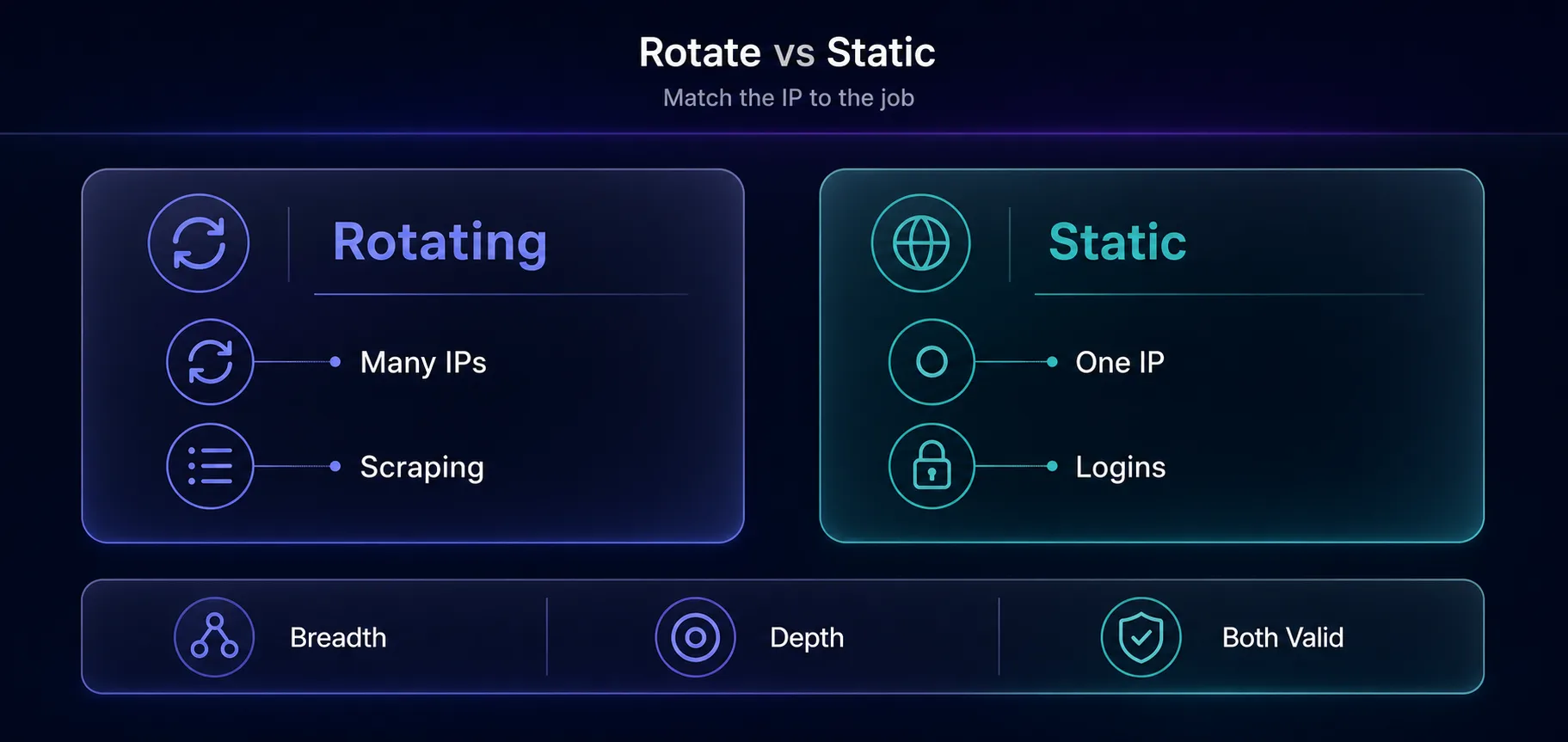
Rotate for breadth (scraping); stay static for depth (logins). Both are valid.
The Benefits of Rotating Proxies
1They Defeat Rate Limits
Rate limiting is the number one reason scrapers fail. When your requests come from many IPs instead of one, no single address crosses the threshold that triggers a block. This is the whole reason web scraping needs proxies.
2They Scale Without Effort
You connect to one endpoint and get access to the entire pool. There's no list to maintain, no dead IPs to prune, no rotation logic to build. The provider handles all of it, so your code stays simple even as your volume grows.
3They Improve Success Rates
Fresh IPs that haven't been hammered are far less likely to be flagged. A good rotating pool keeps your requests looking like ordinary traffic, which means fewer CAPTCHAs, fewer retries, and more usable data per run.
4They Enable Geo-Targeting
Most rotating services let you pin the pool to a country or city, so you can collect localised pricing, search results, or catalogues from anywhere. That's essential for market research and ad verification.
5They Protect Against a Single Point of Failure
If one IP gets blocked mid-run, rotation simply moves you to the next one. A static setup would stall completely. Your crawl keeps going instead of dying on the first bad address.
How to Set Up Rotating Proxies
Getting started takes about five minutes. Here's the whole flow.
1Choose a Provider and Plan
Pick a reputable provider (a few are below) and choose the proxy type your target needs. Residential for strict sites, datacenter for lenient high-volume work. Buy a small plan first to test.
2Get Your Gateway Endpoint
From your dashboard you'll get a host, a port, and either a username and password or an IP-whitelisting option. For a rotating service this is a single gateway address, not a list of IPs. The rotation happens behind it.
3Configure Your Client
Point your scraper or browser at that endpoint. Here's the minimal version in Python, using the rotating gateway so a fresh IP arrives on each call.
import requests

proxies = {
    "http": "http://user:pass@gate.provider.com:7000",
    "https": "http://user:pass@gate.provider.com:7000",
}

for i in range(5):
    r = requests.get("https://httpbin.org/ip", proxies=proxies, timeout=20)
print(r.json()) # a different IP each request4Add Location or Session Control
Most providers let you append parameters to the username to pick a country or hold a sticky session. Something like user-country-us for a US IP, or user-session-abc123 to keep the same IP for a while. Check your provider's docs for the exact format.
5Test Before You Scale
Run a handful of requests against an IP-check endpoint and confirm the address changes. Then test on your real target with a small batch before committing to a full crawl. For code-level rotation control, see our rotating proxy script tutorial.
Types of Rotating Proxies
Rotation is a behaviour, not a proxy type, so you can rotate any kind of IP. The type you pick decides trust, speed, and cost.
Rotating residential proxies cycle through IPs from real homes, so they rarely get blocked. They're the default for strict targets. Rotating datacenter proxies are faster and cheaper but easier to detect, which suits high-volume crawling of lenient sites. Rotating mobile proxies use 4G and 5G carrier IPs and carry the highest trust, which is why they dominate social media work. Our guide to the types of proxies breaks down each one.
Rotating Type | Trust | Speed | Best For |
|---|---|---|---|
Residential | High | Medium | Strict sites, geo-research |
Datacenter | Low-Medium | Fastest | High-volume, lenient sites |
Mobile (4G/5G) | Highest | Medium | Social media, hardest targets |
Best Rotating Proxy Providers
These four manage the pools and gateways so you connect once and let them handle rotation. Each links to full specs.
1Decodo

Clean residential pool, simple rotating and sticky endpoints, and username-based geo-targeting. The easiest starting point for most projects, with pricing that suits smaller budgets.
2Oxylabs

A huge pool with an advanced rotation engine and enterprise support, built for large crawls that can't afford to stall. Premium pricing, but it holds up at serious volume.
3IPRoyal

Non-expiring traffic makes it forgiving for bursty work, and it offers residential, datacenter, and mobile rotation. Good value while you're still tuning your setup.
4Webshare

A genuinely usable free tier and cheap paid plans make it the best place to test rotation before you spend. Native SOCKS5 support too. Compare the full field in our proxy directory.
When Not to Use Rotating Proxies
Rotation is powerful, but it's the wrong tool for a whole category of tasks, and this is where money gets wasted.
Anything you log into needs a stable IP. If your IP changes mid-session on a logged-in account, the site sees a user teleporting across the country and flags it instantly. Account management, checkouts, and multi-step forms all need static or sticky IPs, not per-request rotation. This applies to rotating proxies in Playwright too: use sticky sessions for logins there.
Rotation isn't a magic cloak, either. A fresh IP with a bot-shaped request still gets caught. Sites also read your headers, your browser fingerprint, and your TLS handshake, so rotation is one layer among several. Pair it with realistic headers and pacing, and know that on protected sites your client signature matters as much as your IP.
Our take: rotate for breadth, stay sticky for depth. Collecting many pages? Rotate. Holding one identity through a flow? Don't. Getting this split right solves most proxy problems before they start.
Common Mistakes to Avoid
1Rotating on Logged-in Sessions
The single most common error. Switching IPs while signed in breaks the session and raises a flag. Use sticky sessions for anything behind a login.
2Buying the Cheapest Pool
Bargain rotating pools are often recycled and pre-flagged, so you burn requests on failures. Judge by success rate on your target, not the per-GB price.
3Ignoring Rate Limits Anyway
Rotation raises the ceiling, it doesn't remove it. Hammering a site from many IPs at once is still detectable. Add delays and pace your crawl.
4Forgetting Geo-Consistency
If you need US results, pin the pool to the US. Letting IPs rotate across countries gives you inconsistent, mixed-region data that quietly corrupts your dataset.
Frequently Asked Questions
The Bottom Line
Rotating proxies solve one problem exceptionally well: doing a lot of something from a lot of places without getting blocked. Connect to a single gateway, get a fresh IP on demand, and your scrapers and research tools scale without you babysitting a list of addresses.
Just remember the split that trips everyone up. Rotate for breadth, when you're collecting many pages and want to spread the load. Stay static or sticky for depth, when you're holding one identity through a login. Get that right, pick a clean pool, and pace your requests, and rotation quietly does its job in the background.
Ready to set one up? Browse rotating providers in our proxy directory, compare two side by side with our comparison tool, or read up on residential proxies to pick the right pool for your targets.
Keep Reading
More articles you might enjoy