Best Proxies for Discord in 2026: Top 7 Picks
The best proxies for Discord in 2026 for running multiple accounts, bots, and servers safely. Compare 7 top residential and mobile proxy providers, plus setup tips.

Discord isn’t just a chat app anymore. It’s the backbone of gaming clans, crypto and trading communities, SaaS support servers, and creator fan bases. And the moment you try to do anything at scale on it, running multiple accounts, managing several community servers, deploying bots, or simply logging in from a restricted network, you run headfirst into Discord’s aggressive anti-abuse systems. One flagged IP address can take down every account tied to it in a single sweep.
That’s where proxies come in. A good proxy gives each Discord account or bot its own clean IP address, so your activity looks like separate, genuine users rather than one machine behaving suspiciously. The wrong proxy, though, is worse than none at all: cheap datacenter IPs are exactly what Discord’s filters are built to catch, and they’ll get you flagged faster than a direct connection would.
In this guide we break down the best proxies for Discord in 2026, the type that actually works (and the type that gets you banned), and how to choose and set one up. Every provider here offers clean residential or mobile IPs that hold up to Discord’s scrutiny. Let’s get into it.
Best Proxies for Discord in 2026: Quick Comparison
Here’s an at-a-glance look at our top seven picks before we dig into each one.
| Provider | Best For | Proxy Types | Price Tier |
|---|---|---|---|
| NodeMaven | Best overall for account safety | Residential, Mobile | $$ |
| SOAX | Best for mobile IPs & multi-account | Residential, Mobile, ISP | $$$ |
| IPRoyal | Best budget residential | Residential, Mobile, Datacenter | $ |
| Decodo | Best for ease of use | Residential, Mobile, ISP, DC | $$ |
| Oxylabs | Best premium / enterprise | Residential, Mobile, ISP, DC | $$$ |
| Webshare | Best for beginners | Residential, Datacenter | $ |
| Geonode | Best for unlimited bandwidth | Residential, Mobile, DC | $$ |
Why You Need a Proxy for Discord
A proxy isn’t just for power users. Anyone doing more than casual chatting on a single account benefits from routing Discord through clean IPs. Here are the main reasons.
1Managing Multiple Accounts and Servers
Community managers, marketers, and moderators often run several Discord accounts across different servers. Discord links accounts that share an IP, so logging into five accounts from one connection is a fast route to a mass ban. Assigning each account its own residential IP keeps them separated and looking like distinct, genuine people.
2Running Discord Bots at Scale
Bots that handle moderation, music, analytics, or community engagement make a lot of requests. Run several from a single IP and Discord’s rate limits and abuse detection kick in quickly. Proxies spread that activity across multiple addresses so your bots stay online and responsive instead of getting throttled or blocked.
3Accessing Discord on Restricted Networks
Plenty of schools, workplaces, and even entire countries block Discord at the network level. A proxy routes your connection through an unrestricted location, restoring access without needing admin rights on the device. It’s the simplest way back in when Discord is filtered where you are.
4Privacy and Protecting Your Real IP
Your IP address can reveal your rough location and be logged by servers you join or bots you interact with. A proxy masks it, so your real address stays private. On public or monitored Wi-Fi, that’s a meaningful upgrade. For more on this, see our guide to the best proxies for privacy.
A quick note on responsible use: proxies are a legitimate tool for privacy, community management, and approved automation, but Discord’s Terms of Service prohibit abusive behavior like spam and ban evasion. Use them to work smarter and stay private, not to break the rules.
What Type of Proxy Works Best for Discord?
This is the single most important decision, and getting it wrong is why most people’s proxies fail on Discord. Not all proxies are treated equally by Discord’s detection systems.
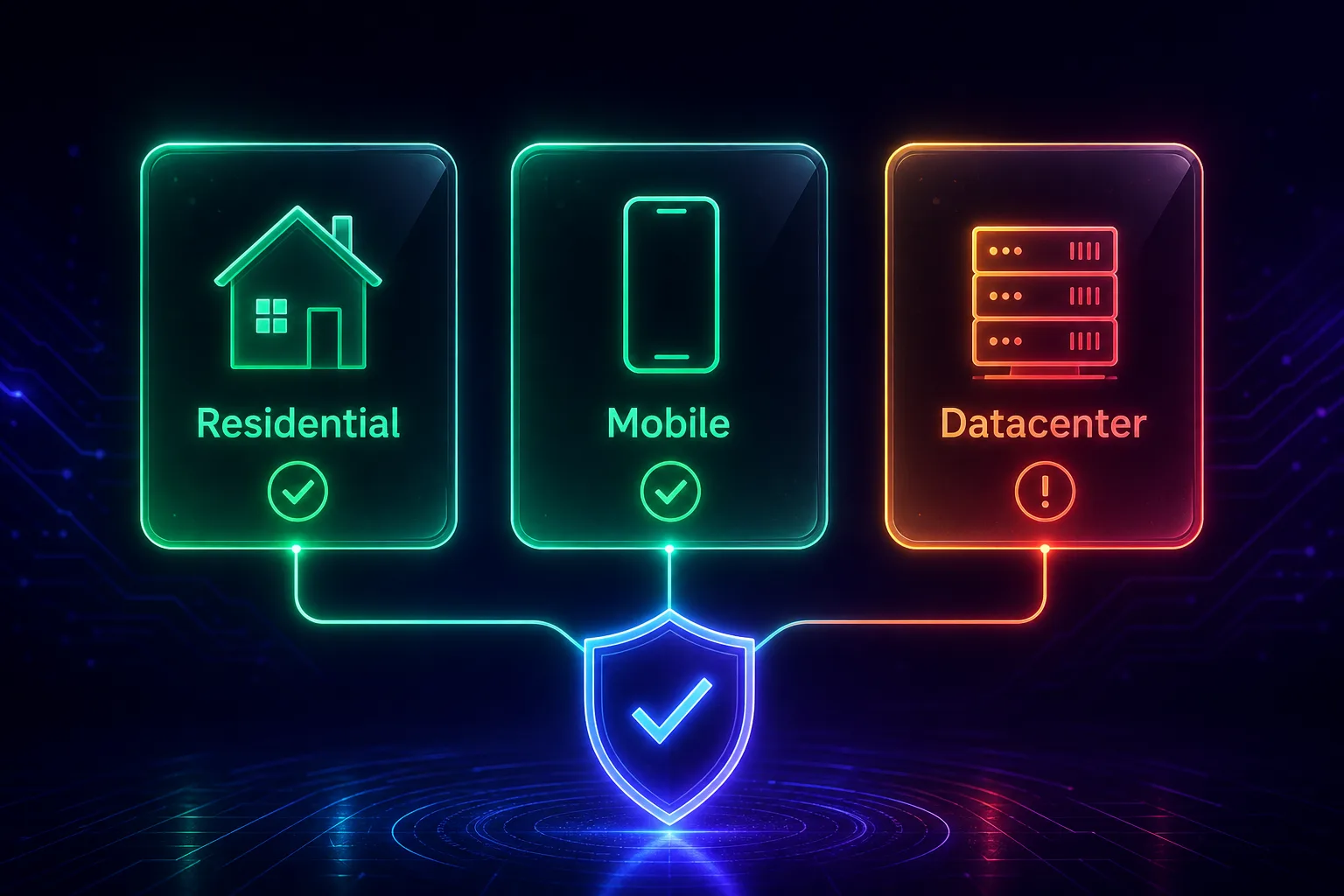
1Residential Proxies: The All-Round Winner
Residential proxies use IP addresses from real home internet connections assigned by ISPs, so Discord sees them as ordinary users. They’re the sweet spot for account management and everyday use, blending in well while staying affordable. For most Discord tasks, this is the type to choose. New to them? Read what a residential proxy is.
2Mobile Proxies: The Highest Trust
Mobile proxies route through real 4G and 5G cellular networks. Because carriers share each IP among many real users, Discord is extremely reluctant to ban them, which makes mobile the gold standard for high-value accounts and the strictest anti-ban needs. They cost more, but they’re the most resilient option. See our roundup of the best mobile proxy providers.
3Datacenter Proxies: Avoid for Account Work
Datacenter proxies are cheap and fast, but they come from hosting providers whose IP ranges Discord recognizes instantly. They’re fine for a throwaway test, but risky for account creation or management, where they get flagged quickly. If account safety matters at all, skip them. Our guide on how websites detect proxy traffic explains exactly why they stand out.
4ISP Proxies: A Solid Middle Ground
ISP proxies (also called static residential) combine the trust of residential IPs with the speed and stability of datacenter hosting. Because the IP stays fixed, they’re great for accounts you want to keep on one consistent address, offering a nice balance of reliability and legitimacy.
The 7 Best Proxies for Discord in 2026
Every provider below offers the clean residential or mobile IPs Discord demands. We’ve noted what each one does best so you can match it to your needs.
1NodeMaven, Best Overall for Account Safety

NodeMaven earns the top spot because its entire pitch is IP quality, which is exactly what Discord account safety depends on. It filters its residential and mobile IPs in real time to weed out flagged or low-reputation addresses, so you’re far less likely to land on an IP Discord already distrusts. Sticky sessions can hold the same IP for up to 24 hours, letting an account keep a stable address the way a real user would.
For anyone running multiple Discord accounts or managing communities where a ban is costly, NodeMaven’s clean-IP focus and generous session control make it the most dependable all-round choice on this list.
2SOAX, Best for Mobile IPs and Multi-Account

SOAX shines when you need the highest-trust IPs and precise control. Its clean residential and mobile pools come with granular targeting down to the city and carrier level, and its flexible rotation lets you assign a fresh or sticky IP exactly where you need one. That combination makes it a favorite for serious multi-account operators who want the lowest possible flag risk.
If your Discord accounts are valuable enough to justify mobile-grade IPs, or you’re juggling many at once, SOAX delivers the reliability and precision to keep them all safe and separated.
3IPRoyal, Best Budget Residential

IPRoyal is the value pick for getting solid, Discord-safe residential IPs without overcommitting. Its pay-as-you-go “Royal Residential” proxies never expire, so you buy traffic once and use it at your own pace, ideal for casual multi-account use or testing the waters. The IPs are clean enough for account work, and sticky sessions are supported.
If you want a low-risk, affordable entry into quality proxies for Discord, IPRoyal offers the best balance of price and performance on this list.
4Decodo, Best for Ease of Use

Decodo (formerly Smartproxy) pairs a huge residential pool with one of the friendliest dashboards in the industry, making it a great fit if you value reliability and a gentle learning curve. Precise country and city targeting handles geo-specific needs, and its consistently high success rates keep connections stable across accounts and bots alike.
For newcomers who still want professional-grade performance, Decodo is the easiest way to get clean Discord proxies up and running quickly.
5Oxylabs, Best Premium and Enterprise Option

Oxylabs is the enterprise heavyweight, with one of the largest and cleanest residential networks available plus mobile and ISP options. If you’re running Discord operations at serious scale, think large communities, agencies, or heavy bot infrastructure, its reliability, uptime, and support are hard to beat. The advanced targeting and stability justify the premium price.
When you need proxies that simply won’t let you down and you have the budget to match, Oxylabs is the top-tier choice for demanding Discord workloads.
6Webshare, Best for Beginners

Webshare is the most approachable option, with a self-service platform, transparent pricing, and even a free tier to experiment with. Its residential proxies are clean enough for light Discord account work, and the simple setup makes it easy to get started without a steep learning curve or a sales call.
If you’re just dipping into proxies and want something affordable and beginner-friendly to learn on, Webshare is a sensible, low-cost starting point, then upgrade to a premium residential provider as your needs grow.
7Geonode, Best for Unlimited Bandwidth

Geonode stands out with unlimited-bandwidth plans, which are a big deal if your Discord activity is traffic-heavy, like running many bots or high-volume automation. Instead of watching a per-gigabyte meter, you pay a flat rate and use as much as you need, which can work out far cheaper for demanding use cases.
For bot-heavy setups or anyone who hates unpredictable bandwidth bills, Geonode’s pricing model makes it a smart, budget-conscious pick. Compare it against the others in our full proxy provider directory.
How to Choose the Right Discord Proxy
With the shortlist above, the right pick comes down to matching a provider to your specific needs. Weigh these factors before you buy.
1IP Type
Prioritize residential or mobile IPs over datacenter for anything involving accounts. Mobile carries the most trust for high-value accounts; residential is the affordable all-rounder for everyone else.
2Sticky Sessions
To keep a Discord account on a consistent IP (which looks natural), you want sticky sessions that hold an address for minutes or hours. Providers like NodeMaven and SOAX give you fine control here.
3Pool Size and Locations
A larger IP pool means cleaner, less-recycled addresses and better geo coverage. If you need to appear in a specific country, confirm the provider has strong coverage there.
4Pricing Model
Per-gigabyte pricing suits light use and account management; flat or unlimited-bandwidth plans (like Geonode’s) win for high-traffic bots. Match the model to your volume so you don’t overpay.
5Success Rate and Support
Look for high advertised success rates and responsive support. When an account or bot goes down, fast help and a reliable network make all the difference.
How to Set Up a Proxy on Discord
Discord doesn’t have a built-in proxy field the way some apps do, so setup depends on how you use it. Here are the three common approaches.
For multiple accounts: the cleanest method is an antidetect browser paired with your proxies. You create a separate browser profile for each Discord account, assign each profile its own residential or mobile IP, and log in to the web version. Each account then has a distinct IP and browser fingerprint, keeping them fully separated.
For a single account or general access: configure the proxy at your operating-system level or use a proxy manager tool, then open Discord as usual. This routes Discord’s traffic through your proxy IP, which is enough for privacy or unblocking on a restricted network.
For bots: set the proxy directly in your bot’s HTTP client or library configuration, so its API requests route through the assigned IP. Give each bot instance its own proxy to avoid shared-IP rate limits. Whichever method you use, always test the connection before relying on it.
Mistakes to Avoid
A few common errors will get your Discord accounts flagged no matter how good your provider is.
1Using Free or Datacenter Proxies
Free proxy lists and cheap datacenter IPs are the number one cause of Discord bans. They’re overcrowded, already flagged, and instantly recognizable to Discord’s filters. Always use paid residential or mobile IPs for account work.
2Sharing One IP Across Many Accounts
Routing several accounts through a single IP is a classic way to get them linked and banned together. Give each account its own dedicated IP so they look like separate, genuine users.
3Ignoring Discord’s Terms of Service
Proxies hide your IP, not your behavior. Spamming, mass-DMing, or evading bans will still get you caught and violates Discord’s rules. Use proxies to stay private and organized, not to abuse the platform.
4Choosing the Cheapest Overloaded Pool
Rock-bottom providers often recycle a small pool of tired IPs among thousands of users, so the addresses arrive pre-flagged. A slightly pricier provider with clean, filtered IPs saves you from constant bans. For account-heavy work, the same logic applies as with our best Instagram proxies guide: quality beats cheap.
Frequently Asked Questions
The Bottom Line
The best proxy for Discord is whichever one gives you clean, trusted IPs that keep your accounts and bots safe, and that always means residential or mobile, never cheap datacenter or free proxies. Get the IP type right and you avoid the single biggest cause of Discord bans.
For most people, NodeMaven is the best overall pick thanks to its relentless focus on IP quality and account safety. Choose SOAX when you need premium mobile IPs for high-value or multi-account work, and IPRoyal when you want the best value without sacrificing clean residential IPs. Whichever you pick, assign one IP per account, respect Discord’s rules, and you’ll keep your communities running smoothly. Compare all of these and more in our full proxy provider directory.
Keep Reading
More articles you might enjoy