How to Use Firecrawl MCP with Claude (2026 Setup Guide)
Connect Firecrawl to Claude.ai, Claude Code, Desktop or the API. We tested every route: which tools each one gets, what it costs, and how to keep context lean.
The pricing-page screenshots in our recent reviews weren’t taken by a person. Claude took them.
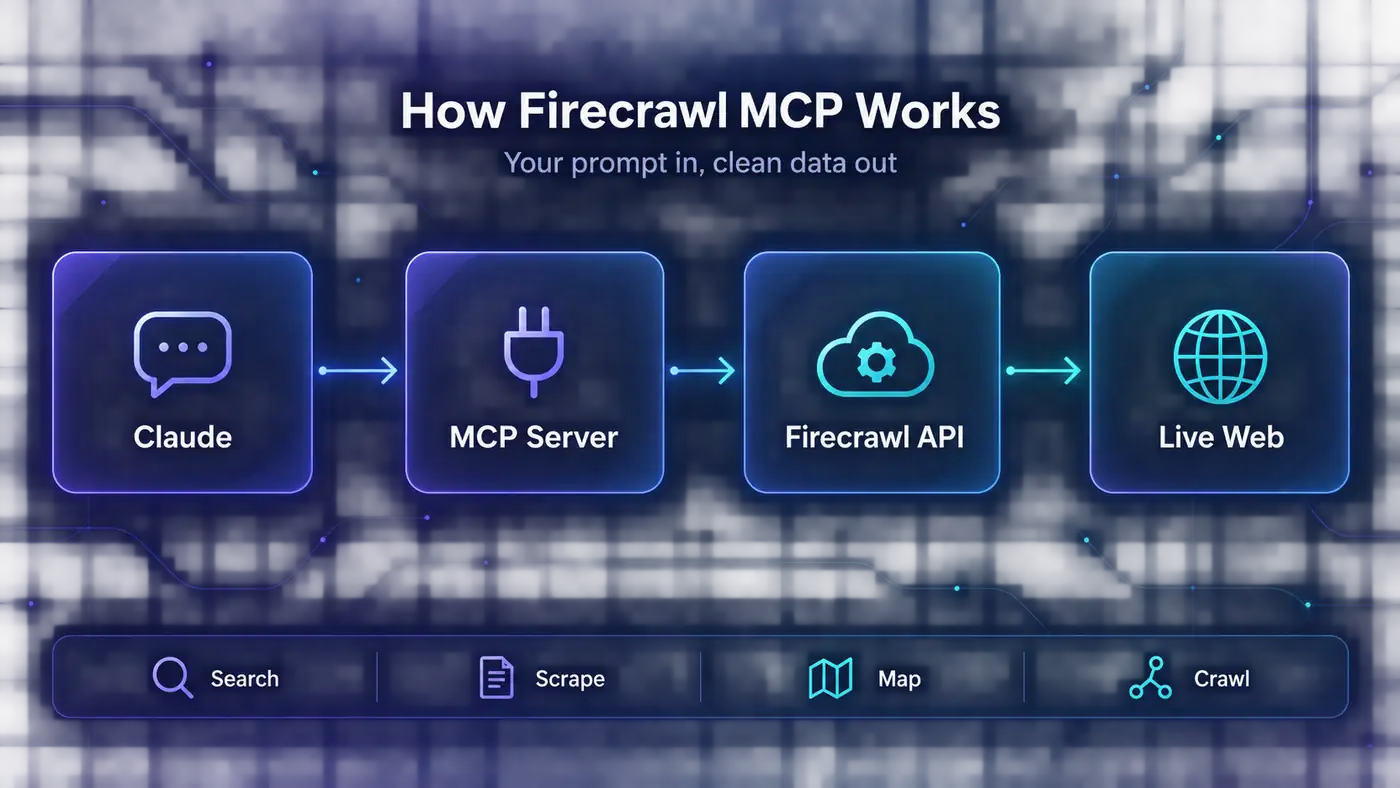
It called Firecrawl’s MCP server from a chat in Claude Code. Firecrawl rendered each page in a real browser and handed back the image. No browser tabs, no extensions, no copying and pasting.
That’s what Firecrawl MCP gives Claude: a scraper, a crawler and a browser it can drive. Connecting it takes a minute. Connecting it the right way takes a little more thought, because your setup decides whether Claude gets 3 Firecrawl tools or 27.
Here’s every way to use Firecrawl MCP with Claude, which one to pick, and the habits that keep it fast, cheap and safe.
- On claude.ai and the Claude apps, Firecrawl is one click away in Claude’s connector directory, but that version is search-focused.
- Claude Code gets the full toolset with one command and a browser sign-in.
- Without an account, Claude gets 3 Firecrawl tools. Signing in or adding an API key unlocks 27.
- Tool definitions and big pages both eat context, so load only the tools you use.
Disclosure: we’re a Firecrawl affiliate, so we may earn a commission if you upgrade through our links. Everything below comes from our own setup, checked against the official docs on October 2, 2026.
Pick Your Setup First
There are six ways to connect Firecrawl to Claude, and the right one depends on where you use Claude. Find your row, then jump to that section.
| You use | Best setup | How you sign in | Firecrawl tools Claude gets |
|---|---|---|---|
| claude.ai, Claude Desktop or the mobile apps | Directory connector | Firecrawl account (OAuth) | 8 search and research tools |
| claude.ai, and you need crawl or map | Custom connector with the OAuth URL | Firecrawl account (OAuth) | Up to 27 |
| Claude Code | Remote server with the OAuth URL | Firecrawl account (OAuth) | Up to 27 |
| Claude Code, just testing | Keyless remote server | No account | 3: search, scrape, parse |
| Claude API, Agent SDK, CI jobs | Remote server with an API key header | API key | Up to 27, or the ones you allowlist |
| Self-hosted Firecrawl or a local process | Local server via npx | API key or your own instance | Up to 27 |
One rule covers almost everyone: if you can sign in with OAuth, do it. You get the full toolset without pasting a key anywhere, and you can revoke access later from Firecrawl’s MCP settings.
What Firecrawl Adds to Claude’s Built-In Web Tools
Claude can already search the web, so it’s fair to ask why you’d add anything. The answer is that searching a page and reading it are different jobs.
Take Claude Code. Its built-in WebFetch tool doesn’t hand Claude the page. A small, fast model reads the page and answers a question about it, and Claude sees only that answer. It’s fine for a quick lookup and unreliable when you need the exact text, a table or a code sample.
| Job | Claude Code’s built-in web tools | Firecrawl MCP |
|---|---|---|
| Read one page | WebFetch: a small model reads the page and answers your question | The page itself as Markdown, JSON or a screenshot |
| Find pages | WebSearch: links and snippets | Search, with full page content in the same call if you want it |
| Cover a whole site | No | Map the URLs, then crawl the section you need |
| Click, scroll or fill a form | No | A live browser session (interact) |
| Watch a page for changes | No | Monitors that check on a schedule |
| Cost | Included | Firecrawl credits (1,000 free a month) |
Firecrawl returns the page itself, cleaned into Markdown, and adds the jobs the built-in tools can’t do at all: whole-site crawls, screenshots, browser actions and change monitoring. Our Firecrawl review covers the product itself, and our guide to web scraping covers the basics. Here we stick to the Claude side.
Add the Firecrawl Connector to Claude.ai, Desktop and Mobile
Firecrawl has an official listing in Claude’s connector directory, so there’s no URL to paste. It takes three steps:
Open the Firecrawl listing and click Sign in to add, or Connect if you’re already signed in.
Sign in to Firecrawl in the window that opens, choose a team and approve access.
In any chat, click + (or type /), open Connectors and switch Firecrawl on.
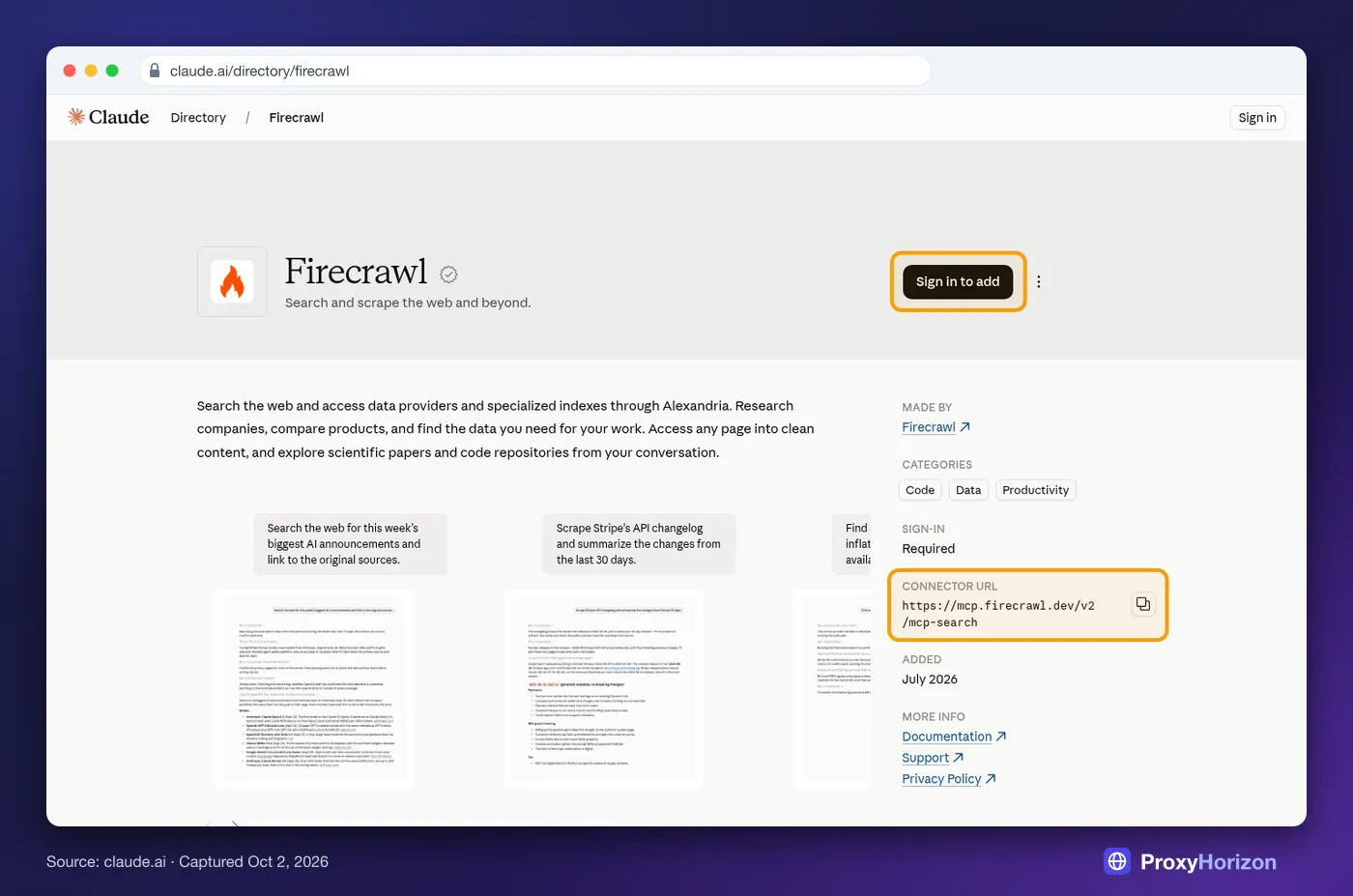
Notice the connector URL in that listing: /v2/mcp-search. That’s Firecrawl’s search profile, with 8 tools for searching, scraping, developer search, research papers and the Alexandria data catalogue. It’s perfect for research, but it can’t map or crawl a site, drive a browser or set up monitors.
Need those? Add Firecrawl as a custom connector instead. In Claude, open Customize, then Connectors, add a custom connector, and paste https://mcp.firecrawl.dev/v2/mcp-oauth. You sign in the same way and get the full toolset.
Either way, the connector lives on your Claude account, so it also shows up in the desktop and mobile apps. On Team and Enterprise plans, an Owner has to enable connectors for the organization before members can connect.
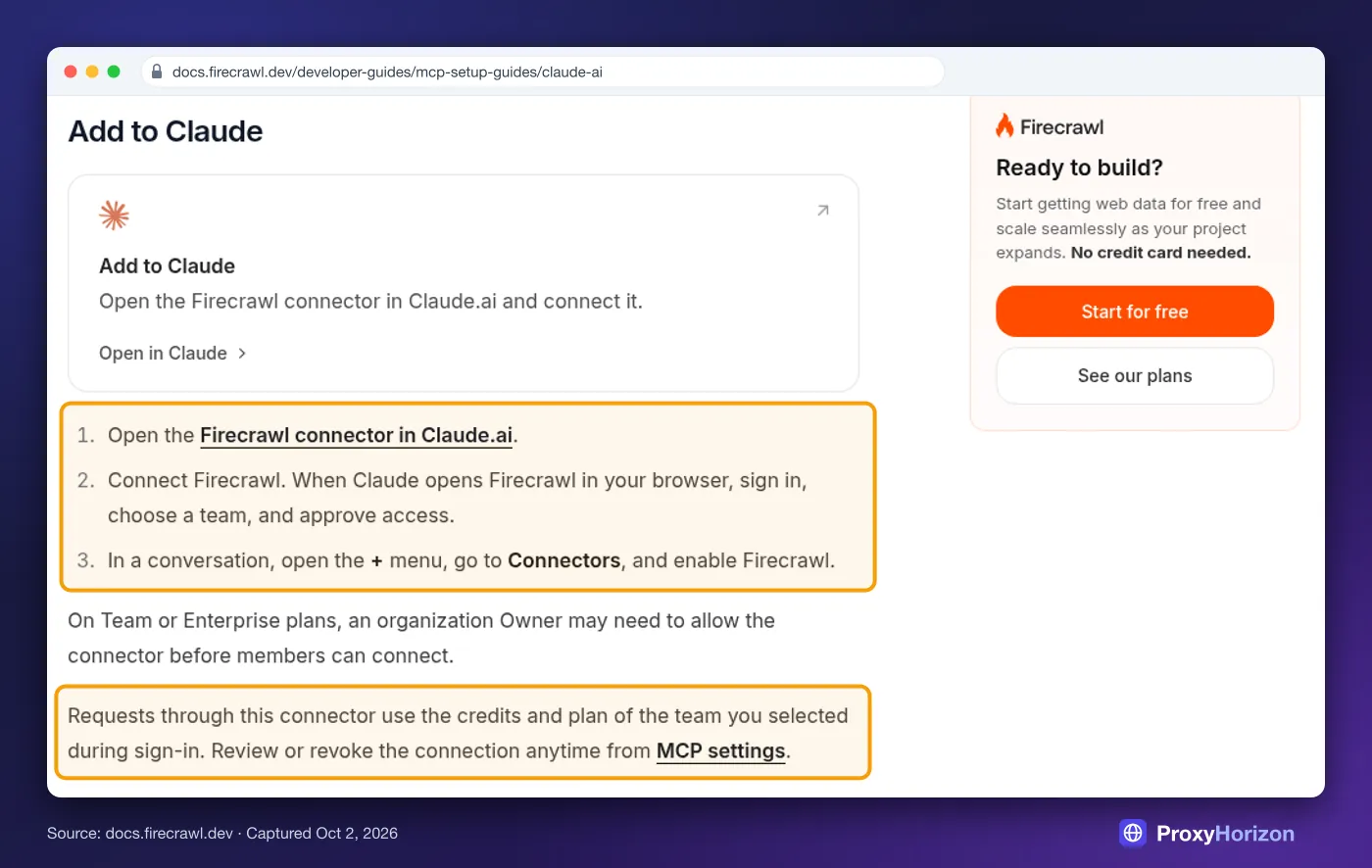
Firecrawl’s own guide flags the detail people miss: requests use the credits of the Firecrawl team you chose at sign-in. Pick the right team if you have more than one.
Set Up Firecrawl MCP in Claude Code
Claude Code takes one command. Firecrawl recommends the OAuth route, and so do we.
1Sign In with OAuth
claude mcp add --transport http firecrawl https://mcp.firecrawl.dev/v2/mcp-oauth

# Then sign in: type /mcp inside Claude Code, pick firecrawl, finish in the browser.
# Or from the terminal:
claude mcp login firecrawl
That gives you the full toolset with no key on disk. Add --scope user to the first command if you want Firecrawl in every project, not just this one.
2Go Keyless for a Quick Test
claude mcp add --transport http firecrawl https://mcp.firecrawl.dev/v2/mcpNo account needed. You get search, scrape and parse, capped per IP address per day. Firecrawl doesn’t publish the numbers, but when you hit them you’ll see 429 errors.
3Use an API Key for Scripts and Teams
When nobody’s around to click through a browser sign-in, send your key as a bearer token:
claude mcp add --transport http firecrawl https://mcp.firecrawl.dev/v2/mcp \
  --header "Authorization: Bearer fc-YOUR-API-KEY"
For a shared repo, put the server in a project .mcp.json and let Claude Code fill in the key from each developer’s environment. The key never lands in git:
{
  "mcpServers": {
    "firecrawl": {
      "type": "http",
      "url": "https://mcp.firecrawl.dev/v2/mcp",
      "headers": {
        "Authorization": "Bearer ${FIRECRAWL_API_KEY}"
      }
    }
  }
}
Keep the "type": "http" line. Some snippets online leave it out, and Claude Code then fails to connect. And never paste a key into the URL itself: Firecrawl’s README warns against it, even though older tutorials still do it.
4Run the Server Locally
The npm package is for self-hosted Firecrawl or setups that need a local process. It requires Node.js 22 or newer:
claude mcp add firecrawl -e FIRECRAWL_API_KEY=fc-YOUR-API-KEY -- npx -y firecrawl-mcp5Already Connected on Claude.ai? Skip All This
If you sign in to Claude Code with your Claude account, connectors from claude.ai load automatically. Their tools show up with names like mcp__claude_ai_FireCrawl__firecrawl_scrape. That’s how Firecrawl reaches the Claude Code setup we use to build this site.
Don’t add a second Firecrawl server on top, or you’ll see it listed twice. Run claude mcp list or type /mcp to check what’s connected.
6Approve the Safe Tools, Keep Prompts for the Rest
Claude Code asks before it runs each MCP tool. Pre-approve the read-only ones in .claude/settings.json and keep the prompt for tools that spend real credits or change things, like browser actions, the agent and monitors:
{
  "permissions": {
    "allow": [
      "mcp__firecrawl__firecrawl_search",
      "mcp__firecrawl__firecrawl_scrape",
      "mcp__firecrawl__firecrawl_map"
    ]
  }
}
Run Firecrawl Locally in Claude Desktop
For the hosted server, Claude Desktop uses the same Connectors menu as claude.ai, so you’re already done. The config file only matters if you want Firecrawl running as a local process on your machine.
Open Settings, then Developer, then Edit Config. On a Mac the file lives at ~/Library/Application Support/Claude/claude_desktop_config.json, and on Windows at %APPDATA%\Claude\claude_desktop_config.json. Add this, then fully restart the app:
{
  "mcpServers": {
    "firecrawl": {
      "command": "npx",
      "args": ["-y", "firecrawl-mcp"],
      "env": {
        "FIRECRAWL_API_KEY": "fc-YOUR-API-KEY"
      }
    }
  }
}
The same Node.js 22 requirement applies. To point the server at your own self-hosted Firecrawl, add FIRECRAWL_API_URL to the env block.
Use Firecrawl MCP from the Claude API and Agent SDK
Building your own app? The Claude API can call Firecrawl’s hosted server directly through its MCP connector, with no MCP client code on your side. This example loads only two Firecrawl tools, which keeps the request lean:
import os
import anthropic

client = anthropic.Anthropic()

response = client.beta.messages.create(
    model="claude-opus-5-5",
    max_tokens=16000,
    betas=["mcp-client-2025-11-20", "server-side-fallback-2026-07-01"],
    fallbacks="default",  # re-runs a refused request on another Claude model
    mcp_servers=[
        {
            "type": "url",
            "url": "https://mcp.firecrawl.dev/v2/mcp",
            "name": "firecrawl",
            "authorization_token": os.environ["FIRECRAWL_API_KEY"],
        }
    ],
    tools=[
        {
            "type": "mcp_toolset",
            "mcp_server_name": "firecrawl",
            "default_config": {"enabled": False},  # allowlist mode
            "configs": {
                "firecrawl_search": {"enabled": True},
                "firecrawl_scrape": {"enabled": True},
            },
        }
    ],
    messages=[
        {
            "role": "user",
            "content": "Find Firecrawl's pricing page and summarize the plans in a table.",
        }
    ],
)

for block in response.content:
    if block.type == "text":
        print(block.text)
A few limits to know. The connector is in beta, and it only supports tool calls. The server has to be reachable over HTTP, so it can’t launch a local npx process. It’s available on the Claude API, Claude Platform on AWS and Microsoft Foundry, but not on Amazon Bedrock or Google Vertex AI.
The Claude Agent SDK, which is Claude Code packaged as a library, takes the same server through its mcpServers option:
import { query } from "@anthropic-ai/claude-agent-sdk";

for await (const message of query({
  prompt: "Scrape https://docs.firecrawl.dev/mcp-server and list every way to connect.",
  options: {
    mcpServers: {
      firecrawl: {
        type: "http",
        url: "https://mcp.firecrawl.dev/v2/mcp",
        headers: { Authorization: `Bearer ${process.env.FIRECRAWL_API_KEY}` },
      },
    },
    allowedTools: ["mcp__firecrawl__firecrawl_search", "mcp__firecrawl__firecrawl_scrape"],
  },
})) {
  if (message.type === "result" && message.subtype === "success") {
    console.log(message.result);
  }
}
The allowedTools list matters. Without it, Claude can see Firecrawl’s tools but can’t call them.
Keyless vs Signed In: What Claude Actually Gets
We listed Firecrawl’s tools ourselves on October 2, 2026. The keyless server returned 3. The full server, with a key configured, returned 27. The gap is bigger than most guides suggest.
Source: ProxyHorizon test, October 2, 2026 (firecrawl-mcp 3.27.2). Token counts measured with OpenAI’s o200k tokenizer, so treat them as a ballpark for Claude.
Every tool name starts with firecrawl_, which we drop below to keep the table readable. The monitor and research rows each cover a family of several tools.
| Tool and what it does | Credits | Keyless? |
|---|---|---|
| search: search the web, news or images, with page content if asked | 2 per 10 results, plus any scrapes | Yes |
| scrape: turn one page into Markdown, JSON or a screenshot | 1 per page, +4 for JSON | Yes |
| parse: convert a PDF, Word file or spreadsheet | Per page | Yes |
| map: list a site’s URLs without fetching them | 1 per call | No |
| crawl: fetch many pages of a site in one job | 1 per page | No |
| interact: click, type and navigate in a live browser | 2 or more per browser minute | No |
| agent: research across sources and return structured data | 5 free runs a day, then usage-based | No |
| monitors: check pages on a schedule and report changes | 1 per page per check | No |
| research: search and read papers from arXiv, PubMed and more | Free | No |
Those tool definitions aren’t free. Every tool Claude can see comes with a description and a schema, and all 27 add up to about 12,300 tokens before Claude reads a single page. The three keyless tools take about 3,800.
Claude Code handles this well. Its tool search keeps MCP tool definitions out of context until Claude needs one, which is why a big toolset doesn’t crowd its context. On the API, every enabled tool’s definition goes out with each request, so use the allowlist from the example above.
Prompts That Get the Best Out of Firecrawl
Claude picks Firecrawl’s tools on its own, but naming the job you want done gets better results. These are the patterns we use most:
| Job | Prompt to try | Tools it uses |
|---|---|---|
| Fresh research with sources | Search for this week’s Firecrawl changelog and cite every source you use. | search, scrape |
| Read one page exactly | Scrape the pricing page at example.com with only the main content and quote the plan prices. | scrape |
| Find the right page first | Map docs.firecrawl.dev for pages about MCP, then scrape the Claude setup guide. | map, scrape |
| Pull structured data | Scrape these 5 product pages and return name, price and stock as JSON. | scrape (JSON format) |
| Ingest docs into your repo | Crawl the /guides section of docs.example.com, limit 30 pages, and save each page as a .md file. | crawl (Claude Code) |
| Get visual proof | Take a screenshot of example.com/pricing and tell me which plan is highlighted. | scrape (screenshot) |
The map-then-scrape pattern is the one we lean on most. When we ran that exact prompt, a single map call returned 13 relevant URLs, and Claude scraped only the page it needed. That beats crawling a whole docs site to find one guide.
If the pages feed a retrieval pipeline rather than a chat, our guide to using Firecrawl for RAG covers chunking and storage.
Keep Context and Credits Under Control
Every scraped page lands in Claude’s context window. In our website-to-Markdown tests, a typical article came back at about 3,900 tokens and a docs page at about 4,700. Scrape 20 of those into one chat and you’ve spent close to 90,000 tokens on reading alone.
Claude Code has a safety valve. It warns when one tool result passes 10,000 tokens. Past 25,000, it saves the result to a file and lets Claude read it in parts. You can raise that ceiling with the MAX_MCP_OUTPUT_TOKENS environment variable, but a narrower request is usually the better fix.
Four habits keep both tokens and credits down:
Ask for main content only. It drops menus and footers, and on docs sites, naming the content container trims even more.
Use JSON for fields. If you need prices or names, a JSON schema returns a few lines instead of a whole page. It costs 4 extra credits per page, which is usually worth it.
Cap every crawl. Give Claude a page limit and a path. A crawl without one can run far longer than you meant.
Write big jobs to disk. In Claude Code, ask Claude to save crawled pages as files and summarize from there.
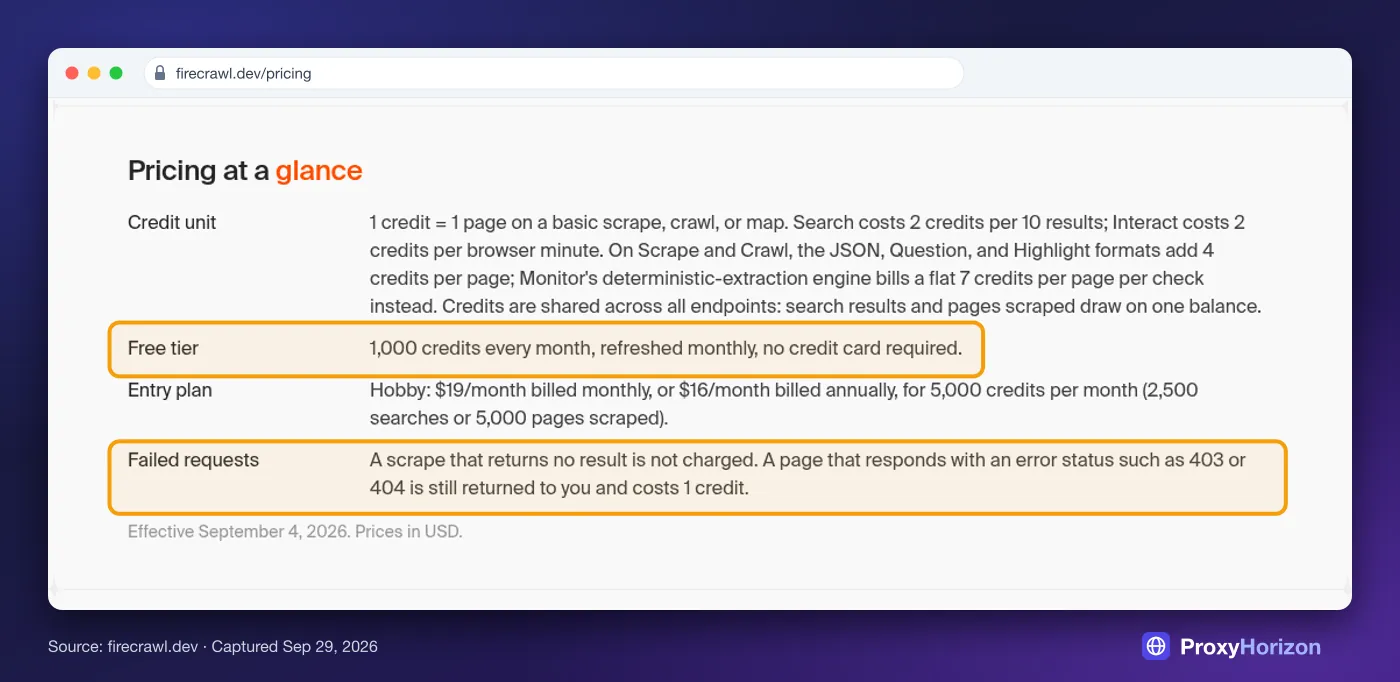
On credits, the free plan gives you 1,000 a month, and a scrape costs 1. Mind the fine print highlighted above: a page that returns a 403 or 404 still costs a credit. Ask Claude to check your balance with the firecrawl_credit_usage tool, and see our Firecrawl pricing breakdown for every plan.
Troubleshooting Firecrawl MCP in Claude
Most problems come down to authentication or a mismatched setup. Find your symptom here:
| Symptom | Likely cause | Fix |
|---|---|---|
| Claude only sees 3 Firecrawl tools | You’re connected keyless | Switch to the OAuth URL and sign in, or add an API key header |
| No map or crawl on claude.ai | The directory connector is the search profile | Add a custom connector with the OAuth URL |
| Server shows needs auth or returns 401 | Sign-in not finished, or a bad key | Run /mcp or claude mcp login firecrawl; check the key starts with fc- |
| 429 errors | Keyless daily cap for your IP | Sign in or use an API key |
| Firecrawl appears twice | A claude.ai connector plus a local server | Keep one: claude mcp remove firecrawl |
| Local server won’t start | Node.js older than 22, or npx missing | Install Node.js 22+ and check node -v |
| API key ignored on Windows | The key never reaches the npx process | Use the hosted URL with a header instead |
| Remote server in .mcp.json fails | The entry has no "type": "http" | Add the type line |
| Result saved to a file instead of shown | Output passed 25,000 tokens | Narrow the scrape, or raise MAX_MCP_OUTPUT_TOKENS |
| Screenshot link stops working | Screenshot URLs expire after 24 hours | Download the image right away |
Some sites block even Firecrawl. Its proxy setting already retries hard pages with enhanced proxies, so a persistent block usually means the site is guarding that content on purpose. If you scrape such targets with your own code instead, you’ll need good residential proxies and a plan for getting past Cloudflare.
Treat Every Scraped Page as Untrusted
Firecrawl brings outside text into Claude’s context, and some of that text is written for AI. Several Firecrawl pages we read while researching this article carried notes addressed to AI agents. They were harmless onboarding tips. The same channel carries prompt injection.
Claude’s directory says it plainly: only use connectors from developers you trust. Keep approval prompts on for tools that act or spend, especially browser actions and monitors, since one monitor tool deletes monitors permanently. Keep keys in environment variables, never in URLs or chats, and revoke stale connections from Firecrawl’s MCP settings.
Firecrawl MCP with Claude: The Short Version
- One-click connector in Claude’s directory
- OAuth sign-in, so there are no keys to paste
- Up to 27 tools: scrape, crawl, map, browser and monitors
- Keyless mode for quick tests
- Works in the Claude apps, Claude Code and the API
- The directory version is search-focused (8 tools)
- All 27 tool definitions cost about 12,000 tokens
- Big crawls burn credits fast
- Keyless daily caps aren’t published
Verdict
The easiest way to give Claude real web access. Sign in with OAuth, load only the tools you need, and watch your credits on crawls.
Our take: Firecrawl is the most capable way we’ve found to give Claude real web access, and the OAuth setup removes most of the old key-handling risk. If it doesn’t fit your budget or stack, our list of Firecrawl alternatives covers the options.
Frequently Asked Questions
The Bottom Line
Firecrawl turns Claude from something that can look things up into something that can actually read the web: whole pages, whole sites, even pages behind a button.
For most people, the best setup is the simplest one. Add the connector on claude.ai if you mostly research, and use the OAuth command in Claude Code if you build. Load only the tools you use, cap your crawls, and keep approvals on for anything that spends credits.
Start with the free plan and one real task, like mapping a docs site and pulling the page you need. You’ll know within a few prompts whether it earns a permanent spot in your setup.
Keep Reading
More articles you might enjoy