What Is a Remote Access VPN? A 2026 Guide
A plain-English guide to remote access VPNs — how they work, protocols, benefits, limits, VPN vs ZTNA, and the best options for individuals and teams.
When remote and hybrid work went mainstream after 2020, one piece of quiet infrastructure suddenly ran the whole show: the remote access VPN. It is the technology that lets an employee at a kitchen table reach the same internal files, apps, and servers they would touch from an office desk — safely, over the open internet.
But "remote access VPN" is one of the most confused terms in networking. People mix it up with the consumer VPN they use for Netflix, with site-to-site VPNs that link whole offices, and increasingly with newer models like Zero Trust Network Access. They are related, but they are not the same thing — and picking the wrong one is how security gaps and wasted budgets happen.
This guide clears it up in plain English. You will learn exactly what a remote access VPN is, how it works step by step, the protocols behind it, how it differs from site-to-site and consumer VPNs, its real benefits and honest limitations, where it is being replaced by Zero Trust, and how to choose the right option — whether you are an IT admin or an individual who just wants secure access to your own machines.
What Is a Remote Access VPN?
A remote access VPN is a secure, encrypted connection that lets an individual user connect to a private network — usually a company's internal network — from anywhere over the public internet. In plain English: it builds an encrypted "tunnel" between your device and a corporate gateway, so you can use internal resources as if you were physically plugged into the office LAN.
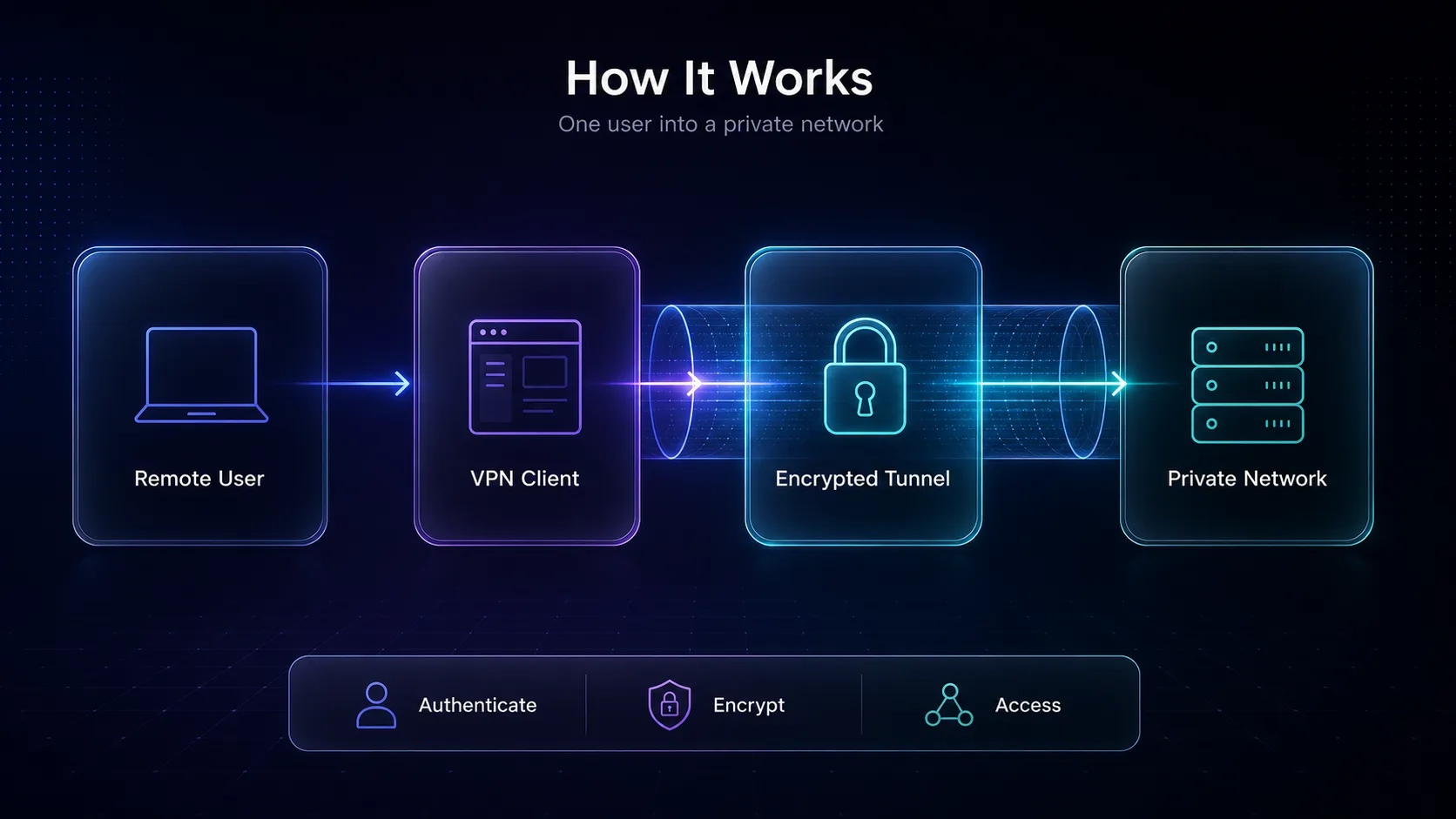
The user runs a piece of software called a VPN client on their laptop or phone. That client authenticates to a VPN gateway (or concentrator) sitting at the edge of the private network, and once the identity checks out, all traffic between the two flows through an encrypted tunnel. Anyone intercepting the connection — on hotel Wi-Fi, a café network, or a compromised router — sees only scrambled data.
This is different from the consumer VPNs most people know. A consumer VPN routes your traffic to the public internet through a provider's server to change your IP and add privacy. A remote access VPN connects you into a specific private network so you can reach things that are not on the public internet at all. Same core technology — encrypted tunnels — pointed at very different goals. If you want the fundamentals first, start with our explainer on what a VPN is and how it works.
How Does a Remote Access VPN Work?
Under the hood, a remote access VPN connection follows the same five stages every time. Understanding them makes the security model obvious.
1The client initiates a connection
You open the VPN client and hit connect. The client reaches out to the VPN gateway's public address and proposes a secure session, agreeing on which encryption protocol and cipher suite to use.
2Authentication verifies who you are
Before any tunnel opens, the gateway confirms your identity — via a username and password, a client certificate, and ideally multi-factor authentication (MFA). This step is the front door; weak authentication here is the single biggest remote-access risk.
3An encrypted tunnel is established
Once authenticated, the two sides negotiate encryption keys and build the tunnel. From this point, data is wrapped in encryption (a process called encapsulation) so it cannot be read or tampered with in transit.
4Traffic flows through the gateway
Your requests travel through the tunnel to the gateway, which decrypts them and forwards them to the right internal resource — a file server, an internal web app, a database. Responses come back the same way. To the private network, you now appear to be a local user.
5The session ends
When you disconnect (or the session times out), the tunnel is torn down and the keys are discarded. Good deployments enforce idle timeouts and re-authentication so a walked-away laptop does not stay connected forever.
The key insight: a remote access VPN is really two things working together — strong authentication (proving who you are) and encryption in transit (protecting the data). Get either wrong and the whole model weakens.
Remote Access VPN vs Site-to-Site VPN
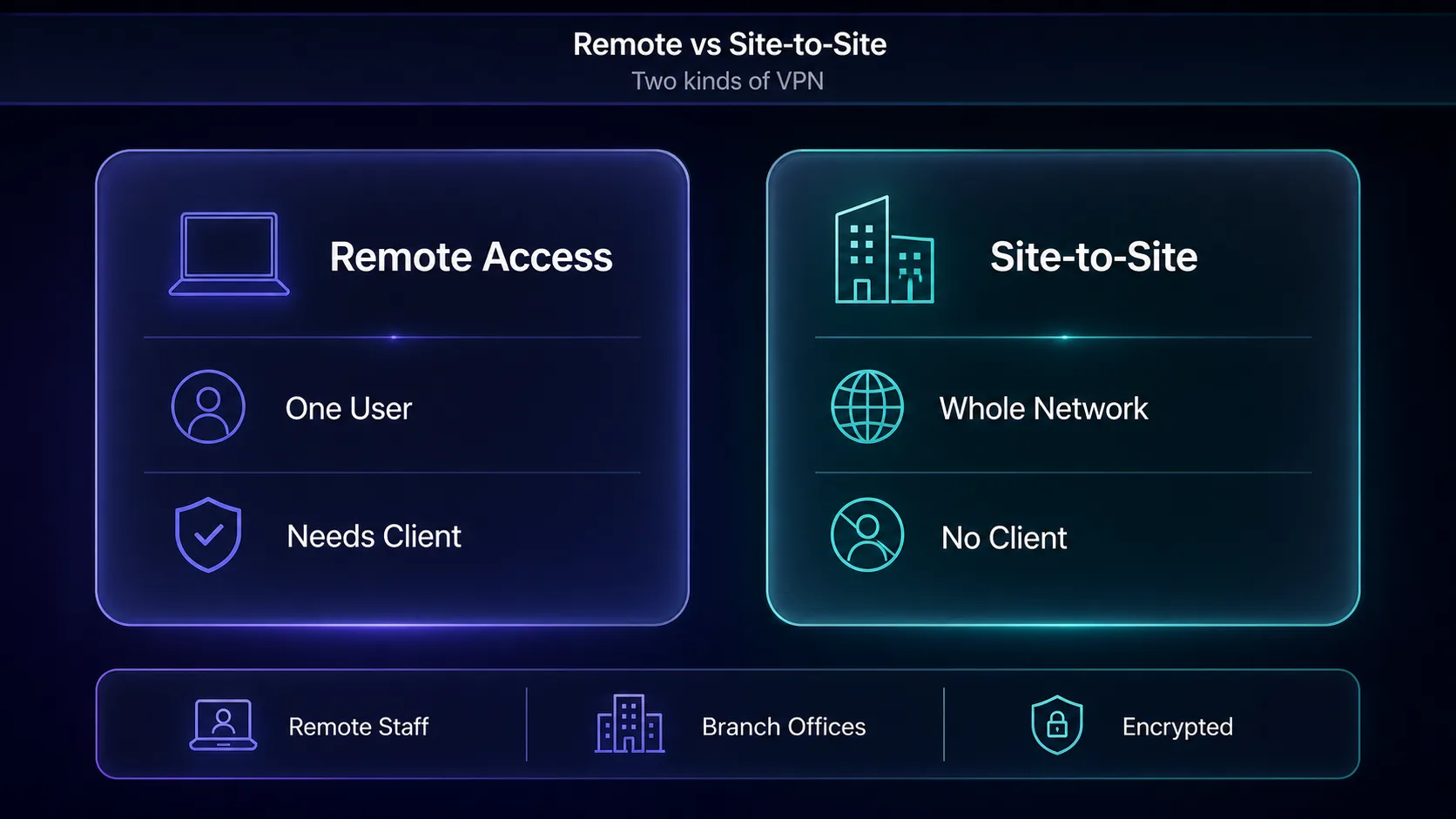
These are the two classic enterprise VPN types, and the difference comes down to what is connecting. A remote access VPN connects one user's device to a network. A site-to-site VPN connects whole networks to each other — say, a branch office in Delhi to headquarters in London — so every device in each location can talk to the other without individual clients.
| Aspect | Remote Access VPN | Site-to-Site VPN |
|---|---|---|
| Connects | A single user/device to a network | An entire network to another network |
| Client software | Required on each device | None — handled by gateways/routers |
| Typical user | Remote/hybrid employees, contractors | Branch offices, data centers |
| Setup | Per-user provisioning | One-time gateway-to-gateway config |
| Best for | Mobile workforce, work-from-home | Permanent links between fixed sites |
Our take: they are complementary, not competitors. A company with three offices and a remote workforce typically runs site-to-site VPNs between the offices and a remote access VPN for the people working from home. For a deeper look at team setups, see our guide to the best VPNs for remote teams.
Remote Access VPN vs Consumer VPN
This is the confusion that trips up most people, so let us be blunt about it. A consumer VPN (NordVPN, Surfshark, Proton VPN) exists to protect your privacy on the public internet — it hides your IP, encrypts your browsing on untrusted Wi-Fi, and lets you change your virtual location. A remote access VPN exists to give you access into a private network you are authorized to use.
In plain English: a consumer VPN is about getting out to the internet safely and privately; a corporate remote access VPN is about getting in to your organization's resources. The underlying encryption is similar, which is why the names collide, but the purpose is opposite. Curious how VPNs stack up against proxies for privacy? Our proxy vs VPN breakdown covers it.
Quick verdict: If you want Netflix in another region or privacy on café Wi-Fi, you want a consumer VPN. If you need to reach your company's internal wiki or a database that only lives on the office network, you need a remote access VPN.
Common Remote Access VPN Protocols
The "protocol" is the ruleset that defines how the tunnel is built and encrypted. The protocol you choose affects speed, security, and what devices are supported.
1IPsec / IKEv2
IPsec is the long-standing enterprise standard, often paired with IKEv2 for fast, stable key exchange — especially good on mobile because it reconnects smoothly when you switch between Wi-Fi and cellular. It operates at the network layer and is robust, but can be trickier to configure and is sometimes blocked by restrictive firewalls.
2SSL/TLS VPN
SSL VPNs use the same TLS encryption that secures HTTPS websites, which means they work over standard web ports and sail through most firewalls. Many are clientless — accessible through a browser — making them popular for contractors and BYOD scenarios where installing software is a hassle.
3OpenVPN
OpenVPN is a mature, open-source protocol trusted for its strong security and flexibility. It can run over TCP or UDP and is highly configurable, though it is more CPU-intensive than newer options. Its open-source nature means it has been heavily audited over the years.
4WireGuard
WireGuard is the modern challenger: a lean codebase, state-of-the-art cryptography, and noticeably faster connections with lower overhead. It has quickly become the default for many new deployments. The trade-off is that its simplicity means some enterprise features are layered on top rather than built in.
5L2TP and PPTP (legacy)
L2TP/IPsec still appears in older setups, and PPTP is effectively obsolete. Warning: PPTP has known, serious security weaknesses — never use it for anything sensitive. If a provider still leans on PPTP, treat it as a red flag.
For a hands-on comparison of the two most popular modern protocols, see OpenVPN vs WireGuard.
| Protocol | Speed | Security | Best For |
|---|---|---|---|
| WireGuard | Fastest | Excellent (modern) | New deployments, mobile |
| IPsec / IKEv2 | Fast | Excellent | Enterprise, mobile reconnects |
| OpenVPN | Moderate | Excellent (audited) | Flexibility, firewall-tricky networks |
| SSL/TLS VPN | Moderate | Strong | Clientless, contractors, BYOD |
| PPTP (legacy) | Fast | Broken — avoid | Nothing sensitive |
SSL VPN vs IPsec VPN: Which Type?
Most remote access VPNs fall into one of two camps, and the choice shapes the user experience.
IPsec VPNs give full network-layer access — once connected, your device behaves like it is on the LAN, which is powerful but broad. SSL VPNs often provide more granular, application-level access, letting admins expose only specific apps rather than the whole network. That tighter scoping is why SSL/TLS approaches align better with modern least-privilege security thinking.
Our take: IPsec suits managed company laptops that need deep network access; SSL VPNs suit contractors, partners, and mixed devices where you want to limit exactly what each person can reach.
Benefits of a Remote Access VPN
- Secure access from anywhere — employees reach internal resources safely over any internet connection, including untrusted public Wi-Fi.
- Strong encryption in transit — data is unreadable to anyone intercepting it between the device and the gateway.
- Centralized control — IT can enforce authentication, MFA, and access policies from one place, and revoke a user instantly.
- Cost-effective connectivity — it uses the existing public internet rather than expensive dedicated lines.
- Enables remote and hybrid work — the backbone that lets distributed teams function as if they were on-site.
Limitations and Drawbacks (The Honest Part)
Remote access VPNs are proven, but they are not flawless — and pretending otherwise is how organizations get caught out. Here is the uncomfortable truth most vendor pages skip.
1The "castle-and-moat" weakness
Traditional VPNs grant broad network access once a user is authenticated. If an attacker steals valid credentials or compromises a device, they can often move laterally across the whole internal network. Trust is placed in the connection, not continuously in the user — a model security teams now consider outdated.
2Performance bottlenecks
All remote traffic funnels through the VPN gateway, which can become a chokepoint under heavy load. Backhauling cloud-app traffic through a central gateway also adds latency — a real annoyance when the app you are using lives in the cloud anyway, not on the office network.
3Management overhead
Client software must be deployed, patched, and supported across every device and OS. Certificates expire, configs drift, and unpatched VPN gateways have been the entry point for several major breaches. It is real, ongoing work.
4Scaling costs
Licensing and gateway capacity scale with your user count, so a fast-growing or spiky workforce can make costs climb quickly. Peak events (think everyone logging in Monday morning) must be sized for.
Remote Access VPN vs Zero Trust (ZTNA)
This is the shift most beginner guides ignore, and it matters. Zero Trust Network Access (ZTNA) is the emerging alternative to the traditional remote access VPN, built on a simple principle: never trust, always verify.
Where a VPN authenticates you once and then grants broad network access, ZTNA verifies every request and grants access to specific applications only — not the whole network. A compromised account can reach far less. Identity, device health, and context are checked continuously, not just at login. Providers like Cloudflare and others have pushed this model hard as remote work exposed the VPN's castle-and-moat limits.
Our take: the remote access VPN is not dead — millions of organizations still rely on it, and it works. But for new deployments, ZTNA's least-privilege model is where security is heading. Many companies now run a hybrid: VPN for legacy systems, ZTNA for modern apps. If someone tells you VPNs are "obsolete," that is marketing oversimplification — the reality is a gradual, sensible migration.
VPNs for Individual Remote Access
Not everyone needs enterprise gear. If you are an individual or a small team wanting to reach your own devices — a home NAS, a work PC, a media server — securely from anywhere, several consumer VPNs now include remote-access-style features (encrypted device-to-device networking) alongside normal privacy. Here are three worth knowing.
1NordVPN

NordVPN's Meshnet feature is the standout here: it lets you create a private, encrypted network linking your own devices directly, no matter where they are — effectively a personal remote access VPN. You can reach your home computer, share files, or route traffic through your own device while travelling.
On top of that you get one of the fastest consumer networks (thanks to its NordLynx protocol, built on WireGuard) and a strong no-logs record. The catch: it is a consumer tool, so it is not a replacement for a managed corporate gateway. For personal remote access, though, it is excellent. See how it compares in NordVPN vs Surfshark.
2Surfshark

Surfshark offers similar dynamic multi-hop and device-linking options at a friendlier price, plus unlimited simultaneous connections — genuinely useful if you want to secure and link many devices without counting seats. It is the value pick for individuals and families.
Speeds are strong via WireGuard, and the feature set (kill switch, clean web, rotating IP) is generous for the money. The honest caveat: it is a younger network than Nord and its remote-device features are less mature than Meshnet. Still, for cost-conscious personal use, it punches above its weight.
3Proton VPN

Proton VPN is the privacy purist's choice, from the team behind Proton Mail, with open-source apps, independent audits, and a genuinely usable free tier. For remote access it supports secure port forwarding and self-hosting scenarios that privacy-minded technical users appreciate.
Its Secure Core routing and Switzerland-based, no-logs stance make it the pick when trust and transparency matter most. The trade-off is that it lacks a one-click Meshnet-style equivalent, so device-to-device access takes more setup. For users who prioritize auditable privacy, it is the standout. Compare privacy-first options in our VPN vs Tor guide.
Browse the full field, side by side, in our VPN directory.
How to Choose and Set Up a Remote Access VPN
1Define who needs access to what
Start with the principle of least privilege. Map which users need which resources, and prefer a solution that lets you scope access narrowly rather than opening the whole network to everyone. This one decision shapes your security posture more than any protocol choice.
2Insist on multi-factor authentication
MFA is non-negotiable. The overwhelming majority of remote-access breaches trace back to stolen or weak credentials, and a second factor blocks most of them. If a solution cannot enforce MFA, walk away.
3Pick a modern protocol
Favor WireGuard, IKEv2, or OpenVPN. Avoid PPTP entirely, and treat plain L2TP without IPsec with suspicion. The protocol determines your speed-and-security balance, so match it to your devices and threat model.
4Plan for patching and monitoring
An unpatched VPN gateway is a known breach vector. Commit up front to keeping clients and gateways updated, logging access, and reviewing who can connect. Security is a process, not a one-time install.
Remote Access VPN Security Best Practices
- Enforce MFA everywhere — treat single-factor remote access as already compromised.
- Apply least privilege — give each user access to only the resources they actually need, not the whole network.
- Keep everything patched — VPN gateways and clients are high-value targets; update them promptly.
- Use strong, modern encryption — current protocols and ciphers only; retire anything legacy.
- Monitor and log sessions — watch for unusual access patterns and set idle timeouts and re-authentication.
- Consider layering ZTNA — for new apps, least-privilege application access reduces the blast radius of any single compromise.
Frequently Asked Questions
Conclusion
A remote access VPN is, at its heart, a simple idea done carefully: an encrypted tunnel plus strong authentication that lets one person safely reach a private network from anywhere. It is the technology that made remote and hybrid work possible, and for millions of organizations it still does its job every day.
The nuances are what matter. It is not the same as the consumer VPN you use for streaming, it is not a site-to-site VPN, and for new deployments its broad-access model is increasingly paired with — or replaced by — Zero Trust. If you are an individual, you probably do not need enterprise gear at all; a consumer VPN with device-linking features like NordVPN's Meshnet covers personal remote access neatly.
Whatever your situation, the fundamentals hold: enforce MFA, use a modern protocol, apply least privilege, and keep everything patched. Ready to go deeper? Compare providers in our VPN directory, put two head-to-head with our comparison tool, or read up on VPNs for remote teams if you are securing a whole workforce.