Best Residential Proxies for Telegram Automation (2026)
The best residential proxies for Telegram automation in 2026 for running bots, userbots, and account farms safely. Compare 7 top providers, with Telethon and Pyrogram setup tips.

Telegram automation is where the real work happens for marketers, community operators, and developers: auto-posting to channels, running userbots, managing account farms, scraping group members, and powering bots that never sleep. But the moment you push past a single account, Telegram’s anti-abuse systems start watching the one thing that ties everything together, your IP address. Run multiple accounts or high-volume actions from the same IP and you’ll trigger verification challenges, session logouts, and outright bans.
This is exactly why residential proxies are the backbone of serious Telegram automation. Because their IPs come from real home internet connections, Telegram treats them as ordinary users instead of the datacenter ranges it flags during registration and mass actions. Give each account or bot its own clean residential IP and your automation looks like a crowd of real people, not one machine hammering the API.
In this guide we cover the best residential proxies for Telegram automation in 2026, why residential IPs are non-negotiable at scale, and how to wire them into tools like Telethon and Pyrogram without getting your accounts banned. Let’s get into it.
Best Residential Proxies for Telegram Automation: Quick Comparison
Here’s an at-a-glance look at our top seven picks before we break down each one.
| Provider | Best For | Standout Feature | Price Tier |
|---|---|---|---|
| NodeMaven | Best overall for account safety | Real-time IP quality filtering | $$ |
| SOAX | Best for account farms | Residential + mobile IPs | $$$ |
| IPRoyal | Best budget for bots | Pay-as-you-go IPs that never expire | $ |
| Decodo | Best for ease of use | Huge pool, simple API | $$ |
| Oxylabs | Best premium / enterprise | Massive, ultra-clean network | $$$ |
| Geonode | Best for high-volume bots | Unlimited-bandwidth plans | $$ |
| Webshare | Best for beginners | Free tier and simple setup | $ |
Why Residential Proxies Are Essential for Telegram Automation
Telegram is unusually sensitive to IP reputation, and automation makes that sensitivity impossible to ignore. During phone-number registration and any bulk activity, Telegram inspects the connecting IP, and datacenter ranges are a well-known red flag. Register a batch of accounts through datacenter proxies and many will be banned within hours, sometimes before you send a single message.
Residential proxies avoid this because their IPs belong to real households assigned by ISPs, so Telegram sees them as genuine users on home broadband. That legitimacy is what lets you register, warm up, and operate accounts at scale without tripping detection. Telegram is also very reactive to sudden IP changes mid-session: if an account that logged in from one country suddenly appears from a datacenter across the world, it gets challenged or logged out. A stable residential IP per account keeps everything looking natural. New to the concept? See what a residential proxy is and our roundup of the best residential proxy providers.
Common Telegram Automation Use Cases
Residential proxies power a wide range of legitimate Telegram automation. Here are the most common.
1Bots and Userbots
Official Bot API bots handle moderation, notifications, and services, while userbots built with MTProto libraries like Telethon and Pyrogram automate real account actions. Running several from one IP invites rate limits and bans; a proxy per instance spreads the load and keeps them alive.
2Managing Account Farms
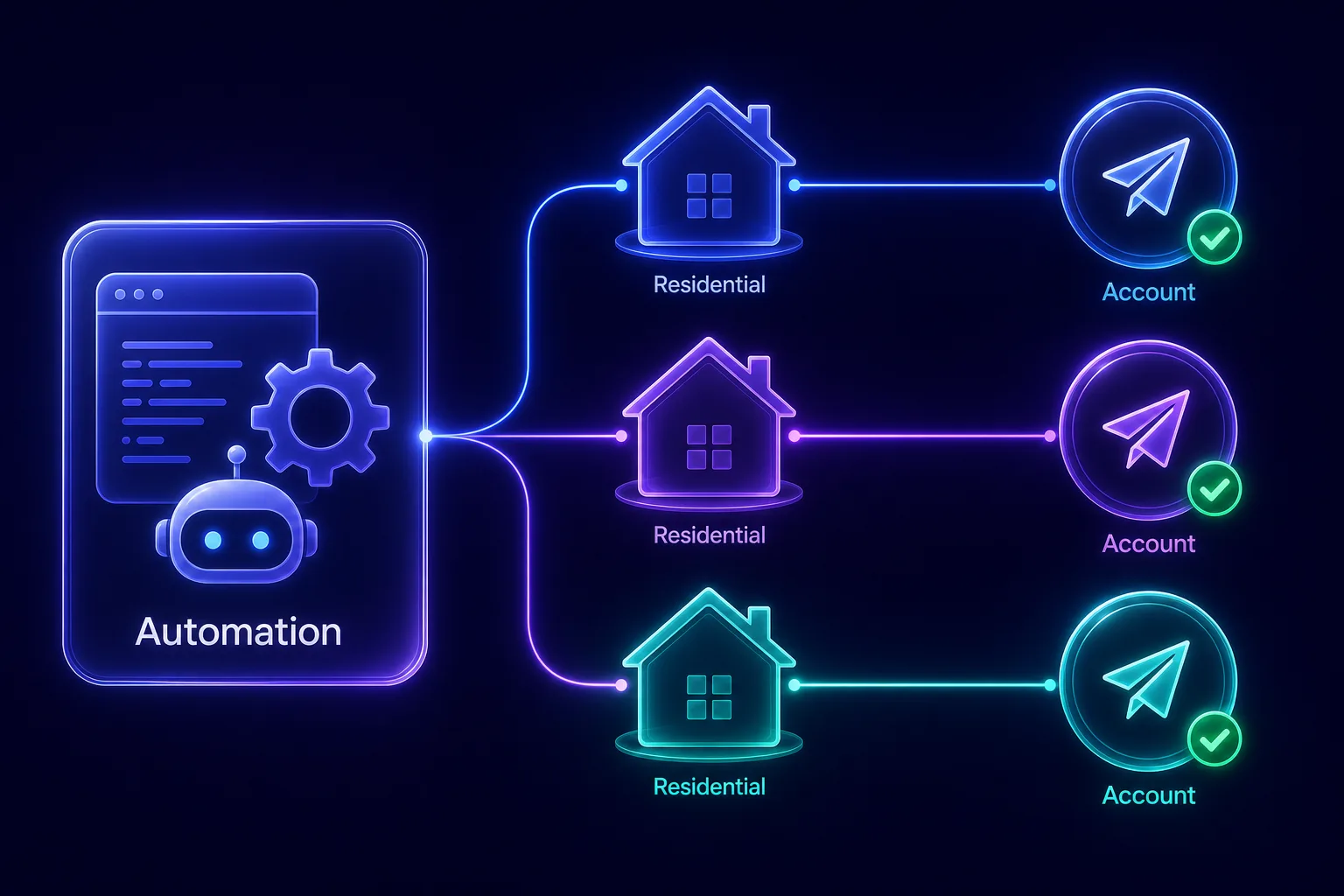
Agencies and marketers often operate dozens of Telegram accounts. Telegram links accounts that share an IP, so a farm on one connection collapses the moment one account is flagged. Assigning each account its own residential IP keeps them isolated and durable.
3Marketing Automation
Scheduled posting across channels, auto-joining groups, and drip campaigns all generate patterns Telegram watches for. Clean residential IPs, combined with sensible pacing, let these campaigns run without the whole operation being fingerprinted to a single address.
4Scraping and Data Collection
Collecting public group members, channel analytics, or message data at volume triggers Telegram’s rate limits fast. Rotating residential proxies spread requests across many IPs so your collection jobs keep running instead of getting throttled.
A note on responsible use: the Bot API is official and automation has legitimate uses, but Telegram’s terms prohibit spam and unsolicited bulk messaging. Use proxies to run compliant automation reliably and privately, not to abuse the platform.
The 7 Best Residential Proxies for Telegram Automation
Every provider below offers the clean, real-user residential IPs that keep automated Telegram accounts alive. We’ve noted what each does best.
1NodeMaven, Best Overall for Account Safety

NodeMaven leads because its entire focus is IP quality, the single biggest factor in keeping automated Telegram accounts from being banned. It filters its residential IPs in real time to screen out flagged addresses, so your accounts start life on clean IPs Telegram trusts. Sticky sessions can hold the same IP for up to 24 hours, which is ideal for Telegram, where a stable per-account address prevents the mid-session IP jumps that trigger re-verification.
For anyone running account farms or userbots where bans are expensive, NodeMaven’s clean-IP focus and long sticky sessions make it the most dependable choice on this list.
2SOAX, Best for Account Farms

SOAX is the pick when you’re managing many accounts and want maximum trust. Alongside a clean residential pool, it offers mobile IPs, which carry the highest trust of all because carriers share them among many real users, making them exceptionally hard for Telegram to ban. Granular city and carrier targeting plus flexible rotation let you assign a stable IP to each account in a farm.
If your automation depends on large numbers of resilient accounts, SOAX’s combination of residential and mobile IPs is purpose-built for the job. See our guide to the best mobile proxy providers for more on mobile IPs.
3IPRoyal, Best Budget for Bots

IPRoyal is the value champion for automation on a budget. Its pay-as-you-go “Royal Residential” traffic never expires, so you buy once and use it at your own pace, which suits bots that run in bursts rather than around the clock. The IPs are clean enough for account work, and sticky sessions let you pin each account to a consistent address.
If you’re bootstrapping a Telegram automation project and want quality residential IPs without a big monthly commitment, IPRoyal offers the best price-to-performance ratio here.
4Decodo, Best for Ease of Use

Decodo (formerly Smartproxy) pairs a massive residential pool with a clean, well-documented API and dashboard, making it a great fit if you want to wire proxies into your automation quickly. Its high success rates keep connections stable across many concurrent accounts, and precise location targeting helps when accounts need to appear from specific regions.
For developers who value good documentation and a gentle setup, Decodo is one of the easiest ways to get residential proxies working with your Telegram scripts.
5Oxylabs, Best Premium and Enterprise Option

Oxylabs is the enterprise heavyweight, with one of the largest and cleanest residential networks available. If you’re automating Telegram at serious scale, think hundreds of accounts or heavy data pipelines, its reliability, uptime, and support are hard to beat. The advanced targeting and rock-solid stability justify the premium price for demanding workloads.
When your automation simply can’t afford proxy failures and you have the budget to match, Oxylabs is the top-tier choice.
6Geonode, Best for High-Volume Bots

Geonode stands out with unlimited-bandwidth residential plans, a major advantage for traffic-heavy automation like large-scale scraping or bots that move a lot of data. Instead of watching a per-gigabyte meter, you pay a flat rate and use as much as you need, which often works out dramatically cheaper for high-volume Telegram jobs.
For scraping operations and bot fleets that would rack up big bandwidth bills elsewhere, Geonode’s pricing model makes it a smart, budget-conscious pick.
7Webshare, Best for Beginners

Webshare is the friendliest starting point, with a self-service platform, transparent pricing, and a free tier to test with before committing. Its residential proxies are clean enough for light Telegram automation, and the simple setup and clear API docs mean you can be routing a bot through a proxy within minutes.
If you’re new to automation and want an affordable, low-friction way to learn safe proxy habits, Webshare is a sensible on-ramp you can scale up from later. Compare it against the others in our full proxy provider directory.
How to Choose the Right Proxy for Telegram Automation
The best pick depends on your automation’s scale and style. Weigh these factors before buying.
1SOCKS5 Support
Telegram and its automation libraries work natively with SOCKS5 proxies, so make sure your provider offers SOCKS5 endpoints. It’s the cleanest way to route both the Telegram app and Telethon or Pyrogram scripts.
2Sticky Sessions
Telegram punishes mid-session IP jumps, so you want sticky sessions that keep each account on one IP for hours. NodeMaven and IPRoyal give you strong control here, which is essential for account farms.
3Pool Size and IP Type
A larger, actively filtered pool means cleaner IPs and better account survival. For the most valuable accounts, consider mobile IPs (from SOAX) for their higher trust.
4Bandwidth and Pricing Model
Per-gigabyte pricing suits account management and light bots; unlimited plans (like Geonode’s) win for heavy scraping. Match the model to your traffic so you don’t overpay.
5Concurrency and Support
If you run many accounts at once, check the provider’s concurrent-connection limits and responsiveness of support. Reliable networks and fast help keep automation running smoothly.
How to Use Residential Proxies with Telegram Automation
Good proxies only help if you wire them up correctly. Follow these practices to keep automated accounts alive.
Route each account through SOCKS5. MTProto libraries like Telethon and Pyrogram accept a proxy setting, so you pass your residential SOCKS5 host, port, and credentials directly in the client configuration. Each script or account instance gets its own proxy. For the basics of adding proxies to the app itself, see our guides to SOCKS5 proxies for Telegram and using proxies in Telegram.
One sticky IP per account. Assign a dedicated sticky residential IP to each account and keep it there. Telegram associates an account with its usual location, so a consistent IP avoids the security challenges that mid-session jumps cause. Never rotate the IP under a logged-in account.
Warm up and pace your actions. Don’t register an account and immediately blast messages or join dozens of groups. Build activity gradually over days, and throttle bulk actions so they resemble human behavior. Clean IPs plus patient pacing is the formula that keeps automation sustainable. Always test each proxy before relying on it.
Mistakes to Avoid
These errors get automated Telegram accounts banned no matter how good your proxies are.
1Using Datacenter or Free Proxies
Datacenter and free proxies are the fastest route to mass bans on Telegram. Their ranges are flagged during registration and bulk actions. Always use paid residential (or mobile) IPs for automation. Our guide on how websites detect proxy traffic explains why datacenter IPs stand out.
2Rotating IPs Mid-Session
Changing an account’s IP while it’s logged in is a classic trigger for verification and logouts. Keep each account on a stable sticky IP; rotate only for scraping jobs that aren’t tied to a logged-in account.
3Sharing One IP Across Accounts
Running multiple accounts through a single IP links them together, so one ban takes down the rest. Give every account its own dedicated residential IP, as shown in the diagram above.
4Automating Too Aggressively
Proxies hide your IP, not reckless behavior. Spamming and unsolicited bulk messaging still get caught and violate Telegram’s rules. Pace your automation and stay compliant. The same quality-over-quantity logic applies as in our best residential proxies for Reddit guide.
Frequently Asked Questions
The Bottom Line
For Telegram automation, proxy type decides whether your accounts survive. Residential IPs from real households are the only kind that reliably passes Telegram’s registration checks and mass-action scrutiny, and pairing one stable sticky IP with each account is what prevents the mid-session jumps and shared-IP links that cause mass bans.
For most operators, NodeMaven is the best overall choice thanks to its real-time IP filtering and long sticky sessions. Choose SOAX for account farms that benefit from mobile-grade IPs, IPRoyal for the best value, and Oxylabs for enterprise scale. Whatever you pick, remember the formula: clean residential IPs, one per account, plus patient, compliant automation. Compare all of these in our full proxy provider directory, or start with our overview of the best proxies for Telegram.
Keep Reading
More articles you might enjoy