What Is a SOCKS5 Proxy for Telegram? Full Guide (2026)
What a SOCKS5 proxy for Telegram is, how it works in the app, why to use one, what to look for, the best providers, and how to set it up step by step.

Telegram is one of the rare apps that lets you route your traffic through a proxy right out of the box, and the most popular type to use is SOCKS5. Whether you want more privacy, access to Telegram from a restricted network, or the ability to run several accounts cleanly, a SOCKS5 proxy is often the tool that makes it happen.
But what exactly is a SOCKS5 proxy in the context of Telegram, and how do you pick and set one up correctly? A lot of guides throw the term around without explaining it, and using the wrong kind of proxy can get your account flagged or leave your connection crawling.
This guide covers everything: what a SOCKS5 proxy for Telegram actually is, how it works inside the app, why you’d use one, what to look for, the best providers to get one from, and how to set it up step by step. Let’s start with the basics.
What Is a SOCKS5 Proxy for Telegram?
A SOCKS5 proxy is an intermediary server that sits between your Telegram app and Telegram’s servers, forwarding your traffic and masking your real IP address in the process. SOCKS5 is the fifth and most capable version of the SOCKS protocol, a long-established internet standard, and Telegram supports it natively in its settings. When you enable it, Telegram appears to connect from the proxy’s location and IP rather than your own.
Unlike Telegram’s other supported protocol, MTProto, a SOCKS5 proxy is a universal tool, the same kind of proxy you can buy from any provider and use across many apps. In Telegram specifically, it’s the workhorse choice for privacy, geo-targeting, and account management. It reroutes and hides; it doesn’t add its own obfuscation layer, which is the key distinction from MTProto that we’ll return to shortly.
How a SOCKS5 Proxy Works in Telegram
When you add a SOCKS5 proxy to Telegram, your app stops talking to Telegram’s servers directly. Instead, it hands each request to the proxy server, which forwards it to Telegram and passes the responses back to you. Telegram sees the connection as coming from the proxy’s IP address, so your real IP and location stay hidden from the service and from anyone monitoring your local network.
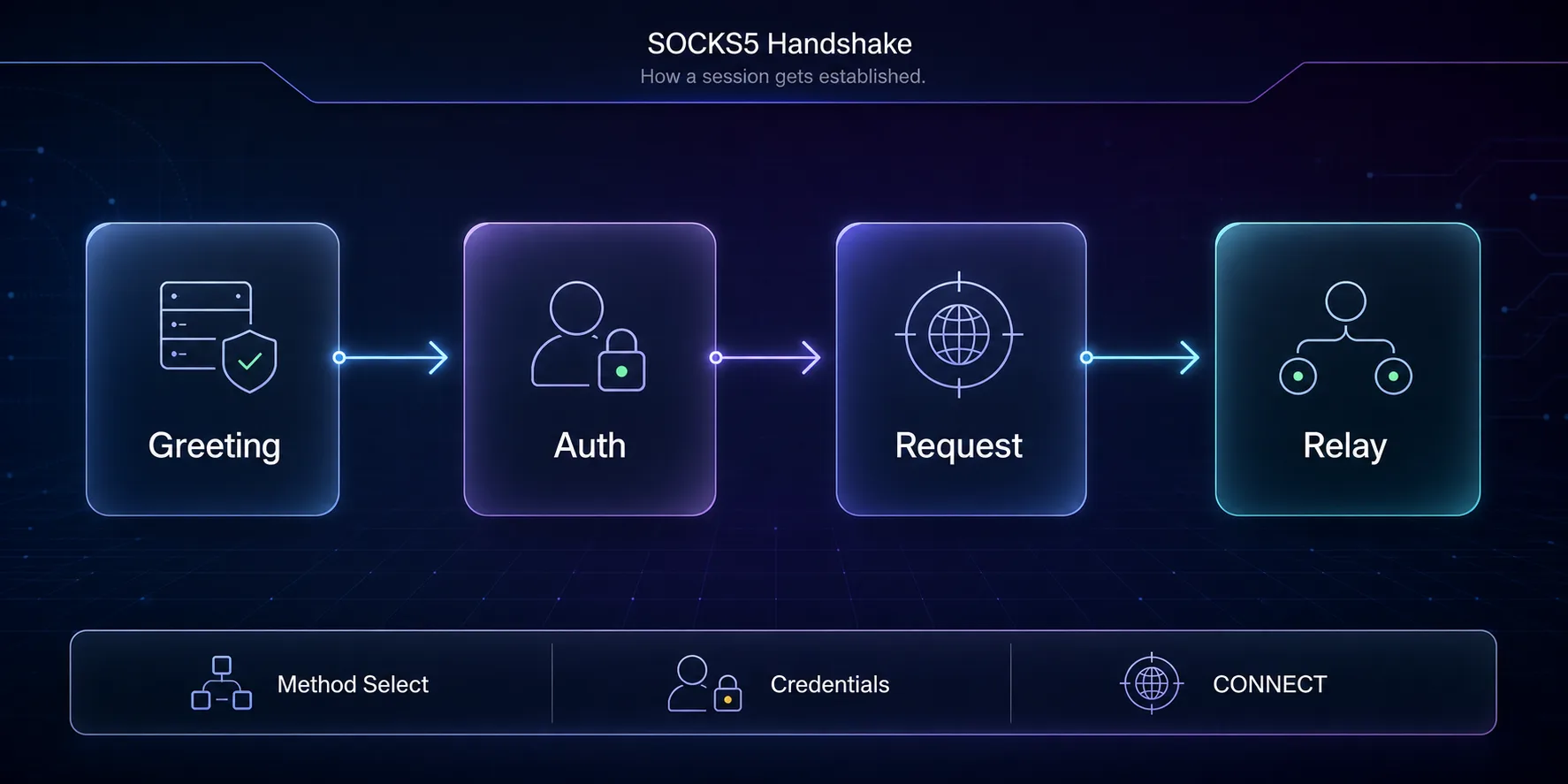
Crucially, SOCKS5 operates at a low level and doesn’t inspect or alter your data, it simply relays it. That means Telegram’s own encryption keeps working end to end; the proxy just changes the path your traffic takes and the IP it appears to come from. If you want the deeper technical picture, our guide on how SOCKS5 proxies work under the hood breaks down the handshake in detail.
Why Use a SOCKS5 Proxy in Telegram?
There are four main reasons people route Telegram through a SOCKS5 proxy, and most users have more than one in mind.
1Privacy and Hiding Your IP
Your IP address can reveal your rough location and be logged by networks you connect through. A SOCKS5 proxy masks it, so Telegram and your local network see the proxy’s IP instead of yours, a meaningful privacy upgrade on public or monitored connections.
2Accessing Telegram Where It’s Restricted
On networks or in regions that block Telegram, routing through a proxy in an unblocked location can restore access. SOCKS5 handles this well where blocking isn’t aggressive; where a network actively hunts proxies, MTProto’s obfuscation is the stronger tool.
3Running Multiple Accounts
Managing several Telegram accounts from one IP is a fast way to get them linked and flagged. Assigning each account its own clean SOCKS5 proxy, ideally residential or mobile, keeps them separated and looking like distinct, genuine users.
4Geo-Targeting
Some channels, bots, or features behave differently by region. A SOCKS5 proxy in a specific country makes Telegram appear to connect from there, useful for testing, research, or accessing region-specific content.
SOCKS5 vs MTProto in Telegram
Telegram supports two proxy protocols, and it’s worth knowing when SOCKS5 is the right pick. SOCKS5 is the universal, provider-backed standard, best for privacy, multi-accounting, and geo-targeting, with quality and speed depending on the provider you choose. MTProto is Telegram’s own protocol whose superpower is obfuscation: it disguises the connection so censors can’t easily block it, making it the better choice specifically for beating aggressive network-level blocks.
In short: reach for SOCKS5 for everyday privacy and account work, and MTProto when a network is actively blocking proxies. They’re not rivals so much as tools for different jobs, and you can keep one of each saved in Telegram. For the full breakdown, see our SOCKS5 vs MTProto comparison and our explainer on what an MTProto proxy is.
What to Look For in a SOCKS5 Proxy for Telegram
Not all SOCKS5 proxies are equal, and the wrong kind can do more harm than good. Prioritize residential or mobile IPs over datacenter ones, they come from real devices and ISPs, so Telegram treats them as genuine users and is far less likely to flag them, which matters enormously for account work. Look for a strict no-logs policy from the provider, since a SOCKS5 proxy doesn’t add its own encryption and you’re trusting the operator with your traffic.
Also weigh speed and uptime (a slow or flaky proxy makes Telegram painful), location coverage (so you can target the country you need), and whether you get dedicated IPs for account separation. Steer well clear of free public SOCKS5 lists for anything sensitive, they’re often overloaded, short-lived, and run by unknown parties. A reputable paid provider is worth it.
Best SOCKS5 Proxy Providers for Telegram
These three providers offer clean, reliable residential and mobile SOCKS5 proxies that work well for Telegram privacy and account management.

IPRoyal is the budget-friendly pick for getting solid SOCKS5 access without overcommitting. Its residential network is large and well-priced, with pay-as-you-go options that suit occasional Telegram use, and its IPs are clean enough for account work. If you want a low-risk, affordable way into quality SOCKS5 proxies, IPRoyal is an easy starting point.

Decodo (formerly Smartproxy) pairs a huge residential pool with one of the friendliest dashboards in the business, making it a great fit if you value reliability and ease of setup. Precise country and city targeting makes it strong for geo-specific Telegram tasks, and its consistently high success rates keep connections stable, a good all-rounder for both privacy and multi-account use.

SOAX stands out for exceptionally clean residential and mobile IPs plus granular targeting down to the carrier level, which makes it a favorite for serious account management. If you’re running multiple Telegram accounts and want the lowest possible flag risk with mobile-grade IPs, SOAX is a premium, dependable choice. Compare all of these and more in our full proxy provider directory.
How to Set Up a SOCKS5 Proxy in Telegram
Once you have your SOCKS5 details from a provider, adding them to Telegram takes under a minute. Open Settings, go to Data and Storage (or Advanced on desktop), then tap Proxy Settings → Add Proxy. Choose SOCKS5, then enter the server address, port, and, if your provider requires them, the username and password. Toggle it on, and Telegram will route through your proxy.
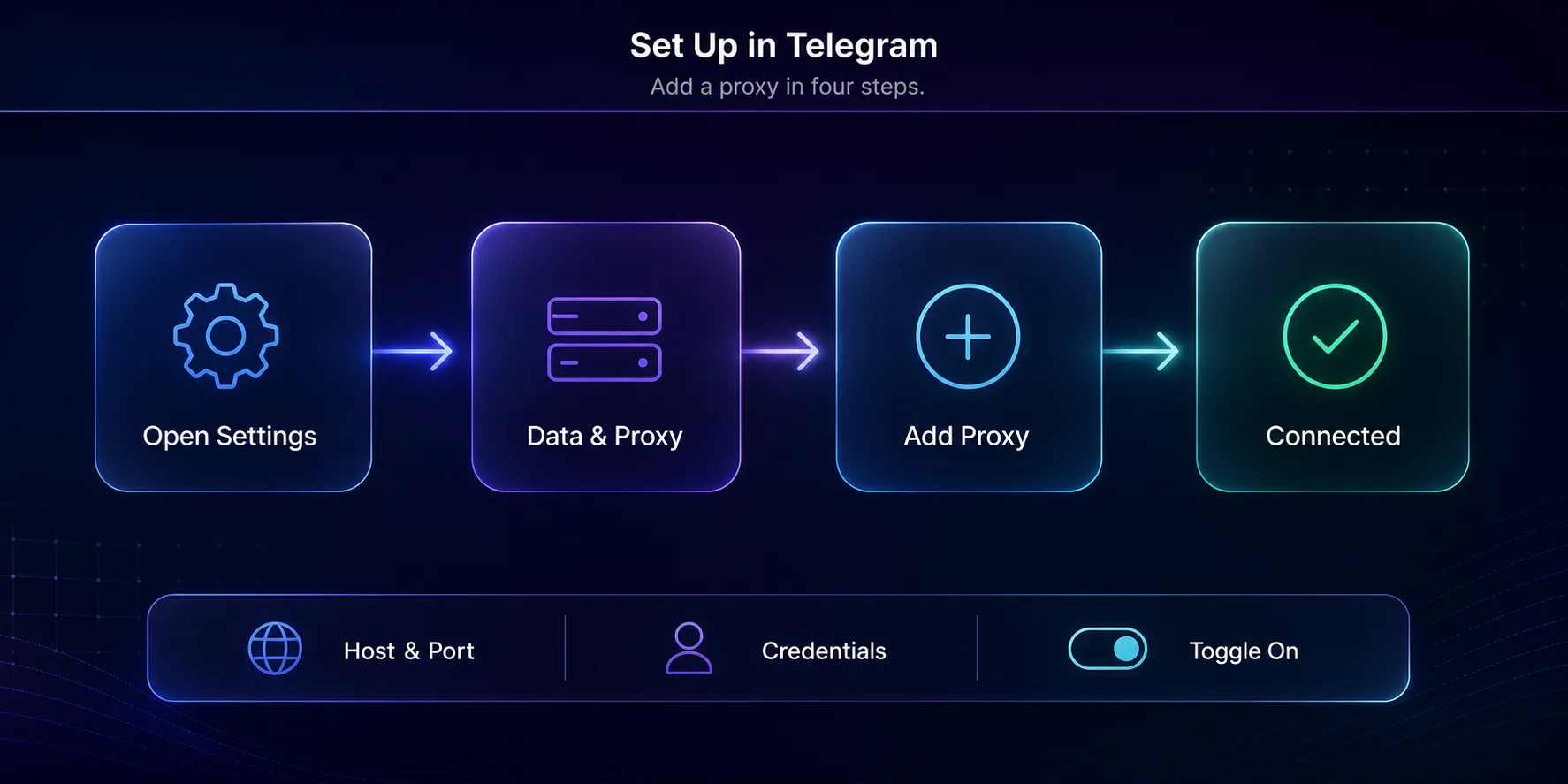
You’ll see a connection indicator when it’s active, and you can save multiple proxies and switch between them. For a detailed walkthrough covering both mobile and desktop, plus troubleshooting tips, see our complete guide to using proxies in Telegram.
Common Mistakes to Avoid
A few missteps trip up newcomers to Telegram proxies.
1Using Free Public SOCKS5 Proxies
Free proxy lists are tempting but risky, they’re often overloaded, unreliable, and run by unknown operators who could monitor your traffic. For anything beyond a quick throwaway test, use a reputable paid provider with clean IPs and a no-logs policy.
2Sharing One IP Across Many Accounts
Routing multiple Telegram accounts through a single proxy IP is a classic way to get them linked and banned. Give each account its own dedicated residential or mobile IP to keep them looking like separate, genuine users.
3Using Datacenter IPs for Account Work
Cheap datacenter proxies are easy for Telegram to recognize and distrust. For account creation and management, residential or mobile IPs blend in far better and dramatically lower your flag risk. Pay a little more; save yourself the bans.
Datacenter vs Residential vs Mobile IPs for Telegram
When you buy a SOCKS5 proxy, you’ll choose between three IP types, and the difference matters enormously for Telegram. Datacenter IPs are the cheapest and fastest, but they come from hosting providers, so Telegram recognizes them easily and treats them with suspicion. They’re fine for casual, low-stakes use but risky for account creation or management.
Residential IPs come from real home internet connections assigned by ISPs, so Telegram sees them as genuine users. They’re the sweet spot for most account work, blending in well while staying affordable enough for everyday use. This is the type most people should default to for anything touching account safety.
Mobile IPs come from real cellular networks and carry the most trust of all, because carriers rotate them among many real users, which makes them very hard to flag. They’re the priciest option, but for high-value accounts or the strictest anti-ban needs, mobile IPs are the gold standard. Providers like SOAX offer both residential and mobile pools, so you can match the IP type to how sensitive your task is. As a rule of thumb: datacenter for throwaway testing, residential for everyday account work, and mobile for your most important accounts.
Frequently Asked Questions
The Bottom Line
A SOCKS5 proxy is the versatile, everyday way to route Telegram through a different IP, ideal for privacy, geo-targeting, and running multiple accounts cleanly. The protocol is supported natively, so the real decisions are choosing quality residential or mobile IPs from a trustworthy provider and avoiding the free public proxies that cause more problems than they solve.
Get a clean SOCKS5 proxy from a provider like IPRoyal, Decodo, or SOAX, assign one IP per account, and set it up in under a minute. If you’re deciding between protocols, our SOCKS5 vs MTProto guide shows exactly when to use each, and our roundup of the best proxies for Telegram compares more options in depth.
Keep Reading
More articles you might enjoy