What Is VPN Passthrough? Do You Still Need It in 2026?
VPN passthrough helps old VPN protocols get through your router. Here’s what those three switches do, why modern VPNs skip them, and how to fix the errors they cause.

You’re poking around your router’s settings and find three switches: PPTP Passthrough, L2TP Passthrough and IPsec Passthrough.
They’re all switched on, and nobody ever told you why.
Most of the time, that’s fine. But if you’re here because a work VPN won’t connect from home, those switches could be the culprit, or a complete red herring.
VPN passthrough is a router feature that helps older VPN protocols get through the way your router shares one internet address. Whether it matters to you comes down to a single question: which protocol does your VPN use?
There’s also one Windows error that looks like a router problem and isn’t. We’ll get to it.
- VPN passthrough helps PPTP, L2TP and IPsec traffic get through your router. It doesn’t encrypt anything on its own.
- Modern VPN apps on WireGuard, OpenVPN or IKEv2 don’t depend on it.
- Leaving the switches on is safe and costs you no speed.
- PPTP is obsolete, and both Apple and Microsoft have dropped or deprecated it.
- Two Windows errors point to NAT trouble, and only one of them is fixed on the router.
What VPN Passthrough Actually Does
VPN passthrough lets a VPN connection that starts on your laptop or phone get out through your router and reach a VPN server. It only applies to three older protocols: PPTP, L2TP and IPsec.
The key word is through. Passthrough doesn’t run a VPN on your router, and it doesn’t protect anything. It stops the router from mangling a VPN connection that’s running somewhere else.
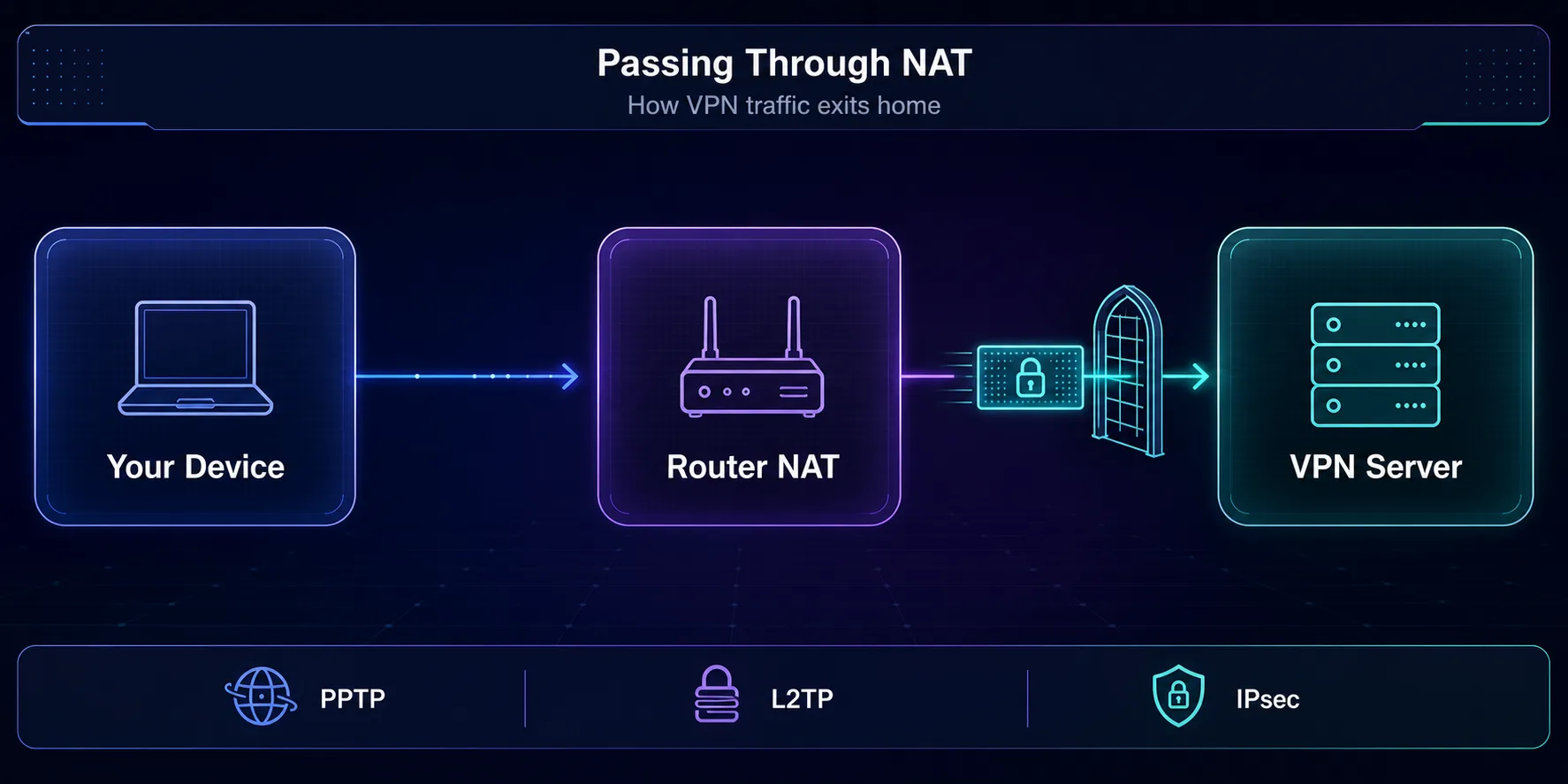
So why would a router mangle it in the first place? It comes down to how your home network shares a single address.
Why Old VPNs Get Lost Inside Your Router
Your home has one public IP address but plenty of devices. Your router shares that address using NAT, or Network Address Translation, and keeps a list of which conversation belongs to which device.
It tells those conversations apart by port numbers. When a reply comes back from the internet, the port tells the router which laptop or phone should get it.
Here’s the catch. Older VPNs wrap their data in packets that have no port numbers at all. PPTP uses a protocol called GRE, and IPsec uses one called ESP. When a reply arrives, the router has nothing to match it on.
Passthrough is the router’s workaround. It recognizes these protocols and tracks them another way. PPTP gets tracked by a call ID inside the tunnel, and IPsec by an identifier in each packet called the SPI.
It works, mostly. But on some routers, that tracking copes with only one tunnel at a time. Say two people in the same house connect to the same office VPN. The second connection knocks the first one offline, and both of them blame the VPN.
One IPsec mode can’t be saved at all. AH, short for Authentication Header, signs the packet’s own address. NAT has to rewrite that address, which breaks the signature every time, and no router setting can fix it.
The Three Passthrough Switches, Explained
Each switch matches one of the protocols that needed help. Here’s what each one covers, and how well it has aged.
| Switch | Protocol | What the router must handle | Status in 2026 |
|---|---|---|---|
| PPTP passthrough | PPTP | TCP port 1723, plus GRE (IP protocol 47) | Obsolete and insecure |
| L2TP passthrough | L2TP over IPsec | UDP port 1701, carried inside IPsec | Legacy |
| IPsec passthrough | IPsec without NAT-T | UDP port 500 for key exchange, plus ESP (IP protocol 50) | Legacy, replaced by NAT-T |
Notice the pattern: every protocol that needs passthrough is an old one. PPTP is the worst of the three. Its security was broken years ago, which is why our VPN tunnel guide tells you to avoid it entirely.
The big platforms agree. Apple removed PPTP from its built-in VPN client in iOS 10 and macOS Sierra in 2016. In October 2024, Microsoft deprecated both PPTP and L2TP for incoming connections in future versions of Windows Server.
How NAT Traversal Made Passthrough Optional
Passthrough was the router’s fix. The better fix arrived inside the protocols themselves.
NAT Traversal, or NAT-T, was standardized in 2005. It wraps IPsec’s ESP packets inside ordinary UDP on port 4500, so every router gets a port number it understands. IKEv2, the modern version of IPsec, detects NAT and switches this on by itself.
WireGuard and OpenVPN never had the problem in the first place. They send everything over normal UDP or TCP, which NAT has always handled.
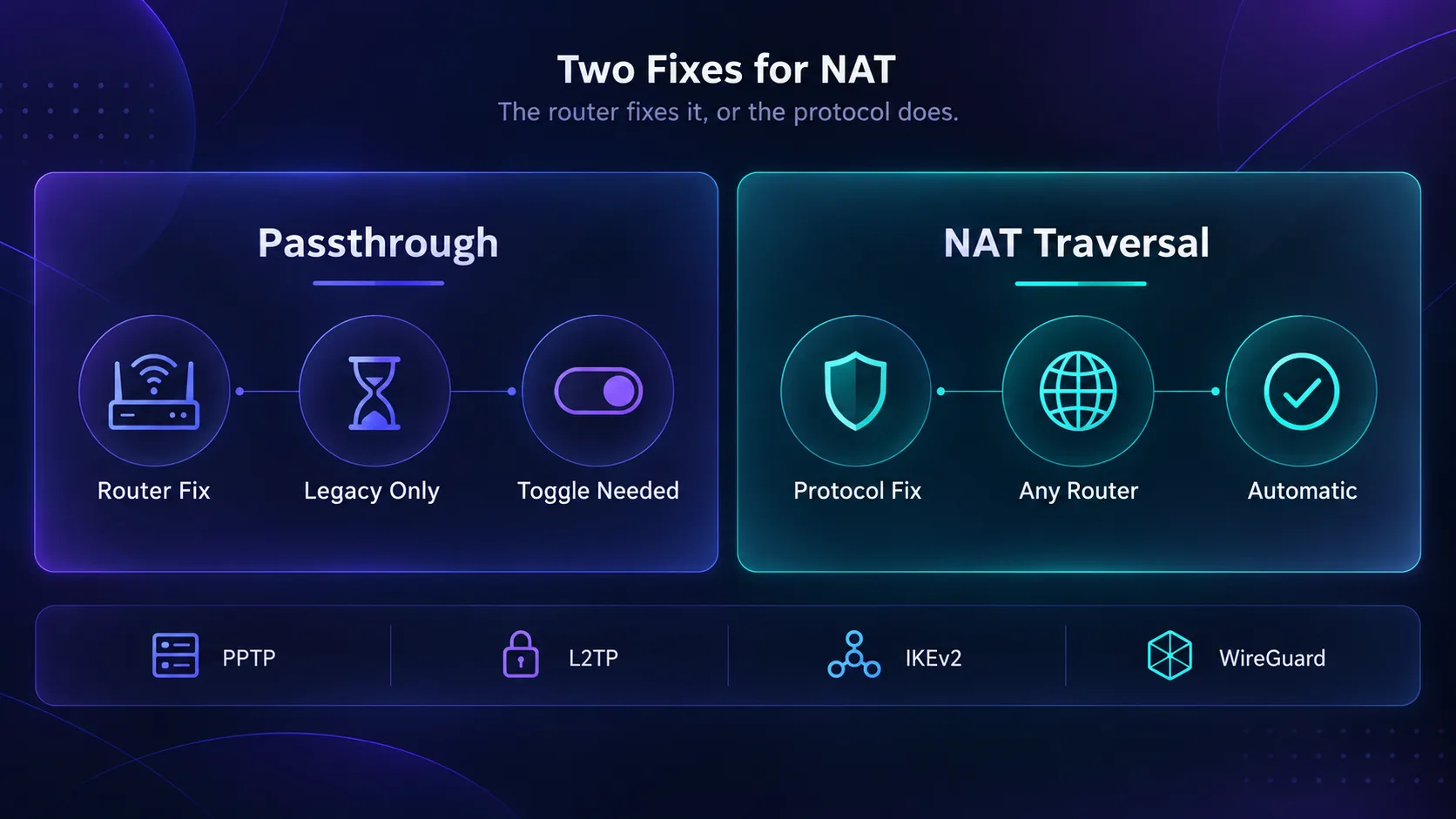
In plain English: passthrough asks your router to make room for an old protocol. NAT-T lets a modern protocol get through any router, with no special feature needed.
Our take: if your VPN app uses WireGuard, NordLynx, Lightway, OpenVPN or IKEv2, the passthrough switches don’t affect you. Leave them on and forget about them.
Passthrough vs a VPN Router vs a VPN App
People often mix up three different setups that all involve a router and a VPN. The difference is where the VPN actually runs.
| Setup | What it does | Where the VPN runs |
|---|---|---|
| VPN passthrough | Lets a device’s VPN get through the router | On your device |
| VPN app | Protects the one device it’s installed on | On that device |
| VPN router | Runs the VPN for everything on your network | On the router |
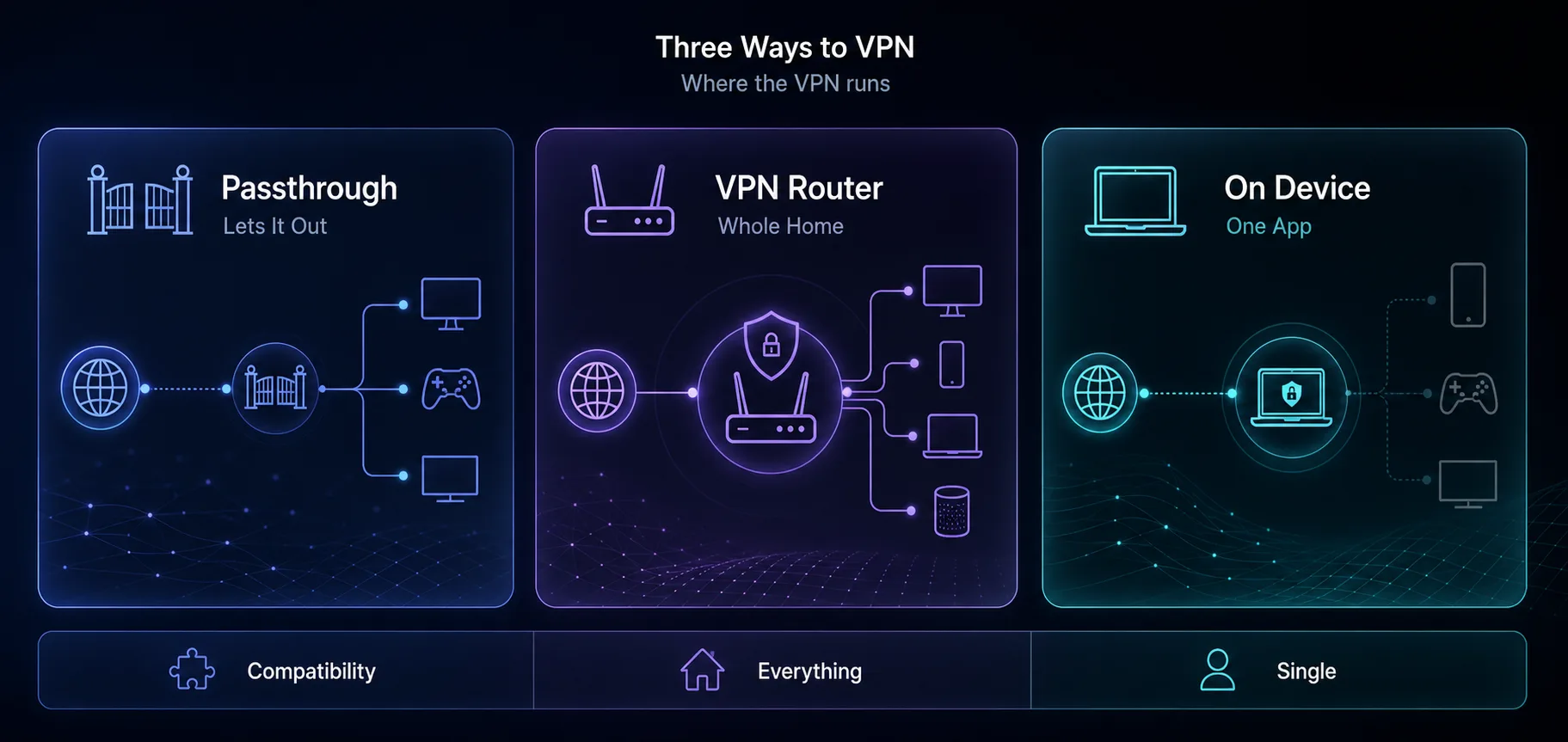
A VPN router is usually what people want when they ask about this. It covers every device on your network, including smart TVs and consoles that can’t run a VPN app. For the basics, see what a VPN is and how it works.
Passthrough vs Port Forwarding
Here’s another mix-up worth clearing up. Passthrough is for VPN connections going out. Port forwarding is for connections coming in.
If you run your own VPN server at home, say WireGuard on a Raspberry Pi, passthrough won’t help at all. Your router has to forward the server’s port to that device, or outside connections never reach it.
| You want to | Direction | What to set up |
|---|---|---|
| Connect to a work or commercial VPN | Outgoing | Nothing for modern protocols, passthrough for PPTP, L2TP or old IPsec |
| Host a WireGuard server at home | Incoming | Forward UDP port 51820, the usual default |
| Host an OpenVPN server at home | Incoming | Forward UDP port 1194, the usual default |
Warning: forward only the one port your VPN server needs. Every forwarded port is a door into your network, so keep that server patched.
When the Switches Still Matter
Passthrough isn’t dead. A few real situations still depend on it.
- Legacy work VPNs. Some company remote access VPNs still run L2TP/IPsec, or IPsec without NAT-T. Connecting to one from home can need the matching switch.
- Old routers and ISP boxes. Older gateways sometimes mishandle these protocols unless passthrough is on.
- Site-to-site links. Some small offices still connect two networks with older IPsec gear.
Then there’s double NAT. That’s when your traffic crosses two routers, such as an ISP gateway feeding your own Wi-Fi router. Legacy VPNs have to survive two rounds of address rewriting, and they often don’t.
The fix is to put the ISP box in bridge mode, so only one router does NAT. Or skip the problem with a modern protocol, which copes with double NAT on its own.
If your company runs its own VPN gateway, it’s probably a VPN concentrator or a firewall doing the same job. Its protocol decides whether any of this applies to you.
Fixing a VPN That Won’t Connect From Home
If a VPN won’t connect from behind your router, start with the protocol. It tells you where to look.
1First, Find Out Which Protocol You’re Using
In a VPN app, the protocol usually sits in the settings, labeled Protocol or VPN protocol. For the VPN built into Windows, open the connection’s settings and look at VPN type.
If it says Automatic, Windows tries several types in turn, so a failure can hide which one broke. Picking the type yourself makes the error easier to read.
2Error 806 on PPTP: GRE Is Blocked
Windows shows error 806 when PPTP’s control connection gets through but its GRE data can’t. Something between you and the server is dropping GRE, and your router is the usual suspect.
Turn on PPTP passthrough and try again. If you run the PPTP server yourself behind a router, forward TCP port 1723 and allow GRE. The better fix is to stop using PPTP altogether.
3Error 809 on L2TP: Often Not Your Router at All
Here’s the error from the top of this guide. Error 809 on an L2TP/IPsec connection often has nothing to do with passthrough.
By default, Windows won’t set up L2TP/IPsec with a VPN server that sits behind NAT, which is common in small offices. Microsoft’s fix is a registry value on the Windows computer, not a router switch.
Set a DWORD named AssumeUDPEncapsulationContextOnSendRule to 2 under HKLM\SYSTEM\CurrentControlSet\Services\PolicyAgent, then restart. If it still fails, check that UDP ports 500 and 4500 aren’t blocked.
4A Modern VPN App Won’t Connect
If you’re on WireGuard, OpenVPN or IKEv2, passthrough is almost never the cause. Look at your firewall, security software or DNS settings instead, or try a different protocol in the app.
Hotel and café Wi-Fi is another usual suspect. A captive login page can block the tunnel until you sign in through a browser.
How to Check the Switches on Your Router
Log in to your router’s admin page, usually at 192.168.1.1 or 192.168.0.1. Look in the VPN, NAT, Firewall or Security section.
Some routers group the switches under a section called ALG, short for Application Layer Gateway. That’s the technical name for the helper that does the tracking.
On most routers, they’re on by default. Should you turn them off? There’s rarely a reason to. Leaving them on doesn’t slow your connection or weaken your security, and it keeps older VPNs working.
Modern VPNs That Never Need Passthrough
The simplest way to never think about this again is a VPN on a modern protocol. These three connect through almost any home router. The VPN cards link to our partners, so we may earn a commission if you sign up.
1NordVPN

NordVPN’s NordLynx protocol is built on WireGuard, so it gets through NAT without help. It pairs an audited no-logs policy with RAM-only servers, and it supports routers if you want whole-home coverage. We compare it head to head in NordVPN vs Surfshark.
2Surfshark

Surfshark runs on WireGuard and allows unlimited devices on one plan. That makes it an easy pick for covering a whole household without worrying about protocols.
3Proton VPN

Proton VPN is open source and independently audited, with modern protocols that connect cleanly almost anywhere. See how it stacks up in our guide to the best VPN services for privacy.
Frequently Asked Questions
Leave the Switches On, Fix the Protocol
VPN passthrough is a small fix from an older internet. It helped PPTP, L2TP and IPsec survive the trip through your router, back when those protocols couldn’t manage NAT alone.
Today, the switches mostly sit there doing nothing, and that’s fine. Leave them on. If a legacy VPN still won’t connect, the real fix is usually a modern protocol, not a router setting.
Your next step: check which protocol your VPN app uses. If it’s WireGuard, OpenVPN or IKEv2, you’re done. If it’s PPTP, switch today. Choosing a new provider? Compare them in our VPN directory or side by side with the comparison tool.
Keep Reading
More articles you might enjoy