How to Automate Antidetect Browser Profiles With Puppeteer, Playwright and Selenium (2026)
Tested code to start an antidetect profile through its local API, attach Puppeteer, Playwright or Selenium over CDP, and stop it cleanly, plus real endpoints for seven browsers.
Most antidetect automation scripts fail on line one.
They call puppeteer.launch(), a plain Chromium window opens, and every fingerprint, cookie and proxy you set up in the profile is nowhere to be seen. The site sees a bot with a fresh face. Your carefully warmed account sees a stranger.
To automate antidetect browser profiles properly, you don’t launch anything. You ask the app to start the profile, then you attach to it. That works the same way in Puppeteer, Playwright and Selenium, and every major antidetect browser exposes it through a local API.
This guide gives you tested code for all three libraries, the real start and stop endpoints for seven browsers, and one cleanup detail that quietly breaks profiles when you get it wrong.
- Antidetect profiles only exist inside the app, so your script must attach to them, never launch a browser.
- Every major antidetect browser exposes a local API that starts a profile and returns a CDP endpoint.
- Puppeteer, Playwright and Selenium each attach with a single line once you have that endpoint.
- One common cleanup call quietly kills the profile before the app can save it.
- Most failures come from the app setup, not the library code.
Why You Attach to a Profile Instead of Launching One
An antidetect profile only exists inside the antidetect app, so your script has to connect to a browser the app already started. Launching a browser from your library skips the app entirely.
Antidetect browsers run a modified Chromium core that loads each profile’s fingerprint, proxy, cookies and storage at startup. That spoofing happens before your code ever runs. If Puppeteer or Playwright starts its own bundled Chromium, none of it is there.
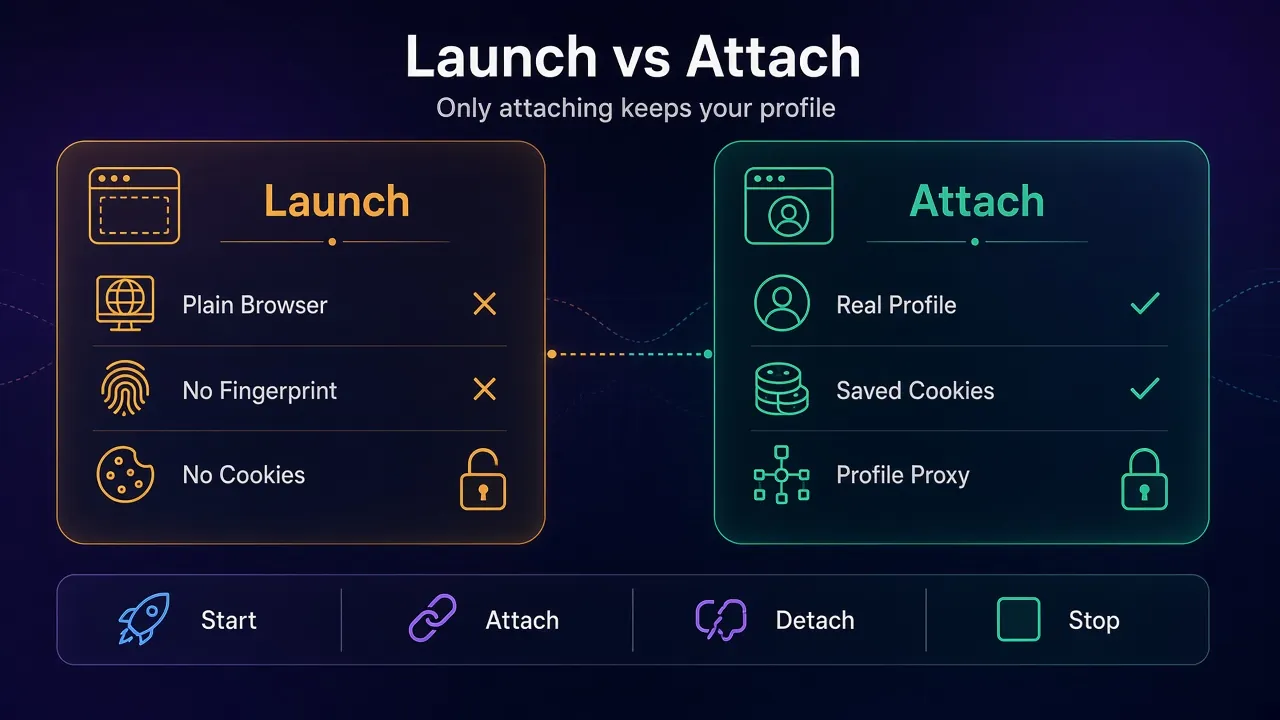
The fix is the Chrome DevTools Protocol (CDP), the same debugging channel Chrome DevTools uses. The app starts the profile with a debugging port open, and your library connects to that port. In plain English: the app owns the identity, and your script just borrows the steering wheel.
If you’re new to scripting browsers at all, our explainer on browser automation covers the basics first.
How the Start, Attach, Stop Loop Works
Every Chromium-based antidetect browser follows the same four steps: start the profile, read the endpoint, attach your library, then detach and stop. Only the URLs and field names change between vendors.
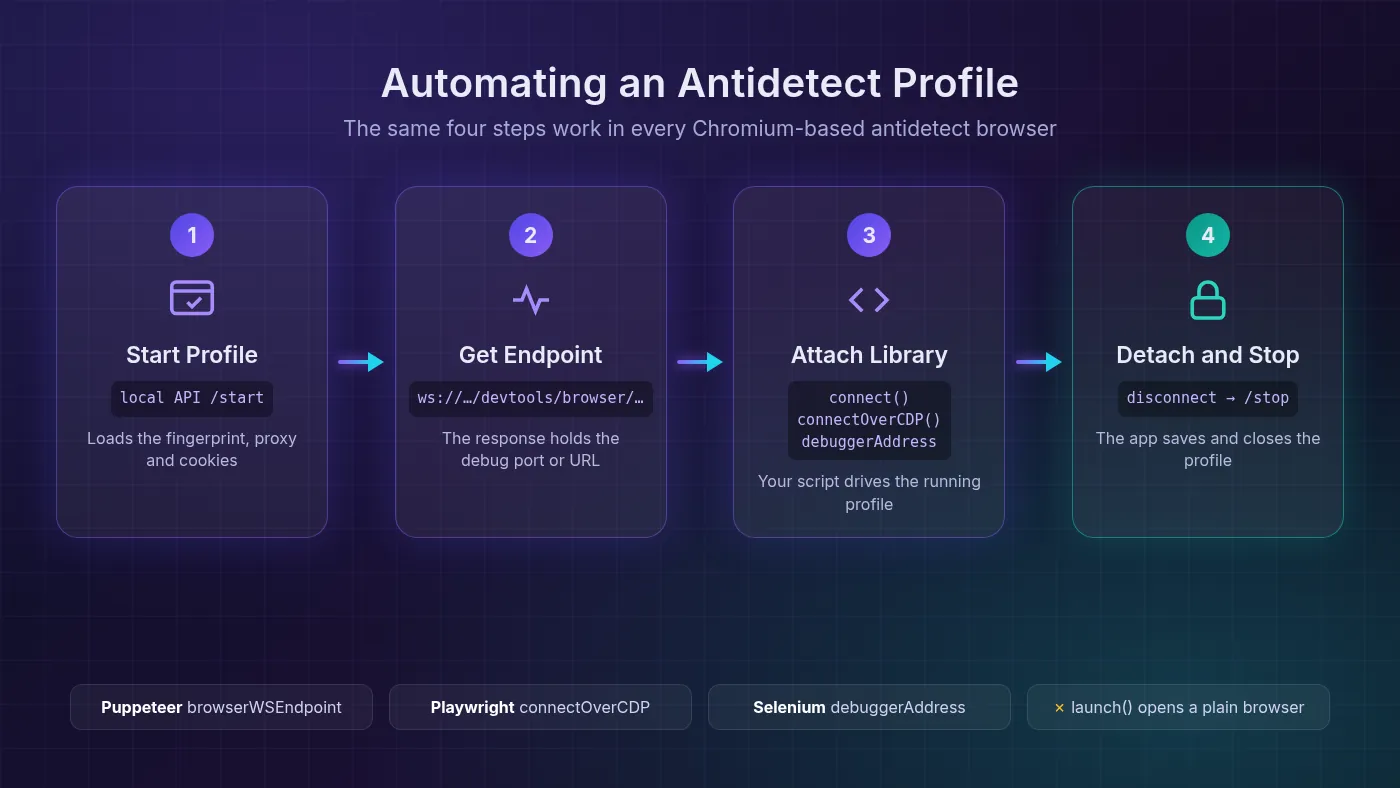
- Start: your script calls the app’s local API with a profile ID.
- Read the endpoint: the response contains a WebSocket URL like
ws://127.0.0.1:PORT/devtools/browser/…, a bare port, or both. - Attach: Puppeteer uses
connect(), Playwright usesconnectOverCDP(), and Selenium uses thedebuggerAddressoption. - Detach and stop: your library lets go, then the API tells the app to close the profile so it can save the session.
Step 4 is where most scripts go wrong. We’ll get to why after the code.
What You Need Before You Write Code
You need the desktop app running and signed in, a plan that includes API access, a profile ID and the right library version. Skip any of these and the start call fails before your code gets a chance.
- The app, running locally. Dolphin Anty, Octo Browser, MoreLogin and Incogniton all say their local API only works while the app is open and logged in.
- A plan with automation. Dolphin Anty blocks automation on its Free plan (any paid plan from Starter works). Multilogin lists its automation scripts for Pro 10 and higher. Incogniton calls its automation API a paid feature.
- An API key or token where required: AdsPower and Multilogin send it as a Bearer header, and Dolphin Anty logs in once with a token.
- The profile ID, copied from the app or listed through the API.
- Your library:
puppeteer-core(no bundled browser needed),playwrightorplaywright-core, orseleniumplus a ChromeDriver that matches the profile’s Chromium version.
Set up the proxy inside the profile, not in your script. Our guide to pairing proxies with an antidetect browser covers the one-proxy-per-profile rule.
Local API Endpoints for Each Antidetect Browser (2026)
The start call differs by vendor, but each one hands back a CDP endpoint you can attach to. We pulled every value below from each vendor’s official API docs, checked November 2026.
| Browser | Start a profile | What comes back | Stop the profile |
|---|---|---|---|
| AdsPower | GET http://local.adspower.net:50325/api/v1/browser/start?user_id=ID | data.ws.puppeteer (WebSocket URL), data.ws.selenium (host:port), data.webdriver (driver path) | GET /api/v1/browser/stop?user_id=ID |
| Dolphin Anty | GET http://localhost:3001/v1.0/browser_profiles/ID/start?automation=1 | automation.port and automation.wsEndpoint (a path) | GET /v1.0/browser_profiles/ID/stop |
| Octo Browser | POST http://localhost:58888/api/profiles/start with uuid and "debug_port": true | ws_endpoint and debug_port | POST /api/profiles/stop with uuid |
| Multilogin X | GET https://launcher.mlx.yt:45001/api/v2/profile/f/FOLDER/p/ID/start?automation_type=puppeteer | data.port | GET https://launcher.mlx.yt:45001/api/v1/profile/stop/p/ID |
| MoreLogin | POST http://127.0.0.1:40000/api/env/start with envId | data.debugPort and data.webdriver | POST /api/env/close with envId |
| Kameleo | Connecting to ws://localhost:5050/puppeteer/ID or /playwright/ID auto-starts the profile | A ready WebSocket endpoint per library | stop_profile(ID) in the Kameleo SDK |
| GoLogin | await GL.start() in the gologin Node.js SDK | wsUrl | GL.stop() or GL.stopLocal() |
A few details hide in those docs. AdsPower says port 50325 “might change,” so read it from the app’s Local API settings. Dolphin Anty moves off port 3001 when it’s busy and shows the new one in its Health window. Octo’s local API needs no token at all, because it uses the desktop app’s session.
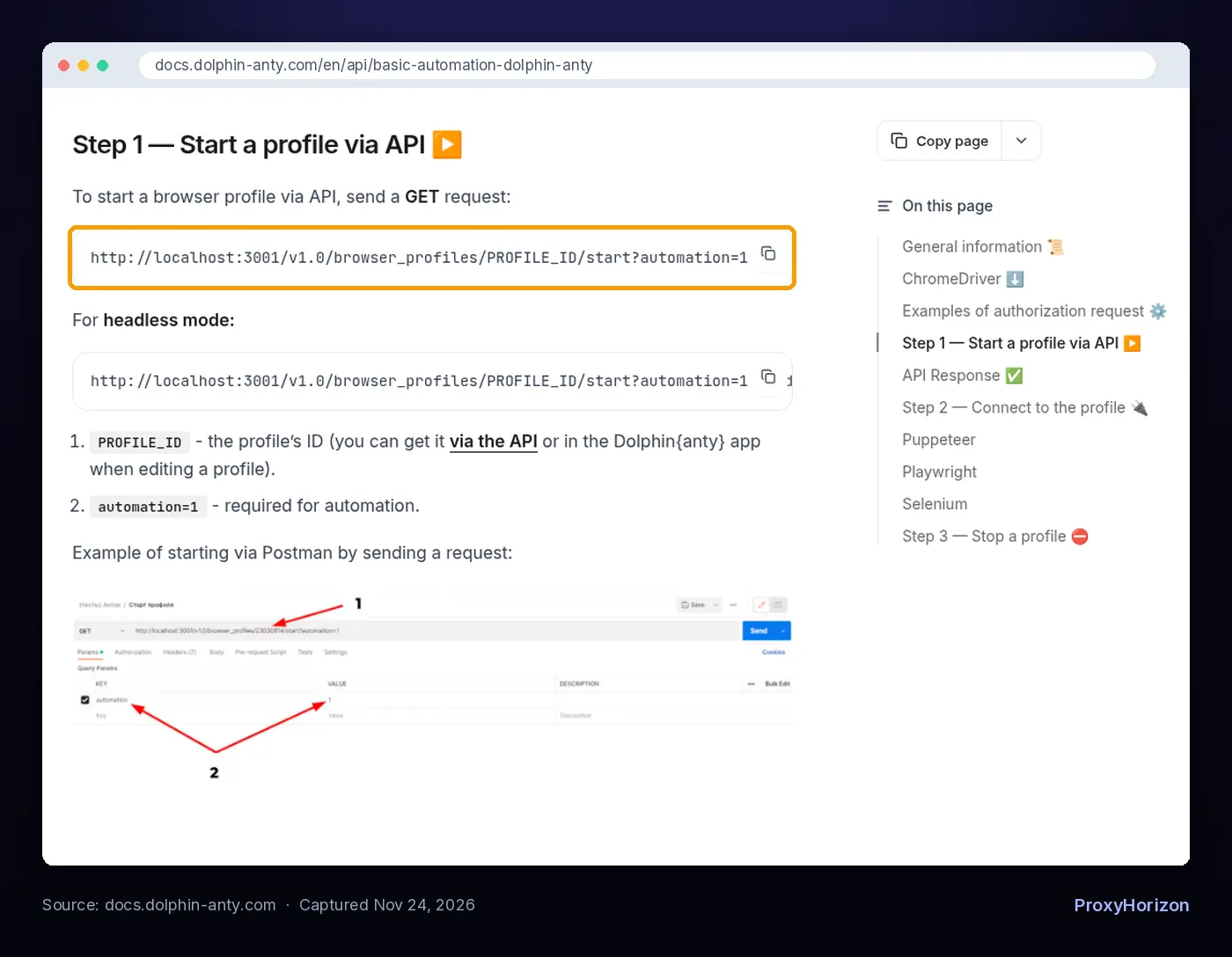
automation=1 to open a profile for automation. Source: docs.dolphin-anty.com, captured November 24, 2026.Incogniton also has a local REST API, on http://127.0.0.1:35000 by default once you switch it on under Settings → Automation, and it can launch profiles for all three libraries. Compare features and pricing across vendors in our antidetect browser directory.
Step-by-Step: Attach Each Library to a Running Profile
The three scripts below start a profile, open a page, detach and stop it. They use AdsPower’s documented request and response shape, because one start call returns both a WebSocket URL and a Selenium address.
How we tested: we don’t run the paid apps for this guide. Instead, we ran every snippet against a small mock of AdsPower’s documented start and stop responses that launched real Google Chrome 156 with a remote debugging port. So the library code is verified. The vendor endpoints come from their docs, not from our own runs.
1Attach Puppeteer With browserWSEndpoint
Puppeteer takes the full WebSocket URL. Install puppeteer-core so npm doesn’t download a browser you’ll never use.
// Start a profile through the local API, attach Puppeteer over CDP, then detach and stop.
const puppeteer = require('puppeteer-core');

const API = process.env.LOCAL_API || 'http://local.adspower.net:50325';
const HEADERS = { Authorization: `Bearer ${process.env.API_KEY}` };
const PROFILE_ID = process.env.PROFILE_ID;

async function api(path) {
  const res = await fetch(`${API}${path}`, { headers: HEADERS });
  const body = await res.json();
  if (body.code !== 0) throw new Error(`Local API error: ${body.msg}`);
  return body.data;
}

(async () => {
  const data = await api(`/api/v1/browser/start?user_id=${PROFILE_ID}`);
  const browser = await puppeteer.connect({
    browserWSEndpoint: data.ws.puppeteer,
    defaultViewport: null, // keep the profile's own window size
  });
  try {
    const page = await browser.newPage();
    await page.goto('https://example.com', { waitUntil: 'domcontentloaded' });
    console.log('Title:', await page.title());
    await page.close();
  } finally {
    await browser.disconnect(); // detach; the profile keeps running
    await api(`/api/v1/browser/stop?user_id=${PROFILE_ID}`); // let the app save and close it
  }
})();
Two details matter. defaultViewport: null stops Puppeteer from forcing its 800×600 default viewport over the profile’s real window size. And disconnect(), not close(), is how you let go.
2Attach Playwright With connectOverCDP
Playwright accepts the same WebSocket URL, or a plain http://127.0.0.1:PORT address when a vendor only returns a port.
// Start a profile through the local API, attach Playwright over CDP, then detach and stop.
const { chromium } = require('playwright-core');

const API = process.env.LOCAL_API || 'http://local.adspower.net:50325';
const HEADERS = { Authorization: `Bearer ${process.env.API_KEY}` };
const PROFILE_ID = process.env.PROFILE_ID;

async function api(path) {
  const res = await fetch(`${API}${path}`, { headers: HEADERS });
  const body = await res.json();
  if (body.code !== 0) throw new Error(`Local API error: ${body.msg}`);
  return body.data;
}

(async () => {
  const data = await api(`/api/v1/browser/start?user_id=${PROFILE_ID}`);
  const browser = await chromium.connectOverCDP(data.ws.puppeteer);
  try {
    const context = browser.contexts()[0]; // the profile's own context: cookies, storage, fingerprint
    const page = await context.newPage();
    await page.goto('https://example.com');
    console.log('Title:', await page.title());
    await page.close();
  } finally {
    await browser.close(); // over CDP this disconnects Playwright
    await api(`/api/v1/browser/stop?user_id=${PROFILE_ID}`);
  }
})();
Use browser.contexts()[0]. That’s the profile’s own context, holding its cookies and storage. Calling browser.newContext() creates a clean, empty one. In our test, a cookie set in the default context was invisible in a new context. Your logged-in session would be too.
Playwright’s connectOverCDP documentation also notes that a CDP connection is lower fidelity than its own protocol. For antidetect profiles you don’t have a choice, but it’s why a few advanced features can misbehave. Our Playwright vs Puppeteer comparison covers the wider trade-offs.
3Attach Selenium With debuggerAddress
Selenium doesn’t take a WebSocket URL. It takes a host:port string through ChromeDriver’s debuggerAddress option, plus a driver that matches the browser’s version.
# Start a profile through the local API, attach Selenium via debuggerAddress, then stop it.
import os
import requests
from selenium import webdriver
from selenium.webdriver.chrome.options import Options
from selenium.webdriver.chrome.service import Service

API = os.environ.get("LOCAL_API", "http://local.adspower.net:50325")
HEADERS = {"Authorization": f"Bearer {os.environ['API_KEY']}"}
PROFILE_ID = os.environ["PROFILE_ID"]

def api(path):
    body = requests.get(f"{API}{path}", headers=HEADERS, timeout=60).json()
    if body["code"] != 0:
        raise RuntimeError(f"Local API error: {body['msg']}")
    return body["data"]

data = api(f"/api/v1/browser/start?user_id={PROFILE_ID}")
options = Options()
options.add_experimental_option("debuggerAddress", data["ws"]["selenium"])  # "127.0.0.1:PORT"
service = Service(executable_path=data["webdriver"])  # driver matched to the profile's core
driver = webdriver.Chrome(service=service, options=options)
try:
    driver.get("https://example.com")
    print("Title:", driver.title)
finally:
    driver.quit()  # ends the WebDriver session
    api(f"/api/v1/browser/stop?user_id={PROFILE_ID}")
AdsPower returns the matching ChromeDriver path in data.webdriver, and MoreLogin does the same. Dolphin Anty offers its own modified ChromeDriver because, in its words, the standard driver “can reveal automation.” Use the vendor’s driver whenever one exists.
4Adapt the Snippet to Your Browser
Only the start and stop lines change. Here’s what each vendor’s docs tell you to pass to the library:
- Dolphin Anty:
wsEndpointis only a path, so buildws://127.0.0.1:${port}${wsEndpoint}first. - Octo Browser: pass
ws_endpointstraight to Puppeteer or Playwright, and127.0.0.1:debug_portto Selenium. - Multilogin X and MoreLogin: both return a port, so connect with
browserURL: 'http://127.0.0.1:' + portin Puppeteer, or pass that URL toconnectOverCDP(). We tested both forms. - Multilogin X with Selenium: start with
automation_type=seleniumand usewebdriver.Remoteon the returned port. Its docs warn thatwebdriver.Chrome()starts a separate browser. - Kameleo with Selenium: point
webdriver.Remoteathttp://localhost:5050/webdriverwith thekameleo:profileIdcapability.
Close or Disconnect? What We Found in Testing
Each library uses a different word for “let go,” and one of them kills the profile instead. We checked whether the browser was still running at the moment each script called the stop endpoint.
| Library and call | Browser still running afterward? | Use it? |
|---|---|---|
Puppeteer browser.disconnect() | Yes | Yes, then call the stop endpoint |
Puppeteer browser.close() | No, it shut the browser down | No |
Playwright browser.close() after connectOverCDP | Yes, it only disconnected | Yes |
Selenium driver.quit() with debuggerAddress | Yes | Yes |
Puppeteer’s own docs say disconnect() leaves the process running, and our test matched. close() on an attached browser shuts it down from under the app, skipping the normal stop that saves the session.
That stop matters. Dolphin Anty’s API reference says stopping is what syncs the profile’s data back to the cloud, and Kameleo’s docs say to always stop the profile to persist its state.
Our take: detach with your library, then stop with the vendor’s API. Every time, even when the script crashes. That’s why each snippet keeps it in a finally block.
Troubleshooting Antidetect Automation Errors
Most failures come from the app, not your code. Here are the ones the vendor docs call out, and what to do about each.
- Dolphin Anty returns 401. The app isn’t authorized. Send your token to
/v1.0/auth/login-with-tokenfirst. - Dolphin Anty returns 402. You’re on the Free plan, which can’t start profiles in automation mode.
- Connection refused on the API port. The app moved ports or isn’t running. Check AdsPower’s Local API settings, Dolphin’s Health window, or Octo’s
OCTO_LOCAL_PORT. - The debugging port changed between runs. Dolphin assigns a new random port on every automation start, and Multilogin’s can change on restart. Read it from each response and never hard-code it.
- ChromeDriver version mismatch. Selenium needs a driver that matches the profile’s Chromium core. Use the path the API returns, or the vendor’s download.
- The profile won’t start again. Octo warns that abandoned profiles block re-launch. Call stop, or Octo’s
force_stopon version 1.7 or later. - Multilogin automation fails on a profile. Puppeteer and Playwright only work with its Mimic (Chromium) profiles, not legacy Stealthfox ones.
Don’t Let Your Script Undo the Fingerprint
The profile’s spoofing only holds if your code leaves it alone. A script that overrides settings can make a careful profile look obviously automated.
Kameleo’s docs warn against adding stealth plugins such as puppeteer-extra-plugin-stealth, because they can reduce masking quality. Don’t set a custom user agent or viewport from code either. The profile already has both.
Run a profile through a browser fingerprint test once while attached, and compare it with a manual session. And automate gently on new accounts: a short account warm-up routine beats firing hundreds of actions on day one.
One honest caveat. Automating accounts can break a platform’s terms of service even when nothing detects it. Check the rules for the sites you work on.
Frequently Asked Questions
The Bottom Line on Automating Antidetect Profiles
Automating an antidetect browser isn’t about the library. Puppeteer, Playwright and Selenium all attach to a running profile with one line each. What separates working scripts from broken ones is the loop around that line: start through the app, attach, detach, then stop through the app.
Our take: pick the library your team already knows, copy the matching snippet, and swap in your vendor’s start and stop calls from the table. Then test with a throwaway profile before touching real accounts. If you’re scaling to dozens of profiles run by an agent, our guide on how AI agents manage multiple browser profiles covers the orchestration side.
Keep Reading
More articles you might enjoy