VPN Encryption Explained: AES-256, ChaCha20 and Forward Secrecy (2026)
How VPN encryption really works: the handshake, AES-256-GCM vs ChaCha20-Poly1305 (with our speed test), perfect forward secrecy and post-quantum ML-KEM.
Every VPN homepage says “AES-256.” Almost none explain what it does.
That’s a shame, because the cipher name is only one piece of the lock. How the two ends agree on a key, how often that key changes and what happens if someone records your traffic today all matter just as much.
This guide breaks down VPN encryption one layer below the protocols: AES-256-GCM, ChaCha20-Poly1305, the handshake that sets them up, forward secrecy, and the post-quantum key exchange now shipping in real apps. We also benchmarked both ciphers, and the speed result isn’t what most VPN marketing implies.
- VPN encryption is two jobs: a handshake that agrees on keys and a cipher that encrypts every packet.
- AES-256-GCM and ChaCha20-Poly1305 are both strong, so the cipher is rarely the weak point.
- Which cipher is faster depends on your hardware, and the gap can be huge.
- Forward secrecy keeps old traffic safe even if a server key leaks later.
- Quantum risk targets the key exchange, which is why some VPNs now add ML-KEM.
What VPN Encryption Actually Does
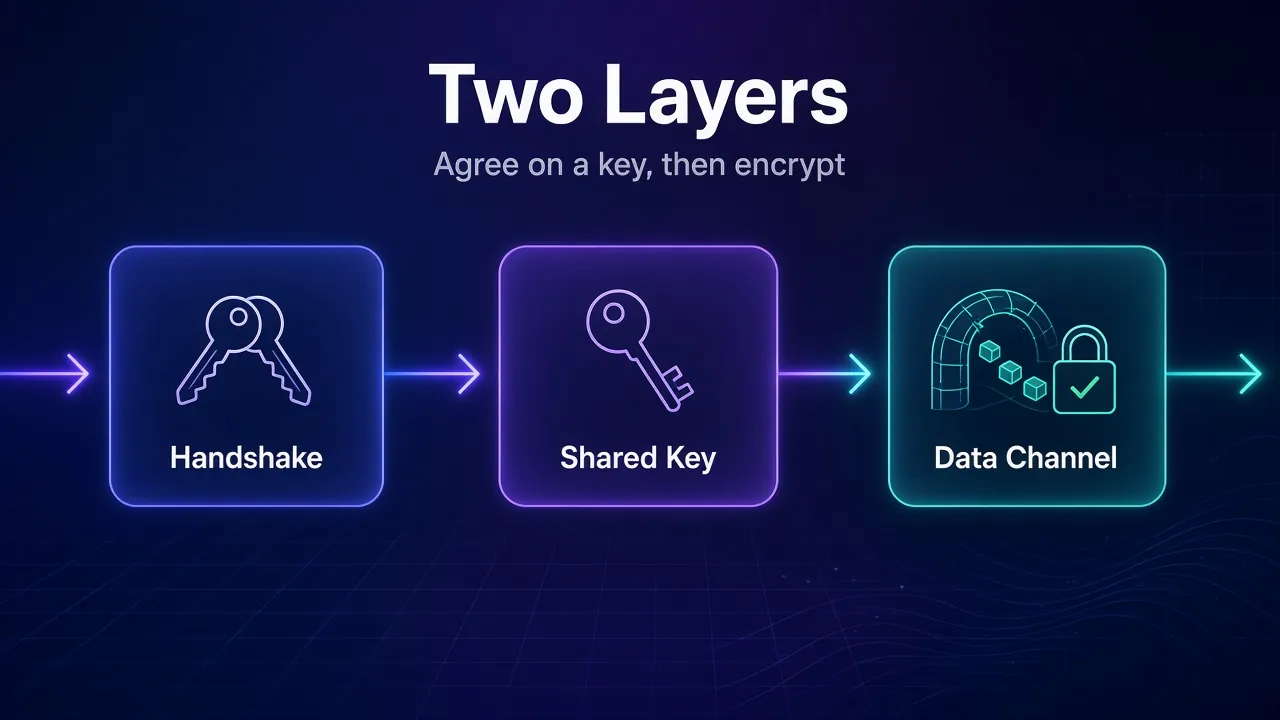
VPN encryption does two separate jobs: a handshake that agrees on secret keys, and a data channel that uses those keys to scramble every packet. Different algorithms handle each job.
When you hit Connect, your app and the VPN server first prove who they are and work out a shared secret over the open internet. Only then does your traffic start flowing through the VPN tunnel, encrypted with a fast symmetric cipher.
| Layer | Job | Typical algorithms | Runs |
|---|---|---|---|
| Authentication | Prove the server (and you) are real | Static public keys, RSA or ECDSA certificates | At connect |
| Key exchange | Agree on a fresh shared secret | Curve25519 ECDH, Diffie-Hellman, ML-KEM | At connect, then every few minutes or hours |
| Data channel | Encrypt and authenticate each packet | AES-256-GCM, ChaCha20-Poly1305 | Every packet |
| Hashing and key derivation | Turn secrets into usable keys | BLAKE2s, SHA-256, HKDF | During the handshake |
When a provider says “AES-256 encryption,” it’s only describing the bottom row. That’s the part that matters least in practice, because every serious VPN already gets it right.
Symmetric vs Asymmetric Encryption in Plain English
Symmetric encryption uses one shared key to lock and unlock data, while asymmetric encryption uses a public key and a private key pair. VPNs need both.
Symmetric ciphers like AES are extremely fast, so they’re perfect for gigabytes of traffic. Their weakness is obvious: both sides need the same key, and you can’t just send it across the internet in the clear.
Asymmetric cryptography solves that. Each side publishes a public key and keeps a private one. With elliptic-curve Diffie-Hellman (ECDH), both ends combine their own private key with the other side’s public key and arrive at the same secret, without that secret ever crossing the wire.
It’s slow compared with AES, though. So VPNs use asymmetric crypto for a few milliseconds at the start, then hand off to a symmetric cipher for everything else.
AES-256-GCM: Why It’s Everywhere
AES is the block cipher NIST standardized in FIPS 197, and AES-256-GCM is the version most VPNs run on their data channel. It encrypts data in 128-bit blocks with a 128, 192 or 256-bit key.
1What the “256” Means
The number is the key length. A 256-bit key has 2256 possible values, which no computer, classical or quantum, can search through. AES-128 is also considered safe today. The extra length is a safety margin, not a speed tax you’ll notice.
NIST’s own post-quantum transition report, NIST IR 8547 (finalized October 2026), puts AES-256 in its highest security category, category 5. It also says symmetric ciphers are significantly less exposed to known quantum attacks than public-key algorithms.
2Why GCM Matters More Than 256
GCM (Galois/Counter Mode) turns AES into an AEAD cipher: authenticated encryption with associated data. It doesn’t just hide each packet. It also attaches a tag that proves nobody changed it on the way.
That second part isn’t optional. The IETF’s IPsec algorithm guidance, RFC 8221, says flatly that encryption without authentication “is not effective and MUST NOT be used,” and names AES-GCM and ChaCha20-Poly1305 as the modern single-step options.
Our take: if a VPN brags about AES-256 but still offers AES-CBC without a matching HMAC setting, that’s a configuration smell. Old OpenVPN setups are where you’ll see it.
ChaCha20-Poly1305: The Cipher Built for Software
ChaCha20-Poly1305 pairs the ChaCha20 stream cipher with the Poly1305 authenticator, giving the same AEAD protection as AES-GCM without needing special hardware. The IETF defines it in RFC 8439.
The RFC explains why it exists. AES is very fast on chips with dedicated AES instructions, but much slower on hardware without them, and many software AES implementations are vulnerable to cache-timing attacks. ChaCha20, per the RFC, is around three times as fast as AES on platforms that lack AES hardware, and it isn’t sensitive to timing attacks.
That’s why WireGuard uses it for everything. The WireGuard protocol page lists ChaCha20 with Poly1305 for encryption, Curve25519 for the key exchange, BLAKE2s for hashing and HKDF for key derivation. There’s no menu of options to misconfigure.
AES-256-GCM vs ChaCha20-Poly1305: Which Is Faster?
On a modern desktop or server CPU with AES instructions, AES-256-GCM is faster. On hardware without them, ChaCha20-Poly1305 wins by a wide margin. We ran OpenSSL’s built-in benchmark to see how big the gap is.
The test machine was a Linux cloud server with an Intel Xeon processor and OpenSSL 3.5.7, tested in November 2026. Each run encrypted 1,350-byte chunks, roughly one full VPN packet, on a single core for three seconds. To mimic a CPU without AES acceleration, we masked AES-NI with OpenSSL’s OPENSSL_ia32cap variable.
openssl speed -seconds 3 -bytes 1350 -evp aes-256-gcm
openssl speed -seconds 3 -bytes 1350 -evp chacha20-poly1305

# Simulate a CPU without AES hardware (masks AES-NI)
OPENSSL_ia32cap='~0x200000200000000' openssl speed -seconds 3 -bytes 1350 -evp aes-256-gcm
OPENSSL_ia32cap='~0x200000200000000' openssl speed -seconds 3 -bytes 1350 -evp chacha20-poly1305
VPN Cipher Speed on One CPU Core
OpenSSL 3.5.7, 1,350-byte chunks, Intel Xeon cloud server
View data
| Throughput | |
|---|---|
| AES-256-GCM (AES-NI on) | 6 GB/s |
| ChaCha20-Poly1305 | 2.3 GB/s |
| ChaCha20-Poly1305 (same mask) | 1.1 GB/s |
| AES-256-GCM (AES-NI masked) | 0.23 GB/s |
With hardware help, AES-256-GCM pushed about 6.0 GB per second, more than double ChaCha20-Poly1305’s 2.3 GB per second. With AES-NI switched off, AES fell to about 0.23 GB per second, while ChaCha20-Poly1305 still managed around 1.1 GB per second under the same mask.
Two lessons. First, both ciphers are far faster than any home internet connection on a modern CPU, so the cipher is rarely your VPN bottleneck. Second, on older phones, cheap routers and low-end ARM boards, ChaCha20 can be the difference between a smooth connection and a choppy one. That’s one reason WireGuard often feels quicker on a VPN router.
You can run the same three commands on your own laptop. The numbers will differ, but the pattern usually holds.
Which Cipher Does Each VPN Protocol Use?
WireGuard locks in ChaCha20-Poly1305, while OpenVPN and IKEv2 negotiate a cipher from a list, usually landing on AES-256-GCM. Our guide on how VPN protocols work covers the protocols themselves. Here’s what runs underneath.
| Protocol | Data channel cipher | Key exchange | Configurable? |
|---|---|---|---|
| WireGuard | ChaCha20-Poly1305 | Curve25519 (Noise IK handshake) | No, fixed by design |
| OpenVPN 2.6 | Default list: AES-256-GCM, AES-128-GCM, ChaCha20-Poly1305 | TLS control channel | Yes, via data-ciphers |
| IKEv2/IPsec | AES-GCM or ChaCha20-Poly1305 (ESP) | Diffie-Hellman groups in IKE | Yes, via proposals |
The OpenVPN 2.6 manual says data-ciphers defaults to AES-256-GCM:AES-128-GCM:CHACHA20-POLY1305 when ChaCha20-Poly1305 is available. The server pushes the first cipher on its list that the client also supports.
Fixed versus negotiable is a real tradeoff. WireGuard can’t be downgraded to a weak cipher because there isn’t one. OpenVPN and IKEv2 are more flexible, which also means a sloppy server config can leave older options switched on.
The Handshake: How Two Strangers Agree on a Key
The handshake authenticates both ends and runs a key exchange, so the client and server finish with matching session keys that never crossed the network. Get this wrong and a perfect cipher doesn’t help.
In WireGuard, each peer already knows the other’s static public key. The Noise_IK handshake mixes those static keys with fresh, single-use (ephemeral) Curve25519 keys. According to the WireGuard docs, the design avoids key-compromise impersonation and replay attacks and provides perfect forward secrecy.
OpenVPN uses a TLS session for the same job, with certificates to prove the server’s identity. IKEv2 runs its own exchange, defined in RFC 7296, and builds IPsec security associations from it.
The details differ. The goal is the same: fresh keys for every session, tied to identities you can check.
Perfect Forward Secrecy: Why Old Traffic Stays Safe
Perfect forward secrecy (PFS) means a stolen long-term key can’t decrypt traffic from past sessions, because each session used temporary keys that were thrown away. It limits the damage of a breach to the present.
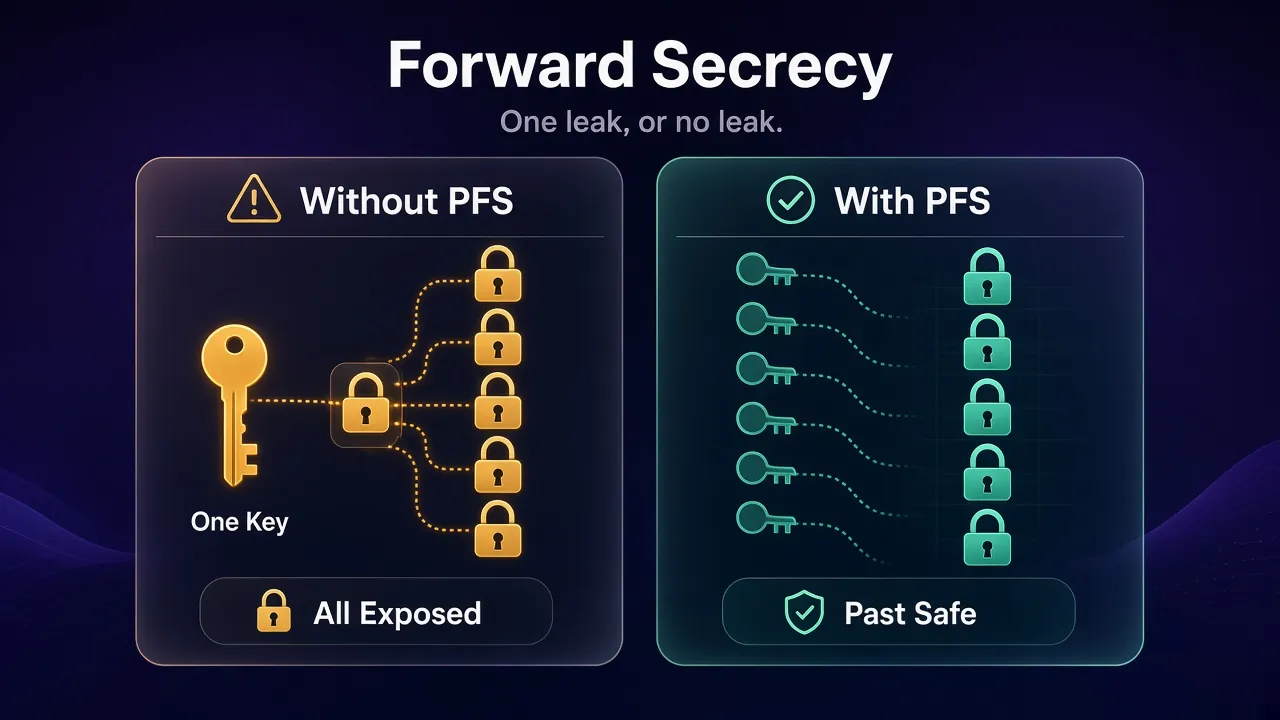
Here’s why it matters. Someone could record your encrypted traffic for months, then later hack the VPN server and steal its private key. Without PFS, that key could unlock everything they saved. With PFS, it unlocks nothing they recorded, because the session keys were never stored.
WireGuard takes this further by rotating keys on a timer. Its protocol page says a fresh handshake happens every few minutes to provide rotating keys for perfect forward secrecy.
Check before you trust: any VPN running WireGuard, modern OpenVPN with TLS 1.2 or 1.3, or IKEv2 with Diffie-Hellman gets forward secrecy. Be wary of a static-key OpenVPN setup, which the OpenVPN 2.6 manual calls deprecated and strictly not recommended.
Post-Quantum VPN Encryption: Harvest Now, Decrypt Later
Quantum computers mainly threaten the key exchange, not AES, so post-quantum VPNs add a quantum-resistant algorithm called ML-KEM alongside the classic handshake. The worry is traffic recorded today and cracked years from now.
NIST calls this the “harvest now, decrypt later” threat in its October 2026 announcement of the transition report. NIST published ML-KEM as FIPS 203 on August 13, 2024, with three parameter sets: ML-KEM-512, ML-KEM-768 and ML-KEM-1024.
NIST IR 8547 then sets the clock. RSA and elliptic-curve key exchange and signatures are deprecated after 2030 and disallowed after 2035 under NIST standards. AES itself stays.
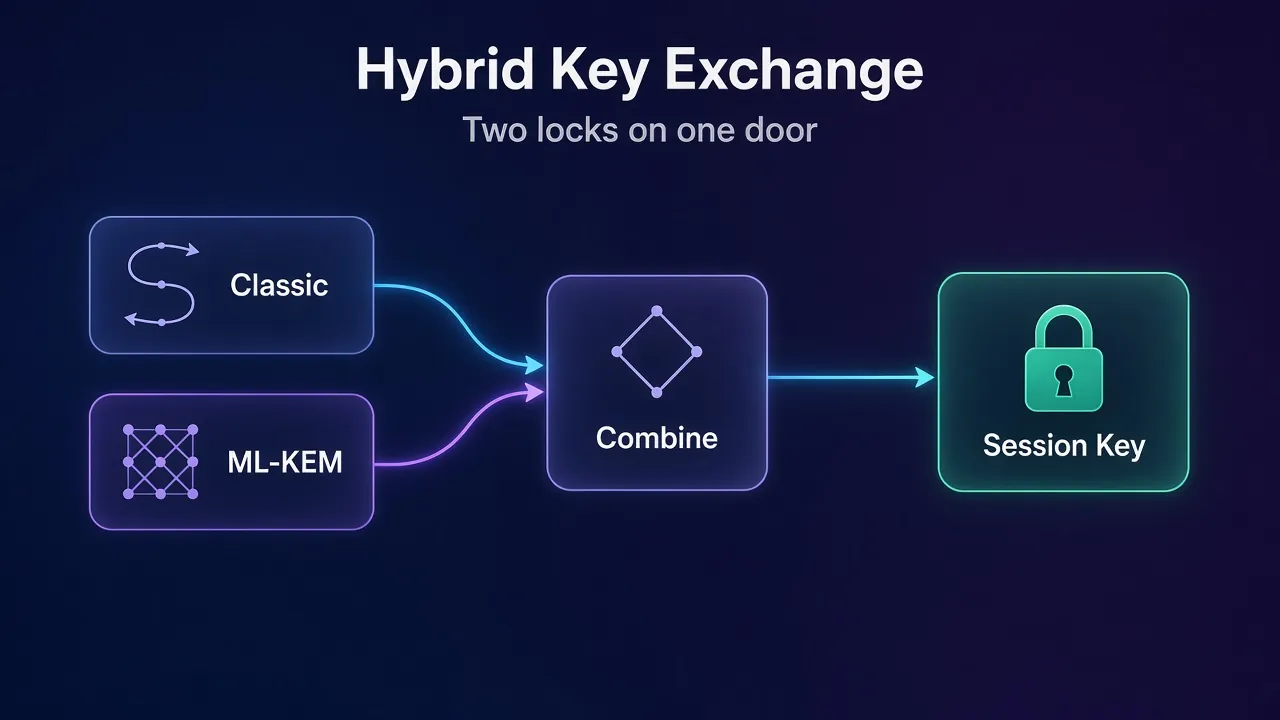
Most providers use a hybrid design, mixing the classic key exchange with ML-KEM so the connection stays safe as long as either one holds. NIST’s announcement compares it to putting two padlocks on a door.
| VPN | Post-quantum approach | Where it works |
|---|---|---|
| NordVPN | Hybrid ML-KEM in NordLynx, on all apps since May 2025 | NordLynx only, not OpenVPN, Dedicated IP, Obfuscated servers or Meshnet |
| ExpressVPN | Lightway upgraded from Kyber to ML-KEM in January 2025, hybrid, NIST Security Level 5 key sizes | Lightway over TCP and UDP |
| Mullvad | Quantum-resistant tunnel: ML-KEM-1024 plus Classic McEliece by default | WireGuard, toggle in app settings |
Sources: the NordVPN help center, ExpressVPN’s Lightway announcement and Mullvad’s quantum-resistant tunnel guide, all checked November 2026. On the IPsec side, RFC 9370 lets IKEv2 run several key exchanges in one setup, which is how post-quantum methods slot into IKEv2.
Our take: if your traffic only needs to stay private for a few years, today’s classic VPN encryption is fine. If you handle data that must stay secret for a decade, turn on the post-quantum option where your provider offers it. It costs little and closes the one gap that matters.
How to Check Which Encryption Your VPN Uses
The protocol you pick decides the encryption, so start in your VPN app’s protocol setting. From there, a few quick checks tell you the rest.
- Find the protocol. Look under Settings for WireGuard, NordLynx, Lightway, OpenVPN or IKEv2. WireGuard-based options always use ChaCha20-Poly1305.
- For OpenVPN, open the config. If you use a downloaded
.ovpnfile, look fordata-ciphersor the oldercipherline. GCM or ChaCha20-Poly1305 is what you want to see. - Look for a post-quantum toggle. It may be off by default, and it often works only with one protocol.
- Read the provider’s security page. A good one names the cipher, the key exchange and the handshake, not just “military-grade.”
Encryption also can’t fix leaks outside the tunnel. Run a DNS leak test after setup, because a perfectly encrypted tunnel doesn’t help if your DNS requests skip it.
VPN Encryption Myths Worth Ignoring
Most encryption marketing describes table stakes, not a real difference between good VPNs. Three claims come up constantly.
- “Military-grade encryption.” It just means AES. Every reputable VPN uses AES-GCM or ChaCha20-Poly1305, so it isn’t a differentiator.
- “AES-256 is twice as secure as AES-128.” Both are far beyond brute force. Handshake design, forward secrecy and server security matter more.
- “Stronger encryption makes you anonymous.” Encryption hides traffic from your ISP and the local network. It doesn’t stop the VPN from logging you, which is why a no-logs VPN with audits matters.
Some apps also offer to wrap your traffic twice through a double VPN. That adds a second server hop, not stronger math. Useful for some threat models, but it’s a routing feature, not better encryption.
Frequently Asked Questions
Which VPN Encryption Should You Trust?
Look past the cipher. AES-256-GCM and ChaCha20-Poly1305 are both excellent, and which one is faster depends on your hardware, not on which is “stronger.” On a modern laptop, AES wins. On an old phone or a router, ChaCha20 often does.
What separates VPNs is everything around the cipher: a well-designed handshake, forward secrecy on every session, no leftover legacy options and, increasingly, a hybrid post-quantum key exchange. WireGuard-based protocols tick most of those boxes by default.
Our take: pick a WireGuard-based protocol, switch on post-quantum protection if your provider offers it, then check the provider’s logging record. Our VPN directory lists what each provider offers. Encryption keeps outsiders out. Only the logging policy tells you what the VPN itself keeps.
Keep Reading
More articles you might enjoy