How to Scrape Paginated and Infinite Scroll Pages (2026)
Learn to scrape paginated and infinite scroll pages: spot the pattern in DevTools, follow next links and cursor APIs, scroll with Playwright, and know exactly when to stop.

Your scraper grabs 20 products and quits. The site has 2,000.
Nothing crashed. The data just lives on page 2, behind a “Load more” button, or below a feed that only fills in as you scroll. Your code never asked for any of it.
Learning to scrape infinite scroll and paginated pages comes down to one skill: spotting how the site fetches the next batch, then copying that request. Most of the time you won’t need to scroll at all.
This guide covers the four pagination patterns you’ll meet, tested Python and Playwright code for each, and the stop conditions that keep a scraper from looping forever or quitting early without telling you.
- Most pagination is one of four patterns: page numbers, next links, cursor or offset APIs, and infinite scroll.
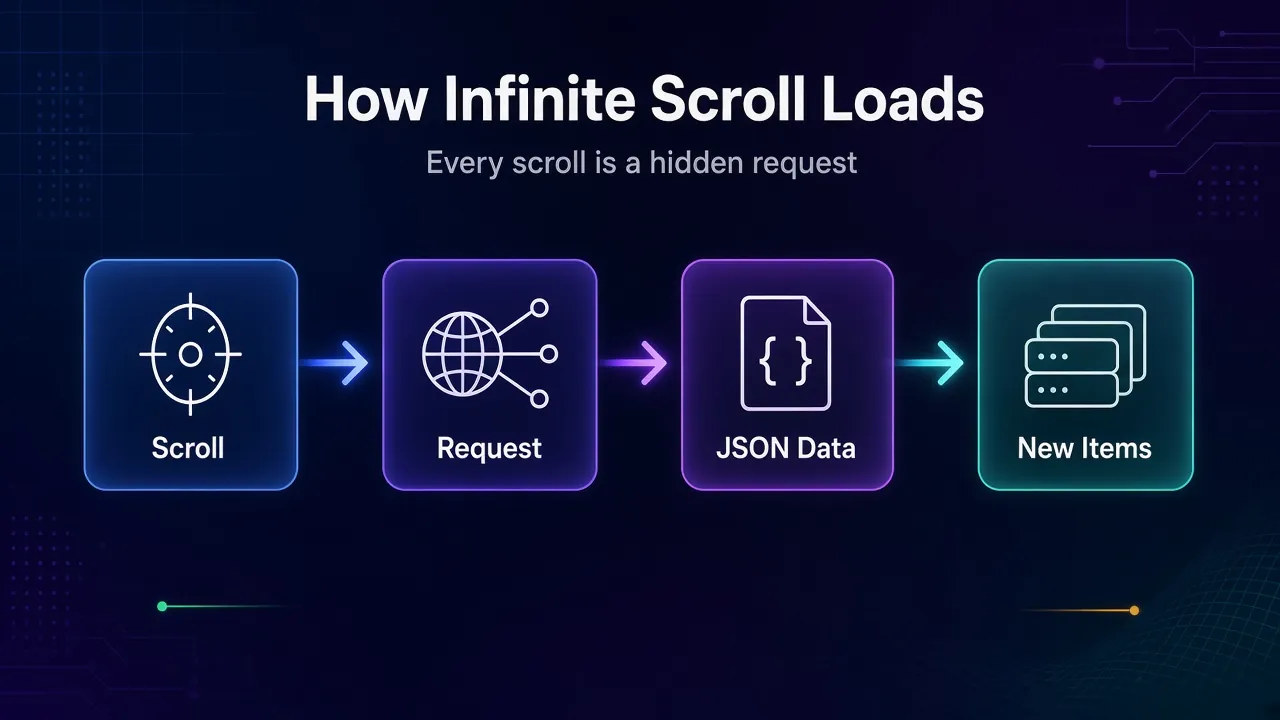
- Infinite scroll and load-more buttons usually call a JSON API you can page through without a browser.
- Follow next links and Link headers instead of building URLs yourself.
- Use Playwright only when the data won’t come any other way, and read the JSON while it scrolls.
- Give every loop two exits, the site’s end signal and your own hard cap, and log which one fired.
Why Your Scraper Only Gets the First Page
A plain HTTP request returns exactly one response, so anything the site loads later never reaches your parser. Pagination splits a list across many URLs or many background requests, and your scraper has to make each one.
Sites do this for speed. Sending 2,000 product cards in one HTML file would be slow for users, so the server sends a slice and a way to ask for more.
Google’s own pagination guidelines for site owners name three user-facing patterns: numbered pagination, “load more” buttons and infinite scroll (checked November 2026). Under the hood, those map to a handful of request types you can reproduce.
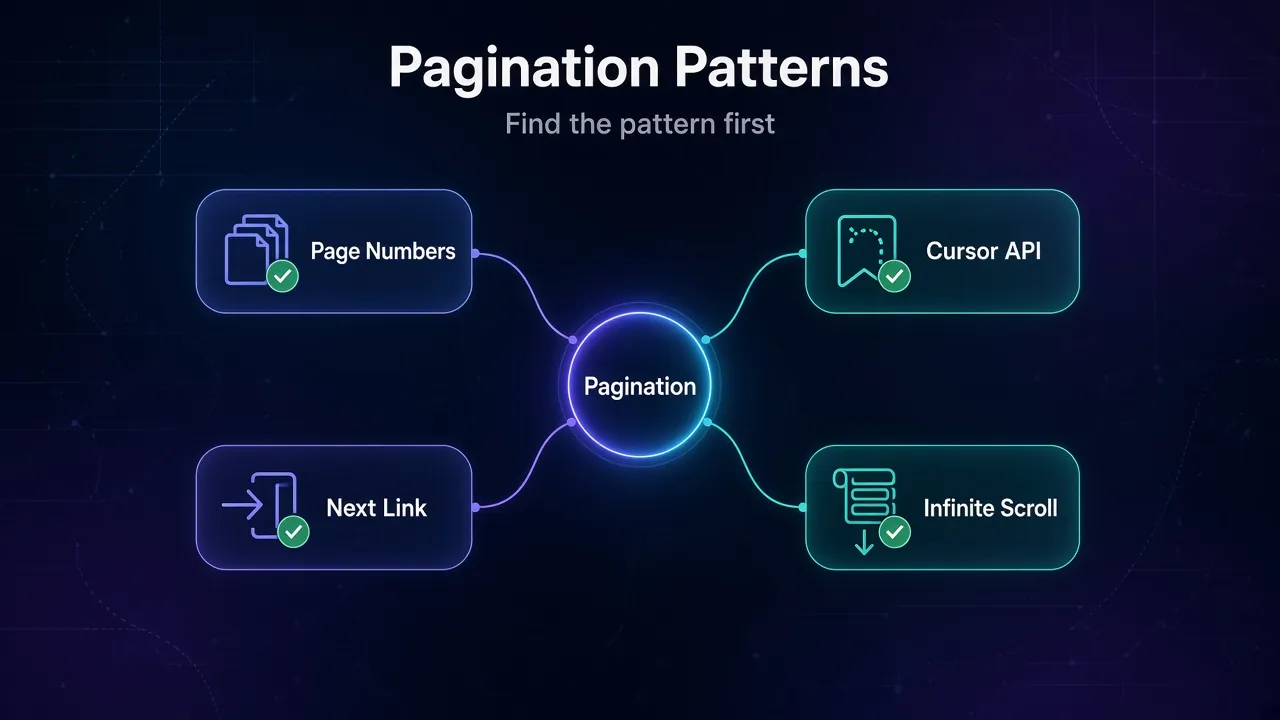
How to Identify the Pagination Pattern in Two Minutes
Open the page in Chrome, press F12, and go to the Network tab with the Fetch/XHR filter on. Then move to the next page the way a user would.
Watch what changes:
- The address bar changes to something like
?page=2or/page/2/: classic page numbers. - The URL changes, but unpredictably (a token or ID in it): follow the “Next” link instead of building URLs.
- The URL stays the same, and a new XHR request appears with
cursor,after,offsetorpagein it: a background API. This is what most infinite scroll and “load more” buttons use. - Nothing useful shows up, because the data arrives in a form you can’t easily replay: you need a real browser.
| Pattern | How to spot it | Best tool | Stop when |
|---|---|---|---|
| Page numbers | ?page=N in the URL | Requests + BeautifulSoup | Empty page, 404 or repeated items |
| Next link | A “Next” anchor, often rel="next" | Requests + BeautifulSoup | No next link, or a URL you’ve seen |
| Cursor or offset API | XHR with cursor, after or offset | Requests (JSON) | Cursor is null or offset passes the total |
| Link header API | A Link response header | Requests (response.links) | No next relation |
| Infinite scroll or load more | New items appear on scroll or click | The API above, else Playwright | Item count stops growing |
Our take: always check the Network tab before you write a browser script. A JSON endpoint is faster, cheaper on proxy bandwidth and far less fragile than scrolling a page.
Pattern 1: Page Numbers in the URL
This is the easy one. The page number sits in the URL, so you loop over it until the site runs out of results.
The trap is the exit. Some sites return a 404 past the last page. Others return an empty list, and a few quietly return the last page again forever. Your loop has to handle all three.
import time
import requests
from bs4 import BeautifulSoup

BASE = "https://example.com/products?page={}"
MAX_PAGES = 200  # hard safety cap

session = requests.Session()
session.headers["User-Agent"] = "Mozilla/5.0 (compatible; my-scraper/1.0)"

seen, rows = set(), []
for page in range(1, MAX_PAGES + 1):
    resp = session.get(BASE.format(page), timeout=20)
    if resp.status_code == 404:
        break  # ran past the last page
    resp.raise_for_status()
    soup = BeautifulSoup(resp.text, "html.parser")
    names = [li.get_text(strip=True) for li in soup.select("li.product")]
    new = [n for n in names if n not in seen]
    if not new:
        break  # empty page, or the site repeated the last page
    seen.update(new)
    rows.extend(new)
    time.sleep(1)  # be polite

print(len(rows), "items from", page - 1, "pages")
Three details do the heavy lifting here. The seen set catches sites that repeat the final page. MAX_PAGES is a hard cap in case every other check fails. And the one-second pause keeps you polite, which matters more than people think (see our guide to rate limiting in web scraping).
New to parsing? Our BeautifulSoup tutorial covers select(), get_text() and saving results to CSV.
Pattern 2: Following the Next Link
When page URLs are unpredictable, stop guessing them and follow the “Next” link the site gives you. This also survives a site changing its URL format, because you never build the URL yourself.
from urllib.parse import urljoin
import requests
from bs4 import BeautifulSoup

url = "https://example.com/products?page=1"
visited, rows = set(), []

with requests.Session() as session:
    while url and url not in visited and len(visited) < 200:
        visited.add(url)
        resp = session.get(url, timeout=20)
        resp.raise_for_status()
        soup = BeautifulSoup(resp.text, "html.parser")
        rows += [li.get_text(strip=True) for li in soup.select("li.product")]
        nxt = soup.select_one("a[rel=next], a.next")
        url = urljoin(url, nxt["href"]) if nxt else None

print(len(rows), "items,", len(visited), "pages")
Two things matter. urljoin() turns relative links like ?page=2 into full URLs. The visited set stops a loop if the last page links back to itself, which happens more often than you’d expect.
The selector tries a[rel=next] first and falls back to a class. If the site has neither, an XPath that matches the link text often works. Our CSS selectors vs XPath guide shows how to write that kind of text-based lookup.
1What About rel=next in the Page Head?
Some sites also put <link rel="next"> in the <head>. Don’t rely on it. Google says it no longer uses these tags for indexing, so many sites have stopped maintaining them. The visible “Next” anchor is the safer target.
Pattern 3: Cursor, Offset and Link Header APIs
Here’s where infinite scroll stops being scary. Most feeds that load as you scroll are calling a JSON API in the background. Find that request, and you can page through it with plain Requests.
1Cursor-Based Pagination
A cursor API returns a batch of items plus a token for the next batch. You send that token back, and it returns null (or leaves it out) when you reach the end.
import requests

API = "https://example.com/api/items"
cursor, rows = "0", []
with requests.Session() as session:
    while cursor is not None:
        data = session.get(API, params={"cursor": cursor}, timeout=20).json()
        rows += data["items"]
        cursor = data.get("next_cursor")  # None on the last page

print(len(rows), "items")
The field names vary by site: next_cursor, after, endCursor, nextPageToken. Open one response in DevTools and copy the exact names. Don’t try to build or decode cursors yourself. Treat them as opaque strings.
2Offset and Limit Pagination
Offset APIs ask for “items 0-9”, then “10-19”, and so on. Many also return a total, which gives you a clean exit.
import requests

API = "https://example.com/api/offset"
LIMIT, offset, rows = 10, 0, []
with requests.Session() as session:
    while True:
        data = session.get(API, params={"offset": offset, "limit": LIMIT}, timeout=20).json()
        batch = data["results"]
        rows += batch
        offset += LIMIT
        if not batch or offset >= data["total"]:
            break

print(len(rows), "of", data["total"], "items")
Common mistake: changing limit to 1,000 to save requests. Many APIs cap it silently and return fewer items than you asked for. If your loop assumes every batch is full, it will skip data. Advance by the number of items you actually received when in doubt.
3Link Header Pagination
Some APIs put the next URL in an HTTP Link header, a format defined in RFC 8288. GitHub’s REST API is the best-known example: its pagination docs say to follow the next URL in the link header rather than build page URLs.
The Requests library parses this header for you. Its docs show it exposed as response.links, keyed by relation.
import requests

url = "https://example.com/api/linked?page=1"
rows = []
with requests.Session() as session:
    while url:
        resp = session.get(url, timeout=20)
        resp.raise_for_status()
        rows += resp.json()
        url = resp.links.get("next", {}).get("url")

print(len(rows), "items")
That’s the whole loop. No URL building, no page counting, and it stops by itself when the header has no next relation.
Pattern 4: Scraping Infinite Scroll With Playwright
Sometimes replaying the API isn’t practical. The request may need a signed token, the response may be hard to read, or you need the page exactly as a user sees it. That’s when you drive a real browser.
If you haven’t used Playwright before, start with our Playwright web scraping guide, then come back for the scroll loop.
1Option A: Scroll Until the Item Count Stops Growing
The idea is simple. Scroll, wait, count the items. If the count doesn’t change for a few rounds in a row, you’ve hit the bottom.
from playwright.sync_api import sync_playwright

with sync_playwright() as p:
    browser = p.chromium.launch()
    page = browser.new_page()
    page.goto("https://example.com/feed")
    items = page.locator(".item")
    items.first.wait_for()

    stalls, last = 0, 0
    while stalls < 3 and last < 5000:
        page.mouse.wheel(0, 4000)
        page.wait_for_timeout(1500)  # give the next batch time to load
        count = items.count()
        stalls = stalls + 1 if count == last else 0
        last = count

    names = items.all_inner_texts()
    print(len(names), "items")
    browser.close()
Why three stalls instead of one? A slow API response can make one round look empty even though more items are coming. Requiring several stalls in a row cuts false stops.
Playwright’s mouse.wheel() docs note that the method doesn’t wait for scrolling to finish before returning. That’s why the loop waits after each scroll instead of counting right away.
2Option B: Capture the JSON While You Scroll
This is the hybrid we prefer. Let the browser scroll and handle any tokens, but read the data from the network responses instead of the HTML.
from playwright.sync_api import sync_playwright

rows = []
with sync_playwright() as p:
    browser = p.chromium.launch()
    page = browser.new_page()
    page.on("response", lambda r: rows.extend(r.json()["items"])
            if "/api/items" in r.url and r.ok else None)
    page.goto("https://example.com/feed")
    page.wait_for_load_state("networkidle")

    for _ in range(50):  # safety cap on scrolls
        before = len(rows)
        page.mouse.wheel(0, 4000)
        page.wait_for_timeout(1500)
        if len(rows) == before:
            break

    print(len(rows), "items captured from the JSON responses")
    browser.close()
You get clean JSON with every field the API returns, including ones the page never displays. Playwright’s network docs cover the response event and expect_response() if you’d rather wait for one specific call.
3Option C: Click “Load More” Until It Disappears
“Load more” buttons are infinite scroll with a manual trigger. Click, wait for new items, repeat until the button goes away.
from playwright.sync_api import sync_playwright

with sync_playwright() as p:
    browser = p.chromium.launch()
    page = browser.new_page()
    page.goto("https://example.com/feed?mode=button")
    button = page.get_by_role("button", name="Load more")

    for _ in range(100):  # safety cap
        if not button.is_visible():
            break
        before = page.locator(".item").count()
        button.click()
        page.wait_for_function(
            "n => document.querySelectorAll('.item').length > n", arg=before)

    print(page.locator(".item").count(), "items")
    browser.close()
wait_for_function() waits until the item count is higher than before the click. That is more reliable than a fixed sleep, because it moves on the moment new items render.
For the wider topic of pages that render with JavaScript, including how to find hidden JSON in the HTML, see our guide to scraping JavaScript-rendered websites.
Stop Conditions: How to Know You’ve Reached the End
Every pagination loop needs at least two exits: the site’s own end signal and a hard cap of your own. Relying on one is how scrapers end up running all weekend, or quitting after page one without an error.
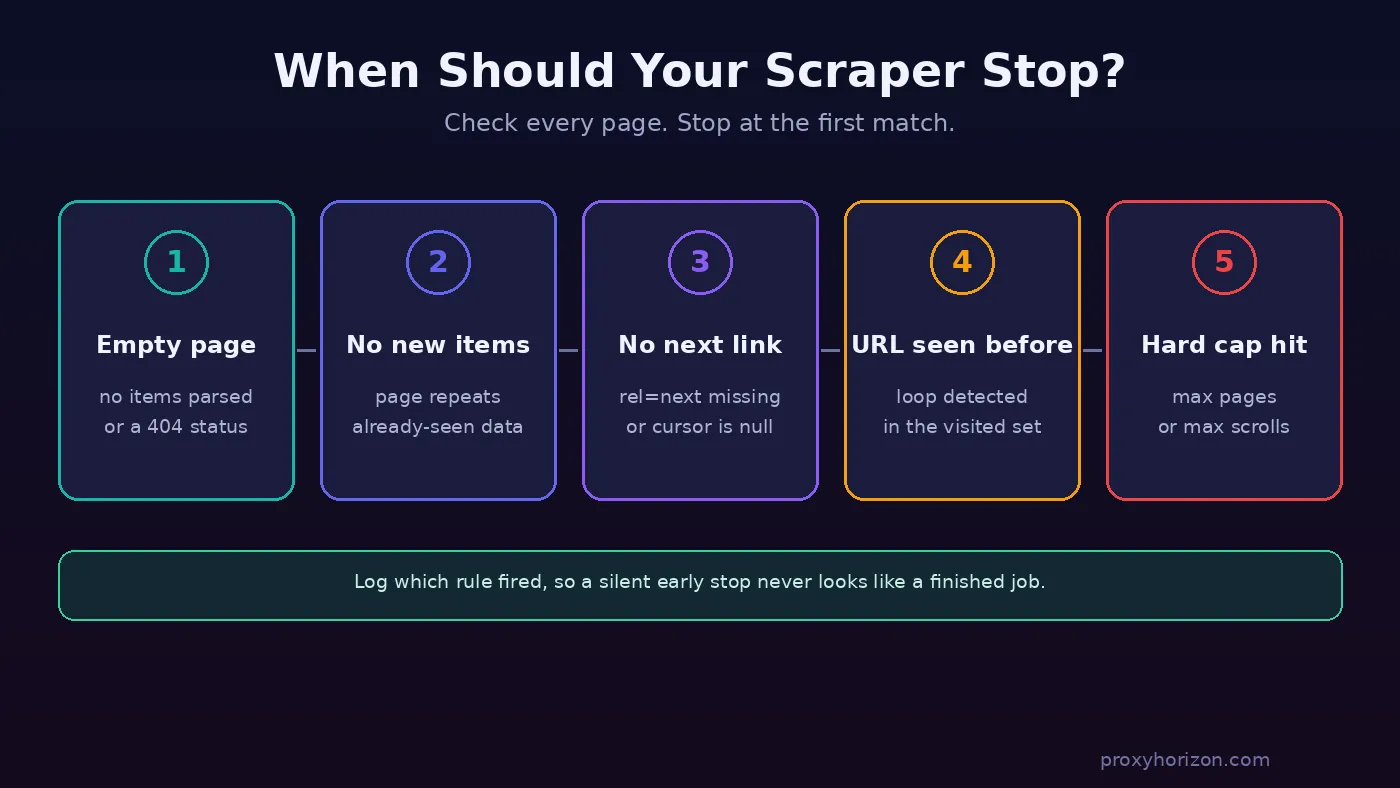
- Empty page or 404: the parser found zero items, or the server said the page doesn’t exist.
- No new items: every item on the page is one you’ve already stored. The site is repeating itself.
- No next signal: no next link, a null cursor, or no
nextrelation in theLinkheader. - URL seen before: the next URL is already in your visited set, so you’re in a loop.
- Hard cap: a maximum page or scroll count that you set from a rough estimate of the real total.
Real-world tip: log which rule ended each run, plus the item count. A scraper that stops at page 3 because of a CAPTCHA page looks exactly like one that finished, unless you record why it stopped.
That CAPTCHA case is common. An “empty” page is sometimes a block page with no product markup. Our guide on handling CAPTCHAs when web scraping covers how to detect one before you treat it as the end.
Pagination at Scale: Proxies, Speed and Getting Blocked
Pagination multiplies requests. A category with 200 pages is 200 requests from you, and deep page numbers are exactly where many sites watch for bots.
A few habits keep you unblocked:
- Slow down before you scale out. Pauses and backoff fix more blocks than new IPs do.
- Keep one session per crawl when the site tracks state. Cursor APIs sometimes tie the cursor to cookies, so switching IPs mid-crawl can break the chain.
- Rotate IPs between crawls, not mid-cursor, unless the API is fully stateless. Our guide to using proxies with Python Requests shows both setups. To compare providers, browse our proxy directory.
- Block images in Playwright when scrolling long feeds through metered proxies. Every scroll can pull megabytes of thumbnails you don’t need.
Running a bigger crawl in a framework? Scrapy handles “Next” links with response.follow(), and our Scrapy proxies tutorial covers adding rotating proxies to that setup.
Mistakes That Break Pagination Scrapers
- Trusting a fixed page count. “There are 50 pages” is true today. Next week there are 53, or 41. Loop until an end signal, not to a hard-coded number.
- Building URLs when a next link exists. It works until the site adds a filter parameter or switches to tokens.
- Using fixed sleeps in a browser. Too short and you stop early, too long and a 500-page job takes hours. Wait for a condition, like a higher item count.
- Scrolling when there’s an API. Browser scrolling is often the slowest and most fragile way to get data that a single JSON endpoint serves directly.
- Ignoring duplicates. Lists change while you crawl. New items push old ones onto the next page, so you’ll see some twice. Dedupe by a stable ID.
- Skipping the rules. Check the site’s terms and robots.txt before crawling deep, especially at scale. Our guide to web scraping legality and robots.txt explains what those signals mean.
Frequently Asked Questions
Conclusion
Pagination looks like four different problems, but it’s one habit: find the request that fetches the next batch, then repeat it until a clear end signal fires.
Start in the Network tab. If you see page numbers or a next link, Requests and BeautifulSoup are enough. If you see a cursor or offset API, page through the JSON directly. Reach for Playwright only when the data won’t come any other way, and even then, read the JSON responses while it scrolls.
Whatever you pick, give every loop two exits and log which one fired. That single line of logging is what separates a finished crawl from a silent failure.
Keep Reading
More articles you might enjoy