How to Use cURL With a Proxy (2026 Command Guide)
Copy-paste cURL proxy commands for HTTP, HTTPS and SOCKS5, plus proxy authentication, environment variables, .curlrc and how to read a 407 in verbose output.

You paste a proxy into cURL, hit enter, and get a timeout. Or worse, a clean 200 that never touched the proxy at all.
cURL is the fastest way to test a proxy, and its proxy support is excellent. But a few defaults surprise almost everyone: the port it assumes, the environment variable it ignores, and where DNS lookups happen.
This guide gives you copy-paste curl proxy commands for HTTP, HTTPS and SOCKS5 proxies, authentication, environment variables and .curlrc. Then it shows you how to read cURL’s debug output when the proxy says no.
- One flag does the work: -x with a scheme, host and port.
- Leave out the port and cURL quietly assumes 1080, even for HTTP proxies.
- socks5h sends DNS through the proxy; plain socks5 resolves on your machine.
- cURL ignores an uppercase HTTP_PROXY, and NO_PROXY can override -x.
- A 407 through a CONNECT tunnel exits with code 56, but on plain HTTP it can look like success.
The One-Line Answer: -x
To send a cURL request through a proxy, add -x (or --proxy) followed by the proxy URL. That’s it for the basic case:
curl -x http://proxy.example.com:8080 https://httpbin.org/ipThe response should show the proxy’s IP, not yours. If it shows your own IP, the request went direct, and something below explains why.
The proxy string follows one pattern: [protocol://][user:password@]host[:port]. The protocol tells cURL what kind of proxy it’s talking to. Here’s what the official cURL man page says each prefix means:
| Prefix | Proxy type | Who resolves the hostname |
|---|---|---|
none or http:// | HTTP proxy | The proxy |
https:// | HTTPS proxy (encrypted to the proxy) | The proxy |
socks4:// | SOCKS4 | Your machine |
socks4a:// | SOCKS4a | The proxy |
socks5:// | SOCKS5 | Your machine |
socks5h:// | SOCKS5 with hostname | The proxy |
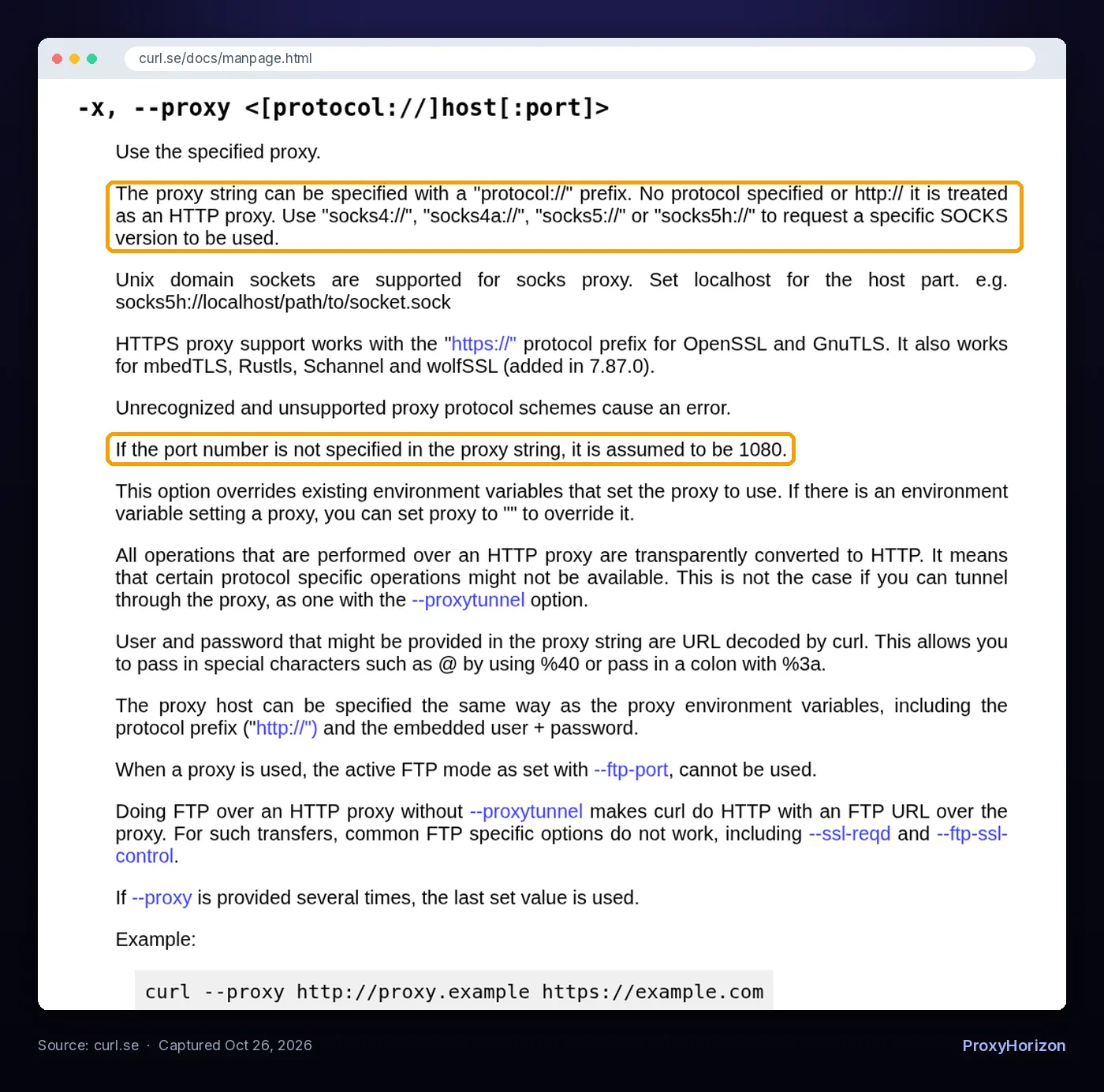
--proxy entry in the official cURL man page. Captured October 26, 2026.An unsupported scheme makes cURL exit with an error rather than guess, so a typo like sock5:// fails loudly.
The Port Trap Most Guides Skip
Leave out the port and cURL doesn’t use 80 or 8080. It assumes port 1080, for HTTP proxies too. The everything curl book admits the reason is “purely historical”.
So curl -x proxy.example.com https://example.com knocks on port 1080. If your provider listens on 8000 or 7777, you get a connection error that looks like a dead proxy. Always write the port.
The one exception: an https:// proxy defaults to port 443.
HTTP and HTTPS Proxies
An HTTP proxy is the most common type, and most residential and datacenter providers offer it. The command differs slightly depending on the site you’re visiting.
1Plain HTTP Targets
curl -x http://proxy.example.com:8080 http://example.com/For an http:// URL, cURL sends the full request to the proxy, and the proxy fetches the page. The proxy can read and modify everything.
2HTTPS Targets Through an HTTP Proxy
curl -x http://proxy.example.com:8080 https://example.com/Same command, different mechanics. For an https:// URL, cURL first sends a CONNECT example.com:443 request to open a tunnel. TLS then runs end to end, so the proxy sees the hostname and port but can’t read or change the encrypted traffic.
You can force tunneling for other protocols with -p (--proxytunnel). The catch: most proxies only allow CONNECT to port 443 and a handful of others, as the cURL docs point out.
3HTTPS Proxies (Encrypted to the Proxy)
curl -x https://proxy.example.com:443 https://example.com/Here’s a distinction that confuses people. An HTTPS target through an HTTP proxy still sends your CONNECT request and proxy credentials in clear text to the proxy. An HTTPS proxy encrypts the hop between you and the proxy too.
Use it when your provider supports it, especially on shared Wi-Fi. Add --proxy-cacert if the proxy uses a private certificate, and save --proxy-insecure for quick local tests only.
SOCKS5 in cURL: socks5 vs socks5h
Use socks5h:// unless you have a reason not to. The difference is one letter and one DNS lookup.
# SOCKS5, your machine resolves the hostname
curl -x socks5://proxy.example.com:1080 https://example.com/

# SOCKS5, the proxy resolves the hostname
curl -x socks5h://proxy.example.com:1080 https://example.com/

# Long-form equivalents
curl --socks5 proxy.example.com:1080 https://example.com/
curl --socks5-hostname proxy.example.com:1080 https://example.com/
With socks5://, cURL looks up example.com on your own resolver and hands the proxy an IP address. Your ISP or local DNS server sees every domain you visit. The site may also land on a server picked for your location, not the proxy’s.
With socks5h://, cURL sends the hostname, and the proxy resolves it. That keeps lookups off your network and matches what a real user in the proxy’s location would get. If you’ve read our guide to HTTP vs HTTPS vs SOCKS5 proxies, this is the DNS detail that decides between them in practice.

One more SOCKS note from the cURL book: SOCKS4 and SOCKS4a don’t work with IPv6. SOCKS5 and SOCKS5h do.
Proxy Authentication Without Leaking Your Password
Most paid proxies need a username and password. cURL gives you two ways to send them.
# Credentials inside the proxy URL
curl -x http://user:pass@proxy.example.com:8080 https://example.com/

# Credentials as a separate flag
curl -x http://proxy.example.com:8080 -U user:pass https://example.com/
-U is short for --proxy-user. Don’t mix it up with lowercase -u, which authenticates you to the website, not the proxy.
1Special Characters in Passwords
Got an @ or : in your password? Inside the proxy URL, cURL URL-decodes credentials, so write @ as %40 and : as %3a. A raw @ makes cURL treat the rest of the password as the hostname.
Gateway usernames with dashes and underscores, like the ones in our backconnect proxy guide, need no encoding. Wrap the whole value in single quotes anyway so your shell leaves it alone.
2Keep Credentials Out of Your Shell History
The cURL man page is blunt about this. It tries to hide -U values from process listings, but they’re still visible for a moment, so credentials “should be retrieved from a file instead”. A config file (covered below) is the simplest fix.
3Basic, Digest and NTLM
cURL uses Basic authentication with proxies by default. Corporate proxies sometimes want something else, and the Proxy-Authenticate header in a 407 response names the scheme.
Pick it with --proxy-digest, --proxy-ntlm or --proxy-negotiate, or let cURL choose with --proxy-anyauth at the cost of an extra round trip. Our explainer on proxy authentication methods covers when providers use IP whitelisting instead.
cURL Proxy Flags at a Glance
Here’s the full set you’ll actually use, on one card. Save it next to your terminal.
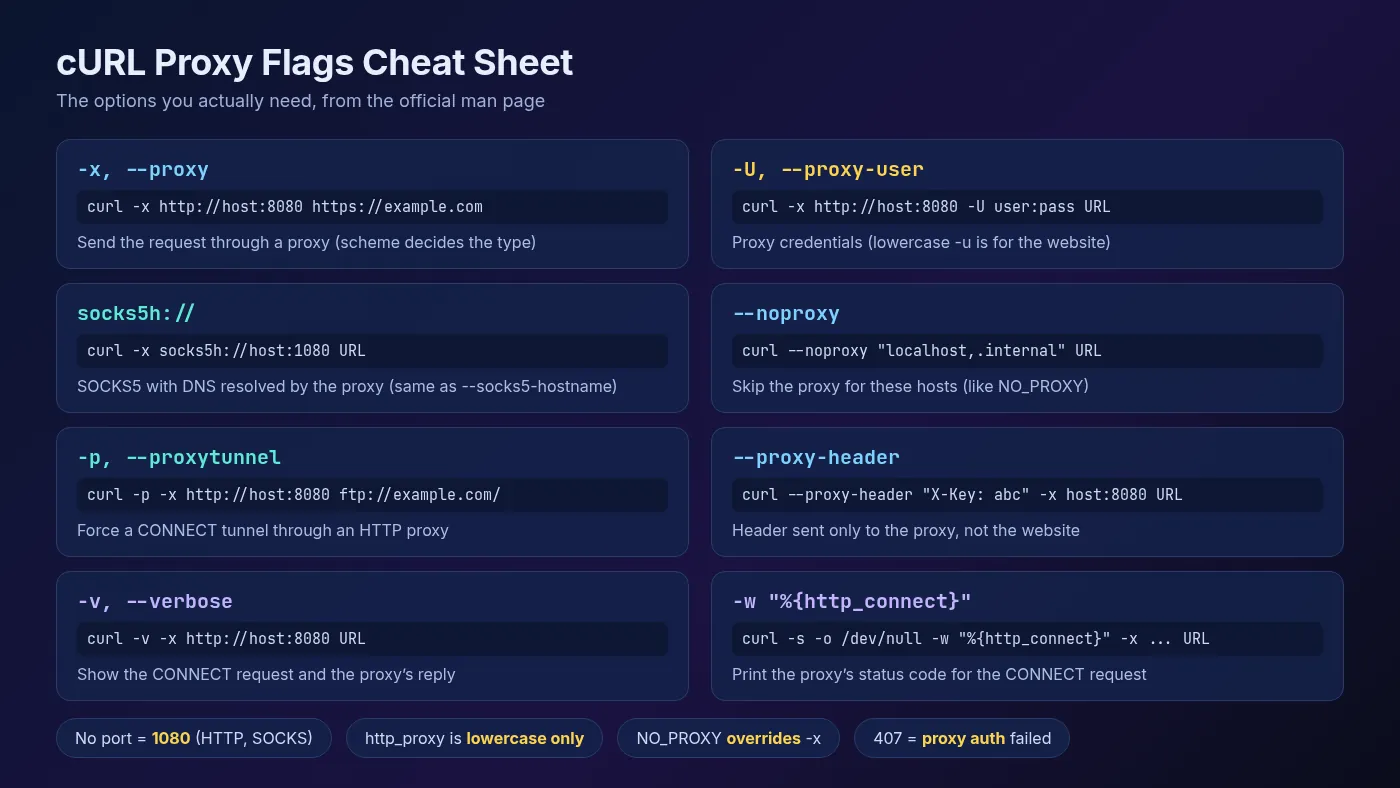
One is easy to overlook: --proxy-header sends a header only to the proxy, for example inside the CONNECT request, while -H headers are meant for the website.
Set a Proxy Once With Environment Variables
Typing -x on every command gets old fast. cURL also reads proxy settings from the environment, which helps when it runs inside a script you can’t edit.
export http_proxy="http://proxy.example.com:8080"
export https_proxy="http://proxy.example.com:8080"
export no_proxy="localhost,127.0.0.1,.internal.example.com"

curl https://example.com/   # uses https_proxy automatically
The rules are stricter than most tutorials suggest:
http_proxyworks only in lowercase. cURL ignoresHTTP_PROXYon purpose. CGI servers turn an incomingProxy:request header into anHTTP_PROXYvariable, so accepting it would let a website pick your proxy.- Other variables accept either case, such as
https_proxyorHTTPS_PROXY. Lowercase wins if both exist. ALL_PROXYcovers every protocol that has no specific variable set. A protocol-specific variable takes precedence.- The variable is picked by the target URL’s scheme, not the proxy’s. An
https://site useshttps_proxy, even if that proxy is a plain HTTP proxy.
1NO_PROXY Beats -x
This one catches people. The man page says NO_PROXY disables the proxy for matching hosts even when you pass -x. A leftover no_proxy=* in your shell profile turns every proxy test into a direct request.
A leading dot matches a whole domain, * matches everything, and since cURL 7.86.0 you can use CIDR ranges like 192.168.0.0/16. To override the environment for one command, use --noproxy "". To ignore an environment proxy, use -x "".
Make It Permanent With .curlrc
A config file keeps your proxy and credentials out of your commands and your history. cURL reads ~/.curlrc on Linux and macOS automatically. On Windows, it checks %USERPROFILE%\.curlrc and %APPDATA%\.curlrc, plus _curlrc names.
# ~/.curlrc
proxy = "http://proxy.example.com:8080"
proxy-user = "user:pass"
noproxy = "localhost,127.0.0.1"
Long option names go without the leading dashes, one per line. Lock the file down with chmod 600 ~/.curlrc since it holds a password.
Need a clean run that ignores it? Put -q as the very first argument: curl -q https://example.com. It only works in that position. For separate profiles per provider, keep several files and load one with -K.
Prefer Wget for downloads? Our guide on using Wget with a proxy covers the same setup.
Debugging Proxy Errors With -v
When a proxy misbehaves, -v shows the conversation. Lines starting with > are what cURL sent, and lines starting with < are what came back. Here’s real output from a proxy that rejected missing credentials, captured with cURL 8.14.1 and trimmed slightly:
$ curl -v -x http://127.0.0.1:38407 https://example.com
*   Trying 127.0.0.1:38407...
* Establish HTTP proxy tunnel to example.com:443
> CONNECT example.com:443 HTTP/1.1
> Host: example.com:443
> User-Agent: curl/8.14.1
> Proxy-Connection: Keep-Alive
< HTTP/1.1 407 Proxy Authentication Required
< Proxy-Authenticate: Basic realm="proxy"
* CONNECT tunnel failed, response 407
curl: (56) CONNECT tunnel failed, response 407
Read it top to bottom. The connection to the proxy worked and the CONNECT request went out. The proxy answered 407, so the tunnel never opened, and cURL exited with code 56.
1The Quiet 407
Now the sneaky part. Point the same proxy at an http:// URL and there’s no tunnel to fail. cURL exits with code 0 and prints the proxy’s 407 page as if it were the website’s response.
Scripts that only check the exit code miss it. Check the status code instead, and add %{http_connect} for HTTPS targets:
curl -s -o /dev/null -x "$PROXY" \
  -w "connect=%{http_connect} status=%{http_code} ip=%{remote_ip} time=%{time_total}s\n" \
  https://example.com/
http_connect is the proxy’s reply to CONNECT, and remote_ip is the address cURL actually connected to, which is the proxy when one is in use.
2Common Errors and Fixes
| What you see | What it means | Fix |
|---|---|---|
407 or exit 56 after CONNECT | Credentials missing or wrong | Check -U, URL-encode special characters, confirm your IP is whitelisted |
| Exit 5: could not resolve proxy | The proxy hostname didn’t resolve | Fix the hostname typo or your DNS |
| Exit 7: failed to connect | Nothing answered on that host and port | Add the right port (remember 1080), check firewalls |
| Exit 97: proxy handshake error | The SOCKS or proxy handshake failed | Check the scheme, socks5 vs http, and credentials |
| Your real IP comes back | The proxy was skipped | Look for no_proxy, or an uppercase HTTP_PROXY that cURL ignores |
Add --connect-timeout 10 and -m 30 while testing, so a dead proxy fails in seconds, not minutes. For deeper fixes, see our guide to fixing proxy connection failed errors.
A Five-Minute Proxy Test Routine
Before you plug a new proxy into a scraper, run these in order:
- Check the exit IP:
curl -x "$PROXY" https://httpbin.org/ip. It should differ from your own. - Check rotation: run it five times. A rotating gateway should return different IPs; a sticky session should return one.
- Check the headers the site sees:
curl -x "$PROXY" https://httpbin.org/headers. Look for headers your proxy adds. - Check timing: use the
-wline above and comparetime_connectwithtime_total.
For a fuller workflow with latency and anonymity checks, read how to test proxy speed and anonymity. When the commands work in cURL, moving them to code is easy: our Python Requests proxy tutorial uses the same URL format, socks5h included.
Frequently Asked Questions
One Flag, a Few Traps
cURL’s proxy support boils down to -x plus the right scheme. Most failures come from the defaults around it: the 1080 port, lowercase-only http_proxy, NO_PROXY overriding your flag, and DNS leaking through plain socks5.
Learn those four and you can debug almost any proxy from a terminal in a minute.
Our take: treat cURL as your proxy smoke test. Put credentials in a locked-down .curlrc, default to socks5h, and keep the -w one-liner handy. Then pick a network from our proxy directory and test it on your real target before you commit.
Keep Reading
More articles you might enjoy