HTTP Headers for Web Scraping: User-Agent and Beyond (2026)
Learn which HTTP headers matter for web scraping, what a real Chrome request sends, why random user-agents backfire, and how header order gets fingerprinted, with Python examples.
Your scraper fetches a page and gets a 403. You open the same URL in Chrome and it loads instantly. Same IP, same URL, different result.
Very often, the difference is in the HTTP headers. Every request carries a small block of metadata that describes the client, and a default Python script describes itself very honestly as a Python script.
This guide shows you which headers matter for web scraping, what a real browser actually sends, why random user-agents tend to backfire, and how sites fingerprint the order your headers arrive in.
- Default Python clients announce themselves with user-agents like python-requests and send just five headers.
- A real Chrome page load sends about 14 headers, including client hints and Sec-Fetch metadata.
- Random user-agents create mismatches with your other headers, so rotate complete profiles instead.
- Header order and HTTP/2 pseudo-header order are fingerprints, even though the spec says order has no meaning.
- Headers sit on top of TLS, so perfect headers can’t hide a non-browser handshake.
What Are HTTP Headers, and Why Do They Matter for Scraping?
HTTP headers are name and value pairs sent before the body of a request or response. On a request, they tell the server who the client is, what formats it accepts, which language it prefers and where it came from.
Servers use them for normal things, like picking a language or compressing the response. Anti-bot systems use them for something else: checking whether the client looks like the browser it claims to be.
Headers are one of the cheapest signals a site can check, because they arrive before any JavaScript runs. That makes them a first-pass filter in most anti-bot detection systems, alongside your IP address and TLS handshake.
What Does a Real Browser Send?
The best way to understand headers is to look at a real request. Here is the exact header set Chrome 156 on Linux sent for a typed-in page load, captured on October 25, 2026 over HTTP/1.1:
GET /page HTTP/1.1
Host: localhost:8765
Connection: keep-alive
sec-ch-ua: "Not:A-Brand";v="8", "Chromium";v="156", "Google Chrome";v="156"
sec-ch-ua-mobile: ?0
sec-ch-ua-platform: "Linux"
Upgrade-Insecure-Requests: 1
User-Agent: Mozilla/5.0 (X11; Linux x86_64) AppleWebKit/537.36 (KHTML, like Gecko) Chrome/156.0.0.0 Safari/537.36
Accept: text/html,application/xhtml+xml,application/xml;q=0.9,image/jxl,image/avif,image/webp,image/apng,*/*;q=0.8,application/signed-exchange;v=b3;q=0.7
Sec-Fetch-Site: none
Sec-Fetch-Mode: navigate
Sec-Fetch-User: ?1
Sec-Fetch-Dest: document
Accept-Encoding: gzip, deflate, br, zstd
Accept-Language: en-US,en;q=0.9
That’s 14 headers in a fixed order. Now compare it with what Python’s Requests library sends by default:
GET /req HTTP/1.1
Host: 127.0.0.1:8765
User-Agent: python-requests/2.34.2
Accept-Encoding: gzip, deflate
Accept: */*
Connection: keep-alive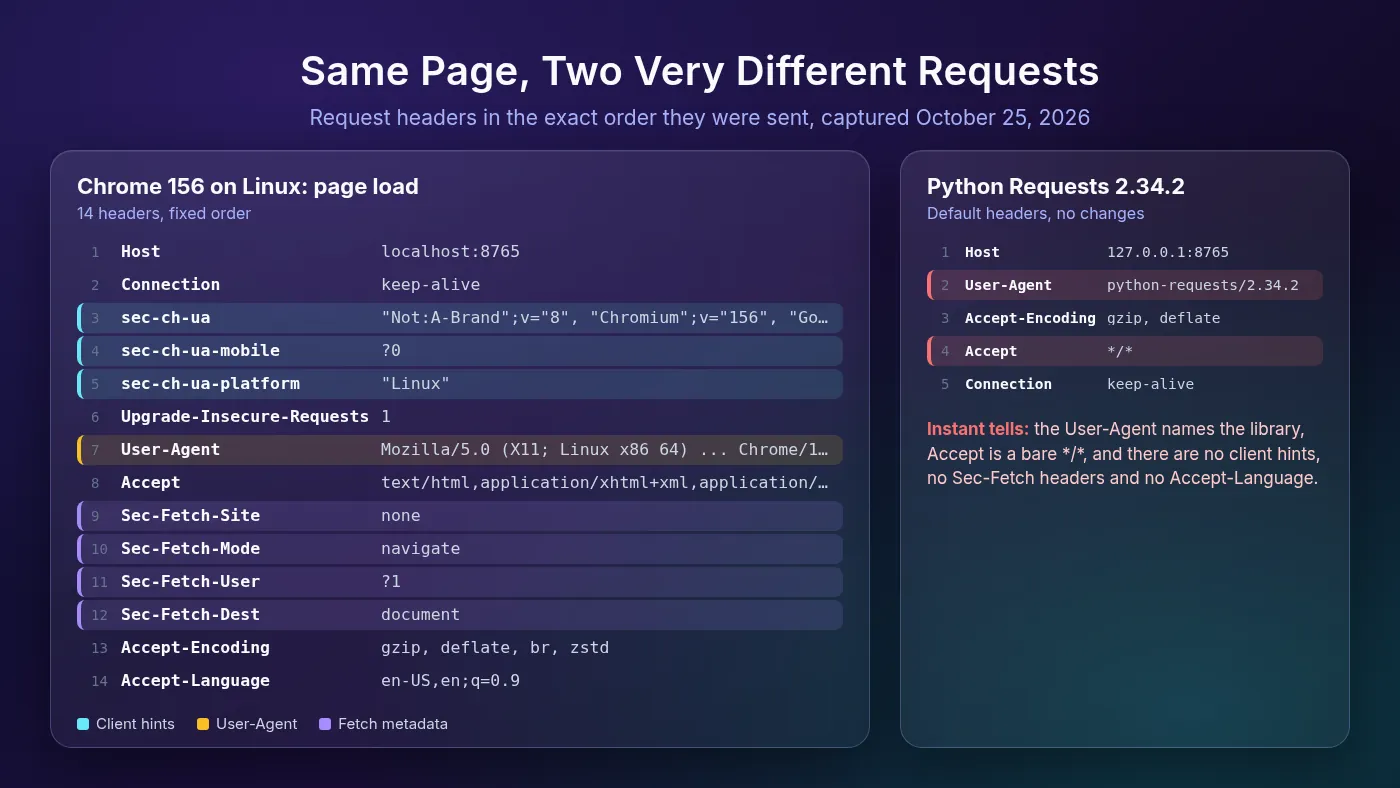
HTTPX is similar. Version 0.28.1 sends Accept: */*, Accept-Encoding: gzip, deflate, Connection: keep-alive and User-Agent: python-httpx/0.28.1.
A site doesn’t need anything clever to spot either one. The user-agent literally says “python”, and the missing browser headers confirm it.
One more detail matters. Chrome’s favicon request on the same page used a different Accept value, added a Referer, switched Sec-Fetch-Dest to image and even reordered the client hints. Browsers send different header sets for different request types.
Which Headers Matter Most?
You don’t need to obsess over every header. These are the ones that carry the most signal.
1User-Agent
MDN’s User-Agent reference describes it as a string that identifies the application, operating system, vendor and version of the client. It’s the first header every scraper changes, and the one most scrapers get subtly wrong.
Modern Chrome sends a reduced user-agent. The major version is real, but the minor version numbers are always zeros, like Chrome/143.0.0.0, and on Android the device model is a fixed K. A copied string with a full build number such as Chrome/143.0.12.45 looks like an older pre-reduction browser, which is a mismatch in itself.
2Accept and Accept-Encoding
Accept lists the content types the client wants. A browser page load asks for HTML first, while an API call made by the page usually asks for JSON. Sending */* on a page navigation is a classic library tell.
Accept-Encoding lists supported compression. Chrome 156 advertised gzip, deflate, br, zstd. Only claim encodings your client can actually decode. The Requests docs note it decodes Brotli only if a Brotli library is installed.
3Accept-Language
This tells the server which languages the user prefers, such as en-US,en;q=0.9. It should make sense for your proxy’s location. A German residential IP with a Japanese-only language header isn’t impossible, but at scale it looks odd.
4Referer
The Referer header carries the page that linked to the request. Real users usually arrive at deep pages from somewhere, so a referer from the site’s own category page or search results is natural for API calls and subresources. A typed-in first visit, like the capture above, sends none.
5Cookie
Cookies travel in a header too. Many sites set a cookie on the first page load and expect it back on every request after that, especially on API calls and protected pages.
A scraper that hits a deep URL with no cookies, or replays one stale cookie from a thousand IPs, stands out fast. A Requests Session stores cookies from responses and sends them back automatically, which is the behavior you want.
6Sec-CH-UA Client Hints
Client hints are Chrome’s newer, structured replacement for parsing the user-agent. MDN lists Sec-CH-UA, Sec-CH-UA-Mobile and Sec-CH-UA-Platform as low-entropy hints sent by default. Servers can ask for more detail, such as the device model, with the Accept-CH response header.
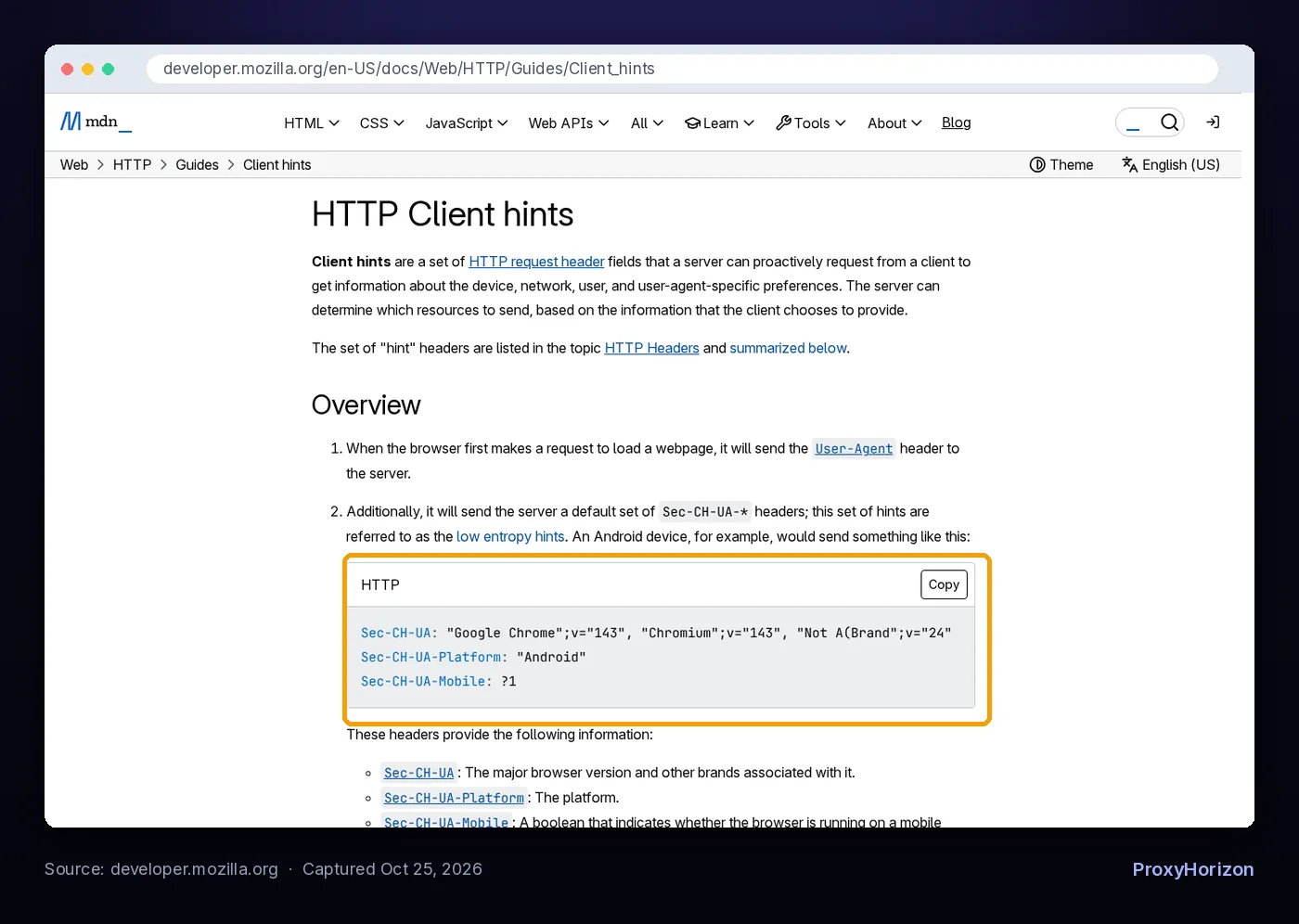
This is where many scrapers trip. If your user-agent says Chrome on Windows, but there’s no sec-ch-ua header or it says "Linux", the two disagree. Chrome’s client hints documentation also notes hints are only sent over secure connections, so expect them on HTTPS targets.
Firefox and Safari don’t send Sec-CH-UA headers at all (MDN’s compatibility data lists no support), so adding them to a Firefox user-agent is its own mismatch.
7Sec-Fetch Headers
Sec-Fetch-Site, Sec-Fetch-Mode, Sec-Fetch-User and Sec-Fetch-Dest describe the context of a request. MDN calls them fetch metadata request headers. Page JavaScript can’t modify them, which is exactly why servers trust them.
A page navigation and a background API call carry different values. Copy the values from the matching request in DevTools rather than reusing one set everywhere.
Why Random User-Agents Backfire
The most common advice is to rotate random user-agents. It sounds sensible: look like many different visitors. In practice it often makes things worse.
A user-agent is a claim. Every other header, your TLS handshake and any JavaScript checks are evidence. When you swap only the user-agent, the claim changes while the evidence stays the same.
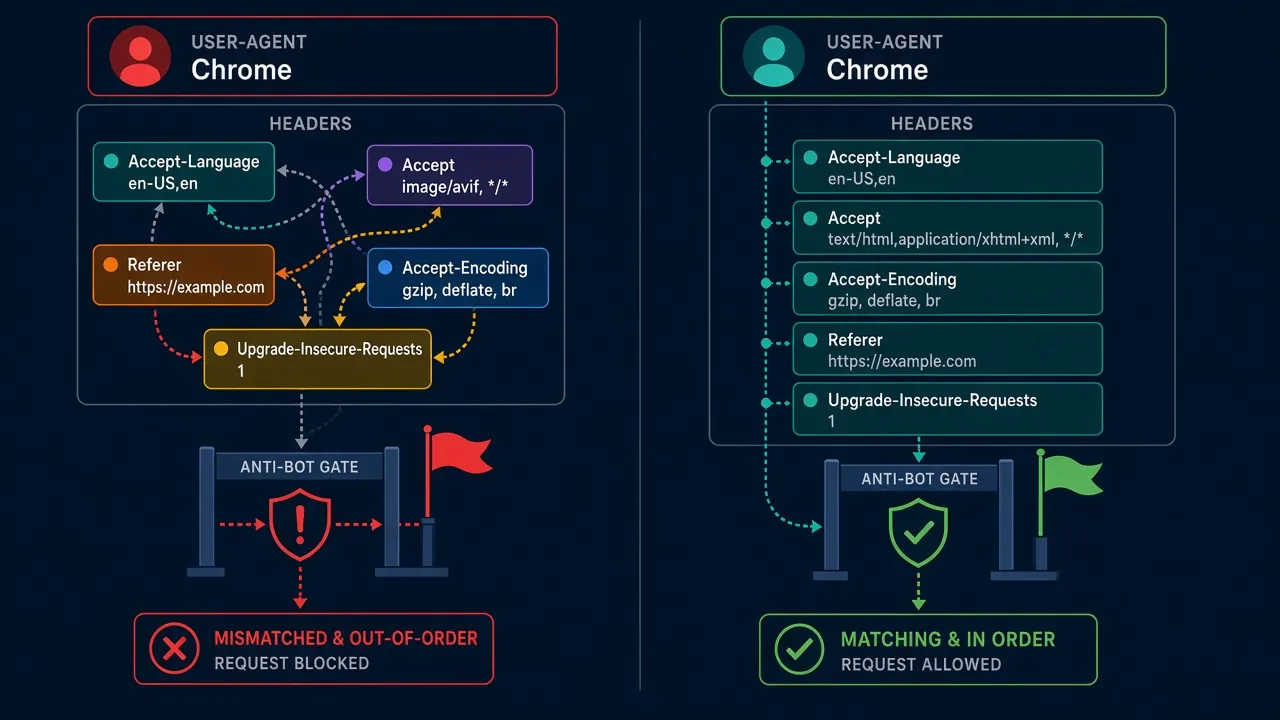
Here are the mismatches that random rotation creates most often:
| What you send | Why it looks wrong |
|---|---|
Safari or Firefox user-agent with sec-ch-ua headers | Those browsers don’t send client hints |
Chrome on Windows user-agent with sec-ch-ua-platform: "Linux" | Platform claims disagree |
Chrome 156 user-agent with sec-ch-ua version 120 | Version claims disagree |
Mobile user-agent with sec-ch-ua-mobile: ?0 | Device type disagrees |
| Modern browser user-agent with only a handful of library headers | Browsers never send that little |
| A new user-agent on every request in one session | Real users don’t change browsers mid-visit |
Even real headless Chrome can contradict itself. In the same October 2026 capture, Chrome 156 started with --headless=new sent an identical header set, except its user-agent said HeadlessChrome/156.0.0.0 while sec-ch-ua still claimed “Google Chrome”. See our explainer on headless browsing for the wider picture.
The better approach is to rotate whole profiles, not strings. Keep a small set of complete, real header sets, each captured from one browser version on one OS, and keep one profile for the full session.
How Header Order Is Fingerprinted
Here’s the twist. According to the HTTP standard, header order shouldn’t matter. RFC 9110 says the order of fields with different names “is not significant”, and field names are case-insensitive.
But every client builds its headers in code, so every client sends them in a consistent order. Chrome put Host and Connection first, then its client hints, then User-Agent. Requests puts User-Agent second. That order is a fingerprint, even if it carries no meaning.
1HTTP/2 Makes It Sharper
Browsers use HTTP/2 or HTTP/3 whenever a site supports them. RFC 9113 requires lowercase header names and puts special pseudo-headers, like :method and :path, before all regular headers. Clients still choose the order of those pseudo-headers.
Akamai researchers documented this in their passive HTTP/2 fingerprinting paper. Their fingerprint combines SETTINGS values, the WINDOW_UPDATE increment, PRIORITY frames and pseudo-header order. In their tests, Chrome sent :method, :authority, :scheme, :path, Firefox sent :method, :path, :authority, :scheme, and curl and Go each used their own order.
The paper also notes that many HTTP/2 clients don’t let you change these details at all. A Python script claiming to be Chrome can be caught by frame settings it never touched.
2Headers Sit on Top of TLS
Before any header is sent, your client performs a TLS handshake, and that has its own fingerprint. Perfect Chrome headers over a Python TLS handshake are still a mismatch. Our guide to TLS fingerprinting explains JA3 and JA4 in detail.
Libraries like curl_cffi exist for this reason: they impersonate a browser’s TLS and HTTP/2 fingerprints, not just its headers.
How to Send a Consistent Header Set in Python
Start from a real capture. Open DevTools, go to the Network panel, click the request you want to imitate and copy its request headers, or right-click and use Copy as cURL.
In Requests, set the headers on a Session. The Requests docs explain that default headers take priority in ordering when you pass headers per request, but a Session.headers set to an OrderedDict is always respected.
from collections import OrderedDict
import requests

s = requests.Session()
s.headers = OrderedDict([
    ("Connection", "keep-alive"),
    ("sec-ch-ua", '"Not:A-Brand";v="8", "Chromium";v="156", "Google Chrome";v="156"'),
    ("sec-ch-ua-mobile", "?0"),
    ("sec-ch-ua-platform", '"Windows"'),
    ("Upgrade-Insecure-Requests", "1"),
    ("User-Agent", "Mozilla/5.0 (Windows NT 10.0; Win64; x64) AppleWebKit/537.36 "
                   "(KHTML, like Gecko) Chrome/156.0.0.0 Safari/537.36"),
    ("Accept", "text/html,application/xhtml+xml,application/xml;q=0.9,"
               "image/avif,image/webp,image/apng,*/*;q=0.8"),
    ("Sec-Fetch-Site", "none"),
    ("Sec-Fetch-Mode", "navigate"),
    ("Sec-Fetch-User", "?1"),
    ("Sec-Fetch-Dest", "document"),
    ("Accept-Encoding", "gzip, deflate"),
    ("Accept-Language", "en-US,en;q=0.9"),
])

resp = s.get("https://example.com/", timeout=30)
print(resp.status_code)
Two choices here are deliberate. The platform hint matches the Windows user-agent, and Accept-Encoding only lists what Requests can decode without extra packages. Swap in values from your own capture so the version numbers stay current.
For follow-up API calls, change only what a browser would change: Accept, Referer and the Sec-Fetch values. Our guide to scraping JavaScript-rendered websites shows how to find those API requests, and using proxies with Python Requests covers routing the session through a proxy.
If you need HTTP/2, HTTPX supports it when you install httpx[http2] and create a client with http2=True. Remember that it changes your HTTP/2 fingerprint too.
Header Checklist Before You Scrape
- Copy, don’t invent. Use a header set captured from a real, current browser.
- Keep one identity per session. Same user-agent, hints and language for every request in a session.
- Make the claims agree. User-agent,
sec-ch-uaversion, platform and mobile flag must match. - Match the request type. Navigations, images and API calls carry different
AcceptandSec-Fetchvalues. - Match your proxy.
Accept-Languageshould fit the IP’s country. Our guide on how websites detect proxy traffic covers the IP side. - Don’t forget the layers below. Header order, HTTP/2 settings and TLS should all point to the same client.
Headers won’t rescue a burned IP, though. If you still hit challenges, read how to handle CAPTCHAs when web scraping, and compare networks in our proxy directory.
Frequently Asked Questions
Match the Whole Browser, Not Just the User-Agent
Headers are the easiest place for a site to spot a scraper, and the easiest place for you to fix. A library default announces itself, and a random user-agent creates contradictions.
Capture a real header set, keep it consistent for the whole session, and make sure the order, HTTP version and TLS handshake tell the same story.
Our take: one honest, complete browser profile beats a thousand random user-agent strings.
Keep Reading
More articles you might enjoy