What Is VPN Obfuscation? Stealth Protocols Explained (2026)
VPN obfuscation disguises your VPN so firewalls can’t spot it. Here’s how obfuscated servers beat DPI, when you need them, and the speed cost.
Your VPN works at home. On hotel Wi-Fi, it won’t connect at all.
Nothing is wrong with your account. The network simply recognized the VPN and shut the door. Encryption hides what you send, but it doesn’t hide that you’re using a VPN.
That’s the gap VPN obfuscation fills. It disguises the tunnel itself so a firewall sees ordinary web traffic instead of a VPN. This guide explains how firewalls spot VPNs, how obfuscated servers slip past them, which providers offer a stealth mode, and the speed cost nobody puts on the box.
- Obfuscation hides the fact that you’re using a VPN, not just what you send.
- Firewalls spot VPNs by packet shape, not by reading your data.
- Port 443 alone beats simple blocks, not deep packet inspection.
- Expect some speed loss, so use stealth mode only when a network blocks you.
- Websites can still see a VPN IP address, obfuscated or not.
What Is VPN Obfuscation, in Plain English?
VPN obfuscation is a disguise layer that makes VPN traffic look like something else, usually normal HTTPS browsing or meaningless random data. The goal is reachability: getting a VPN connection through a network that blocks VPNs.
A regular VPN hides the contents of your traffic. An obfuscated one also hides the fact that it’s a VPN. Think of it like sending a sealed letter in an envelope that looks exactly like a utility bill.
Providers call it different things: obfuscated servers, stealth VPN, Stealth protocol, camouflage mode or NoBorders. The idea underneath is the same.
How Firewalls Spot a VPN Without Reading It
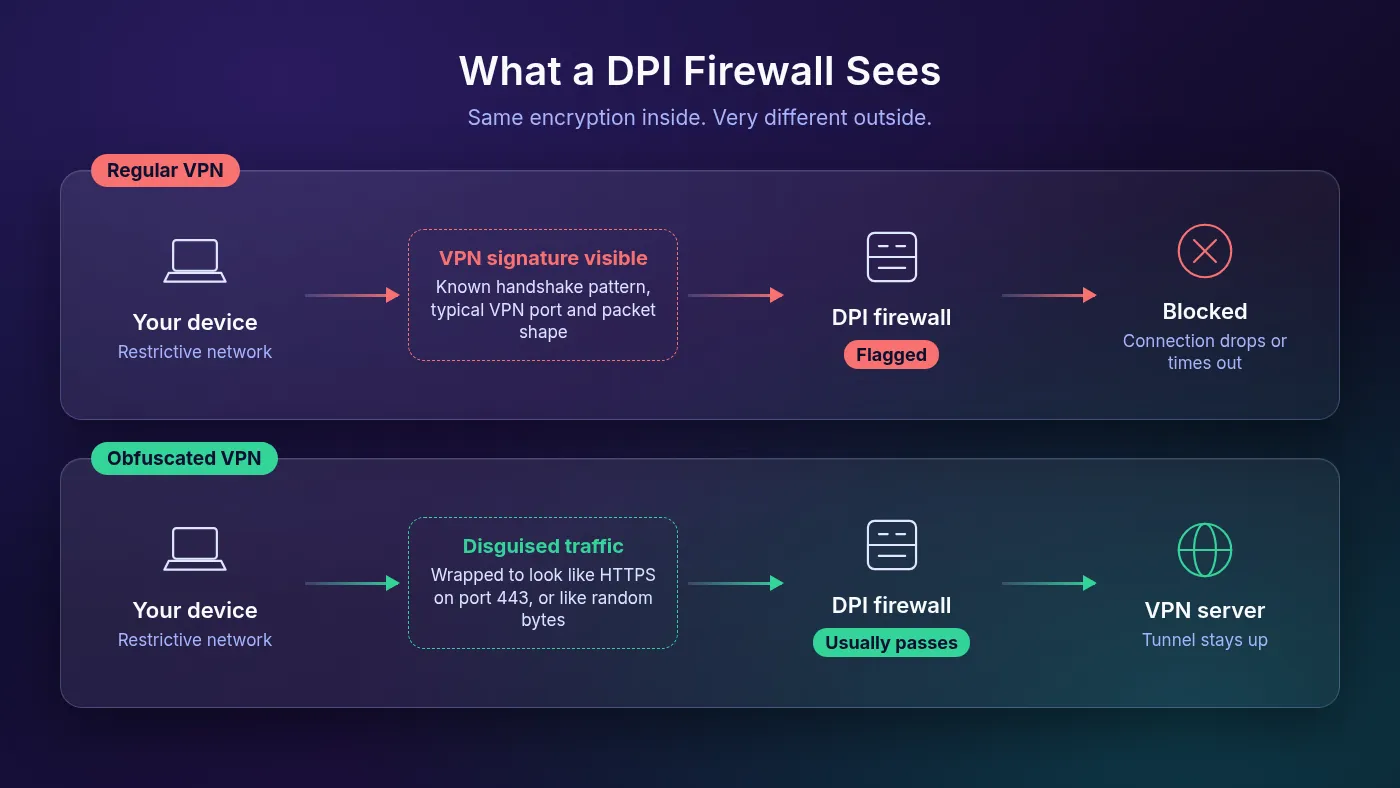
Firewalls don’t need to decrypt your traffic to know it’s a VPN. They look at its shape. The technique is called deep packet inspection, or DPI, and it examines how packets look rather than what they say.
Standard VPN protocols were built for security and speed, not secrecy. They leave fingerprints a DPI system can match:
- Handshakes: each protocol opens a connection with a recognizable message pattern.
- Ports: VPNs often run on well-known default ports.
- Transport: most popular VPN protocols use UDP, which Proton notes makes them easier to detect and block.
- Packet shape: sizes and timing that don’t match typical web browsing.
WireGuard is honest about this. Its own known limitations page says WireGuard “does not focus on obfuscation” and that disguising it should happen in a layer above the protocol. Our guide to how VPN protocols work covers why each one looks the way it does.
How Obfuscated Servers Hide VPN Traffic
Obfuscated servers remove or mask the patterns DPI looks for. NordVPN describes two broad methods: wrapping VPN data in an extra layer such as SSL, and scrambling packets so the VPN metadata disappears. Most stealth modes use one or both.
1Wrapping the Tunnel in TLS
TLS is the encryption behind every HTTPS website. Wrap a VPN tunnel inside a TLS session on TCP port 443 and, from the outside, it resembles someone loading a website.
Proton’s Stealth protocol takes this route. Proton says Stealth uses obfuscated TLS tunneling over TCP, and that it establishes connections in a way designed to avoid alerting internet filters.
2Scrambling Traffic Into Noise
The other approach makes traffic look like nothing at all. The Tor Project’s obfs4 transport, built for the same cat-and-mouse fight, adds a layer of encryption that makes traffic look like random bytes. It also resists active probing, where a censor connects to a suspected server to confirm what it is.
On the OpenVPN side, the OpenVPN 2.6 manual says its --tls-crypt option encrypts control channel packets, hides the certificate and “makes it harder to identify OpenVPN traffic as such.” Helpful, but harder isn’t the same as hidden.
3Why Port 443 Alone Isn’t Obfuscation
Here’s the myth most guides repeat: run your VPN on port 443 and it’ll blend in. Not quite.
Proton explains that WireGuard TCP and OpenVPN TCP can use port 443 to avoid simple port blocks. It also warns that deep packet inspection can easily spot the difference between HTTPS and VPN packets. Port 443 beats a basic port filter. Real obfuscation is what beats DPI.
Stealth Options From Major VPNs Compared
Most big VPNs now ship some form of obfuscation, but they switch it on in very different ways. Here’s what each provider’s own documentation says, checked in October 2026.
| Provider | Feature | How it works | How you turn it on |
|---|---|---|---|
| Proton VPN | Stealth protocol | WireGuard-based, obfuscated TLS over TCP | Pick Stealth as the protocol; available on all plans, including Free |
| NordVPN | Obfuscated servers | Now run on the NordWhisper protocol, which makes VPN traffic resemble regular web traffic | Specialty servers, then Obfuscated |
| Surfshark | Obfuscation plus NoBorders | Modified OpenVPN; NoBorders suggests servers that work under restrictions | Choose an OpenVPN protocol; NoBorders can switch on automatically |
| ExpressVPN | Automatic obfuscation | Applied on supported platforms without user action | Nothing to toggle |
| Tor (not a VPN) | obfs4 bridges | Makes Tor traffic look like random bytes | Choose a bridge in Tor Browser’s connection settings |
NordVPN’s change is brand new. Its support center says the Obfuscated Servers category has moved from OpenVPN to NordWhisper, and its Linux app 6.0.0, released October 22, 2026, removed the old nordvpn set obfuscate command entirely.
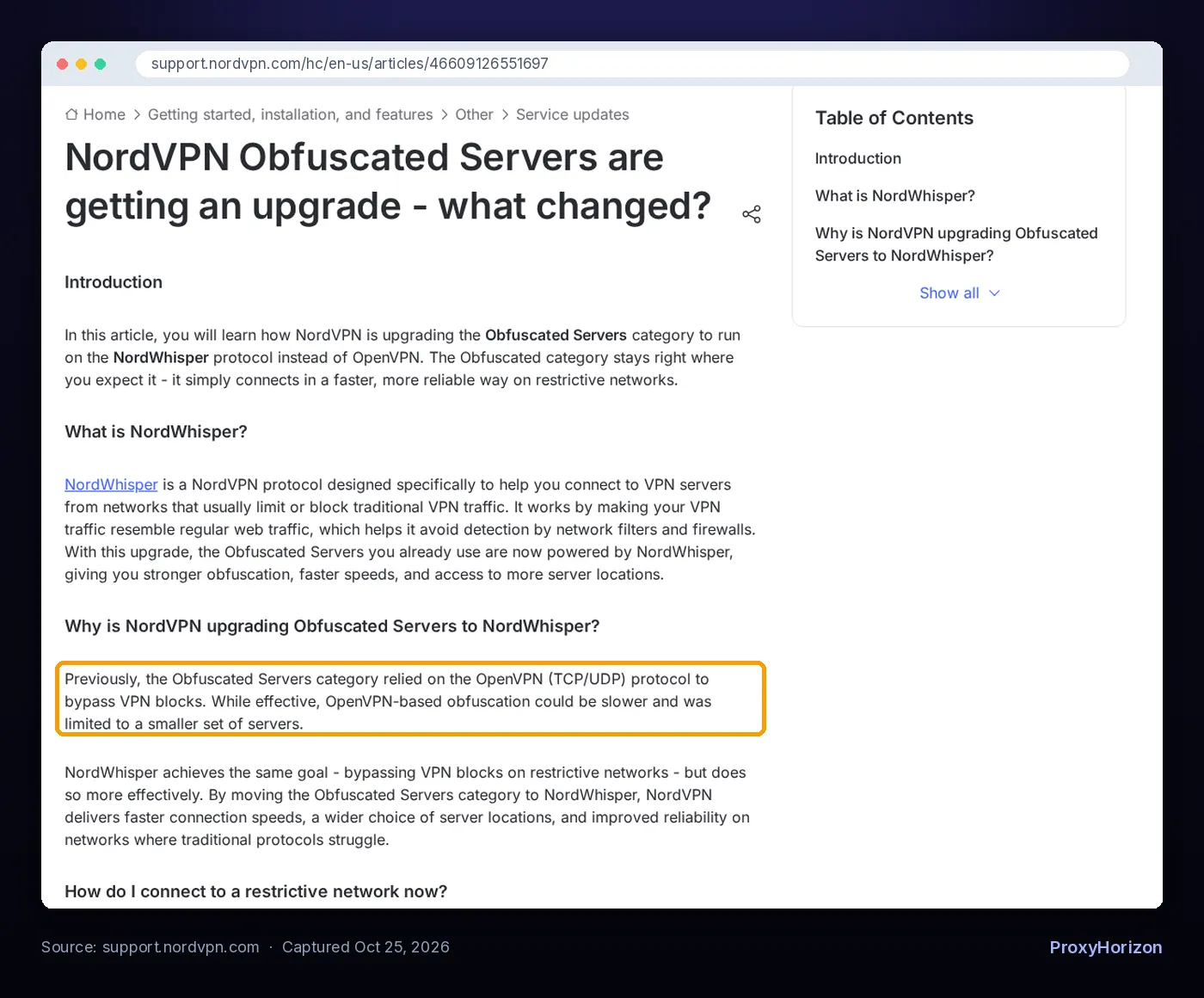
One catch from that same page: you can no longer reach NordVPN’s obfuscated servers through a manual OpenVPN setup. If you relied on config files for a router, check your setup before you travel. Prices and plans for each brand sit in our VPN directory.
When You Actually Need VPN Obfuscation
You need obfuscation when a network blocks or interferes with VPN connections. Otherwise, leave it off. NordVPN itself says obfuscated servers aren’t intended for casual use.
| Your situation | Turn on obfuscation? | Why |
|---|---|---|
| Home broadband, VPN connects fine | No | You pay the speed cost for nothing |
| School, office or hotel Wi-Fi blocks the VPN | Yes | Local firewalls often filter VPN protocols |
| Country or ISP that restricts VPNs | Yes, before you arrive | You may not be able to download apps or change settings once there |
| VPN connects but a website blocks you | No | Sites block by IP address, which obfuscation doesn’t change |
| Journalism or activism on monitored networks | Yes, alongside other safeguards | Hiding VPN use can matter as much as hiding content |
Say you’re flying somewhere with heavy filtering. Install the app, sign in and pick the stealth option at home, then test it on your phone’s hotspot. Our checklist for protecting your privacy while traveling abroad covers the rest of the packing list.
Check before you go: some countries restrict or regulate VPN use. Obfuscation changes whether a VPN is visible. It doesn’t change local law, so know the rules where you’ll be.
The Speed Cost: What You Actually Give Up
Obfuscation is usually slower than a plain VPN connection. How much slower depends on the method, and no provider publishes a single benchmark you can rely on. So rather than quote a made-up percentage, here’s where the slowdown comes from.
- Extra wrapping: every packet gets another layer of processing on both ends.
- TCP instead of UDP: TLS-style disguises run over TCP. When the traffic inside is also TCP, delays stack up. WireGuard’s documentation calls the performance of tunneling TCP-over-TCP “classically terrible.”
- Fewer servers: stealth modes sometimes run on a smaller pool, so the closest fast server may not be an option.
The vendors admit the old way hurt. NordVPN says its OpenVPN-based obfuscation “could be slower” and was limited to a smaller set of servers. Proton says Stealth can beat older obfuscated protocols built on OpenVPN over TCP.
Our take: newer protocols like Stealth and NordWhisper narrow the gap, but they don’t erase it. Expect the biggest hit on latency-sensitive tasks like gaming and calls. Our OpenVPN vs WireGuard gaming test shows why protocol choice matters so much there. Measure on your own network, with obfuscation on and off, and keep whichever works.
What VPN Obfuscation Won’t Hide
Obfuscation hides your VPN from the network in between. It doesn’t hide it from the website at the other end. That’s the most common misunderstanding we see.
NordVPN states plainly that websites and services can still detect VPN traffic from the server’s IP address. Streaming platforms, banks and APIs check IP reputation lists, not packet shapes. Our breakdown of how APIs detect VPN traffic walks through those checks.
A few other things stay the same:
- Leaks: a misconfigured device can still expose DNS requests. Run a DNS leak test after you connect.
- Dropped connections: stealth links can be less stable, so pair them with a VPN kill switch.
- Anonymity: your VPN provider still sees your connection, so trust in the provider matters as much as ever.
Warning: no stealth mode is invisible to every censor forever. Detection and obfuscation evolve against each other, which is why providers keep releasing new protocols.
How to Turn On Obfuscation in Popular VPN Apps
Here are the official paths, taken from each provider’s help pages:
- Proton VPN (Windows): open Settings, then Connection, then Protocol, and choose Stealth. On Linux you first need to enable Proton Protocols.
- NordVPN (Windows, macOS): scroll to Specialty servers and click Obfuscated Servers. Use the three dots to pick a country.
- Surfshark: go to Settings, VPN settings, Protocol, and choose an OpenVPN option. NoBorders lives under Settings, Advanced.
- ExpressVPN: nothing to do. Obfuscation applies automatically on supported platforms.
Then confirm it worked. If the VPN connects on the network that blocked it before, the disguise is doing its job.
For a cleaner test, run a quick comparison. Connect with your normal protocol, note whether it fails, then connect with stealth on and load a few sites. Run a speed test both ways on a network where both connect, so you know your real speed cost before you depend on it.
Stealth Mode Still Won’t Connect? Try These Fixes
When an obfuscated connection fails, the cause is usually the network, the server choice or the app setup, in that order. Work through these before you give up on the network.
- Switch servers or countries. A filter may have blocked one server’s IP address while others still work. Nearby countries are often the fastest to try.
- Try a different stealth method. If one provider’s disguise is blocked, another provider’s may not be. Methods differ, so they don’t all fail at once.
- Update the app. Providers change obfuscation often. NordVPN’s move to NordWhisper is the latest example, and older app versions may not have it.
- Check captive portals. Hotel and airport Wi-Fi often needs you to accept terms in a browser before any VPN can connect.
- Turn off split tunneling while testing. Excluded apps skip the tunnel, which makes results confusing. Our guide to split tunneling explains how exclusions work.
Still stuck? Tor’s bridges are built for exactly this kind of censorship, and obfs4 is the Tor Project’s suggested first try. Tor is slower than a VPN and protects only what you route through it, but it’s a useful fallback when every VPN disguise is blocked.
Real-world tip: keep a note of which server and protocol worked on a given network. Next time, you’ll connect on the first try instead of the fifth.
Frequently Asked Questions
Use Stealth When the Network Fights Back
VPN obfuscation solves one specific problem: networks that recognize and block VPN traffic. It wraps or scrambles the tunnel so DPI sees ordinary traffic, at the price of some speed.
It won’t fool websites that check IP addresses, and it won’t make a VPN legal where it isn’t.
Our take: keep obfuscation off day to day, and switch it on before you hit a restrictive network, not after. Set it up and test it at home, then compare stealth features across providers in our VPN directory before you commit to a plan.
Keep Reading
More articles you might enjoy