Best Use Cases of Firecrawl (2026): With Examples
Ten Firecrawl use cases worth building, each with Python code checked against the current SDK, the right endpoint and real credit costs, plus the jobs where Firecrawl is the wrong tool.

Most people use Firecrawl for one job: turning a URL into Markdown.
That’s a fine start. It’s also the smallest slice of what the API does in 2026. Firecrawl now crawls whole sites, runs research agents, watches pages for changes and reads PDFs, and each of those jobs bills credits differently.
So the useful question isn’t “what can Firecrawl do?” It’s which endpoint fits your job, and what it’ll cost before you scale it.
Below are the ten Firecrawl use cases we’d actually build, each with Python code, the endpoint behind it and the credit math. One of them costs five times more per page than most people expect. We’ll show you which.
- Firecrawl in 2026 is several tools in one API: scrape, crawl, map, search and agent, plus monitors and file parsing.
- RAG pipelines, agent web access and lead enrichment are where it saves the most engineering time.
- The output format you request drives the bill more than the plan you pick.
- It refuses LinkedIn and some social sites, and it isn’t the strongest option on heavily protected targets.
Disclosure: we’re a Firecrawl affiliate, so we may earn a commission if you upgrade through our links. We’ve included the jobs where it’s the wrong tool, too.
Five Endpoints Do Almost All the Work
Every use case below runs on a handful of endpoints. Learn these first and the rest of this guide reads like a recipe book. If you’re new to the idea, our primer on web scraping covers the basics.
| Endpoint | You give it | You get back | Credits |
|---|---|---|---|
| Scrape | One URL | Markdown, HTML, JSON, screenshots and more | 1 per page (5 with JSON) |
| Crawl | A start URL | Every reachable subpage, scraped | 1 per page |
| Map | A domain | A list of the site’s URLs | 1 per call |
| Search | A query | Web, news or image results, scraped if you want | 2 per 10 results, plus scraping |
| Agent | A prompt, no URLs | Structured answers it researched itself | Usually a few hundred per run |
| Monitor | Pages, a site or a search, plus a schedule | Change alerts by webhook or email | 1 per URL per check |
| Parse | A file such as a PDF or DOCX | Markdown or JSON | 1 per PDF page |
Two more sit around the edges. Batch scrape runs a list of known URLs as one job. Interact turns a scrape into a live browser session you can click through, at 2 credits a minute with code or 7 when you drive it with a prompt.
The format matters as much as the endpoint. According to Firecrawl’s billing docs, Markdown, links, screenshots and summaries cost the base 1 credit. JSON, question, query and highlights add 4, so each of those pages costs 5.
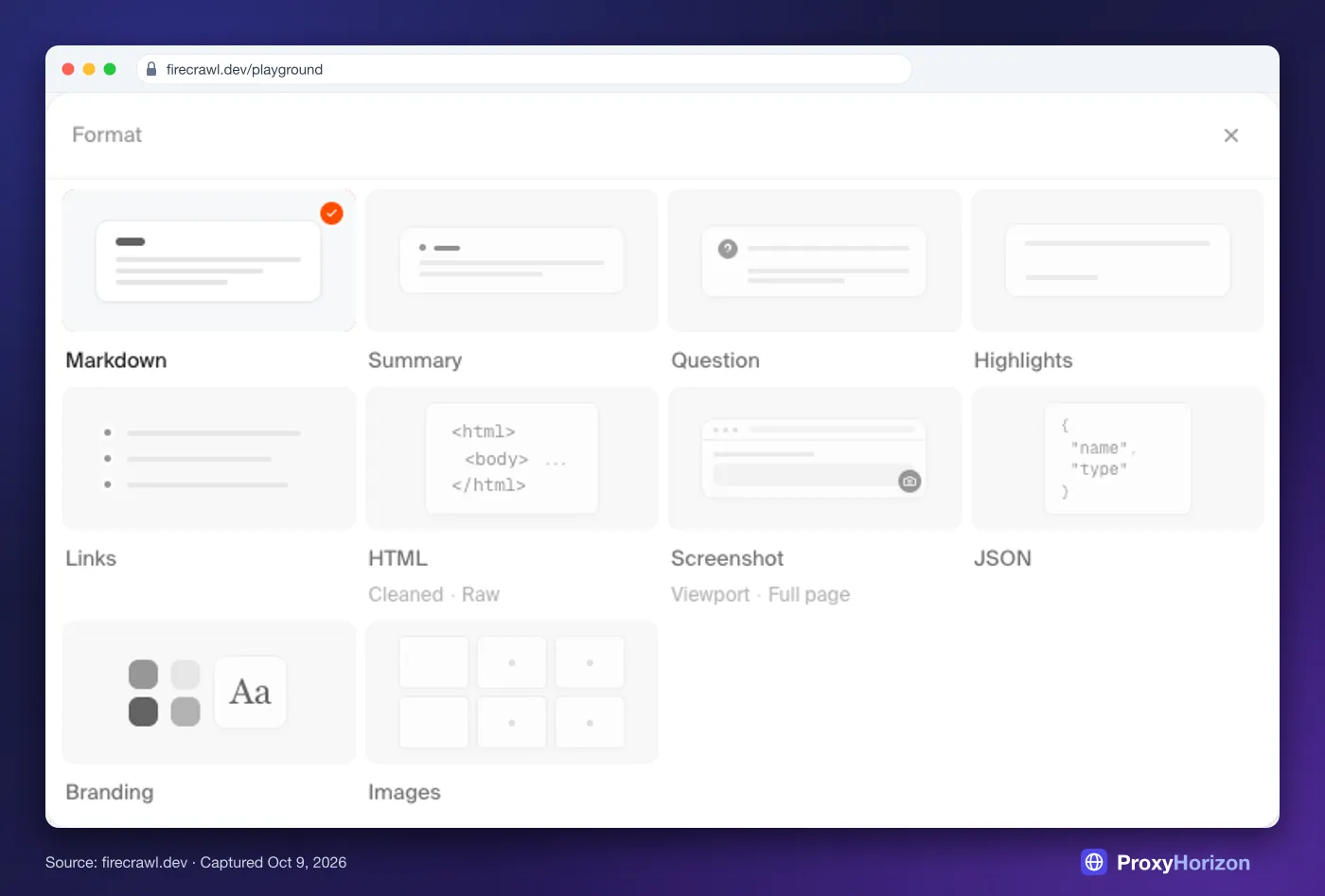
Our take: start every project on Markdown. Switch to JSON only for fields you’d otherwise parse by hand, because that one change multiplies the bill by five.
The Best Firecrawl Use Cases in 2026
Here’s the list, roughly in order of how much engineering time each one saves.
 (opens in a new tab)
We ran Firecrawl hands-on for our website-to-Markdown tests. For this round-up, we checked every snippet against the current Python SDK (firecrawl-py 4.50), and the credit figures come from Firecrawl’s docs as of October 9, 2026. Each snippet assumes this setup:
pip install firecrawl-py
from firecrawl import Firecrawl

firecrawl = Firecrawl(api_key="fc-YOUR-API-KEY")1RAG Chatbots and Knowledge Bases
This is Firecrawl’s home turf. You crawl a docs site or help center, get clean Markdown for every page, and chunk it into a vector database. Zapier’s chatbots, Replit’s agent and Botpress all feed knowledge bases this way, according to Firecrawl’s customer stories.
Crawl handles discovery. Give it a start URL, cap the page count and filter the paths, so you don’t index the blog or the careers page by accident.
docs = firecrawl.crawl(
    "https://docs.example.com",
    limit=300,
    include_paths=["^/guides/.*"],
    formats=["markdown"],
    only_main_content=True,
)
print(docs.credits_used, "credits for", len(docs.data), "pages")
for page in docs.data:
    print(page.metadata.source_url, len(page.markdown or ""))
Cost: 1 credit per page. A 2,000-page docs site costs 2,000 credits, so the Hobby plan covers two full refreshes a month. Our Firecrawl RAG guide covers chunking and embeddings.
2Live Web Access for AI Agents
An agent that can’t read the web guesses. Firecrawl’s search endpoint returns results and can scrape each one in the same call, so your model reads full pages instead of two-line snippets.
Stanford’s AI Playground runs more than 800 search-and-scrape jobs a day this way, and Credal says it scrapes over 6M URLs a month for its users’ agents. Both figures come from Firecrawl’s customer stories.
results = firecrawl.search(
    "firecrawl monitor endpoint pricing",
    limit=5,
    scrape_options={"formats": ["markdown"]},
)
for page in results.web:
    print(page.metadata.source_url, len(page.markdown or ""))
Cost: 2 credits per 10 results, plus 1 for each page scraped. A five-result search with scraping costs 7 credits, so 1,000 agent lookups run about 7,000.
Working in Claude or Cursor? Skip the code. The Firecrawl MCP server gives your assistant the same tools, and its keyless mode covers scrape, search and parse.
3Lead Enrichment from Company Websites
Sales teams hand Firecrawl a list of domains and get back structured company profiles: what each company sells, who it sells to and whether there’s a free trial. 11x runs its prospect research this way and has sent more than 11M requests across 175,000 domains.
Use the JSON format with a schema, and keep the schema short. Firecrawl’s docs warn that schemas with 30 or more fields produce less consistent results.
schema = {
    "type": "object",
    "properties": {
        "company_name": {"type": "string"},
        "what_they_sell": {"type": "string"},
        "pricing_page": {"type": "string"},
        "has_free_trial": {"type": "boolean"},
        "industries_served": {"type": "array", "items": {"type": "string"}},
    },
}
doc = firecrawl.scrape(
    "https://www.example.com",
    formats=[{"type": "json", "schema": schema}],
)
print(doc.json)
Cost: 5 credits per page, because JSON adds 4 to the base credit. Enriching 1,000 homepages costs 5,000 credits, a whole month of the Hobby plan. That’s the five-times surprise from the intro.
LinkedIn data works differently. Firecrawl doesn’t scrape LinkedIn itself and routes those requests to paid partners instead, such as Apollo at 30 credits a profile.
4Competitor Price and Product Tracking
E-commerce teams track prices, stock and variants across rival stores. Firecrawl’s product format pulls the title, brand, prices, availability and variants from a product page without an LLM call.
Firecrawl lists no surcharge for it, so it bills at the base credit instead of JSON’s five. That makes it the cheapest structured format for catalog work. It’s cloud-only, though, so self-hosters can’t use it.
doc = firecrawl.scrape(
    "https://shop.example.com/products/trail-runner",
    formats=["product"],
)
print(doc.product.title)
for variant in doc.product.variants:
    price = variant.price.formatted if variant.price else "no price"
    stock = "in stock" if variant.availability.in_stock else "sold out"
    print(variant.title, price, stock)
Cost: 1 credit per page. Checking 200 product pages once a day runs about 6,000 credits a month, just past Hobby. Hourly checks would be 144,000, which needs the Growth plan.
5Change Alerts on Pages That Matter
Some jobs are about timing, not volume. A competitor edits its pricing page, a regulator posts a new rule, a supplier quietly changes its terms. You want to know the same day.
Firecrawl’s monitor endpoint checks pages, whole sites or web searches on a schedule, as often as every five minutes, and alerts you by webhook or email. For a one-off comparison, the changeTracking format diffs a page against your last scrape.
monitor = firecrawl.create_monitor(
    name="Competitor pricing pages",
    schedule={"cron": "0 9 * * *", "timezone": "America/New_York"},
    targets=[{
        "type": "scrape",
        "urls": [
            "https://competitor-a.com/pricing",
            "https://competitor-b.com/pricing",
        ],
    }],
    webhook={"url": "https://your-app.com/hooks/firecrawl"},
)
print(monitor.id, monitor.estimated_credits_per_month)
Cost: 1 credit per URL per check. Two pages checked daily come to about 60 credits a month. The response includes Firecrawl’s own monthly estimate, so you can sanity-check a schedule before it runs. The monitoring docs list every target type.
6Deep Research Without a URL List
Sometimes you don’t know where the answer lives. The agent endpoint takes a plain-English prompt, searches, browses and returns structured results. You don’t supply a single URL.
Firecrawl’s docs call it the successor to the older /extract endpoint. Most runs use a few hundred credits and return roughly 150 to 200 rows, so set max_credits. The default ceiling is 2,500.
result = firecrawl.agent(
    prompt=(
        "Find open-source web crawlers with more than 10,000 GitHub stars. "
        "Return the name, license and latest release date for each."
    ),
    max_credits=500,
)
print(result.status, result.credits_used)
print(result.data)
Cost: it varies, and every account gets five free runs a day. Firecrawl’s own example shows the trade-off: finding a company’s founders costs about 1 credit with a targeted scrape and 100 to 500 with the agent.
Our take: use the agent to discover sources. Once you know the URLs, switch to scrape or batch scrape.
7SEO Audits and Content Inventories
SEO and content teams need the full picture of a site: every URL, its title, status code and links. Map lists a site’s URLs in one call, then batch scrape fills in the details for each page.
Map isn’t perfect, and Firecrawl’s docs admit it may miss some links. Compare its count with your sitemap before you trust the audit.
site = firecrawl.map("https://www.example.com", limit=5000)
blog_urls = [link.url for link in site.links if "/blog/" in link.url]

job = firecrawl.batch_scrape(blog_urls[:200], formats=["links"])
for page in job.data:
    meta = page.metadata
    print(meta.status_code, meta.source_url, meta.title, len(page.links or []))
Cost: 1 credit for the map, plus 1 per page scraped. Auditing 200 blog posts costs about 201 credits. For rank tracking rather than on-page audits, a dedicated tool from our SERP API roundup is the better fit.
8Training Data and Evaluation Sets
Fine-tuning and evaluation sets need lots of clean text with the source attached. Batch scrape takes a list of known URLs and returns Markdown for each one, ready to write out as JSONL.
For academic topics, Firecrawl’s research index lets you search about 43M paper abstracts, and those searches have been free since August 2026.
import json

job = firecrawl.batch_scrape(article_urls, formats=["markdown"])
with open("dataset.jsonl", "w", encoding="utf-8") as f:
    for page in job.data:
        record = {"url": page.metadata.source_url, "text": page.markdown}
        f.write(json.dumps(record, ensure_ascii=False) + "\n")
Cost: 1 credit per page. A 50,000-page dataset uses half of the Standard plan’s monthly credits.
Warning: scraping a page doesn’t give you the right to train on it. Check the site’s terms and license before the text goes anywhere near a model.
9Brand Kits and Design Extraction
The branding format returns a site’s colors, fonts, typography, spacing and logo as structured data. Designers use it for style guides. Builders use it to make generated pages match a client’s look.
Firecrawl’s open-source Open Lovable project, with about 29,000 GitHub stars, uses Firecrawl to rebuild a website as a React app. Dub uses it to turn a website into an affiliate landing page.
doc = firecrawl.scrape("https://www.example.com", formats=["branding"])
brand = doc.branding
print(brand.colors)
print(brand.fonts)
print(brand.logo)
Cost: Firecrawl’s billing page lists no surcharge for branding, so it should bill at the base 1 credit per page.
10PDFs, Filings and Office Files
A lot of useful data hides in documents: annual reports, filings, price lists, research papers. The parse endpoint turns uploaded PDF, DOCX, XLSX and PPTX files into Markdown or JSON, up to 50 MB each.
Since October 8, 2026, plain scrape also reads PDFs and Office files straight from a URL, so you don’t have to download them first.
doc = firecrawl.parse("q3-earnings-report.pdf")
print(doc.markdown[:800])
Cost: 1 credit per PDF page, so a 40-page report costs 40 credits. If documents are your main workload, compare it with the tools in our data extraction API roundup.
Which Endpoint Fits Which Job
Start from what you already know. If you have the URL, scrape it. If you only have a question, you need search or the agent.
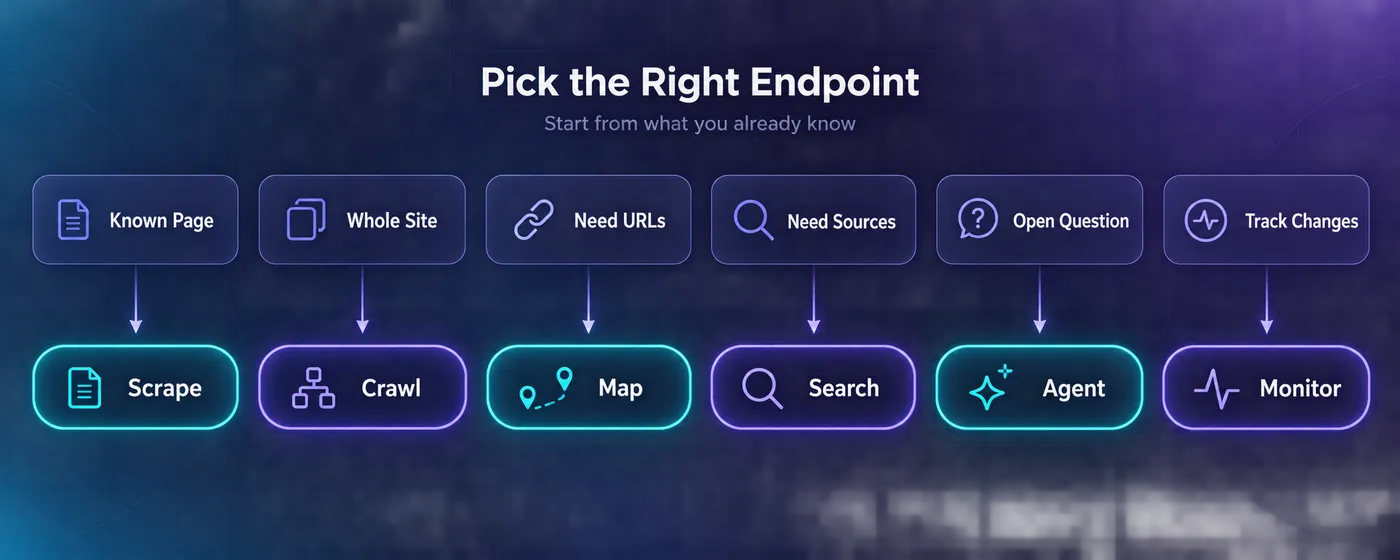
Here’s the same logic with real numbers for each use case above:
| Use case | Endpoint and format | Example job | Credits |
|---|---|---|---|
| RAG chatbot | Crawl, Markdown | 2,000-page docs site | 2,000 |
| Agent web access | Search, Markdown | 1,000 searches, 5 pages each | 7,000 |
| Lead enrichment | Scrape, JSON | 1,000 company homepages | 5,000 |
| Price tracking | Scrape, product | 200 pages daily for 30 days | 6,000 |
| Change alerts | Monitor | 2 pages daily for 30 days | 60 |
| Deep research | Agent | One research run | A few hundred |
| SEO audit | Map, then batch scrape | 200 blog posts | 201 |
| Training data | Batch scrape, Markdown | 50,000 pages | 50,000 |
| Brand kits | Scrape, branding | 100 websites | 100 |
| PDF parsing | Parse | 40-page report | 40 |
What These Use Cases Really Cost
Credits are shared across every endpoint, so your plan is one pool. Here’s what each plan buys on yearly billing, as listed on October 9, 2026:
| Plan | Price a month | Credits a month | Cost per 1,000 credits |
|---|---|---|---|
| Free | $0 | 1,000 | Free |
| Hobby | $16 | 5,000 | $3.20 |
| Standard | $83 | 100,000 | $0.83 |
| Growth | $333 | 500,000 | $0.67 |
| Scale | $599 | 1,000,000 | $0.60 |
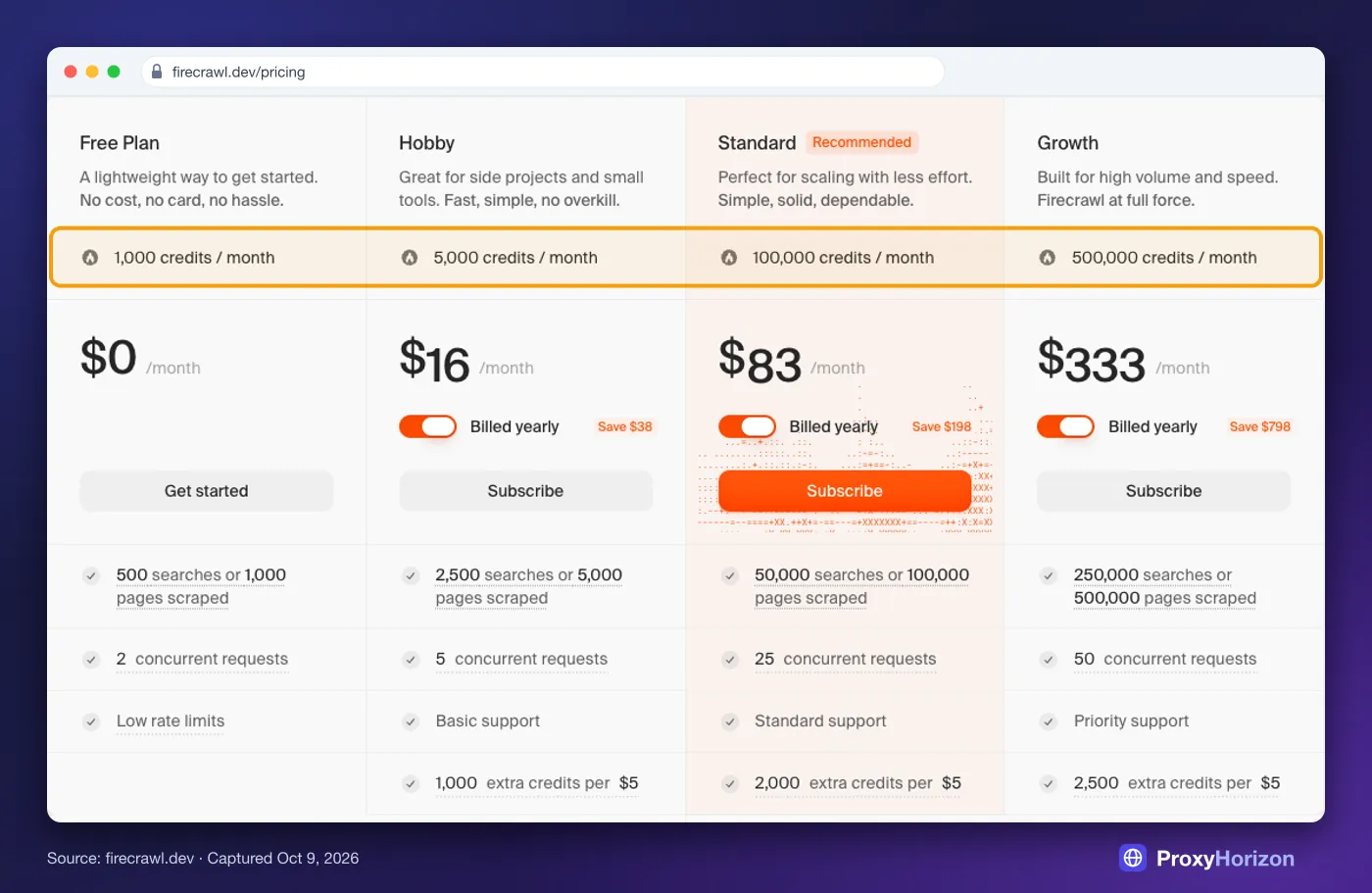
Say you run a support chatbot on a 2,000-page docs site, refresh it weekly, and let an agent answer 1,000 web questions a month. That’s about 8,000 crawl credits plus 7,000 search credits.
Fifteen thousand credits fits Standard with room to spare. Hobby would run dry in the second week.
Two billing rules catch people out. Pages that return a 403 or 404 still cost a credit, and cached results cost the same as fresh ones. Unused credits don’t roll over either, except on annual Scale and Enterprise plans. Our Firecrawl pricing breakdown covers overage packs and plan limits.
Where Firecrawl Is the Wrong Tool
Firecrawl is excellent on the long tail of ordinary websites. It isn’t the answer to everything, and a few jobs go better elsewhere.
LinkedIn and some social platforms. Firecrawl’s docs say plainly that it doesn’t scrape LinkedIn, and blocked sites return an UNSUPPORTED_SITE error. For Instagram, TikTok and Google Maps, Firecrawl itself points people to Apify’s ready-made scrapers. Our Firecrawl vs Apify comparison shows where each one wins.
Heavily protected targets. In Proxyway’s independent test from late 2025, Firecrawl finished last of 11 scraping APIs on protected sites. It has since cut the price of its enhanced proxy mode, but those proxies only cover the US and the Netherlands. For tough targets, see our guide to getting past Cloudflare.
Huge crawls of simple sites. At $0.60 to $0.83 per 1,000 pages on the bigger plans, Firecrawl is cheap. A self-run crawler on datacenter proxies can still undercut it across millions of static pages, if you have time to maintain it.
Self-hosting. The open-source core is AGPL-3.0, and it leaves out Fire-engine, Firecrawl’s anti-bot layer, plus the agent, interact and the product format. Expect a different product from the cloud API.
Our take: Firecrawl wins when your bottleneck is engineering time. When the bottleneck is a hard target or a huge budget line, test a specialist first. Our Firecrawl alternatives roundup covers the options.
Mistakes That Burn Firecrawl Credits
1Requesting JSON When Markdown Would Do
JSON costs 5 credits a page. If an LLM reads the output next anyway, Markdown at 1 credit is often enough, and your model can pull the fields itself.
2Crawling Without a Limit or Path Filter
A crawl defaults to a 10,000-page limit and checks your balance before it starts. If you can’t cover the limit, it stops with a 402 error. Set limit and include_paths on every crawl.
3Checking Pages More Often Than They Change
Hourly monitoring costs 24 times more than daily. Match each schedule to how often the page really changes. A terms page doesn’t need checking every five minutes.
4Sending the Agent to a Page You Already Know
The agent earns its credits on unknown sources. On a known URL, a JSON scrape costs 5 credits. An agent run on the same question can cost hundreds.
5Assuming Cached Pages Are Free
By default, Firecrawl can serve a cached copy up to two days old. It’s faster, but it still costs a credit and can be out of date. Set max_age=0 when you need today’s prices.
Frequently Asked Questions
Where to Start
If you remember one thing, make it this: choose the endpoint before the plan. Crawl and Markdown for knowledge bases, search for agents, product or branding formats when they fit, and JSON only when you need it.
Start on the free plan with the use case closest to your real job. A docs crawl or a 200-domain enrichment run will show you within an hour whether the output is good enough, and what a month at scale would cost.
Comparing tools first? Line them up in our comparison tool, or browse the proxy directory for the targets Firecrawl can’t reach.