How SOCKS5 Proxies Work Under the Hood (2026)
A technical deep dive into how SOCKS5 proxies work: the handshake, commands, addressing, authentication, UDP support, and why SOCKS5 beats HTTP and SOCKS4.
Every time you point a browser, torrent client, or scraper at a SOCKS5 proxy, a small and precise conversation happens in milliseconds before a single byte of your real traffic moves. Most guides tell you SOCKS5 "hides your IP" and stop there. This one opens the hood and shows you the actual machinery.
SOCKS5 is a proxy protocol defined in RFC 1928 back in 1996, and it has outlasted almost everything from that era because of one design choice: it doesn't care what you're sending. Where an HTTP proxy reads and understands web requests, SOCKS5 just shuttles raw bytes between you and a destination. That makes it protocol-agnostic, lightweight, and equally happy carrying web traffic, email, game packets, or a torrent swarm.
By the end of this guide you'll understand how SOCKS5 proxies work under the hood: the handshake step by step, the three commands the protocol supports, how it handles addresses and DNS, where authentication fits, and the one thing SOCKS5 deliberately does not do. If you only want the practical picture, our comparison of HTTP vs SOCKS5 proxies covers when to use which. This is the deep dive.
What a SOCKS5 Proxy Really Is
SOCKS5 operates at the session layer, sitting between the transport layer (TCP and UDP) and the application. That position is the whole story. It's low enough to move any kind of traffic, but high enough to add useful features like authentication and remote name resolution. It establishes a connection on your behalf and then relays bytes in both directions without interpreting them.
Compare that to an HTTP proxy, which speaks HTTP fluently: it can read headers, cache pages, and filter requests, but it only understands web traffic. SOCKS5 is the opposite philosophy. It's a dumb, fast pipe, and "dumb" here is a compliment. Because it never parses your data, it adds little overhead and works with protocols it has never heard of. If you understand how a proxy server relays a request in general, SOCKS5 is that idea stripped to its efficient core.
The SOCKS5 Handshake, Step by Step
Before any of your traffic flows, the client and the proxy run a short negotiation. It's only a few message exchanges, but each one has a job.
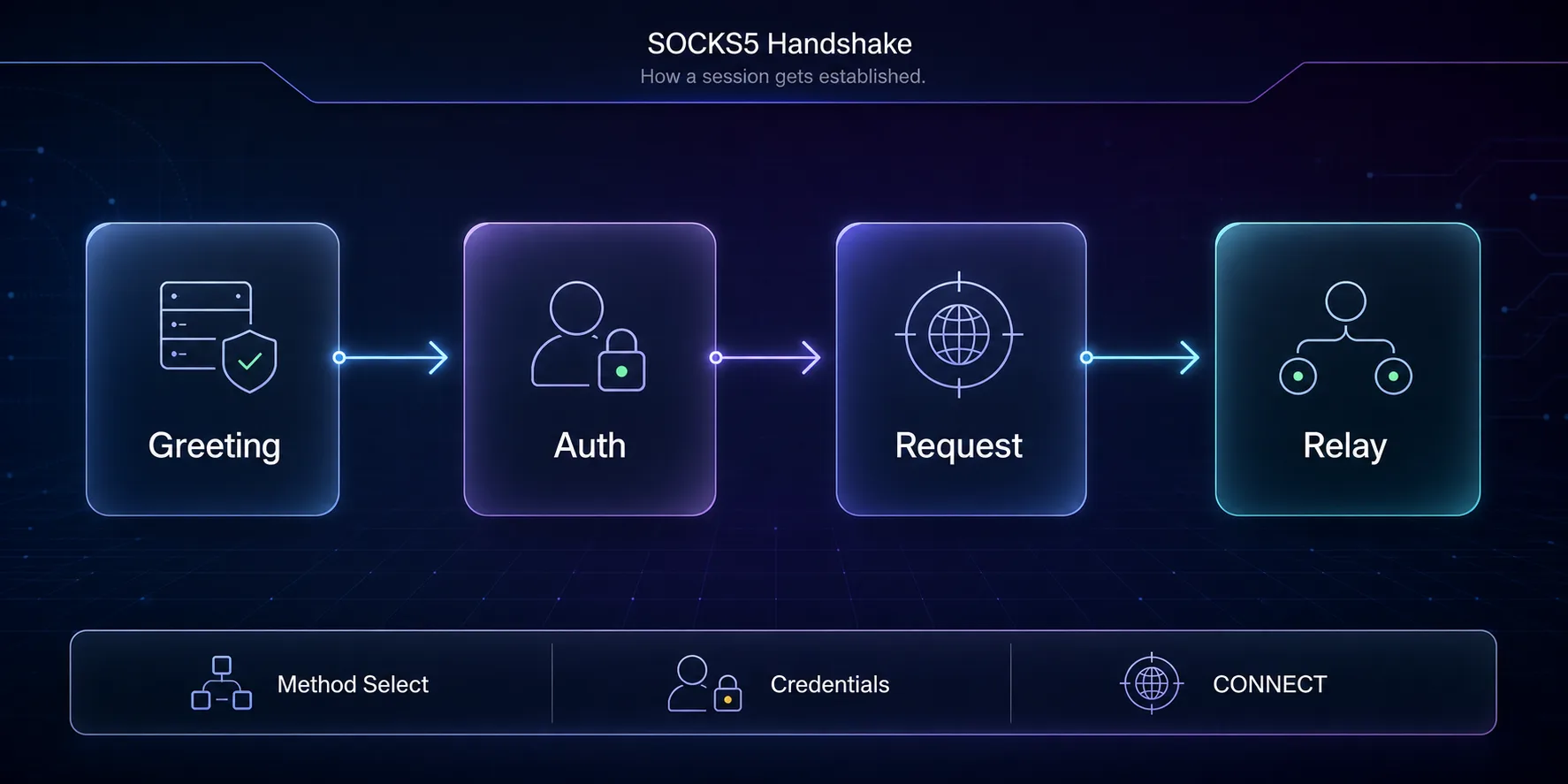
First comes the greeting. The client sends the protocol version (0x05) and a list of authentication methods it supports. The proxy replies with its method selection, picking one method, or 0xFF if none are acceptable, which ends the session. If the chosen method needs credentials, a short authentication sub-negotiation runs next.
Then the client sends the request: the version again, a command (connect, bind, or UDP associate), a reserved byte, an address type, and the destination address and port. The proxy attempts the action and returns a reply with a status code, 0x00 meaning success. From that moment the connection becomes a transparent relay: the proxy pipes bytes between you and the target until someone hangs up. Everything after the handshake is just your raw traffic flowing through.
CONNECT, BIND, and UDP ASSOCIATE
The command byte in that request is where SOCKS5 shows its range. It supports three, and the third is the one that sets it apart from older proxies.
| Command | Byte | What the proxy does | Typical use |
|---|---|---|---|
| CONNECT | 0x01 | Opens an outbound TCP connection to your target and relays it | Browsing, scraping, APIs, most traffic |
| BIND | 0x02 | Listens for an inbound connection on your behalf | Active-mode FTP, some legacy P2P |
| UDP ASSOCIATE | 0x03 | Sets up a relay for connectionless UDP traffic | Online gaming, streaming, VoIP, DNS |
CONNECT handles the vast majority of real-world use. BIND is a niche holdover for protocols that need the server to open a connection back to you. UDP ASSOCIATE is the quiet hero: because SOCKS5 can relay UDP, it works for latency-sensitive traffic like games and voice calls that an HTTP proxy simply can't carry.
How SOCKS5 Handles Addresses and DNS
Inside the request, the address type byte tells the proxy how to read the destination. SOCKS5 accepts three: an IPv4 address (0x01), a domain name (0x03), or an IPv6 address (0x04). That domain-name option is more important than it looks.
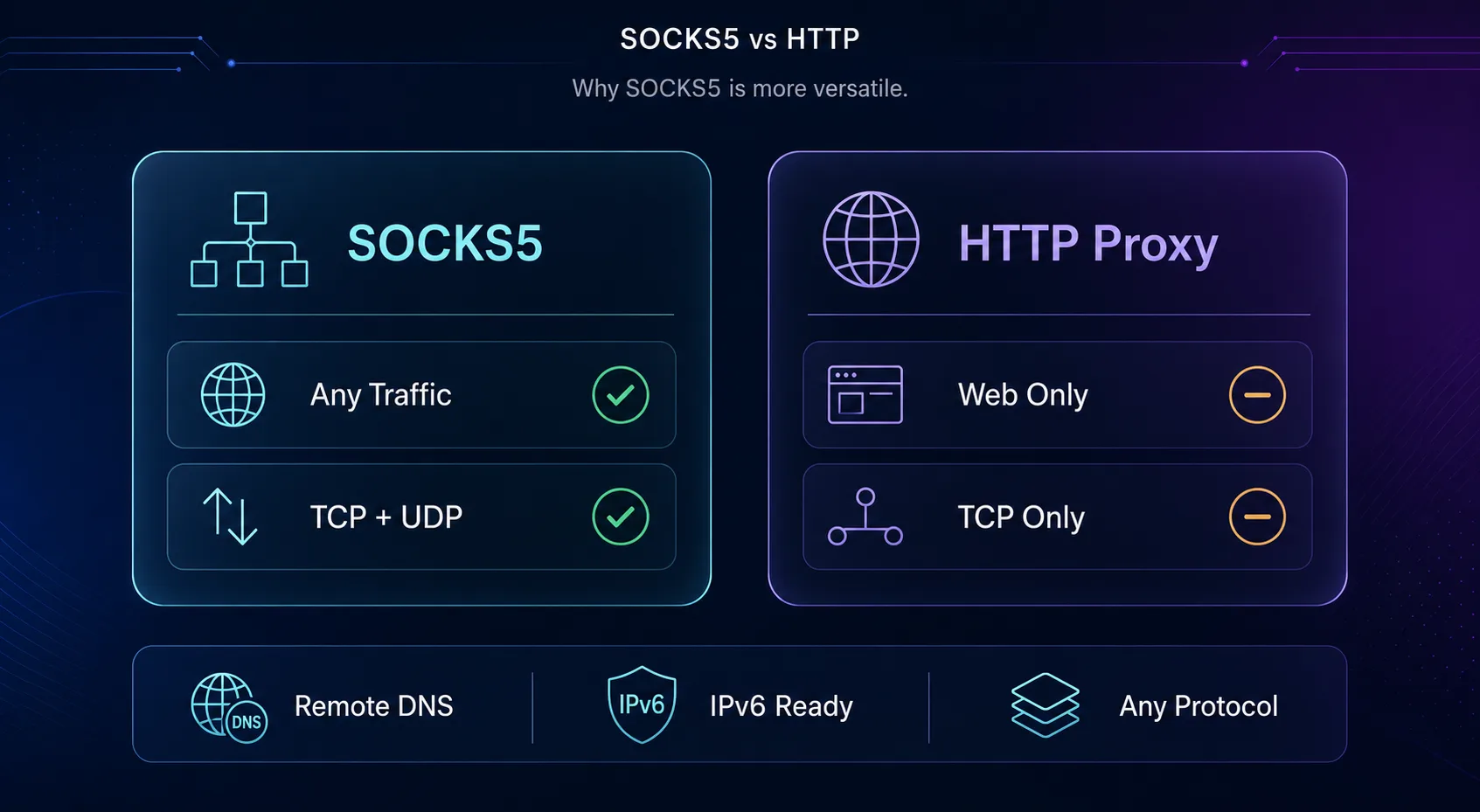
When you pass a domain rather than an IP, the proxy resolves the DNS lookup itself, on its end, not yours. This is remote DNS resolution, and it's why SOCKS5 helps prevent DNS leaks: your device never has to ask its local resolver where "example.com" lives, so your ISP doesn't see the lookup. Native IPv6 support, meanwhile, keeps SOCKS5 relevant on modern networks where an older protocol would choke. If you want to confirm your setup isn't leaking, you can check your IP address after connecting.
Authentication in SOCKS5
SOCKS5 was the first version of the protocol to take authentication seriously, which is a big reason commercial providers standardized on it. During the greeting, the client and proxy agree on one of a few methods. The common ones are no authentication (0x00), username and password (0x02, defined in RFC 1929), and GSSAPI (0x01) for enterprise setups.
Username and password is what nearly every proxy provider uses to tie usage to your account. Here's the honest catch: that credential exchange is sent in plain text within the handshake, so on an untrusted network it can be observed. It's fine over infrastructure you trust, but it's another reminder that SOCKS5 is a routing protocol, not a security blanket. For a fuller picture of the options, see our guide to proxy authentication methods.
SOCKS5 vs SOCKS4 vs HTTP Proxies
SOCKS5 didn't win by accident. Lining it up against its predecessor and against HTTP proxies makes the design trade-offs obvious.
| Capability | SOCKS4 | SOCKS5 | HTTP proxy |
|---|---|---|---|
| Traffic types | TCP only | TCP and UDP | HTTP / HTTPS |
| Authentication | Ident only | None, user/pass, GSSAPI | Basic / Digest |
| IPv6 support | No | Yes | Yes |
| Remote DNS | No (SOCKS4a adds it) | Yes | Yes |
| Reads your app data | No | No | Yes (can cache/filter) |
| Best fit | Legacy systems | Any protocol, versatile | Web-only control and caching |
SOCKS4 lacked UDP, IPv6, and real authentication, so SOCKS5 replaced it almost everywhere. An HTTP proxy isn't worse, it's different: because it understands web traffic, it can cache and filter, which is genuinely useful for web-only workloads. But it can't touch your game, your torrent, or your DNS the way SOCKS5 can.
Why SOCKS5 Became the Default for Proxies
Put the pieces together and the appeal is clear. SOCKS5 is versatile because it carries any protocol; it's fast because it never parses your data; and it's flexible because it handles TCP and UDP, IPv6, remote DNS, and authentication in one clean spec. That combination fits almost every proxy use case, from web scraping to sneaker bots to streaming to torrenting.
For data work specifically, that low overhead matters. When you're firing millions of requests, a proxy that adds minimal processing per connection compounds into real speed. It's the same reason developers reach for SOCKS5 when they wire proxies into code, as in our walkthrough on using SOCKS5 proxies in Python. The protocol gets out of the way.
What SOCKS5 Does Not Do
This is the part marketing pages skip, and it's the most important thing to understand. SOCKS5 does not encrypt your traffic. It changes the route your data takes and masks your IP from the destination, but the bytes themselves travel exactly as your application sent them. If that traffic is HTTPS, it's already encrypted by the application. If it's plain HTTP, anyone between you and the proxy can read it.
That's the core difference from a VPN. A VPN builds an encrypted tunnel for your whole device; SOCKS5 reroutes specific app traffic without encrypting it. Neither is "better", they solve different problems. Use SOCKS5 for IP masking, geo-targeting, and per-app routing at high speed. Reach for a VPN when you need device-wide encryption. Treating SOCKS5 as a privacy shield it was never designed to be is how people get a false sense of security.
Where to Get Reliable SOCKS5 Proxies
The protocol is only as good as the network behind it. How we picked: we favored providers with solid SOCKS5 support, clean IP pools, wide geographic coverage, and pricing models that suit different scales. A quick disclosure: some links below are affiliate links, and we may earn a commission if you sign up, which never changes our recommendations.
1IPRoyal

IPRoyal is the best budget-friendly way into SOCKS5. It offers residential and datacenter IPs with full SOCKS5 support, and its non-expiring traffic model suits people whose usage comes in bursts rather than a steady monthly stream. For a first SOCKS5 setup without a big commitment, it's an easy start.
The network is smaller than the enterprise giants and the dashboard favors simplicity over advanced controls. For most individual and small-team use, though, that's exactly what you want.
2Oxylabs

Oxylabs is the choice for SOCKS5 at serious scale. Its 100M+ residential network, near-perfect uptime, and enterprise support are built for teams running heavy, sustained workloads where reliability is non-negotiable. The SOCKS5 endpoints are stable and fast, and the geo-coverage is comprehensive.
It's premium infrastructure at a premium price, so it's overkill for a hobby project. When volume and stability matter more than saving a few dollars, it's a top-tier pick.
3PyProxy

PyProxy is a strong fit for developers who want SOCKS5 by the IP at high volume. It offers a large residential pool with SOCKS5-by-IP pricing and an unlimited-bandwidth daily option that heavy scrapers appreciate. For code-driven workflows that hammer a lot of requests, the pricing model can work out cheaper than per-GB plans.
It's less of a polished, hand-holding platform than the bigger names, so it rewards users comfortable configuring things themselves. For that audience, the value is real. Compare all three in our proxy provider directory.
Common Misconceptions About SOCKS5
A few myths follow SOCKS5 around. Clearing them up saves you from a dangerous false sense of security.
1"SOCKS5 Encrypts My Traffic"
It doesn't, and this is the big one. SOCKS5 reroutes and masks your IP, but the data travels unencrypted unless your application already encrypts it (as HTTPS does). If you need the traffic itself protected, that job belongs to TLS or a VPN, not the proxy.
2"SOCKS5 Is the Same as a VPN"
They overlap but aren't interchangeable. A VPN encrypts and tunnels every app on your device; SOCKS5 reroutes chosen app traffic without encryption. SOCKS5 is lighter and often faster; a VPN is more secure device-wide. Pick based on whether you need speed and per-app routing or full-device protection.
3"SOCKS5 Makes You Anonymous"
It hides your IP from the destination, which is not the same as anonymity. Logged-in accounts, browser fingerprints, and tracking cookies still identify you. A proxy is one layer, not a cloak, and treating it as total anonymity is a mistake.
4"SOCKS5 Is Always Faster"
Usually it has low overhead, but speed depends on the proxy server's location, load, and the quality of the IP. A distant or overloaded SOCKS5 server can easily be slower than a well-placed HTTP proxy. The protocol helps; it doesn't guarantee speed.
5"You Always Connect on Port 1080"
Port 1080 is the traditional default for SOCKS, but providers run SOCKS5 on all sorts of ports. Always use the exact host and port your provider gives you rather than assuming 1080, or the connection simply won't establish.
Frequently Asked Questions
The Bottom Line
SOCKS5 has lasted nearly three decades because its design is honest about what it is: a fast, protocol-agnostic pipe that reroutes your traffic and hides your IP, with authentication, UDP, IPv6, and remote DNS built in. Understand the handshake and the three commands, and the protocol stops being a mystery setting and becomes a tool you can use deliberately.
Just remember the one line that matters most: SOCKS5 routes, it doesn't encrypt. Pair it with HTTPS or a VPN when the traffic itself needs protecting, and choose a provider with clean IPs and stable endpoints. IPRoyal is the budget entry, Oxylabs the enterprise workhorse, and PyProxy the developer's high-volume pick. Browse the full shortlist in our proxy provider directory when you're ready to plug one in.
Keep Reading
More articles you might enjoy