What Is a Proxy Server? How It Works?
A plain-English guide to proxy servers — what they are, how they work step by step, forward vs reverse, the main types, proxy vs VPN, and how to choose one.
Almost half of all internet traffic is now automated rather than human (Imperva's Bad Bot Report), and behind a huge share of it sits one quiet piece of infrastructure: the proxy server. It is the middleman that lets a company scrape prices, a marketer run many accounts, a security team filter employee traffic, and a website absorb millions of requests without falling over.
Yet "proxy server" is one of those terms everyone has heard and few can actually explain. Is it the same as a VPN? Does it make you anonymous? Why do some proxies cost pennies and others cost a fortune? The confusion is understandable — the word covers several very different tools that happen to share one idea: routing your traffic through an intermediary.
This guide clears it up in plain English. You will learn exactly what a proxy server is, how it works step by step, the difference between forward and reverse proxies, the main types and when to use each, how proxies compare to VPNs, the honest risks, and how to choose one. Whether you are a curious beginner or evaluating proxies for real work, you will leave knowing what matters.
What Is a Proxy Server?
A proxy server is an intermediary computer that sits between your device and the internet. Instead of connecting directly to a website, your request goes to the proxy first; the proxy forwards it to the destination, receives the response, and passes it back to you. To the website, the traffic appears to come from the proxy's IP address — not yours.
In plain English: a proxy is a stand-in. It makes requests on your behalf, so the sites you visit see the proxy's identity rather than your own. That single property — swapping your IP for someone else's — is the foundation of nearly everything proxies are used for, from privacy and geo-access to web scraping and traffic management.
The concept is simple, but the details matter enormously. A cheap shared proxy and a premium residential proxy both "route your traffic," yet they behave completely differently on strict websites. Understanding the mechanics is what lets you pick the right one — so let us look under the hood.
How Does a Proxy Server Work?
Every proxy connection follows the same basic round trip. Here is what actually happens when you load a page through one.
1You send a request to the proxy
Your device is configured to send traffic to the proxy server's address instead of directly to the web. You ask for a page; that request goes to the proxy first.
2The proxy evaluates and forwards it
The proxy receives your request, optionally applies rules (block this site, cache that one, add or strip headers), and then forwards it to the destination server using its own IP address.
3The destination responds to the proxy
The website processes the request as if it came from the proxy and sends the response — the web page, file, or data — back to the proxy, not to you.
4The proxy returns the response to you
Finally, the proxy relays the response back to your device. From your side it feels like a normal connection; behind the scenes, your real IP never touched the destination.
The key insight: the proxy is a relay that substitutes its identity for yours. Some proxies add extra jobs on top — caching content to speed things up, filtering requests for security, or rotating IPs to spread traffic — but the core loop is always this request-forward-respond-relay cycle.
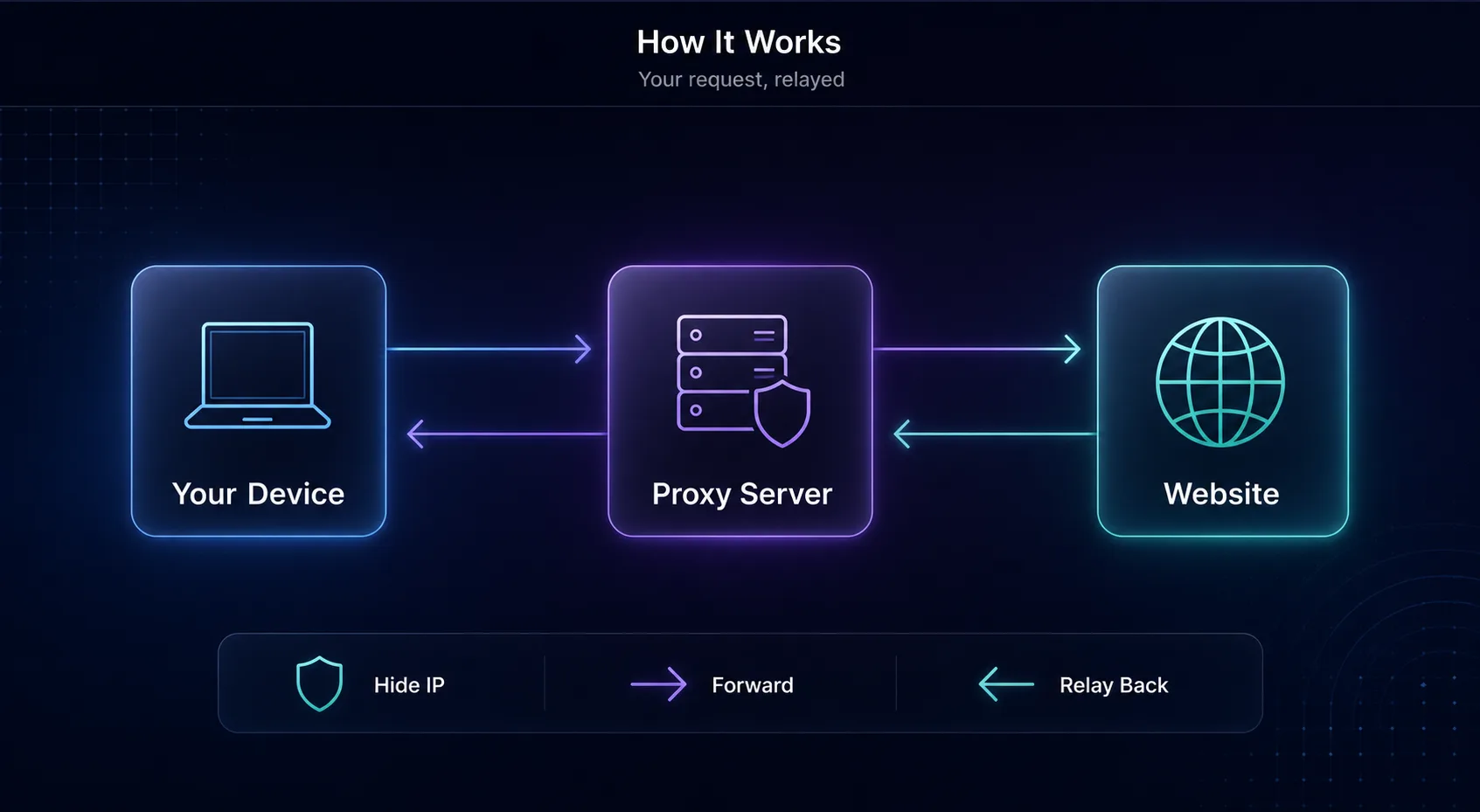
The request-forward-respond-relay loop: the proxy stands in for your device.
Forward Proxy vs Reverse Proxy
This is the distinction that trips up most people. The two are mirror images: it comes down to whose side the proxy works for.
A forward proxy sits in front of clients (users) and represents them to the internet — this is the "proxy" most people mean when they talk about residential or datacenter proxies. A reverse proxy sits in front of servers and represents them to incoming visitors, handling load balancing, caching, and security for a website.
Aspect | Forward Proxy | Reverse Proxy |
|---|---|---|
Works for | The client / user | The web server |
Sits in front of | Users making requests | Servers receiving requests |
Hides | The user's IP from sites | The server's details from visitors |
Typical use | Privacy, scraping, geo-access | Load balancing, caching, WAF |
Examples | Residential/datacenter proxies | Nginx, Cloudflare, load balancers |
Our take: when this article says "proxy server" in the everyday sense — for privacy, geo-access, or web scraping — it means a forward proxy. Reverse proxies are infrastructure that website owners run; you interact with them constantly (Cloudflare is one) without ever configuring them yourself.
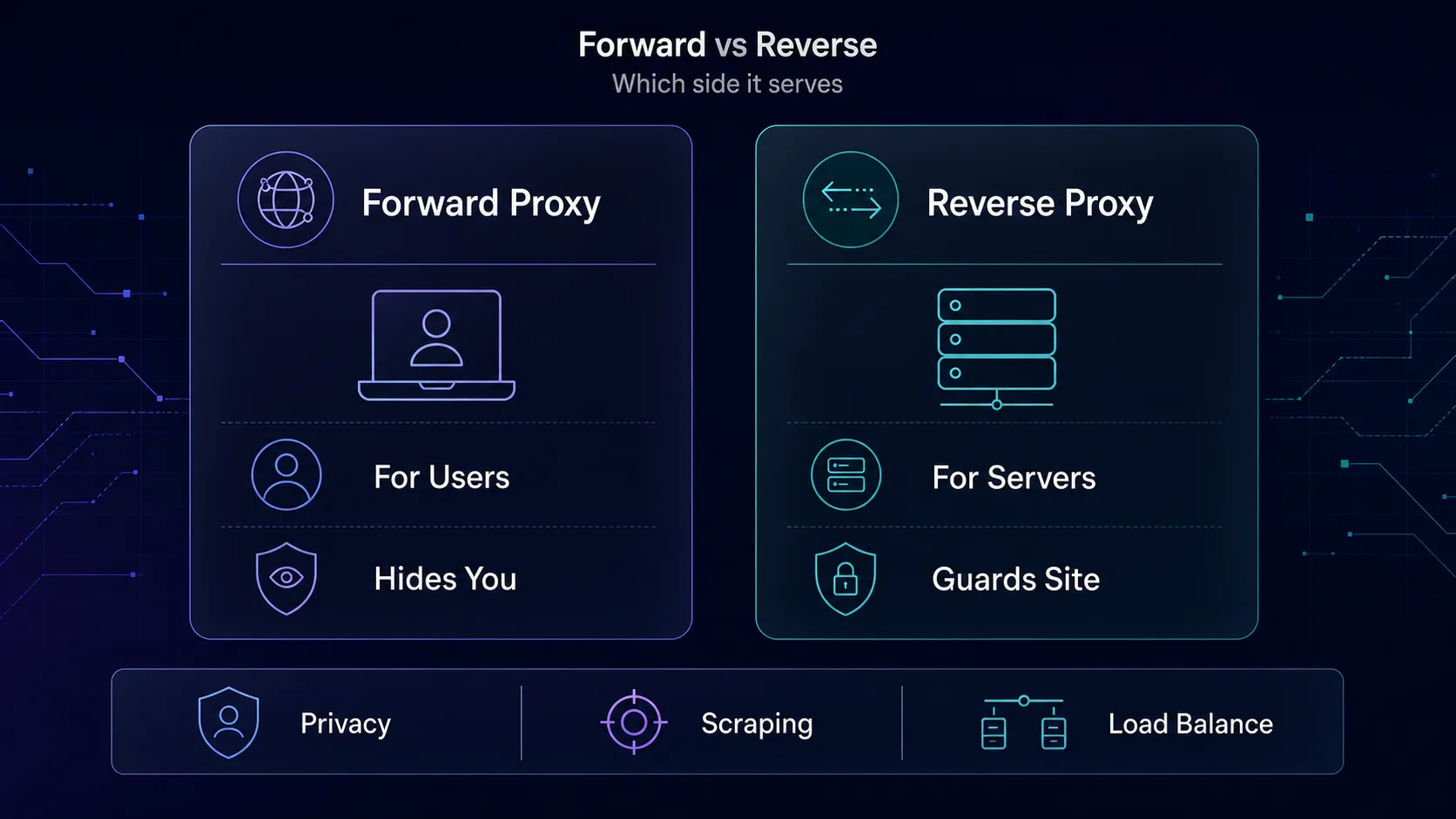
Forward proxies serve users; reverse proxies serve servers.
Types of Proxy Servers
Proxies are classified two ways: by where the IP comes from and by how much anonymity they offer. Both matter for choosing the right tool.
1By IP source
Residential proxies use IPs assigned by real ISPs to real homes, so they look like genuine users and rarely get blocked. Datacenter proxies come from cloud servers — fast and cheap, but easy to detect on strict sites. ISP (static residential) proxies blend the two: ISP-registered IPs hosted in data centers, giving residential trust at datacenter speed. Mobile proxies route through 4G/5G carrier IPs and carry the highest trust of all.
We cover each in depth in dedicated guides: residential proxies, datacenter proxies, ISP proxies, and mobile proxies. For the full landscape, see our overview of the different types of proxies.
2By protocol
HTTP/HTTPS proxies handle web traffic and are the most common. SOCKS5 proxies are protocol-agnostic — they route any kind of traffic (web, email, torrents, gaming), which makes them more flexible. Our guide to HTTP, HTTPS and SOCKS5 proxies breaks down the differences.
3By anonymity level
Transparent proxies pass along your real IP (used for content filtering, not privacy). Anonymous proxies hide your IP but reveal that a proxy is in use. Elite (high-anonymity) proxies hide both — the site cannot tell you are using a proxy at all.
Proxy Type | Anonymity | Speed | Best For |
|---|---|---|---|
Residential | High | Medium | Scraping, accounts, geo-access |
Datacenter | Low–Medium | Fastest | Bulk, speed-sensitive tasks |
ISP (static) | High | Fast | Sneakers, long sessions |
Mobile | Highest | Medium | Social media, hardest targets |
Proxy Server vs VPN
This is the most common question, so let us be precise. Both route your traffic through an intermediary and hide your IP, but they operate at different levels and serve different goals.
A VPN encrypts all traffic from your device and routes it through one server — great for privacy and security across your whole system, but it is one connection at a time. A proxy typically works at the application level (one browser or tool), often without encryption, but gives you access to a pool of many IPs and fine-grained, per-request control — which is exactly what scraping and multi-account work need.
Quick verdict: want to encrypt your whole device for privacy on public Wi-Fi? Use a VPN. Need thousands of rotating IPs for data collection or many accounts? Use proxies. For the deep dive, see our proxy vs VPN comparison.
Why Use a Proxy Server?
Proxies power a surprising range of everyday and enterprise tasks. The most common reasons:
Web scraping and data collection — rotating IPs let you gather public data at scale without being rate-limited or blocked.
Privacy and IP masking — hide your real IP from the sites you visit and reduce tracking.
Accessing geo-restricted content — appear to browse from another country to see localized pricing, results, or catalogs.
Managing multiple accounts — give each account its own IP so platforms do not link and ban them.
Ad verification and brand protection — check how ads and listings appear in different regions.
Security and content filtering — organizations route employee traffic through a proxy to block threats and enforce policy.
Caching and speed — proxies can store frequently requested content to reduce load and latency.
Best for: anyone who needs scale, geo-flexibility, or per-request IP control. If you just want whole-device privacy on one connection, a VPN is simpler.
Limitations and Risks (The Honest Part)
Proxies are powerful, but they are not magic — and some are outright dangerous. Here is what vendor pages tend to skip.
1Free proxies are a real hazard
Running proxy servers costs money, so "free proxy lists" are often monetized in the worst ways: logging your traffic, injecting ads, or harvesting data. Many are slow, unstable, and already blocked. For anything that matters, a free proxy is a false economy — you pay with your data.
2Most proxies do not encrypt
Unlike a VPN, a standard HTTP proxy does not encrypt your traffic. It hides your IP but does not secure the data in transit, so it is not a substitute for encryption on sensitive connections. HTTPS to the destination still helps, but the proxy layer itself adds no privacy shield.
3A proxy alone is not full anonymity
Swapping your IP is only one signal. Your browser fingerprint, cookies, and logged-in accounts can still identify you. Sites also see far more than your IP — as our guide on whether websites can see your IP explains. Treat a proxy as one layer, not a cloak.
4Quality varies wildly
Cheap, overused residential pools are often flagged before you even start, so you burn bandwidth on retries and challenges. Judge a proxy by successful requests, not the sticker price — quality and IP reputation matter more than raw cost.
Top Proxy Providers to Consider
If you have decided a proxy is what you need, here are four reputable providers we rate, spanning value, budget, and enterprise scale. Each links to full specs and pricing.
1Decodo

Best all-rounder. Decodo (formerly Smartproxy) pairs a large, clean residential pool with an easy dashboard and beginner-friendly pricing, making it the natural first pick for scraping, geo-access, and account work. Rotating and sticky sessions cover most use cases from a single plan.
2IPRoyal

Best pay-as-you-go value. IPRoyal's non-expiring residential traffic means your bandwidth balance does not vanish monthly — ideal for occasional users. It also offers datacenter, mobile, and SOCKS5 options as you scale, all with friendly entry pricing.
3Oxylabs

Best for enterprise scale. Oxylabs brings a huge IP pool, enterprise SLAs, and a mature API with strong docs — infrastructure built for large scraping operations. It is premium-priced, but for teams that need reliability at volume, it delivers.
4Webshare

Best for tight budgets. Webshare offers a genuinely usable free tier plus some of the cheapest paid datacenter and residential plans around, with native SOCKS5. It is the ideal place to learn and test before scaling up. Browse the full field in our proxy directory.
How to Choose and Set Up a Proxy Server
1Match the type to your task
Account work and strict sites need residential or mobile IPs; high-volume, logged-out scraping tolerates datacenter. Long sessions favor ISP proxies. Naming your use case first narrows the choice instantly.
2Decide rotating vs sticky
Rotating proxies change IP per request — great for spreading scraping load. Sticky sessions hold one IP for minutes or hours — needed for logged-in accounts. Most quality providers offer both; make sure yours does.
3Configure it correctly
You typically get a host, port, username, and password. Enter these in your browser's network settings, your scraping tool, or an app's proxy configuration. For SOCKS5, choose the SOCKS5 option specifically. Then test with an IP-check site to confirm your traffic is routing through the proxy.
4Test before you commit
Buy a small plan first. Quality varies by location and target site, so validate on your real workflow before scaling to a large plan. Compare options side by side with our comparison tool.
Common Proxy Mistakes to Avoid
1Using free public proxies for real work
They are slow, unstable, often already blocked, and a genuine privacy risk. For anything that matters, use a reputable paid provider — the cost is small and the reliability difference is enormous.
2Picking datacenter proxies for strict sites
Datacenter IPs are easy to detect, so using them on sites with strong anti-bot systems means constant blocks. Reserve them for lenient, high-volume targets and use residential or mobile where trust matters.
3Ignoring your fingerprint
A fresh IP with a botty browser fingerprint still gets flagged. Pair proxies with proper headers, realistic pacing, and — for account work — separate browser profiles. The IP is one signal among many.
4Chasing the lowest price per GB
Bargain pools are often recycled and pre-flagged, so you waste bandwidth on failures. Measure cost by successful requests, not the headline rate. Quality wins.
5Treating a proxy as full security
A standard proxy hides your IP but does not encrypt your traffic. If you need security and whole-device privacy, use a VPN or ensure end-to-end encryption — do not rely on the proxy alone.
Frequently Asked Questions
Conclusion
A proxy server is, at heart, a simple idea with enormous reach: an intermediary that makes requests on your behalf and swaps its IP for yours. That one property powers web scraping, privacy, geo-access, multi-account management, security filtering, and the load balancing that keeps big websites online.
The nuances are what make you effective. Forward proxies serve users; reverse proxies serve servers. Residential and mobile IPs carry trust; datacenter IPs carry speed. Proxies give you IP scale and control; VPNs give you whole-device encryption. And free proxies are almost always a trap. Match the type to your task, and a proxy becomes one of the most versatile tools on the internet.
Ready to go further? Explore live specs and pricing in our proxy directory, compare providers head-to-head with our comparison tool, or read up on the different types of proxies to find your exact fit. Start small, test on your real workflow, and scale what works.