What Is an IPv6 Leak? Why VPNs Leak IPv6 and How to Fix It (2026)
An IPv6 leak lets websites see your real address even with a VPN on. Here’s why dual-stack networks slip past some VPNs, how to test in two minutes, and how to fix it on every system.
Your VPN says “Connected.” An IP checker shows a server in another country. Then a second test page lists a long address full of colons, and it belongs to your home internet connection.
That’s an IPv6 leak. Your VPN protected one kind of traffic and let the other kind walk straight past it.
This guide explains why dual-stack networks cause IPv6 leaks, how to check for one in a couple of minutes, and how to fix it on Windows, macOS, Linux and your router without breaking anything.
- An IPv6 leak happens when a VPN tunnels IPv4 but lets IPv6 traffic use your normal connection.
- Dual-stack devices often prefer IPv6, so IPv6-capable sites can see your real address.
- Test with curl -4 and curl -6 icanhazip.com, or test-ipv6.com, with the VPN off and on.
- The best fix is a VPN app that tunnels or blocks IPv6. Manual WireGuard configs need ::/0 in AllowedIPs.
- Disabling IPv6 is a fallback. On Windows, Microsoft recommends preferring IPv4 instead.
What Is an IPv6 Leak?
An IPv6 leak happens when your VPN sends your IPv4 traffic through its encrypted tunnel but lets IPv6 traffic go out over your normal connection. Websites that support IPv6 then see your real IPv6 address instead of the VPN server’s.
The internet runs on two versions of the Internet Protocol at the same time. IPv4 addresses look like 203.0.113.7. IPv6 addresses are much longer, like 2001:db8::8a2e:370:7334. If you want a refresher on what an address reveals, our guide to what your IP address is covers the basics.
An IPv6 address is often tied closely to your own internet connection, so leaking it can be as revealing as leaking your IPv4 address. Proton VPN’s support team describes the real IPv6 address as “unique to your connection” in its IPv6 support guide (checked November 5, 2026).
Why Do VPNs Leak IPv6 Traffic?
The short answer: most devices and many home networks are now dual-stack. They have both an IPv4 and an IPv6 address, and they’ll use whichever one works best for each site.
The IETF wrote this problem up in RFC 7359, “Layer 3 VPN Tunnel Traffic Leakages in Dual-Stack Hosts/Networks.” It explains that many VPN products only handled IPv4. They add an IPv4 default route into the tunnel but “do nothing to secure IPv6 traffic.”
Any packet headed to an IPv6 address then goes out in the clear through your local router.
Three things make this more likely than it sounds:
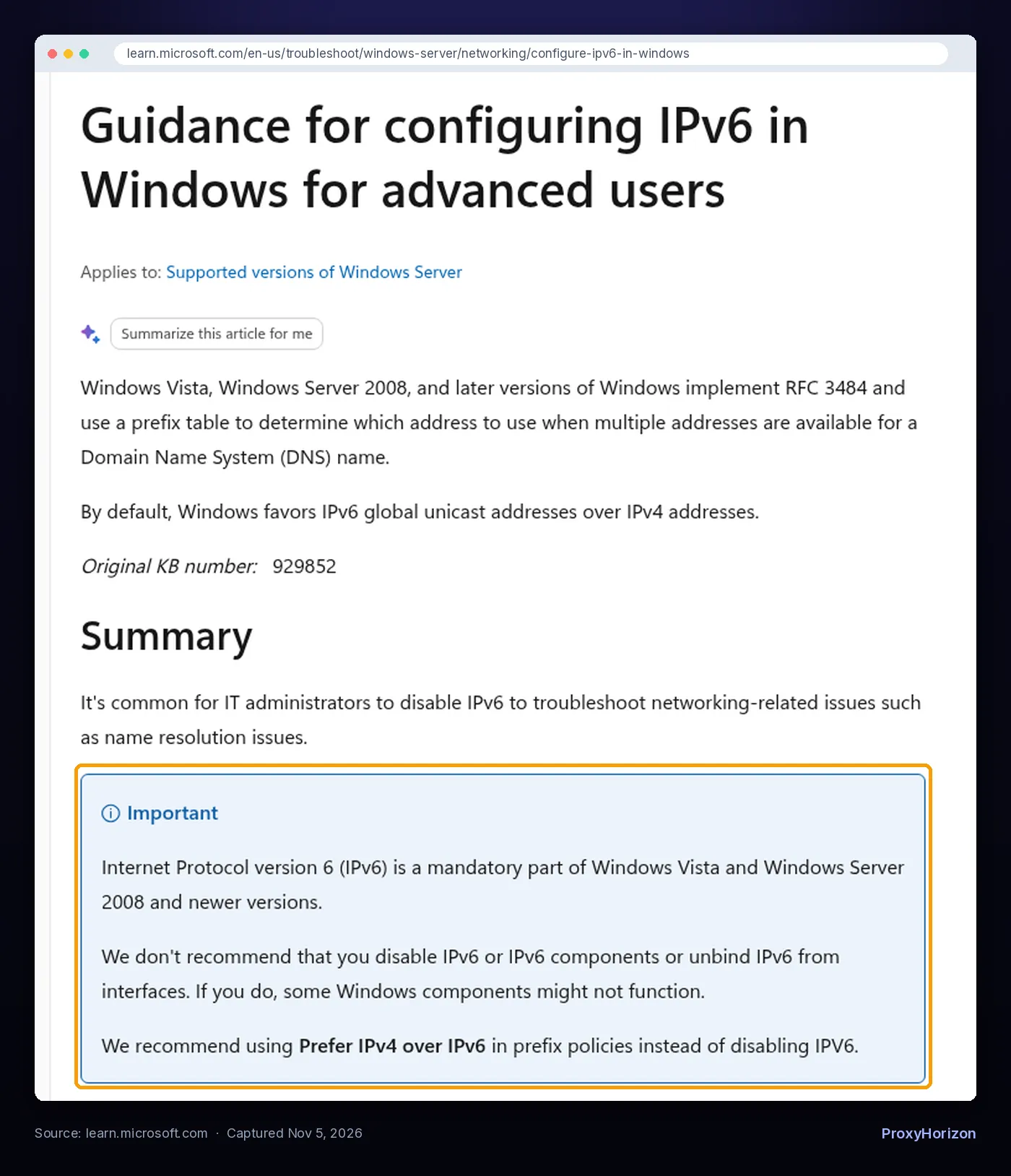
- Your device prefers IPv6. RFC 7359 notes that many systems prefer IPv6 addresses over IPv4 when both exist. Microsoft says the same about Windows: “By default, Windows favors IPv6 global unicast addresses over IPv4 addresses,” per its IPv6 configuration guide.
- DNS hands out both. A dual-stack website publishes an A record (IPv4) and an AAAA record (IPv6). Your browser asks for both and may pick the IPv6 one.
- IPv6 can wake up on its own. Your device can sit on an IPv4-only network with IPv6 “dormant,” as the RFC puts it, then move to a café or office network that offers IPv6. A VPN that ignores IPv6 won’t notice the change.
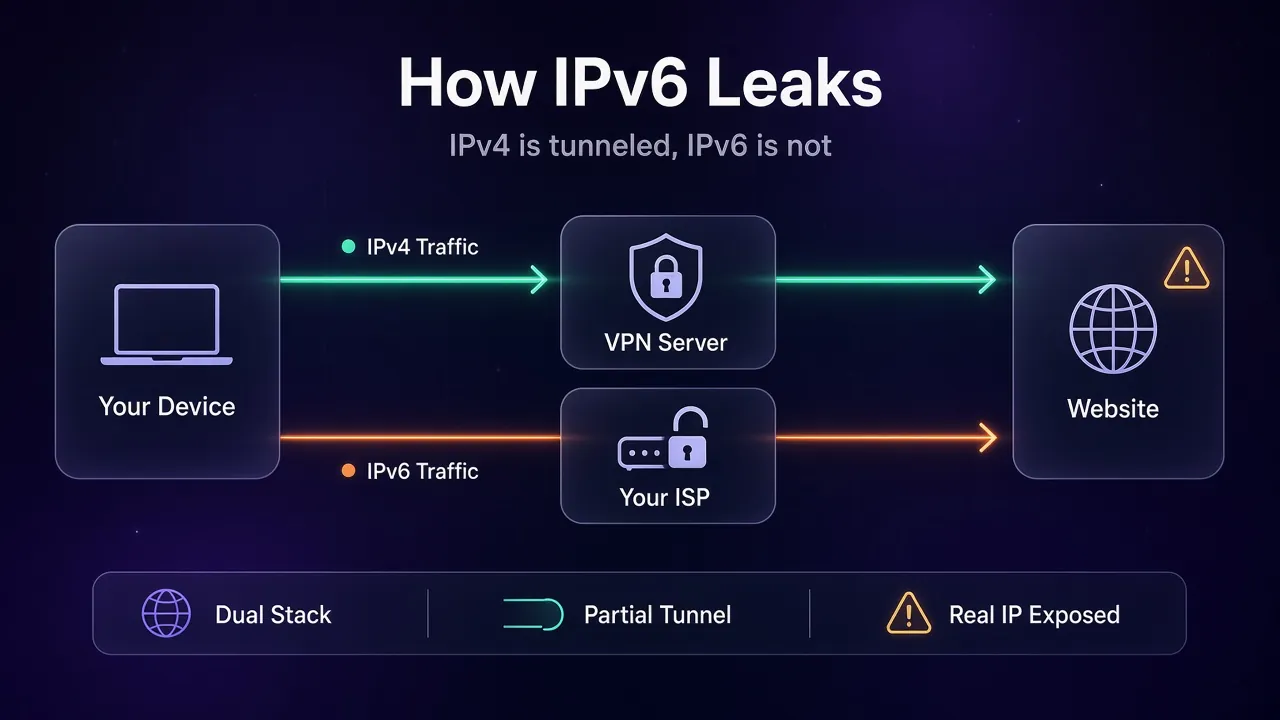
There’s also an attack version. RFC 7359 describes how someone on the same local network can send forged IPv6 Router Advertisement messages to switch on IPv6 for your device, or to pose as your DNS server. On public Wi-Fi, that turns a quiet gap into a real exposure.
What an IPv6 Leak Exposes (and What It Doesn’t)
An IPv6 leak is about your IP address and your unencrypted traffic, not about your whole connection failing.
- Your real IPv6 address is visible to any IPv6-capable site you visit, which can point to your ISP and rough location.
- Leaked traffic skips the VPN’s encryption, so your ISP and anyone on your local network can see where it’s going. HTTPS still protects page contents, but not the destination.
- Your IPv4 traffic is still protected. Sites that only support IPv4 keep seeing the VPN server, which is why a quick IP check can look perfectly fine.
That last point is why IPv6 leaks are easy to miss. It’s also why “my IP changed, so my VPN works” is one of the VPN myths worth dropping.
How to Test for an IPv6 Leak
You only need two checks: one with the VPN off and one with it on. Do this any time you change VPN apps, protocols or networks.
1Quick Browser Test
- Disconnect your VPN and open test-ipv6.com. Note whether it finds an IPv6 address. If it says you have no IPv6 connectivity, your network can’t leak IPv6 right now.
- If it shows an IPv6 address, write down the first few blocks. That’s your real one.
- Connect the VPN, refresh the page and compare.
With the VPN on, you want one of two results. Either no IPv6 address at all, which means the VPN blocks IPv6, or an IPv6 address that belongs to the VPN server. If your real IPv6 address shows up, you have a leak.
2Command-Line Test
Proton VPN’s guide to checking if your VPN is working suggests a cleaner test using cURL, which ships with Windows 10 and 11, macOS and most Linux systems:
curl -4 icanhazip.com
curl -6 icanhazip.com
Run both with the VPN off, then again with it on. The first line forces an IPv4 request and the second forces IPv6.
If the -4 result changes to the VPN’s address but the -6 result still shows your own IPv6 address, that’s a textbook IPv6 leak. If -6 fails to connect with the VPN on, IPv6 is being blocked, which is fine.
Here’s how to read the results with the VPN connected:
IPv4 result (-4) | IPv6 result (-6) | What it means |
|---|---|---|
| VPN server’s address | Fails or times out | No leak. The VPN blocks IPv6. |
| VPN server’s address | VPN server’s IPv6 address | No leak. The VPN tunnels IPv6. |
| VPN server’s address | Your own IPv6 address | IPv6 leak. Fix it with the steps below. |
| Your own address | Anything | The VPN isn’t working at all, so check the connection first. |
While you’re testing, run a DNS leak test and a WebRTC leak test too. They expose different things, and a VPN can pass one and fail another.
How to Fix an IPv6 Leak
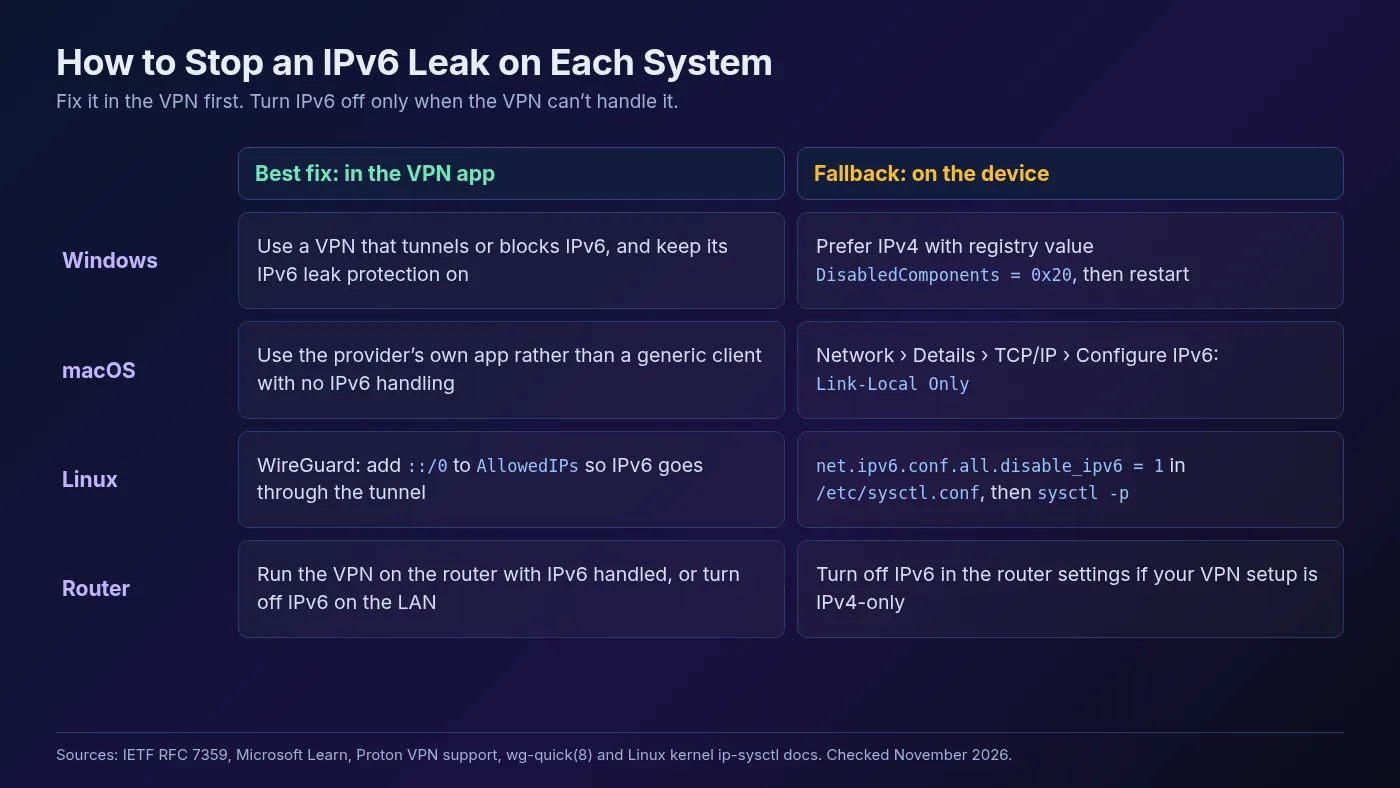
RFC 7359 gives a clear order of preference. The proper fix is a VPN client that handles IPv6 correctly, either by sending it through the tunnel or by blocking it. Turning IPv6 off on your device is listed as a temporary workaround for VPN software that can’t do that.
1Fix It in the VPN App
Look in your VPN’s settings for an option called IPv6, IPv6 leak protection or in-tunnel IPv6. Two examples from official docs (checked November 5, 2026):
- Proton VPN says it supports IPv6 in its Windows, Linux and Android apps and its browser extension, and that about 80% of its servers support IPv6. On Windows, IPv6 support is off by default and sits under Settings › Connection › Advanced Settings › IPv6 support. On apps without full IPv6 support yet, Proton says IPv6 is turned off so your address can’t be exposed.
- Mullvad has an In-tunnel IPv6 setting. Its guide says Windows and Linux users normally don’t need it, while Mac users should normally turn it on or some websites may not load in some browsers.
Whatever app you use, also check that split tunneling isn’t excluding your browser, since excluded apps bypass the tunnel on purpose. Our guide to split tunneling shows how to check. A VPN kill switch is worth turning on as well, though it protects you when the tunnel drops, not when IPv6 was never in it.
2Configure Manual WireGuard or OpenVPN Correctly
Most IPv6 leaks today come from manual setups, such as the official WireGuard client or Tunnelblick with a downloaded config. Proton’s macOS IPv6 guide specifically recommends disabling IPv6 when you use third-party clients like these.
For WireGuard, the routes come from the AllowedIPs line. The wg-quick manual says it treats 0.0.0.0/0 or ::/0 as the default route. To send all IPv6 traffic through the tunnel, the peer section needs both:
[Peer]
AllowedIPs = 0.0.0.0/0, ::/0
A config with only 0.0.0.0/0 tunnels IPv4 and leaves IPv6 on your normal route. If the server doesn’t offer IPv6, use the device-level fallback below instead.
3Turn Off or Deprioritize IPv6 on Your Device
Use this when your VPN can’t tunnel or block IPv6. Each system does it differently.
Windows. Microsoft is blunt here: “We don’t recommend that you disable IPv6 or IPv6 components,” because some Windows features might stop working. Its recommended alternative is to prefer IPv4 over IPv6 by setting the DisabledComponents registry value to 0x20 (decimal 32) from an administrator Command Prompt, then restarting:
reg add "HKEY_LOCAL_MACHINE\SYSTEM\CurrentControlSet\Services\Tcpip6\Parameters" /v DisabledComponents /t REG_DWORD /d 32 /fPreferring IPv4 makes Windows pick IPv4 whenever a site offers both, which closes most everyday leaks. Microsoft documents 0xFF as the value that disables IPv6.
It also warns that values other than 0 or 32 cause the Routing and Remote Access service to fail.
macOS. Proton’s guide lists two methods. In System Settings, open Network, click Details next to your connection, go to TCP/IP and set Configure IPv6 to Link-Local Only. On older macOS versions you can use Terminal instead:
networksetup -setv6off Wi-Fi
networksetup -setv6off Ethernet
Linux. The kernel setting is disable_ipv6, which the Linux kernel documentation lists as off by default (IPv6 enabled). Proton’s Linux guide adds this line to /etc/sysctl.conf on most Debian-based distros:
net.ipv6.conf.all.disable_ipv6 = 1Then run sudo sysctl -p to apply it. Network managers or later boot scripts can turn IPv6 back on for some interfaces, so re-run the leak test after a reboot.
4Check Your Router
If you run the VPN on your router to cover every device, the same rules apply there. A router VPN that only tunnels IPv4 while the router hands out IPv6 addresses to your devices will leak for the whole house.
Either make sure the router’s VPN handles IPv6, or turn IPv6 off on the LAN side. Our guide to setting up a VPN on your router walks through the setup side.
Should You Just Disable IPv6 Everywhere?
It works, but it’s a blunt tool. RFC 7359 calls disabling IPv6 a temporary workaround, and Microsoft warns that some Windows components expect IPv6 to be there.
Proton’s view is that for now there’s little downside, since IPv6-only ISPs are still rare and most sites still answer over IPv4. That’s true today, but more networks and services add IPv6 every year, so the long-term answer is a VPN that supports it properly.
A sensible approach for most people:
- Use a VPN app that either tunnels or blocks IPv6, and keep its leak protection on. Our VPN directory lists providers with their features.
- Disable or deprioritize IPv6 only on devices where you use a manual or IPv4-only VPN client.
- Re-test after app updates, OS updates and network changes.
What About Proxies and IPv6?
Proxies work differently from VPNs. A proxy set in your browser or scraper only carries the traffic that app sends to it, and the proxy itself decides whether to reach the target over IPv4 or IPv6. So the classic “IPv6 escapes the tunnel” problem is mostly a VPN issue.
The catch is everything outside that app. Other programs on the same machine still use your direct connection, and features like WebRTC can reveal addresses around the proxy. If you’re choosing proxies by IP version, our guide to IPv4 vs IPv6 proxies explains where each one fits.
Frequently Asked Questions
The Bottom Line
An IPv6 leak doesn’t mean your VPN is broken. It means your VPN tunnels IPv4 while your dual-stack device quietly uses IPv6 for some sites. Your IP check looks fine, and your real address still gets out.
The fix is simple once you know it’s there. Run the curl -4 and curl -6 test, switch on your VPN’s IPv6 handling, and fall back to preferring or disabling IPv6 only where your VPN can’t cope.
If you’re replacing a VPN that fails the test, compare a few options in our comparison tool and check each one’s IPv6 support before you pay.
Keep Reading
More articles you might enjoy