Proxy Error Codes Explained: 403, 407, 429, 502 and More (2026)
A lookup table for proxy error codes 403, 407, 429, 502 and 504. See who returned each status, what it means, and the fix that actually works.
Your scraper was fine yesterday. Today the logs are a wall of 403, 407, 429 and 502, and every retry makes it worse.
Those numbers look the same in any HTTP client. They do not mean the same thing. Some come from your proxy. Some come from the website. A few are not HTTP status codes at all.
This guide is a practical lookup for proxy error codes in 2026: what each one means, who usually sent it, and the fix that matches. We’ll also show you how to tell the speaker apart with one verbose cURL request.
- Same status code can come from the proxy or the origin. Check who replied before you fix anything.
- 407 is almost always proxy auth. Fix Proxy-Authorization, not site cookies.
- 403 and 429 usually come from the target after CONNECT succeeds.
- 502 means a bad upstream reply; 504 means the upstream timed out.
- SOCKS5 failures use RFC 1928 reply codes, not HTTP status numbers.
Proxy Error Codes Are Not All Alike
An HTTP status code is just a three-digit reply. The hard part is knowing which machine wrote it.
When you send traffic through a forward proxy, the path is client → proxy → target (and often a CDN edge in front of the target). Any hop that speaks HTTP can return a status.
MDN’s HTTP response status codes reference (checked November 5, 2026) defines what each number means in the protocol. It does not tell you which hop used it.
That gap is why people “fix” a 403 by rotating credentials, or hammer a 407 with more concurrency. Wrong speaker, wrong fix.
Our take: treat every proxy error as a two-part question. First, who replied? Second, what does that code mean from that speaker?
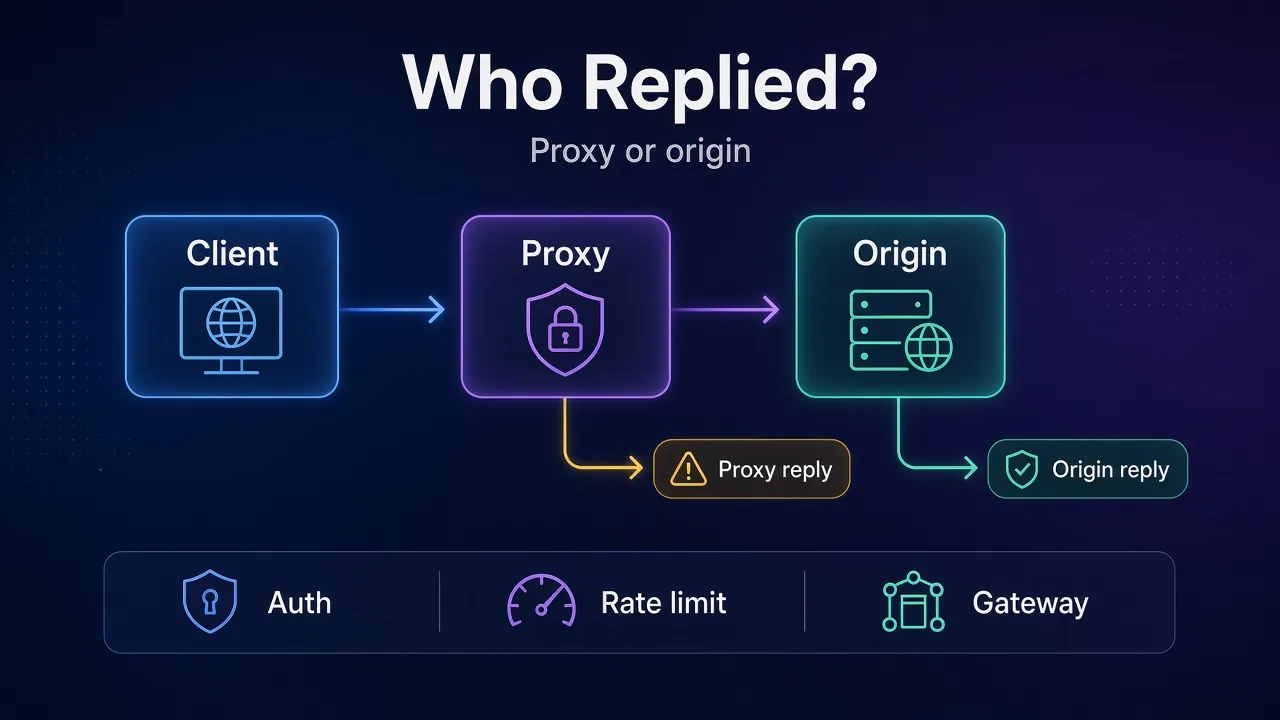
How to Tell If the Proxy or the Origin Replied
Use verbose cURL and watch where the status appears relative to the CONNECT tunnel. Our cURL with a proxy guide covers the full syntax; here is the diagnostic pattern:
curl -v -x http://USER:PASS@PROXY_HOST:PORT https://example.com/For HTTPS, your client first asks the proxy to open a tunnel with CONNECT. MDN’s CONNECT method page (checked November 5, 2026) notes that a successful CONNECT switches the proxy into blind tunnel mode.
- Status before the tunnel is up (reply to
CONNECT, or failure before TLS): the proxy spoke. Classic example:407 Proxy Authentication Required. - Status after “CONNECT tunnel established” and after the TLS handshake: the origin (or an edge in front of it) spoke. Classic examples: target
403,429,503. - No HTTP status at all (connection refused, empty reply, timeout at TCP): you never got an HTTP answer. Start with proxy connection failed errors instead of a status table.
SOCKS5 is different again. It uses binary reply codes from RFC 1928, not HTTP status codes. If your client prints a SOCKS reply, do not map it to “HTTP 502” by guesswork. Jump to the SOCKS section below.
Quick verdict: if
curl -vshows a 407 on CONNECT, fix proxy auth. If the tunnel opens and then you get 403 or 429, fix the request or the exit IP, not the username.
Proxy Error Codes Lookup Table
Keep this table next to your logs. “Typical speaker” is what we see most often in forward-proxy setups; edges like Cloudflare can sit in front of the origin and still count as “target side” for your scraper.
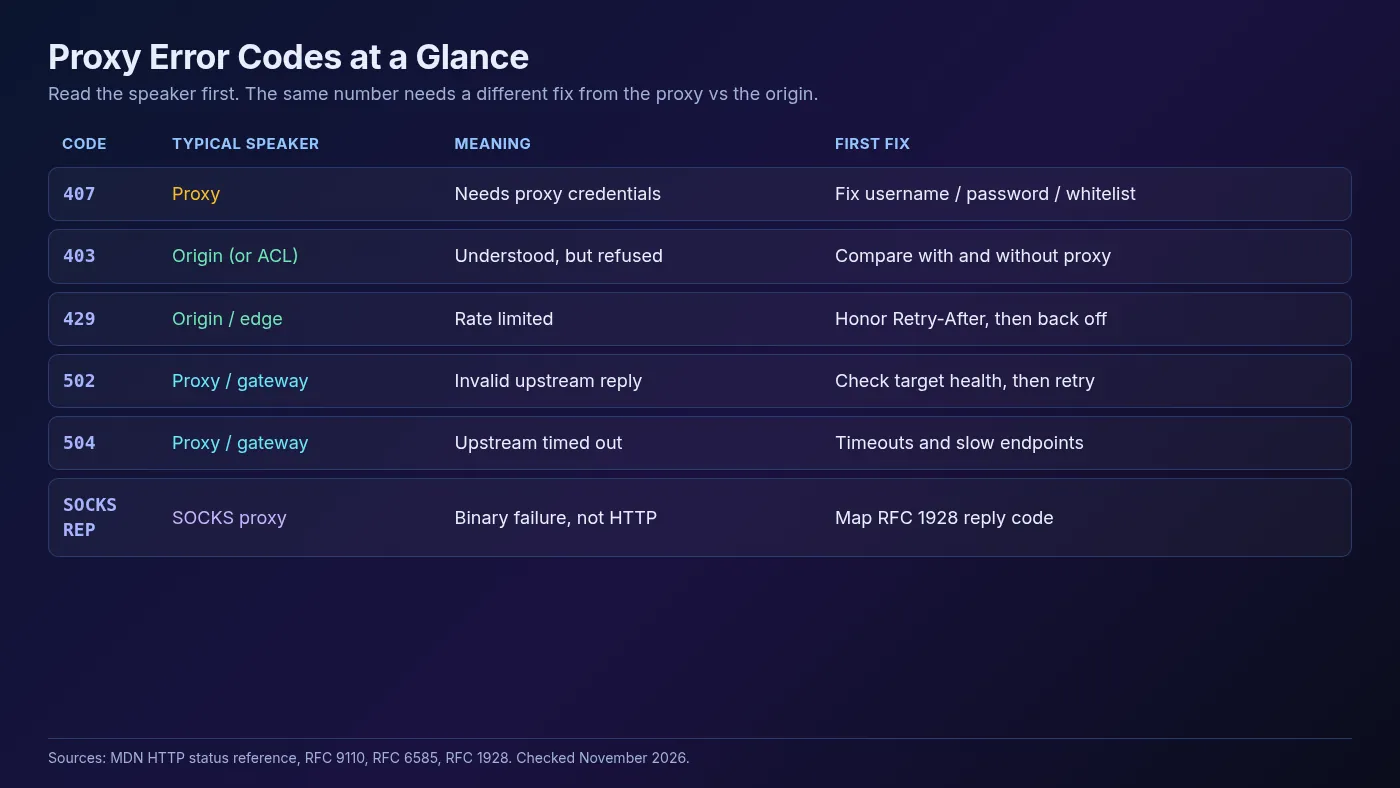
| Code | Typical speaker | What it means | First fix |
|---|---|---|---|
407 | Proxy | Proxy needs credentials | Fix username/password; URL-encode special characters |
401 | Origin | Site needs its own auth | Do not confuse with proxy auth |
403 | Origin (sometimes proxy ACL) | Understood, but refused | Compare with and without proxy; check IP type and headers |
429 | Origin / edge | Rate limited | Honor Retry-After; back off with jitter |
502 | Proxy / gateway | Invalid upstream response | Check proxy health and target availability; retry with backoff |
504 | Proxy / gateway | Upstream timed out | Raise timeouts carefully; see timeout handling |
503 | Origin / edge | Unavailable or overloaded | Back off and retry later |
SOCKS REP ≠ 0x00 | SOCKS proxy | Binary SOCKS failure | Map the reply code; do not treat as HTTP |
The sections below unpack the codes scrapers hit most. For connection failures without a status, pair this guide with proxy timeouts and connection failures.
407 Proxy Authentication Required
407 almost always comes from the proxy, not the website. MDN’s 407 Proxy Authentication Required page (checked November 5, 2026) says the request lacked valid credentials for the proxy. The response includes a Proxy-Authenticate challenge. You retry with Proxy-Authorization.
That is different from 401 Unauthorized, which is the origin asking for Authorization. Mixing the two headers is a classic silent failure.
Common causes:
- Wrong username or password copied from the dashboard
- Special characters in the password that were not URL-encoded in the proxy URL
- IP whitelist mode enabled while your client still sends Basic auth (or the reverse)
- Credentials sent only on the first hop when you need them on CONNECT
Fix path: recopy credentials, URL-encode them, and confirm the auth mode your provider expects. For schemes, sessions and header vs URL auth, read proxy authentication methods explained. In cURL, a clean form looks like:
curl -x http://user:p%40ss@proxy.example:8000 https://httpbin.org/ipIf verbose output still shows 407 on CONNECT after that, the proxy is rejecting the account (expired plan, wrong product port, or IP not allowlisted). Fix the account side before you touch scraper logic.
403 Forbidden
403 means the server understood the request and still refused it. Per MDN’s 403 Forbidden page (checked November 5, 2026), retrying the same request usually fails again. Re-authenticating often does nothing, unlike a 401.
Through a proxy, 403 usually comes from the target or its edge after the tunnel is open. Typical reasons:
- Exit IP reputation (datacenter ranges get filtered hard)
- Geo or ASN blocks
- Missing or inconsistent headers and cookies
- Browser fingerprint or TLS fingerprint mismatches on automated clients
- A proxy ACL that forbids that destination (less common, but real)
Decision test: run the same URL once through the proxy and once from your laptop without it. If only the proxied path gets 403, the exit IP or the proxy path is the problem. If both fail, the site is refusing the request itself.
For deeper detection patterns, see how websites detect proxy traffic. Rotating blindly rarely helps a sticky 403 that is keyed to headers or a logged-in session.
Common mistake: treating every 403 as “bad proxy.” Plenty of healthy residential exits still get 403 when the request looks like a bot.
429 Too Many Requests
429 is rate limiting. MDN’s 429 Too Many Requests page (checked November 5, 2026) notes the server may include Retry-After as seconds or an HTTP date. RFC 6585 defines the status.
Cloudflare’s Error 429 docs (updated August 14, 2026; checked November 5, 2026) describe the same pattern for sites and APIs sitting behind their edge: slow down, and respect the wait when the header is present.
What 429 is not: proof that your proxy is broken. A fresh IP does not reset a limit keyed to a cookie, API key or account. New IPs also will not help if you keep the same concurrency against the same host.
Fix path:
- Parse and honor
Retry-Afterwhen it exists. - Otherwise use capped exponential backoff with jitter.
- Lower concurrency per host, not just per process.
- Only then consider rotating exits, and only for IP-keyed limits.
We walk through polite crawlers, Scrapy AutoThrottle and jitter patterns in rate limiting in web scraping.
502 Bad Gateway and 504 Gateway Timeout
These two are gateway codes. Per MDN (checked November 5, 2026):
- 502 Bad Gateway: the proxy or gateway got an invalid response from upstream.
- 504 Gateway Timeout: the proxy or gateway got no response in time.
In a forward-proxy scrape, that “upstream” is usually the target site (or the CDN in front of it). Your proxy tried to fetch something and the next hop failed.
Cloudflare’s 502/504 troubleshooting page (updated October 12, 2026; checked November 5, 2026) is useful even when you are the client: a Cloudflare-branded 502/504 often means Cloudflare could not reach its origin. Your scraper still sees 502. The fix is rarely “buy a different proxy brand.” Wait, retry with backoff, and check whether the site is degraded for everyone.
Practical checks:
- Hit a known-good URL through the same proxy (for example an IP echo). If that works, your proxy path is alive.
- Hit the target without a proxy. If it is down for you too, it is not your exit IP.
- Watch whether 504s cluster on slow endpoints. That points to timeouts more than to a dead proxy account.
Raise client timeouts carefully. A longer timeout can turn a fast 504 into a stuck worker. Prefer fail-fast plus retry budgets over infinite waits.
Other Codes Scrapers See Around Proxies
Not every red line in the log is 403/407/429/502. These show up often enough to know cold:
- 401 Unauthorized: the origin wants credentials. Fix site login or API tokens, not proxy user/pass.
- 408 Request Timeout: the server closed an idle or slow request. Tune keep-alive and request deadlines.
- 503 Service Unavailable: target or edge is overloaded or in maintenance. Back off; do not burn the whole IP pool.
- Empty reply / connection reset: often a middlebox or proxy closing the socket. Treat as a connection failure, not an HTTP status.
If you are choosing protocol types while debugging, remember HTTP(S) proxies speak these status codes natively, while SOCKS5 does not. A protocol mismatch often shows up as a failed handshake, not a tidy status code.
SOCKS5 Reply Codes Are Not HTTP Status Codes
SOCKS5 failures arrive as a one-byte REP field after authentication, defined in RFC 1928 §6 (checked November 5, 2026):
| REP | Meaning | What to check |
|---|---|---|
0x00 | Succeeded | Nothing; tunnel or relay is ready |
0x01 | General SOCKS server failure | Proxy health; try another exit |
0x02 | Not allowed by ruleset | Destination blocked by provider policy |
0x03 | Network unreachable | Routing from the exit; IPv6 vs IPv4 mismatch |
0x04 | Host unreachable | Bad host, DNS at exit, or filtered route |
0x05 | Connection refused | Target port closed, or wrong port on your side |
0x06 | TTL expired | Routing loop or far destination |
0x07 | Command not supported | Client asked for BIND/UDP the proxy does not offer |
0x08 | Address type not supported | IPv6 request on an IPv4-only proxy, or the reverse |
Two failures share English words and opposite culprits. “Connection refused” before any SOCKS handshake means nothing is listening on the proxy host:port. “Connection refused” as REP 0x05 means the proxy reached the target and the target rejected the port. Verbose client logs usually show which hop said no.
Prefer socks5h:// when your client supports it, so DNS happens at the exit. Local resolution can send the proxy toward an address it cannot reach. More detail lives in how SOCKS5 proxies work.
A Fix Order That Saves Hours
When the dashboard is on fire, follow this order instead of rotating everything at once:
- Classify the speaker with
curl -v(proxy vs origin vs no HTTP status). - Fix 407 first if auth is wrong. Nothing else is trustworthy until CONNECT succeeds.
- Honor 429 before you buy more bandwidth. Slow down, then scale out.
- Investigate 403 as a detection or ACL problem, not a random fluke.
- Treat 502/504 as upstream health or timeout issues. Retry with a budget; confirm the target is up.
- Map SOCKS REP codes on their own scale. Do not invent HTTP equivalents.
If you need a stable provider while you debug, pick one residential, ISP, mobile or datacenter option, then retest the same failing URL with one change at a time.
Warning: changing credentials, IP type, headers and concurrency in the same deploy hides the real cause. Change one variable per test.
Common Mistakes With Proxy Error Codes
- Retrying 403 forever. The spec says the same request will usually fail again. Change the request or the exit identity.
- Ignoring Retry-After on 429. Immediate retries are how temporary limits become bans.
- Assuming 502 means “proxy is scam.” Gateways return 502 when upstream is broken. Check the target.
- Putting site cookies in Proxy-Authorization. Wrong header, wrong hop.
- Reading SOCKS failures as HTTP 5xx. Different protocol, different table.
- Logging only the status integer. Keep the phase (CONNECT vs response), response headers and whether a tunnel opened.
Frequently Asked Questions
Conclusion: Read the Speaker, Then the Code
Proxy error codes only help when you know who spoke. A 407 on CONNECT is an auth problem. A 429 after the tunnel opens is a rate limit. A 502 is a bad upstream answer. A SOCKS REP is not an HTTP status at all.
Start with one verbose request, match the code in the lookup table, and apply the matching fix. That beats burning an IP pool on retries that were never going to work.
When you are ready to retest with a cleaner setup, pick a provider from the ProxyHorizon proxy directory and change one variable at a time until the status you care about disappears for the right reason.
Keep Reading
More articles you might enjoy