Web Scraping With Scrapy and Proxies (2026 Tutorial)
Add proxies to a Scrapy spider the right way: a single proxy, authentication, a rotating middleware that switches IPs on retries, and the settings that keep large crawls polite.

Scrapy can crawl thousands of pages an hour without breaking a sweat. That speed is also why a site notices it so quickly, and why your crawl starts returning 403s and 429s halfway through page 300.
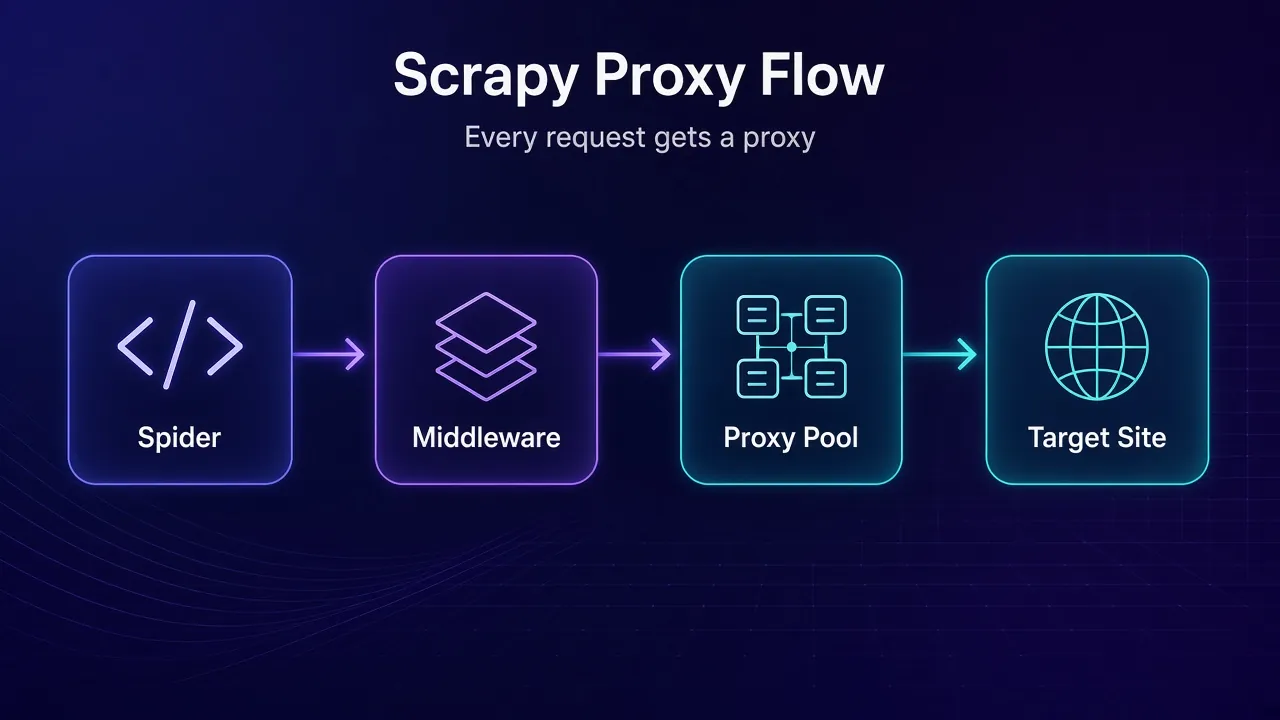
Proxies spread that load across many IP addresses. Scrapy already ships with the middleware to use them, so you don’t need a plugin to get started.
This tutorial builds a small Scrapy spider, then adds a single proxy, authenticated proxies, a rotating proxy middleware, retries that switch IPs, and the settings that keep a large crawl polite. Every snippet was run against Scrapy 2.19.0 in October 2026.
- Scrapy’s built-in HttpProxyMiddleware reads a proxy from request.meta or environment variables.
- A 15-line custom middleware at order 740 gives every request a proxy.
- Retried requests pass through that middleware again, so they switch IPs automatically.
- Add 403 to RETRY_HTTP_CODES and cut DOWNLOAD_TIMEOUT from 180 to about 30 seconds.
- SOCKS5 needs the experimental httpx download handler; http:// proxy URLs are the safe default.
How Does Scrapy Handle Proxies?
Scrapy routes requests through a chain of downloader middlewares before they reach the network. One of them, HttpProxyMiddleware, is on by default and looks for a proxy on every request.
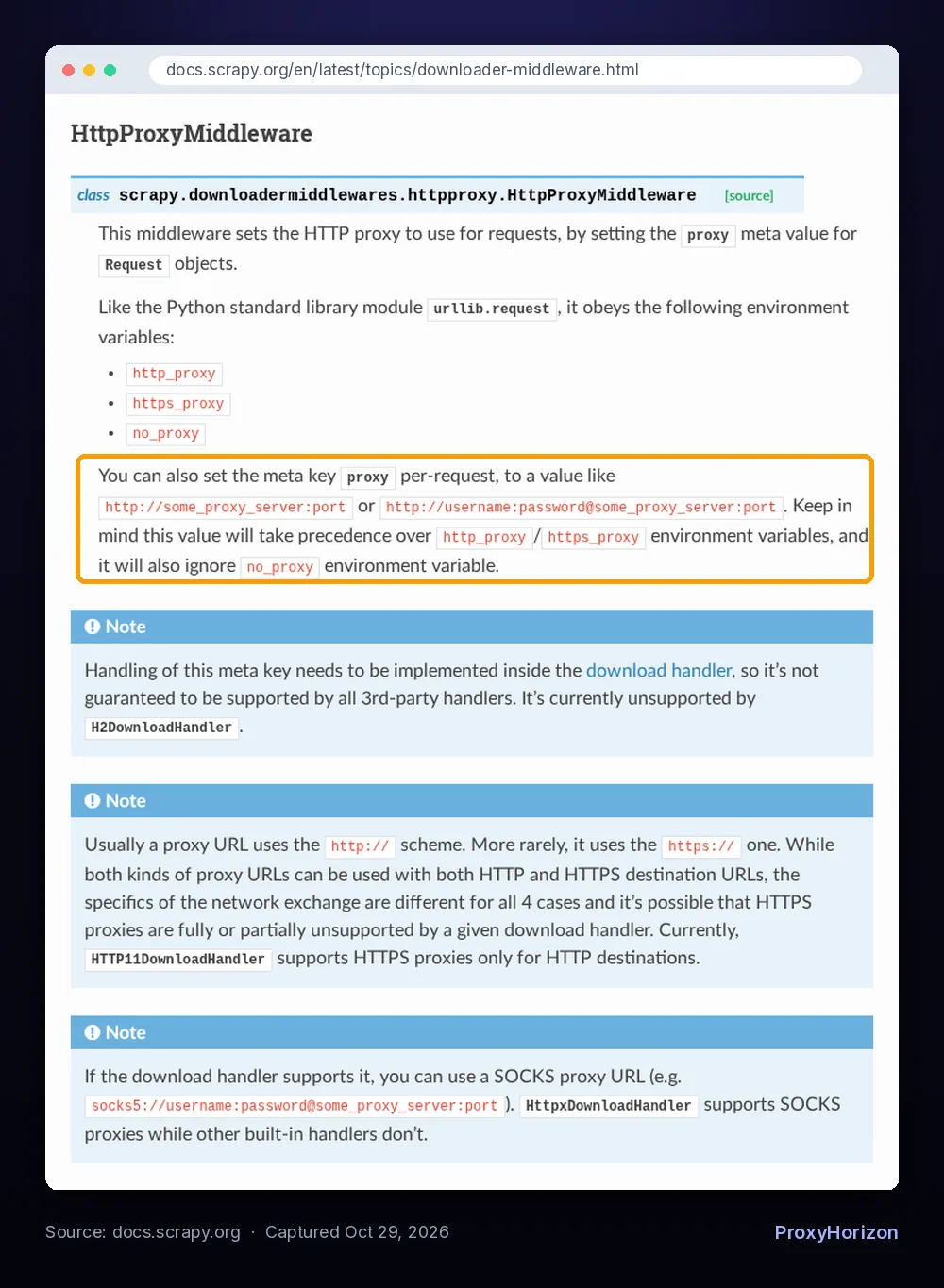
According to the official Scrapy docs, it gets that proxy from two places:
- Environment variables:
http_proxy,https_proxyandno_proxy, the same ones Python’surllib.requestreads. - The request’s
proxymeta key: a URL likehttp://host:portorhttp://user:pass@host:port, set per request.
The meta key wins. It takes precedence over the environment variables and also ignores no_proxy. That’s the hook every rotation setup uses: something sets request.meta["proxy"], and the built-in middleware does the rest.
Install Scrapy and Create a Project
Scrapy 2.19.0 is the current release on PyPI (released September 10, 2026) and needs Python 3.10 or newer. Install it in a virtual environment, then create a project:
python -m venv .venv
source .venv/bin/activate
python -m pip install scrapy
scrapy startproject quotesbot
cd quotesbot
The new project’s settings.py already starts politely. The 2.19 template sets ROBOTSTXT_OBEY = True, CONCURRENT_REQUESTS_PER_DOMAIN = 1 and DOWNLOAD_DELAY = 1. Keep those while you build, and loosen them only when you know what the target can take.
Write a Basic Spider First
Get the spider working without a proxy before you add one. That way, when something breaks later, you know the proxy is the cause. Save this as quotesbot/spiders/quotes.py. It uses quotes.toscrape.com, the practice site from Scrapy’s own tutorial:
import scrapy


class QuotesSpider(scrapy.Spider):
    name = "quotes"
    allowed_domains = ["quotes.toscrape.com"]
    start_urls = ["https://quotes.toscrape.com/"]

    def parse(self, response):
        for quote in response.css("div.quote"):
            yield {
                "text": quote.css("span.text::text").get(),
                "author": quote.css("small.author::text").get(),
                "tags": quote.css("div.tags a.tag::text").getall(),
            }

        next_page = response.css("li.next a::attr(href)").get()
        if next_page:
            yield response.follow(next_page, callback=self.parse)
Run it and write the results to a file:
scrapy crawl quotes -O quotes.jsonYou should see Crawled (200) lines in the log and a JSON file full of quotes. If you’re new to Python scraping in general, our web scraping with Python tutorial covers selectors and parsing in more depth.
How to Use a Single Proxy in Scrapy
The quickest way is to set the proxy meta key on each request. Override start(), which in current Scrapy is an async generator that yields your first requests:
import scrapy

PROXY = "http://203.0.113.10:8080"


class QuotesSpider(scrapy.Spider):
    name = "quotes"
    allowed_domains = ["quotes.toscrape.com"]

    async def start(self):
        yield scrapy.Request(
            "https://quotes.toscrape.com/",
            meta={"proxy": PROXY},
        )

    def parse(self, response):
        # ... same parsing as before ...
        next_page = response.css("li.next a::attr(href)").get()
        if next_page:
            yield response.follow(next_page, meta={"proxy": PROXY})
Notice the second meta. Meta isn’t inherited, so every new request you yield needs the proxy too. That gets tedious fast, which is why the middleware approach further down is the better habit.
For a one-off run, environment variables are even simpler. No code changes are needed:
export http_proxy="http://203.0.113.10:8080"
export https_proxy="http://203.0.113.10:8080"
scrapy crawl quotes -O quotes.json
Replace 203.0.113.10:8080 with the host and port from your provider. Most proxy URLs use the http:// scheme even for HTTPS targets, because the proxy tunnels the encrypted traffic for you.
How to Add Proxy Authentication
Paid proxies usually need a username and password. Put them in the proxy URL, and HttpProxyMiddleware turns them into a Proxy-Authorization header for you:
import os
from urllib.parse import quote

user = quote(os.environ["PROXY_USER"], safe="")
password = quote(os.environ["PROXY_PASS"], safe="")
PROXY = f"http://{user}:{password}@gate.example-proxy.com:7777"
Encode the credentials with quote(). A password containing @, : or # breaks an unencoded URL and leads to confusing 407 errors. The credentials are encoded as latin-1 by default, which you can change with the HTTPPROXY_AUTH_ENCODING setting.
One useful detail from the middleware’s source: when a request’s proxy URL changes, Scrapy drops the old Proxy-Authorization header instead of sending it to the new proxy. So rotating between proxies with different credentials is safe.
How to Rotate Proxies With a Custom Middleware
For real crawls, write a small downloader middleware that assigns a proxy to every request. Your spider stays clean, and every request gets a proxy without you remembering to add it. Add this to quotesbot/middlewares.py:
import random


class RotatingProxyMiddleware:
    """Assign a random proxy to every request, and a new one on each retry."""

    def __init__(self, proxies):
        self.proxies = proxies

    @classmethod
    def from_crawler(cls, crawler):
        return cls(crawler.settings.getlist("ROTATING_PROXY_LIST"))

    def process_request(self, request):
        if not self.proxies or request.meta.get("proxy_locked"):
            return None
        request.meta["proxy"] = random.choice(self.proxies)
        return None
Then enable it in settings.py:
ROTATING_PROXY_LIST = [
    "http://user:pass@203.0.113.10:8080",
    "http://user:pass@203.0.113.11:8080",
    "http://user:pass@203.0.113.12:8080",
]

DOWNLOADER_MIDDLEWARES = {
    "quotesbot.middlewares.RotatingProxyMiddleware": 740,
}
The number 740 matters. Downloader middlewares run in order from low numbers (the engine side) to high numbers (the downloader side). The built-in HttpProxyMiddleware sits at 750, so 740 sets the proxy just before it gets read. RetryMiddleware sits at 550, earlier in the chain.
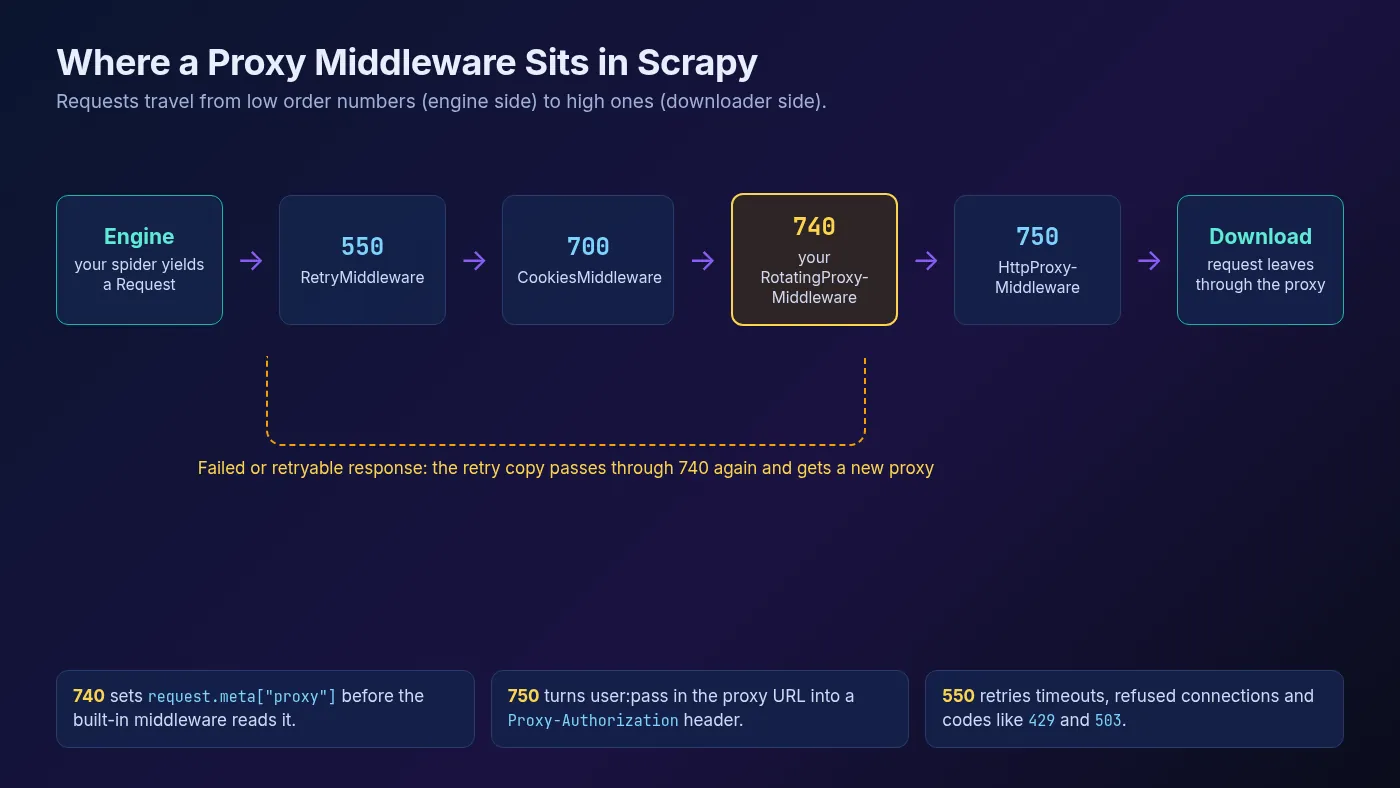
That ordering gives you IP switching on retries for free. When a request fails, the retry copy travels back down the chain, hits your middleware again, and picks a new proxy. In our test run with one dead proxy and one working one, Scrapy logged a refused connection, retried once, and finished with all 20 items scraped.
If you use a provider’s rotating gateway instead of a list, put the single gateway URL in the list. The provider then hands out a new IP behind that one address. Our explainer on backconnect proxies shows how those gateways work.
1When to Keep the Same Proxy
Random rotation is right for independent pages like product listings. It’s wrong when requests depend on each other, such as a login followed by account pages, or a search with paginated results.
That’s what the proxy_locked flag in the middleware is for. Set the proxy yourself and lock it:
yield scrapy.Request(
    url,
    meta={"proxy": "http://user:pass@203.0.113.10:8080", "proxy_locked": True},
)
Our guide to sticky vs rotating proxy sessions explains which jobs need which.
Retry Blocked Requests on a New IP
Scrapy’s RetryMiddleware is on by default. Per the retry docs, RETRY_TIMES defaults to 2 retries on top of the first attempt, and RETRY_HTTP_CODES defaults to 500, 502, 503, 504, 522, 524, 408 and 429. Connection errors, timeouts and DNS failures are always retried.
Notice that 403 isn’t on the list. Many sites answer a blocked IP with a 403, so for proxy crawls it often makes sense to add it, along with one more retry:
RETRY_TIMES = 3
RETRY_HTTP_CODES = [500, 502, 503, 504, 522, 524, 408, 429, 403]
DOWNLOAD_TIMEOUT = 30
Lowering DOWNLOAD_TIMEOUT helps too. The default is 180 seconds, which is a long time to wait on a dead proxy. You can also set max_retry_times or download_timeout in a single request’s meta.
Keep retries modest. If every IP gets a 403, more retries just burn bandwidth. The problem is usually your headers, your pace or the type of IP, not bad luck. Our guide to HTTP headers for web scraping covers the most common cause.
Settings for Large Crawls
Proxies let you send more traffic, but the target site still sees the total load. These are the settings to tune, with defaults from the Scrapy settings reference:
| Setting | Default | What it controls |
|---|---|---|
CONCURRENT_REQUESTS | 16 | Total requests in flight across all sites |
CONCURRENT_REQUESTS_PER_DOMAIN | 1 in new projects (8 without the template) | Requests in flight to one domain |
DOWNLOAD_DELAY | 1 in new projects (0 without the template) | Minimum seconds between requests to the same domain |
DOWNLOAD_DELAY_JITTER | 0.5 | Randomizes each delay by up to ±50% (new in 2.19) |
AUTOTHROTTLE_ENABLED | False | Adjusts the delay automatically from server response times |
DOWNLOAD_TIMEOUT | 180 | Seconds to wait before a download times out |
A sensible starting point for a proxy crawl looks like this:
CONCURRENT_REQUESTS = 16
CONCURRENT_REQUESTS_PER_DOMAIN = 4
DOWNLOAD_DELAY = 1

AUTOTHROTTLE_ENABLED = True
AUTOTHROTTLE_START_DELAY = 5
AUTOTHROTTLE_MAX_DELAY = 60
AUTOTHROTTLE_TARGET_CONCURRENCY = 1.0
AutoThrottle uses server latency to set the delay, and the docs note that non-200 responses can’t lower it. So when a site slows down or starts erroring, your crawler backs off on its own. Our guide to rate limiting in web scraping goes deeper on backoff and 429 handling.
Scrapy’s own common practices page lists spreading requests over a pool of IP addresses as one way to avoid bans. It also suggests a USER_AGENT that identifies you and how to reach you, so site owners can ask you to adjust rather than block you. Both ideas work best together.
For crawls that run across many machines or millions of URLs, see our guide to web scraping at large scale.
Can Scrapy Use SOCKS5 or HTTPS Proxies?
Partly, and this catches a lot of people out. The default download handler, HTTP11DownloadHandler, doesn’t support SOCKS proxies. It also supports https:// proxy URLs only for plain HTTP targets.
SOCKS support comes from HttpxDownloadHandler, added in Scrapy 2.15. It needs the httpx extra and a settings change:
python -m pip install "scrapy[httpx]"DOWNLOAD_HANDLERS = {
"http": "scrapy.core.downloader.handlers._httpx.HttpxDownloadHandler",
"https": "scrapy.core.downloader.handlers._httpx.HttpxDownloadHandler",
}Then a socks5://user:pass@host:port URL works in the proxy meta key. There are two catches, both from the download handler docs. The handler is marked experimental and not yet recommended for production. It also opens a separate connection pool for each proxy URL, which uses more resources when you rotate many proxies.
For most scraping, plain http:// proxy URLs are the reliable choice. Nearly every provider offers them alongside SOCKS5.
Common Scrapy Proxy Errors
| Error or symptom | Likely cause | What to try |
|---|---|---|
Connection was refused by other side | The proxy is down, or the host or port is wrong | Test the proxy with curl, remove dead entries from the list |
407 Proxy Authentication Required | Wrong credentials or unencoded special characters | URL-encode the username and password with quote() |
| Requests hang for minutes | A slow proxy and the 180-second default timeout | Set DOWNLOAD_TIMEOUT to around 30 |
| Your real IP still shows | The proxy was set on the first request only, or the middleware isn’t enabled | Use a middleware, check DOWNLOADER_MIDDLEWARES in the startup log |
| SOCKS proxy ignored or failing | The default handler doesn’t support SOCKS | Switch to HttpxDownloadHandler or use an http:// proxy URL |
| Lots of 403 or 429 responses | Too fast, poor headers or flagged IPs | Enable AutoThrottle, fix headers, try residential IPs |
A quick tip for the “real IP” case: Scrapy prints its enabled downloader middlewares when a crawl starts. If yours isn’t in that list, the path in DOWNLOADER_MIDDLEWARES is wrong. Our guide to handling proxy timeouts and errors covers fixes that apply to any client.
What About Ready-Made Rotation Packages?
You’ll find third-party packages for this, such as scrapy-rotating-proxies. Check how current they are before you depend on one. That package’s latest release on PyPI, 0.6.2, dates from May 2019.
The custom middleware above is about 15 lines, uses only documented Scrapy hooks, and was tested on the current release. For most projects that’s the safer bet. If you’d rather manage rotation outside Scrapy entirely, a provider’s rotating gateway is a good alternative.
Scraping a JavaScript-heavy site where Scrapy alone isn’t enough? Our Selenium proxy rotation guide shows the same rotation idea in a real browser. For picking a pool, browse our proxy directory.
Frequently Asked Questions
The Bottom Line
Scrapy already knows how to use proxies. All you have to do is set request.meta["proxy"], and the built-in HttpProxyMiddleware handles the connection and authentication.
For anything beyond a quick test, put that in a small middleware at order 740. Every request then gets a proxy, and retries switch to a new IP automatically. Add 403 to your retry codes, cut the timeout to around 30 seconds, and turn on AutoThrottle.
Build the spider without a proxy first, add one proxy and confirm it works, then add rotation. Debugging one change at a time is much faster than debugging all of them at once.
Keep Reading
More articles you might enjoy