Sticky vs Rotating Proxy Sessions: Which to Use in 2026
Rotating sessions give you a new IP on every request. Sticky sessions hold one IP for minutes or hours. Here’s how to pick, how session IDs work and what happens when a sticky IP drops.
Your scraper logs in, opens page two of the results, and gets bounced back to the login screen. Nothing in your code changed.
The culprit is usually the proxy session, not the scraper. A rotating proxy handed that second request a brand-new IP, and the site decided someone had stolen the session cookie.
Flip the setting to sticky and the opposite problem shows up: one IP hammering a catalog until it gets rate-limited.
Here’s how to choose between sticky and rotating sessions, how session IDs actually work behind the gateway, and the one setting that decides what happens when a sticky IP disappears mid-job.
- Rotating sessions use a new IP per request and suit stateless pages.
- Sticky sessions hold one IP for a set time and suit logins, carts and pagination.
- A session ID in the proxy username decides which IP you keep.
- Sticky IPs can drop early, so pick a strict mode for account work.
What Sticky and Rotating Sessions Actually Mean
A rotating session gives you a new IP address on every request, while a sticky session keeps the same IP for a set time or until you change the session ID. Both usually run through the same gateway address. The difference is a setting.
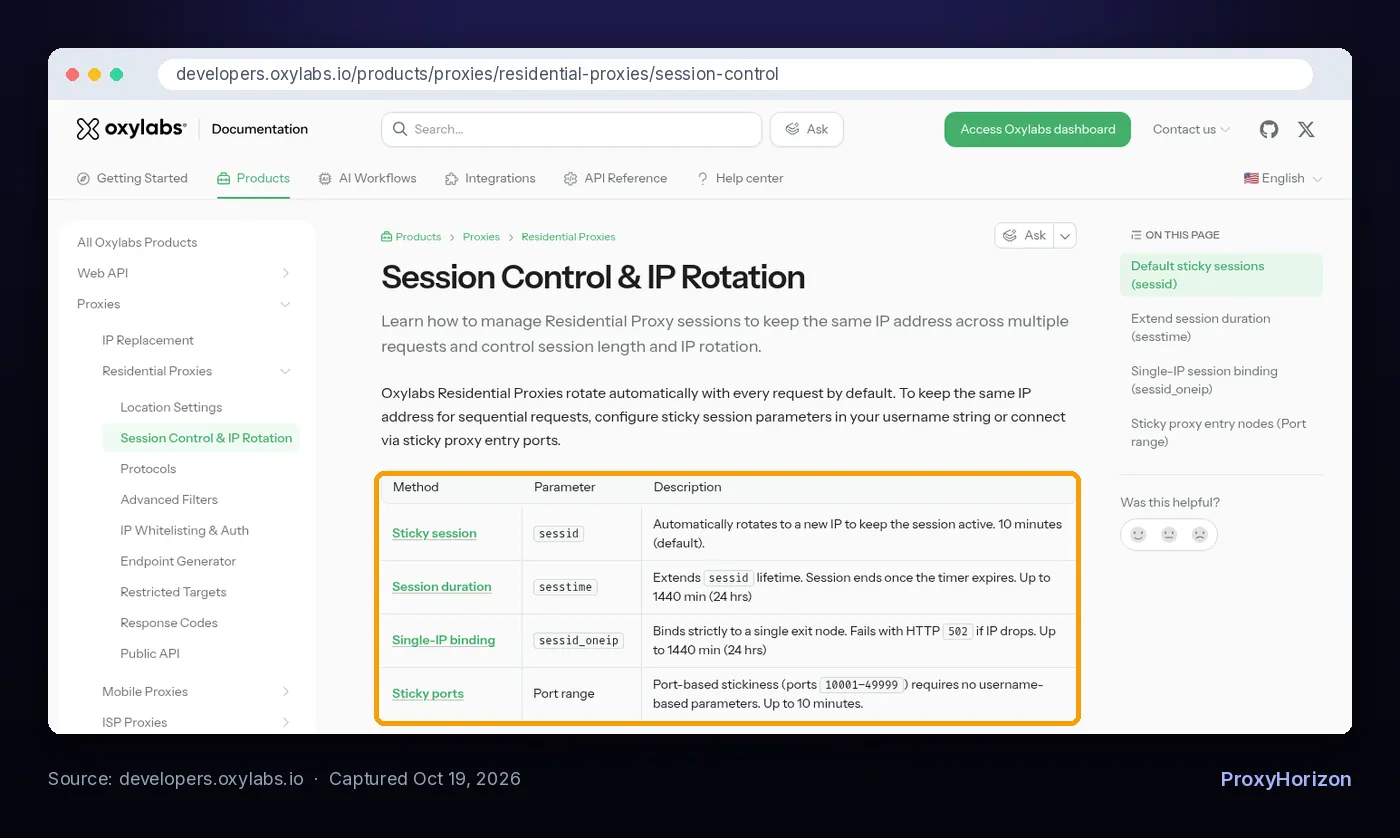
Oxylabs’ session control docs say its residential proxies rotate with every request by default. You opt into stickiness by adding a session parameter to the username or by connecting to a sticky port (checked October 19, 2026).
Decodo’s session types page describes the same split. A rotating port assigns a new IP every time you load a page. A sticky port keeps the first IP for the chosen duration, however many requests you send.
If you want the bigger picture of how a rotating pool works, our guide to what rotating proxies are covers the gateway and pool basics.
The Simple Rule: Does the Site Remember You?
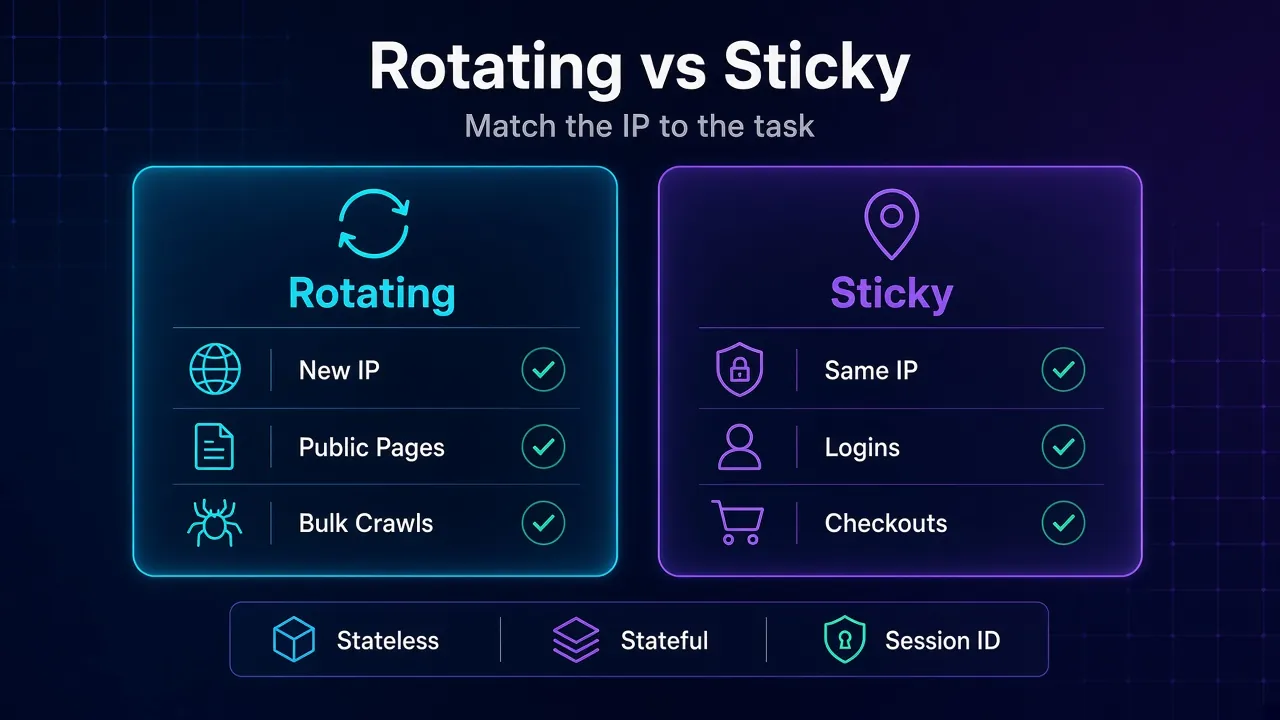
Pick the session type by asking one question: does the next request depend on the last one?
If every page stands alone, rotate. If the site ties cookies, a login, a cart or a page cursor to your visit, stick. That’s the same line our guide to stateless vs stateful scraping draws at the architecture level.
| Task | Session type | Why |
|---|---|---|
| Product or price pages, one URL each | Rotating | Each page is independent, so spreading load across IPs costs nothing |
| Search results and SERP checks | Rotating | Short, stateless requests that get rate-limited per IP |
| Logging in and staying logged in | Sticky | Many sites flag a session cookie that jumps between IPs |
| Add to cart and checkout flows | Sticky | The cart, tokens and fraud checks follow one visit |
| Paginating with a cursor or session token | Sticky | Page two only makes sense to the IP that saw page one |
| Managing social or marketplace accounts | Sticky, one per account | A stable identity matters more than volume |
| Monitoring the same page from many regions | Rotating with geo-targeting | You want variety, not continuity |
Most beginners get this wrong: they pick one mode for the whole project. Real jobs often need both. Log in on a sticky session, then fan out to public listing pages on rotating ones.
How Session IDs Work Behind the Gateway
A session ID is just a label you add to your proxy username. The gateway keeps a map of labels to exit IPs, so the same label routes you through the same IP until the session ends.
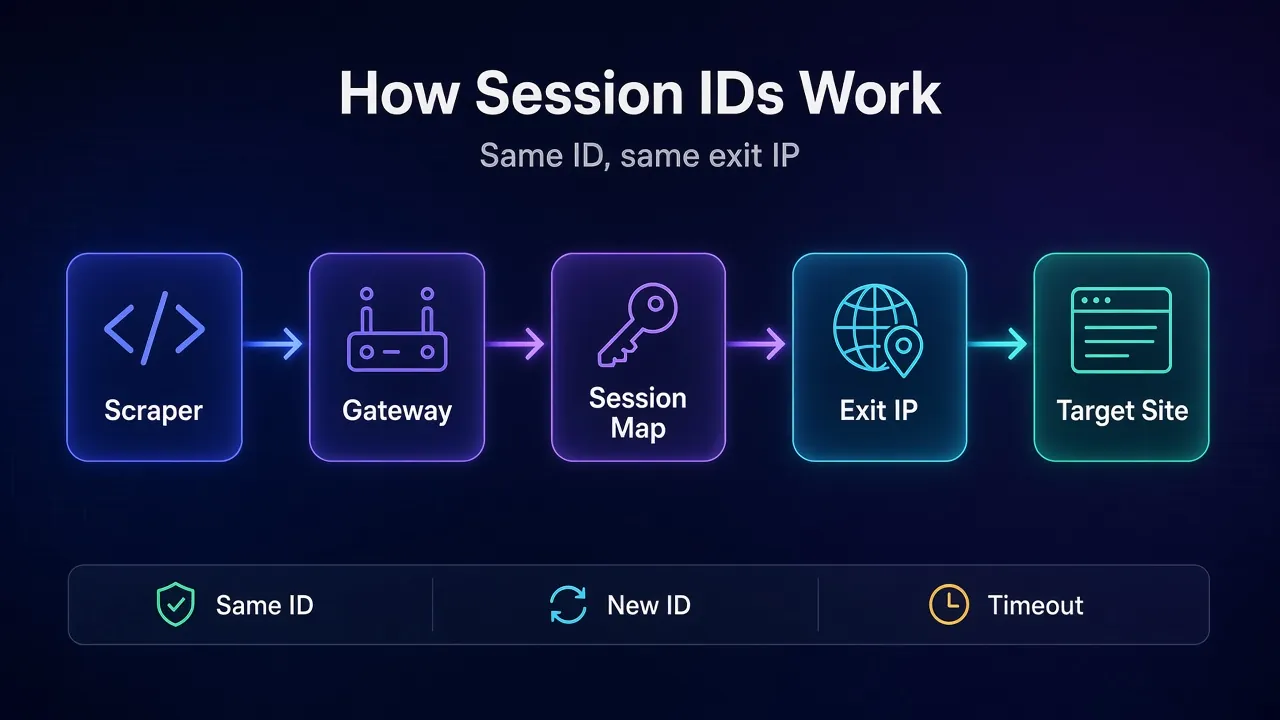
Here’s what that looks like with the documented formats. The names change, the idea doesn’t:
Oxylabs:     customer-USERNAME-cc-DE-sessid-abcd1234-sesstime-30:PASSWORD
Decodo:      user-USERNAME-session-example1-sessionduration-90:PASSWORD
IPRoyal:     PASSWORD_country-br_session-sgn34f3e_lifetime-10m
Bright Data: brd-customer-ID-zone-ZONE-session-mystring12345
Three practical consequences follow from that design:
- Want a new IP early? Change the session ID. Decodo’s docs say switching the port or the session ID rotates the IP before the timer ends.
- Need ten identities at once? Use ten session IDs. Decodo describes different session values as separate concurrent sessions, and Bright Data says each unique session ID gets a unique IP.
- Follow the format rules. IPRoyal’s rotation docs require the session value to be a random alphanumeric string of exactly 8 characters.
Building this into code? Our tutorials on a rotating proxy script in Python and rotating proxies in Playwright show where the username string goes.
How Long a Sticky Session Really Lasts
The number you set is a ceiling, not a promise. Sticky sessions end earlier than you’d expect, for three reasons.
1Duration Limits Vary by Provider
| Provider | Session parameter | Default | Maximum |
|---|---|---|---|
| Oxylabs | sessid plus sesstime | 10 minutes | 24 hours |
| Decodo | session plus sessionduration | 10 minutes | 24 hours |
| IPRoyal | _session- plus _lifetime- | You set it | 7 days |
| Bright Data | -session- | Not stated on the options page | Not stated on the options page |
Sources are the official docs linked in this guide, checked October 19, 2026. IPRoyal’s minimum lifetime is one second, and its help center notes you can only use one time unit per string.
2Idle Sessions Can Expire First
Oxylabs says a default sessid session lasts 10 minutes or ends after 60 seconds without any requests, whichever comes first. If your scraper pauses to parse a big page or waits on a queue, the next request may land on a new IP.
Its docs also warn that a session expires when the timer runs out, even if requests are still in progress. Set the duration a little longer than your longest flow.
3Residential Devices Go Offline
Residential and mobile IPs belong to real devices that join and leave the network. Decodo states it plainly: the longer the session, the more likely the IP rotates early because the device at the end went offline.
That’s why long sticky sessions on a peer pool are a gamble. If you need one IP for days, a static option like ISP proxies is usually the better tool than a 24-hour residential session.
What Happens When a Sticky IP Drops
This is the setting most guides skip, and it decides whether your job fails loudly or quietly.
By default, most providers swap in a new IP when your sticky one disappears. IPRoyal says its system silently assigns a replacement. Oxylabs says sessid automatically rotates to keep the session going.
That’s fine for scraping public pages. It’s a problem for a logged-in account, because the site sees your session hop to a new IP without warning.
So providers offer a strict mode that fails instead of switching:
- Oxylabs:
sessid_oneipbinds to one exit node and returns HTTP 502 if it drops. - Decodo:
session_iplockreturns a 502 and won’t grant a new IP for the rest of the session, according to its custom sticky session docs. - IPRoyal:
_killswitch-1returns HTTP 410 instead of rotating. - Bright Data:
-const, used with-session, keeps the same peer and returns a 502 “no peer available” if it’s gone.
Our take: use the strict mode for anything tied to an account, and treat the error as a signal to pause, start a fresh session and re-authenticate. Use the default fallback for public data, where a surprise IP change costs nothing.
When Rotating Sessions Are the Right Call
Rotation shines when volume matters more than continuity. Every request looks like a different visitor, so per-IP rate limits barely touch you.
- Large public crawls: catalogs, listings, news and directories.
- Price and availability checks: the same URL, many times a day.
- Retry logic: a blocked request simply goes out again on a new IP.
The catch is that rotation doesn’t fix a bad fingerprint or an aggressive request rate. Sites also watch headers, timing and behavior. Our guide to scraping e-commerce sites safely covers the rest of the checklist.
When Sticky Sessions Are the Right Call
Stick whenever an action spans more than one request and the site expects one visitor to perform it.
- Logins and account dashboards: one account, one session ID, ideally the same region every time.
- Multi-step forms and checkouts: tokens issued on step one get checked on step three.
- Infinite scroll and cursor pagination: the cursor is often bound to the visit.
- Antidetect browser profiles: one profile, one sticky IP, so the fingerprint and the address tell the same story.
Keep sticky sessions short for scraping. Ten minutes covers most login-and-paginate flows, and shorter sessions spread your load across more IPs.
Sticky Session or Static Proxy?
A sticky session borrows an IP from a shared, rotating pool for a while. A static proxy is an address assigned to you for as long as you pay for it. They solve different problems.
- Pick a sticky session when a flow lasts minutes and you want a different identity for the next one.
- Pick a static IP when the same account has to come back from the same address every day, or when a partner allowlists your IP.
- Pick a mobile sticky session when the target trusts carrier traffic most. Our guide to mobile proxies explains why those IPs are shared by many real users.
Here’s the catch with long residential sessions: you pay for the flexibility of a pool and still can’t count on the IP. If the address itself matters, rent an address.
How to Check Which IP You’re Actually Getting
Don’t trust the setting. Test it. A two-minute check tells you whether your session sticks and for how long.
Both Oxylabs and Decodo document an IP echo endpoint in their examples: ip.oxylabs.io/location and ip.decodo.com. Send a few requests through your proxy to one of them and compare the IPs that come back.
curl -x pr.oxylabs.io:7777 -U "customer-USERNAME-cc-DE-sessid-abcd1234:PASSWORD" https://ip.oxylabs.io/location- Same IP on every call: the sticky session is working.
- A new IP on every call: the session parameter isn’t being read, or you’re on a rotating port.
- The IP changes after a pause: you hit an idle timeout, so send requests more often or extend the duration.
Run the same loop without a session ID and you should see a fresh IP each time. If you don’t, the gateway is pinning you by port, and you need a rotating port instead.
Five Session Mistakes That Get Scrapers Blocked
Most session problems aren’t provider bugs. They’re setup choices that look fine on paper.
- One session ID for every worker. Fifty threads on one sticky IP is just a slow way to get rate-limited.
- Rotating in the middle of a login. The cookie from request one arrives on a new IP in request two, and the site logs you out.
- Setting a 24-hour session and assuming it holds. Peer IPs drop. Plan for a new IP at any point, or use a strict mode.
- Reusing an old session ID for a new account. If the ID is still alive, two accounts share one IP, which is exactly the link you were trying to avoid.
- Mixing countries inside one session. A sticky IP in Germany followed by a French one looks like account sharing, even if both are clean.
Mixing Both in One Scraper
The cleanest setup uses both modes on purpose. A session ID per task, not one global setting.
- Generate a session ID per logical task. One per account, one per checkout, one per paginated search.
- Reuse it for every request in that task, then throw it away.
- Send stateless requests with no session ID so they rotate freely.
- Pick the fallback per task: strict mode for accounts, default rotation for public data.
- Log the exit IP with each request, so you can spot unexpected changes when debugging.
Shopping for a pool that handles both well? Our list of the best rotating proxies compares providers on rotation control and sticky options, and the proxy directory lets you filter by type.
Frequently Asked Questions
Rotate for Volume, Stick for Identity
Sticky vs rotating isn’t a quality question. It’s about whether the site remembers you between requests.
Rotate on stateless pages where each request stands alone. Stick for logins, carts, cursors and accounts, keep those sessions only as long as the flow needs, and switch on your provider’s strict mode when a silent IP change would hurt.
The bottom line: give each task its own session ID and decide its fallback up front. If you’re still choosing the IP type underneath, our guide to residential proxies explains why they’re the usual base for both modes.
Keep Reading
More articles you might enjoy