How to Stay Safe on Airport Wi-Fi in 2026
Airport Wi-Fi is convenient and genuinely risky. Learn the evil-twin traps, captive-portal tricks, and the VPN setup that keeps your data private in transit.
Picture the scene. Your connecting flight is delayed two hours, you're bored at the gate, and the phone helpfully offers "Free Airport WiFi." You tap connect and start clearing emails, maybe checking your bank. That exact moment, repeated by thousands of travelers a day, is one of the softest targets in modern security. Airport terminals are crowded, everyone's rushing, and almost nobody stops to ask whether the network they just joined is real.
Airport Wi-Fi deserves special caution because it combines the worst ingredients: open networks, a constant churn of strangers, and travelers distracted enough to type passwords without thinking. The US Federal Trade Commission has long cautioned against sensitive activity on public networks, and security researchers routinely demonstrate "evil twin" hotspots at airports that look identical to the official one. This guide shows you how to stay safe on airport Wi-Fi from the second you land to the moment you board.
You'll learn why airports are uniquely risky, how to spot a fake network, the one tool that makes the whole problem go away, and the charging-station trap most people never see coming. None of it is technical. All of it takes minutes.
Why Airport Wi-Fi Is a Hacker's Favorite Playground
Coffee shops and hotels carry the same public-network risks, but airports concentrate them. Thousands of people cycle through a single network every hour, which is a huge pool of potential victims for anyone running an attack. Everyone is in a hurry, half-watching a departures board, primed to connect fast and think later. And because travelers are often abroad or between countries, they're more likely to do exactly the high-value things, like banking and logging into work, that attackers want to see.
The core weakness is that an open network gives you no way to verify who else is on it or whether the hotspot itself is legitimate. On your home network you trust the router. At Gate 24, you're trusting a name on a screen. That gap is the whole problem, and it's why the same advice that protects you on hotel Wi-Fi applies here, just with the volume turned up.
| Airport Wi-Fi risk | Why it's worse at an airport | Your defense |
|---|---|---|
| Traffic snooping | Huge, constantly changing crowd on one open network | Always-on VPN plus HTTPS |
| Evil twin hotspots | Fake networks named after the airport blend into dozens of real SSIDs | Verify the exact name; a VPN protects you even if you slip |
| Captive-portal phishing | Fake login pages mimic the real airport sign-in | Never enter passwords or card details in a portal |
| Account lockouts abroad | Banks flag logins from a foreign airport IP | Connect to a VPN server in your home country |
| Juice jacking | Public USB charging kiosks can move data, not just power | Your own charger, a power bank, or a USB data blocker |
Our take: airport Wi-Fi isn't cursed, and you don't need to avoid it. You need to make your traffic unreadable and your login habits paranoid. Do those two things and the crowd stops being a threat.
The Evil Twin: When "Free Airport Wi-Fi" Isn't
The signature airport attack is the evil twin. Someone sets up a hotspot with a name like Airport_Free_WiFi or Terminal2_Guest, sits it right next to the real one, and waits. Your phone sees a strong, familiar-looking signal and connects, sometimes automatically. Everything you do then flows through the attacker's equipment, where logins and session cookies can be captured.
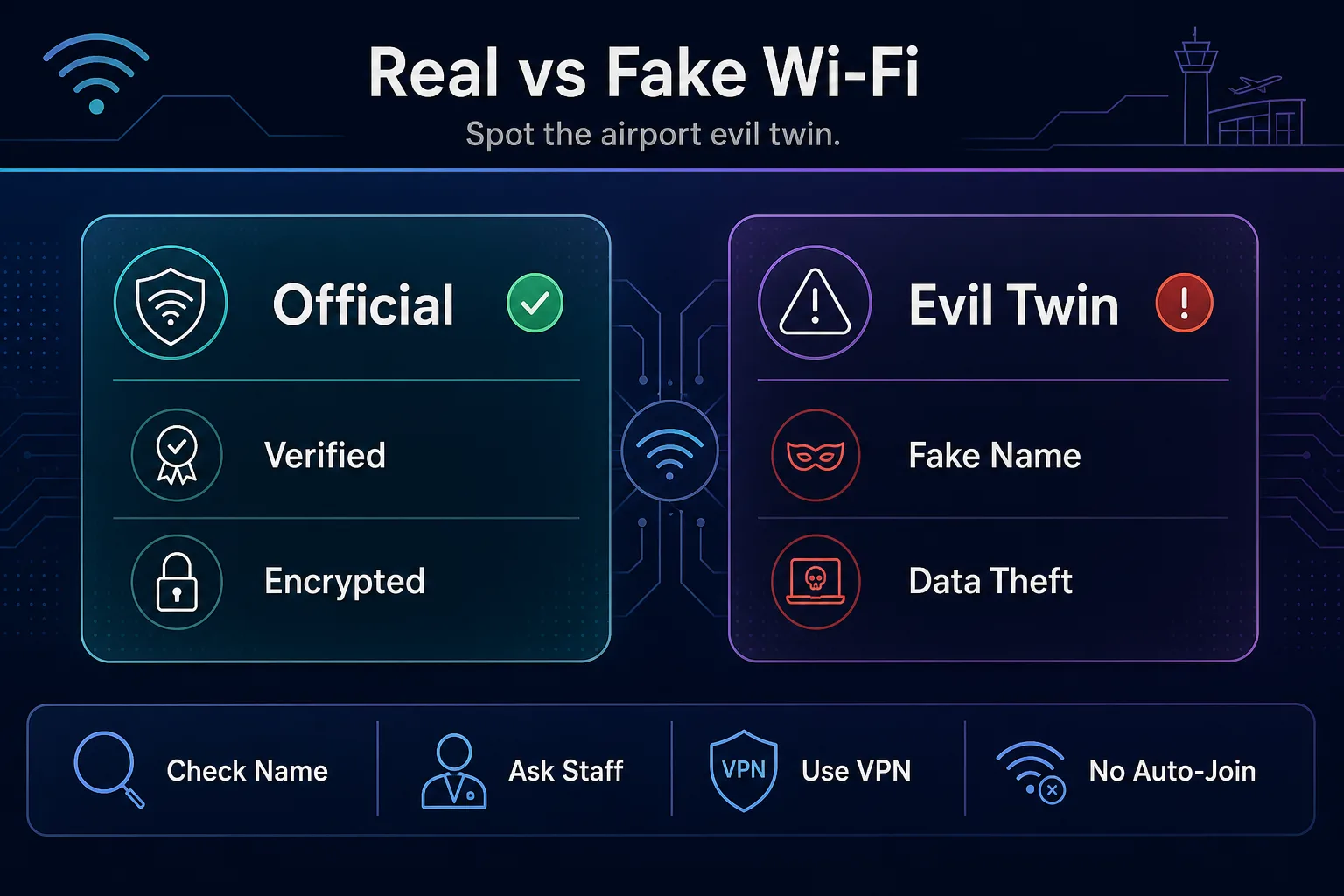
The fix is simple and worth the ten seconds. Confirm the exact official network name with airport signage or a staff member rather than guessing from the list. Turn off auto-join for open networks so your phone can't silently connect to a twin while it's in your pocket. And run a VPN, because even if you do connect to a fake network by mistake, your encrypted traffic is useless to whoever set it up.
Captive Portals and the Fake Login Trap
Most airport Wi-Fi makes you pass through a captive portal, that sign-in page asking for an email or a click to accept terms. Attackers know this, so a favorite trick is a counterfeit portal that asks for far more than it should: your full name, a password, even payment details "to verify your identity." A real airport portal almost never needs your password or card.
Treat every portal as untrusted. Enter the minimum it demands, never reuse a real password there, and if a page asks for banking or card information just to get online, back out immediately. If you must give an email, a throwaway address keeps your primary inbox out of it. The portal is the one place attackers can dress up as the airport itself, so it's exactly where skepticism pays off.
Your Airport Wi-Fi Safety Playbook
Here's the whole routine, split into what to do before you connect and what to keep running once you're on. Set the first group up at home, on a network you trust, so you're not configuring security while a gate agent calls your row.
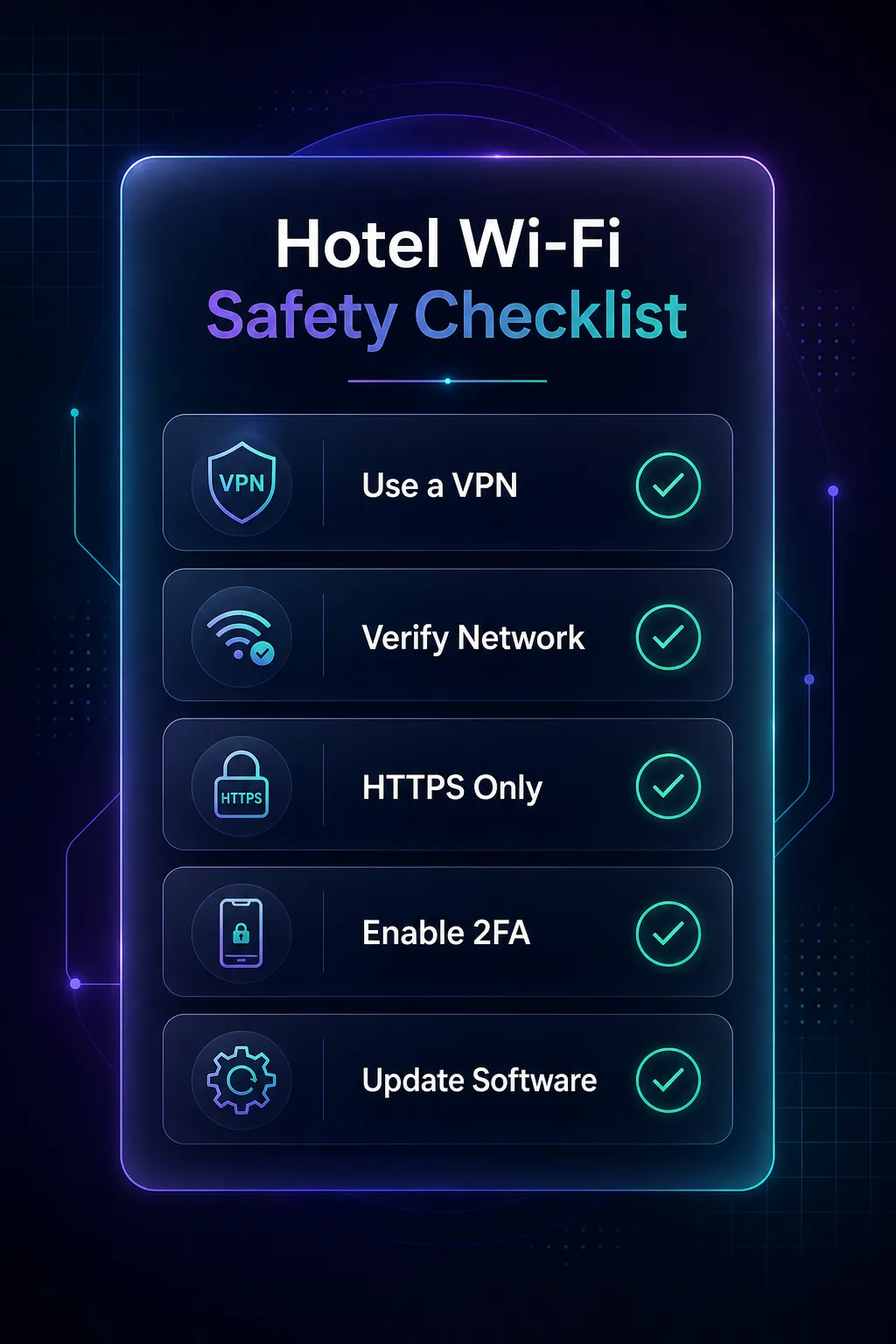
Before you connect: install and test a VPN at home, confirm its kill switch works, turn off auto-join for open networks, and move your important accounts to app-based two-factor rather than SMS, which can fail while you're roaming. Once you're on: switch the VPN on before you open a browser, keep it running for the entire session, stick to HTTPS sites, and save anything truly sensitive for a connection you control. Small habits, and they cover the vast majority of airport risk.
Why a VPN Is the Fix, and How It Works Here
If you take one thing from this guide, take this: a VPN turns the airport Wi-Fi problem into a non-problem. It wraps everything your device sends in an encrypted tunnel, so even if you're on a compromised network or an evil twin, an eavesdropper sees scrambled noise instead of your email and passwords. It also swaps your visible IP for one in a location you choose, which stops your bank from panicking at a login from a foreign airport. If the mechanics are new to you, our explainer on how a VPN works breaks it down.
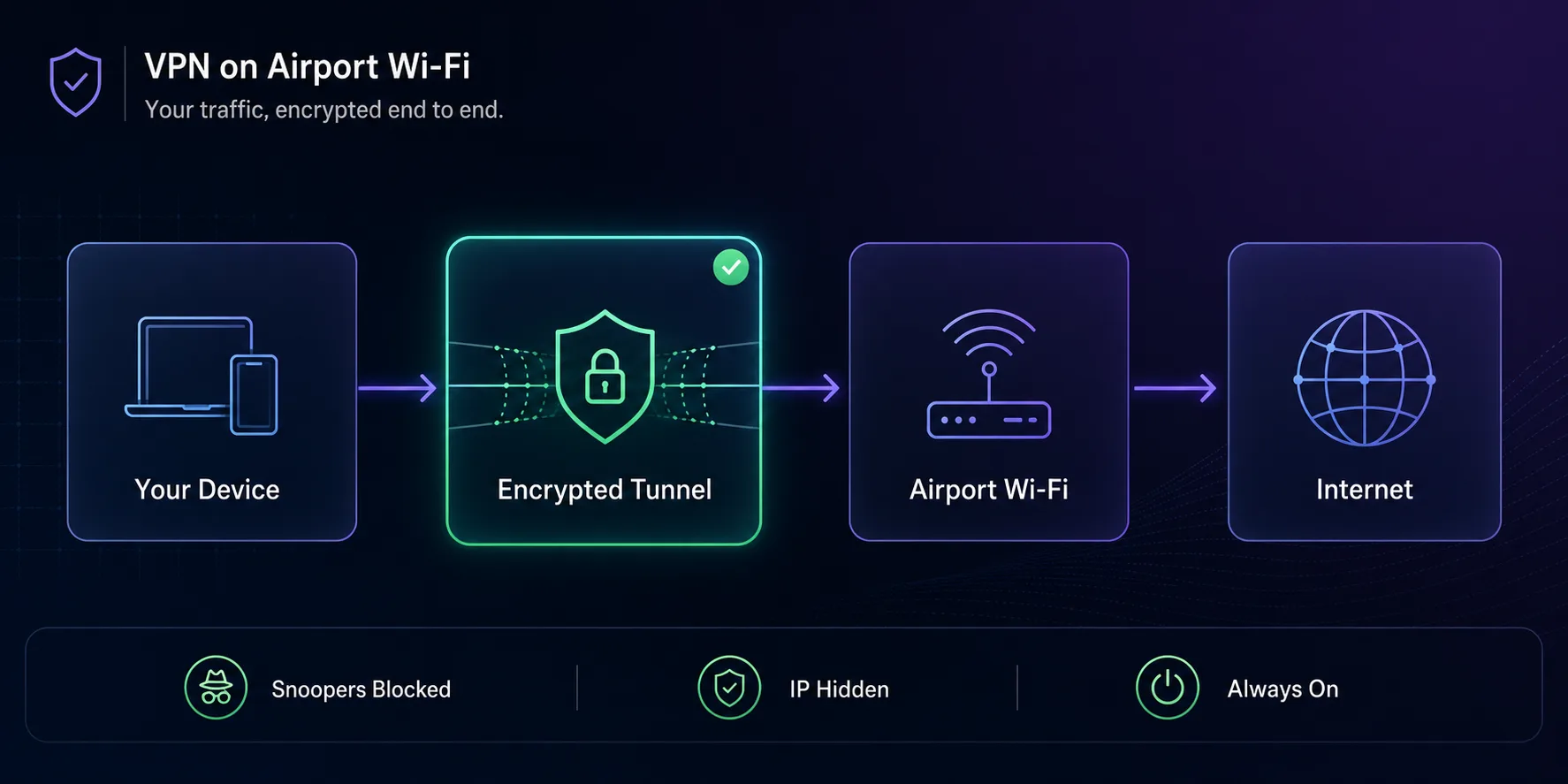
Here's the honest limit, because affiliate posts never mention it. A VPN protects data in transit; it does not protect a phone you leave unlocked on a seat, and it doesn't hide you from services you're logged into. It also can't save you if you hand a password to a fake captive portal. A VPN plus good habits is the combination that works, not the VPN alone. And it does nothing about your browser trackers and fingerprint, which is a separate fight.
The Best VPNs for Airport and Travel Wi-Fi in 2026
For airport use you want a VPN that connects fast on captive-portal networks, has a dependable kill switch, and offers servers back home so your apps behave normally. How we picked: we favored providers with an audited no-logs policy, reliable kill switches, broad server coverage, and apps that hold up on flaky public networks. A quick disclosure: some links below are affiliate links and we may earn a commission if you subscribe, which never changes our picks. You can also weigh more options in our roundup of VPNs built for privacy.
| VPN | Our rating | Servers | Countries | Devices | From | Kill switch |
|---|---|---|---|---|---|---|
| NordVPN | 4.6/5 | 6,400+ | 111 | 10 | $3.59/mo | Yes |
| Proton VPN | 4.7/5 | 4,800+ | 91 | 10 | $4.49/mo | Yes |
| Surfshark | 4.5/5 | 3,200+ | 100 | Unlimited | $2.19/mo | Yes |
1NordVPN

NordVPN is the easy default for airports because it just works under pressure. Best for travelers who want one reliable app and no fuss: it connects quickly even on fussy captive-portal networks, its kill switch is solid, and Threat Protection blocks malicious sites you might stumble onto over public Wi-Fi. With servers in 111 countries, there's always a fast option nearby and a home server for your banking.
It covers 10 devices, so your phone, laptop, and tablet are all protected on the same plan. The one catch is that the low headline price applies to the longer subscriptions, so it's best value when you commit rather than buying a single month for one trip.
2Proton VPN

Proton VPN is the pick when privacy is the priority, not just Wi-Fi safety. Based in Switzerland with open-source, independently audited apps, it also runs the only genuinely useful free tier here, which makes an excellent backup on a second device or for a quick airport session. Its Secure Core routing adds an extra layer for anyone who wants it.
Speeds are strong and the app is clean, though the network is a touch smaller than NordVPN's and the paid tiers cost a little more. You're paying for a jurisdiction and a track record that back up the privacy claims, which for many travelers is exactly the point.
3Surfshark

Surfshark is the value champion, and its unlimited simultaneous connections are perfect for travel. One subscription covers your phone, laptop, tablet, and a travel partner's devices too, with no counting. Camouflage mode helps on networks that try to block VPNs, and speeds hold up well for streaming your home content during a long layover.
At its lowest long-term price it's comfortably the cheapest of the three. It's a younger company than Nord or Proton and the occasional far-flung server can be inconsistent, but for coverage-per-dollar it's tough to beat. Compare all three side by side in our VPN directory.
Charging Stations: The Other Airport Trap
Your data isn't the only thing at risk in a terminal; so is your device the moment you plug it into a public USB port. Those free charging kiosks can carry data as well as power, an attack nicknamed "juice jacking" that both the FBI and the FCC have publicly warned travelers about. A tampered port or cable can attempt to pull files or push malware while your phone sits there charging.
The defense is boring and effective. Carry your own charger and use a wall outlet, or better yet a power bank so you never depend on airport ports at all. If you truly must use a public USB port, a cheap USB data blocker passes power through while physically cutting the data pins, so nothing can move off your device. A dead battery is annoying; a compromised phone is a ruined trip.
Working Safely on a Long Layover
Long layovers are when people let their guard down and do real work: joining a call, opening company documents, logging into dashboards. That's precisely when the stakes are highest. Keep the VPN on the whole time, not just for the "important" tabs, because background sync and email leak just as much as anything you open deliberately.
For genuinely sensitive tasks, skip airport Wi-Fi entirely and use your own connection. A personal hotspot or an eSIM gives you a private link that no stranger shares, and it pairs well with a VPN on top. If you're traveling internationally and juggling more than just Wi-Fi safety, our guide to protecting your privacy while traveling abroad covers borders, devices, and the bigger picture.
Common Mistakes Travelers Make at the Airport
Smart people slip up in transit, almost always in the same few ways. Avoid these and you've handled most of the risk.
1Connecting on Autopilot
The reflex to join any strong "free" network the second you sit down is the big one. Turn the VPN on before you touch the browser, and disable auto-join so your phone doesn't quietly connect to an evil twin while it's still in your bag.
2Trusting a Network Because It Has a Password
An airport or lounge Wi-Fi password is not protection. It's printed on a sign and known to everyone in the terminal, so it does nothing to stop another person on the same network from watching your traffic. Encryption protects you, not the login screen.
3Banking Without a VPN
Checking a balance "just for a second" on open Wi-Fi is how sessions get hijacked. If you must handle money in transit, do it over a VPN or your own mobile data, never on raw airport Wi-Fi. And confirm you can check your IP address shows the VPN location before you log in.
4Relying on SMS Codes
Roaming gaps and dead SIMs can lock you out of SMS two-factor at the worst moment, and SMS is the weakest form anyway. Move important accounts to an authenticator app before you fly so your codes work offline, anywhere in the world.
5Leaving Devices Unattended
A phone left on a seat while you grab coffee, a laptop open at the gate: no software fixes physical carelessness. Short auto-lock timers and the simple habit of pocketing your phone close a gap that encryption can't.
Quick Habits That Keep You Safe in Transit
The tools do the work, but these habits make them count. Build them in and airport security becomes automatic.
- VPN on before the browser, and left on for the whole session.
- Verify the exact network name with staff or signage, and kill auto-join for open Wi-Fi.
- Never type passwords or card details into a captive portal.
- Carry your own charger or power bank and skip public USB ports.
- Prefer your own hotspot or eSIM for anything truly sensitive.
None of this slows you down once it's a routine. It's the digital version of keeping a hand on your bag: small, constant, and the difference between an uneventful trip and a story you'd rather not tell. For the why behind all of it, our piece on why online privacy matters is worth a read on the plane.
Frequently Asked Questions
The Bottom Line
Airport Wi-Fi isn't something to fear; it's something to handle. The crowd, the evil twins, and the fake portals only work on travelers who connect on autopilot. Encrypt your traffic, stay skeptical of any login screen, and keep your devices and charging under your own control, and the busiest terminal in the world can't touch your data.
If you do just one thing, install a solid VPN and leave it on from the moment you land. NordVPN is the reliable all-rounder, Proton VPN is the privacy-first choice with a free backup tier, and Surfshark covers every device you travel with for less. Test one on a small plan before your next trip, or line them up in our VPN directory, then connect at the gate without a second thought.
Keep Reading
More articles you might enjoy