What Is Double VPN (Multi-Hop)? Is It Worth It in 2026?
Double VPN sends your traffic through two VPN servers instead of one. Here’s how multi-hop works, who it actually protects, and how much speed it costs.
You turn on your VPN and your traffic goes through one server. Turn on Double VPN and it goes through two.
That sounds like twice the protection. Sometimes it is. Often it’s just twice the distance, and your connection pays for it.
This guide explains how double VPN (also called multi-hop) actually works, the specific threat it’s built for, what it costs in speed, and how to decide whether you need it or whether a single, well-chosen VPN already covers you.
- A double VPN sends your traffic through two VPN servers instead of one.
- It mainly protects against one server linking your real IP to your activity.
- It doesn’t hide VPN use, stop browser tracking or replace a trustworthy provider.
- Expect slower speeds, so switch it on only for sensitive sessions.
- Most people are fine with a single, audited no-logs VPN.
What Is a Double VPN?
A double VPN routes your internet traffic through two VPN servers instead of one, encrypting it at each step before it reaches the website you’re visiting. The same idea goes by many names: multi-hop, Double VPN, Multi Hop, Secure Core or VPN chaining.
A regular VPN creates one encrypted VPN tunnel between your device and a single server. A double VPN adds a second server to the route, usually in a different country. If you’re new to the basics, our explainer on how a VPN works is the right first stop.

How Multi-Hop Routing Works, Step by Step
Your traffic enters at one server and leaves from another, so no single hop sees the whole trip. NordVPN’s Double VPN page lays out the route like this:
- Device to server 1: your VPN app encrypts your traffic and sends it to the first (entry) server.
- Server 1 to server 2: the entry server passes it on, encrypted again, to the second (exit) server.
- Server 2 to the website: the exit server decrypts the last layer and forwards your request to the site.
- The return trip: the response comes back the same way, in reverse.
The website only sees the exit server’s IP address. Your ISP only sees you talking to the entry server. NordVPN’s support center puts it simply: the traffic is encrypted twice and your IP address changes twice.
1Nested Tunnels vs Relay Hops
Not every provider builds multi-hop the same way, and the difference matters. Mullvad’s WireGuard multihop guide says its data stays encrypted end to end through the hops, so you keep a privacy benefit even if the first server were compromised.
NordVPN describes its version as the first server decrypting and re-encrypting the traffic before passing it on. Both add a hop. They just handle the middle step differently, so read your provider’s own documentation if that detail matters to you.
What Double VPN Actually Protects You From
Multi-hop is built for one main threat: someone watching or controlling a single VPN server and matching your incoming traffic to your outgoing traffic. That’s called a timing or correlation attack.
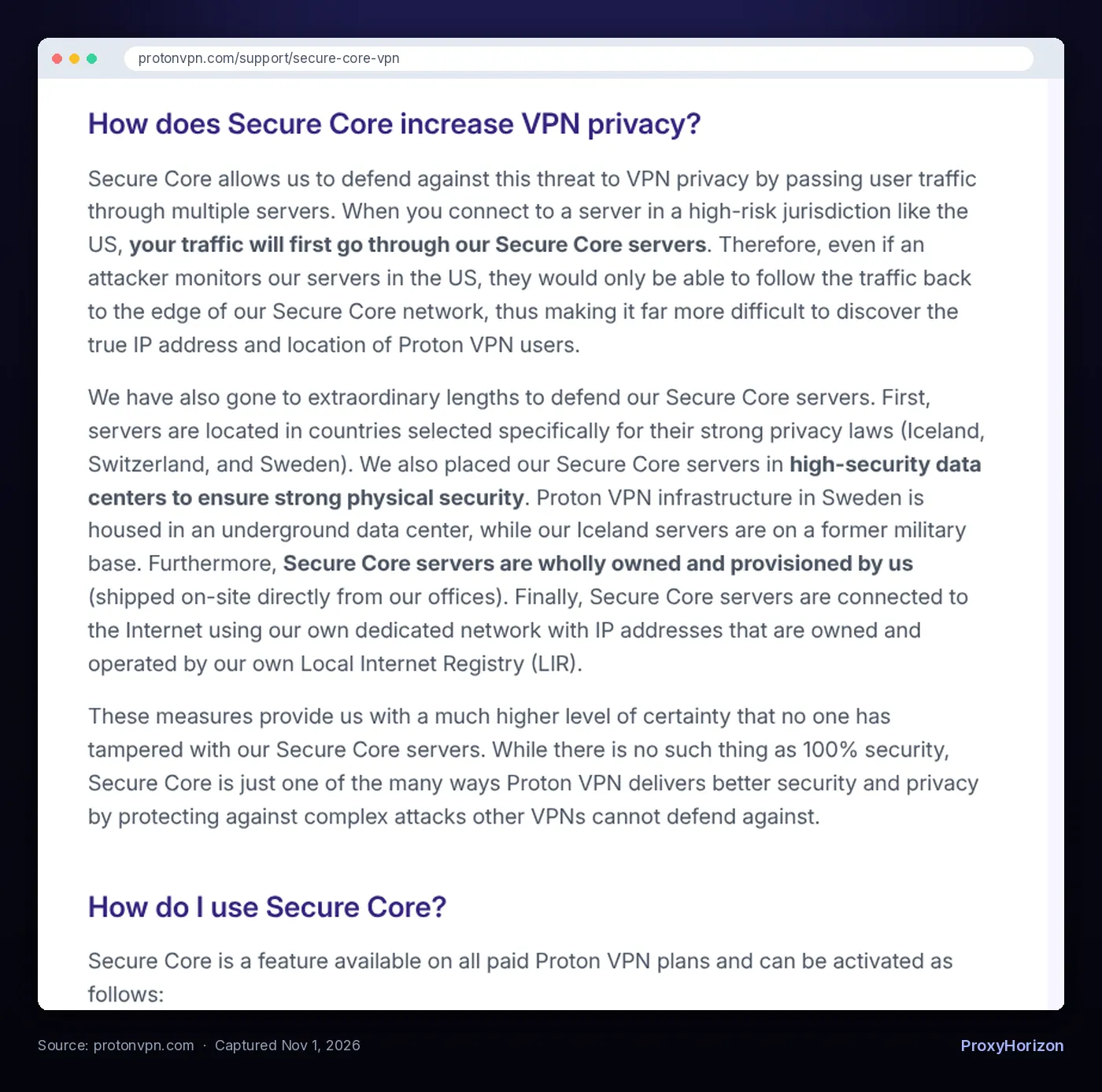
Proton explains the risk in its Secure Core documentation. If an attacker controls a VPN server, or monitors the network around it, they can match VPN users with their traffic. Proton adds that in some countries, authorities can legally pressure a VPN or hosting provider to help with that monitoring.
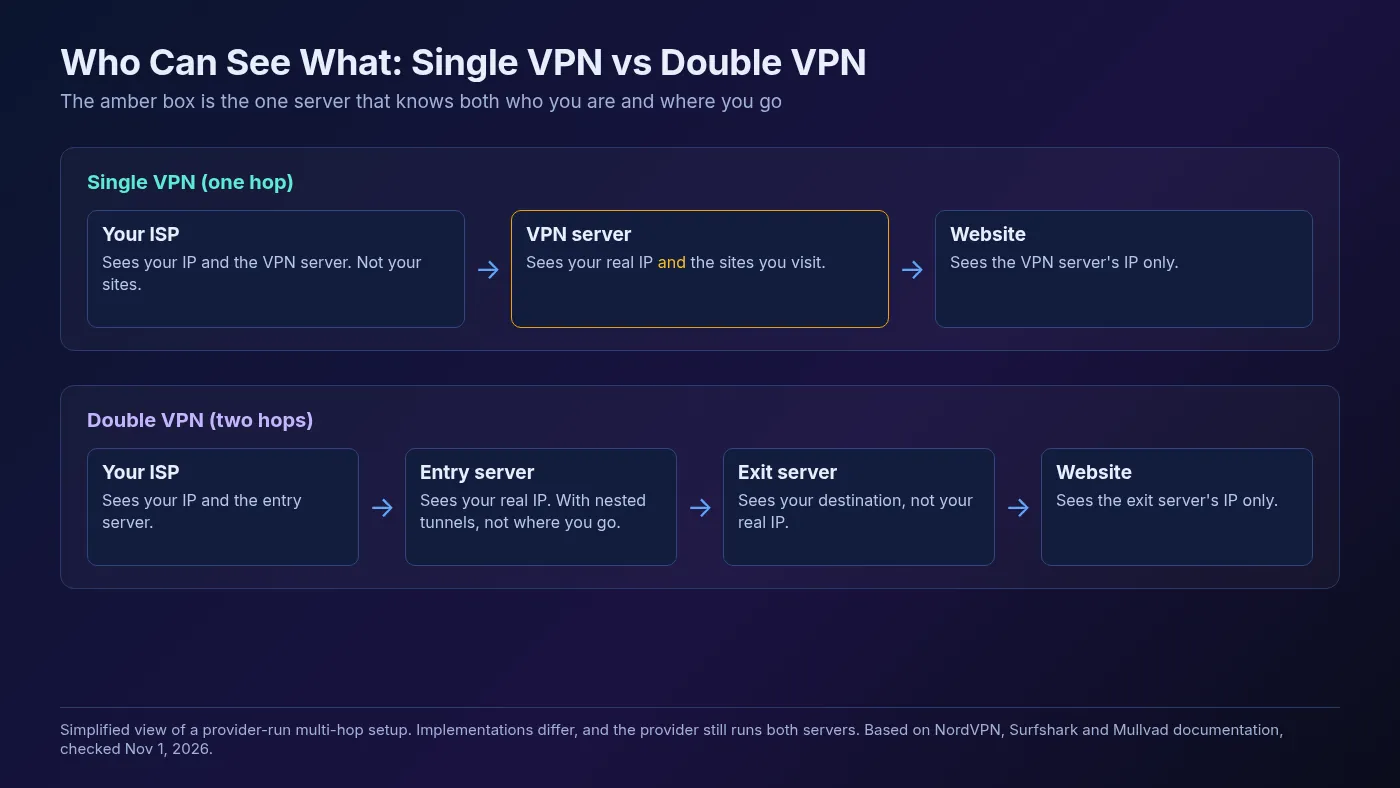
A second hop splits that knowledge. Mullvad says an adversary would then need to run timing attacks in multiple locations to analyze your activity. That’s much harder when the hops sit in different countries with different data centers and network providers.
Multi-hop also gives you a little more distance from a single seized or compromised exit server. Proton says that even if someone monitors its US servers, they could only follow traffic back to the edge of its Secure Core network.
What Double VPN Won’t Do
A second hop doesn’t fix the problems a single VPN can’t fix either. This is where most of the marketing gets fuzzy, so here’s the honest list.
- It doesn’t remove trust in your provider. With a one-provider multi-hop, the same company runs both servers. A no-logs policy backed by an audit matters more than the number of hops.
- It doesn’t hide that you use a VPN. Surfshark notes that a double VPN adds encryption but doesn’t hide VPN use. For that, you need VPN obfuscation.
- It doesn’t stop tracking in your browser. Cookies, logged-in accounts and browser fingerprints identify you no matter how many servers sit in the middle.
- It doesn’t fix leaks. A misconfigured device can still expose requests outside the tunnel. Run a DNS leak test either way.
And “twice the encryption” doesn’t mean twice as secure in any practical sense. Surfshark itself says a single layer of AES-256 or ChaCha20 encryption is enough for most users. The real gain from multi-hop is about who can link you to your traffic, not about cracking the encryption.
The Speed Penalty: What a Second Hop Costs
Double VPN is almost always slower than a single hop. Your data travels farther, gets processed by two servers and often crosses borders twice. No major provider publishes a standard speed-loss figure, so we won’t invent one.
Here’s what the providers say themselves, checked in November 2026:
- NordVPN says a slower connection is expected with Double VPN and that it isn’t recommended for everyday activities. It also warns that latency-sensitive tasks like fast-paced gaming can suffer.
- Surfshark says not to use Multi Hop for casual browsing or streaming, because routing via multiple servers may decrease your speed.
- Mullvad says multihop generally makes your connection slower over distance. It adds that a well-chosen entry and exit pair can sometimes beat a direct route when ISPs peer poorly.
Protocol choice adds to the cost. NordVPN says that if Double VPN doesn’t show up in its app, you should switch to OpenVPN TCP or UDP, and NordVPN itself says its WireGuard-based NordLynx protocol is much faster than OpenVPN. Our OpenVPN vs WireGuard gaming test shows how much that gap can matter.
Real-world tip: pick entry and exit countries close to you and to each other. A hop from Germany to the Netherlands costs far less than a hop from Germany to Australia.
Who Should Use a Double VPN (and Who Shouldn’t)
Use multi-hop when being linked to your traffic carries real consequences. For everything else, one hop is enough. Mullvad says a standard single-hop setup is adequate for the majority of users.
| Your situation | Double VPN? | Why |
|---|---|---|
| Journalist protecting sources | Yes | NordVPN and Surfshark both name this as a core use case |
| Activist on a surveilled network | Yes, with other safeguards | Correlation by one server is the threat multi-hop targets |
| Connecting through a high-risk country’s server | Worth it | Proton built Secure Core for exactly this case |
| Everyday browsing and public Wi-Fi | No | A single VPN already encrypts your connection |
| Streaming, gaming or big downloads | No | The extra hop adds latency and slows throughput |
| Getting past a VPN block | No, use obfuscation | A double VPN still looks like a VPN |
Say you’re a researcher reading sensitive material while traveling. Multi-hop with entry and exit points in privacy-friendly countries is a reasonable call. If you’re just checking email at a café, it’s overkill, and a VPN kill switch will do more for you.
Double VPN Options From Major Providers Compared
Most big VPNs offer some form of multi-hop, but they differ in how much control you get. Here’s what each provider’s own documentation says, checked November 1, 2026.
| Provider | Feature name | How it works | Where to find it |
|---|---|---|---|
| NordVPN | Double VPN | Preset server pairs; needs OpenVPN if the option is missing | Specialty servers, then Double VPN |
| Proton VPN | Secure Core | Entry through owned servers in Iceland, Switzerland or Sweden | Secure Core filter or toggle; paid plans only |
| Surfshark | Multi Hop | Preset pairs, or build your own entry and exit pair | Multi Hop tab (under Advanced on iOS) |
| Mullvad | Multihop | WireGuard tunnels between servers; pick any entry and exit | Settings, VPN settings, WireGuard settings |
Proton’s approach stands out because it controls the entry hardware. Its documentation says Secure Core servers are wholly owned by Proton, housed in high-security data centers and connected through its own network, using IP addresses owned and operated through its own Local Internet Registry.
NordVPN says Double VPN is included in its subscription. If it’s on your shortlist, our NordVPN pricing breakdown shows what each plan and renewal costs. You can compare the rest in our VPN directory.
Double VPN vs VPN Over VPN vs Tor
A provider’s multi-hop, stacking two VPN apps and Tor all add hops, but they make very different trade-offs.
1VPN Over VPN (Two Providers)
You can chain two different providers, for example a VPN on your router plus a VPN app on your laptop. That spreads trust across two companies. It also slows things down a lot, and Surfshark warns that two VPN apps on one device can conflict, leak data or trip the kill switch.
NordVPN makes a related point: each extra server beyond the first hop cuts speed sharply without a matching gain in security. If you want the two-provider version, our router VPN setup guide covers the router half.
2Tor
Tor goes further. The Tor Project says Tor passes your traffic through at least three servers, with a separate layer of encryption for each relay, run by volunteers rather than one company. That’s stronger anonymity, at a much bigger speed cost. Our VPN vs Tor comparison walks through when each one makes sense.
How to Turn On Double VPN in Popular Apps
These paths come straight from each provider’s help pages:
- NordVPN: open the app, find Specialty servers, and select Double VPN. If it’s missing, switch your protocol to OpenVPN (TCP or UDP).
- Proton VPN (Windows, Android): open Countries, choose the Secure Core filter tab and pick the country you want to appear from. On macOS and iOS, switch Secure Core on first.
- Surfshark: open the Multi Hop tab, then choose a preset pair or build your own.
- Mullvad: go to Settings, then VPN settings, then WireGuard settings, and enable multihop. Then pick an entry and exit location.
Then check it worked. Visit an IP checker and confirm you appear in the exit country, not the entry one. Run a quick speed test with multi-hop on and off so you know the real cost on your connection.
Frequently Asked Questions
Is Double VPN Worth It?
For most people, no. A single, trustworthy VPN with a solid protocol already encrypts your connection and hides your IP address from the sites you visit.
Double VPN earns its place when one server seeing both ends of your connection is a real risk: journalism, activism, or connecting through servers in countries you don’t trust.
Our take: treat multi-hop as a tool you switch on for sensitive sessions, not a default. Pick a provider with an audited no-logs policy first, keep your hops close together, and turn it off when you’re done.
Keep Reading
More articles you might enjoy