How Large-Scale Web Crawlers Manage Request Queues (2026)
How large-scale web crawlers manage request queues: the crawl frontier, two-layer priority and politeness design, Bloom filter deduplication, and distributed partitioning.

Ask someone how a web crawler works and they will describe fetching a page, extracting links, and adding them to a list. That is accurate for a hundred pages. At a hundred million, the fetching is the easy part and the list becomes the entire engineering problem.
A large-scale crawler lives or dies on its queue. Get it wrong and you hammer one server into blocking you while a million URLs sit idle, or you crawl the same page a thousand times, or a restart loses a week of discovered links. The queue decides your throughput, your politeness, your crash resilience, and whether the sites you crawl consider you a nuisance.
This guide explains how production crawlers actually manage request queues: what a crawl frontier is, why politeness forces a per-host design, how prioritisation and deduplication work at scale, and how all of it survives being distributed across many machines. Let us build it up properly.
- A single global queue breaks immediately, because it hammers whichever host happens to dominate the queue at that moment.
- Production crawlers use a two-layer frontier: front queues decide priority, back queues enforce one-host-per-queue politeness.
- Deduplication at scale relies on URL normalisation plus a probabilistic structure such as a Bloom filter, since an exact seen-set will not fit in memory.
- Distributed crawlers partition work by hashing the hostname, which keeps every URL for a host on one worker and preserves politeness.
Why the Naive Queue Breaks Immediately
The obvious implementation is a first-in-first-out list of URLs that workers pull from. It fails for four reasons, and understanding each one motivates a piece of the real design.
It destroys politeness. When you crawl a site, you extract hundreds of its internal links and push them onto the queue together. Moments later your entire worker pool is pulling from that contiguous block and firing hundreds of concurrent requests at one server. You have accidentally built a denial-of-service tool, and you will be blocked within seconds.
It has no sense of priority. A homepage that links to thousands of valuable pages is treated identically to a paginated archive from 2009. Crawl order determines what you actually collect before your budget runs out, so treating every URL as equal wastes most of your capacity.
It duplicates endlessly. The web is a dense graph and the same URL will be discovered from dozens of pages. Without deduplication you will re-crawl the same content repeatedly and can trap yourself in infinite loops through calendar pages and faceted navigation.
It does not survive a restart. An in-memory list vanishes when the process dies, taking every discovered-but-uncrawled URL with it. At scale, processes die routinely.
The Crawl Frontier
The proper name for a crawler’s queue system is the frontier: the managed set of URLs that have been discovered but not yet fetched. It is a scheduler rather than a list, and it answers a specific question on demand, which is "given everything I know, which URL should be fetched next, by which worker, and when?"
A frontier has to satisfy several constraints at once. It must respect per-host rate limits, order work by priority, avoid duplicates, survive crashes, and distribute across machines. Those requirements pull against each other, which is why the architecture that satisfies them is less obvious than a queue.
The Two-Layer Frontier: Priority and Politeness
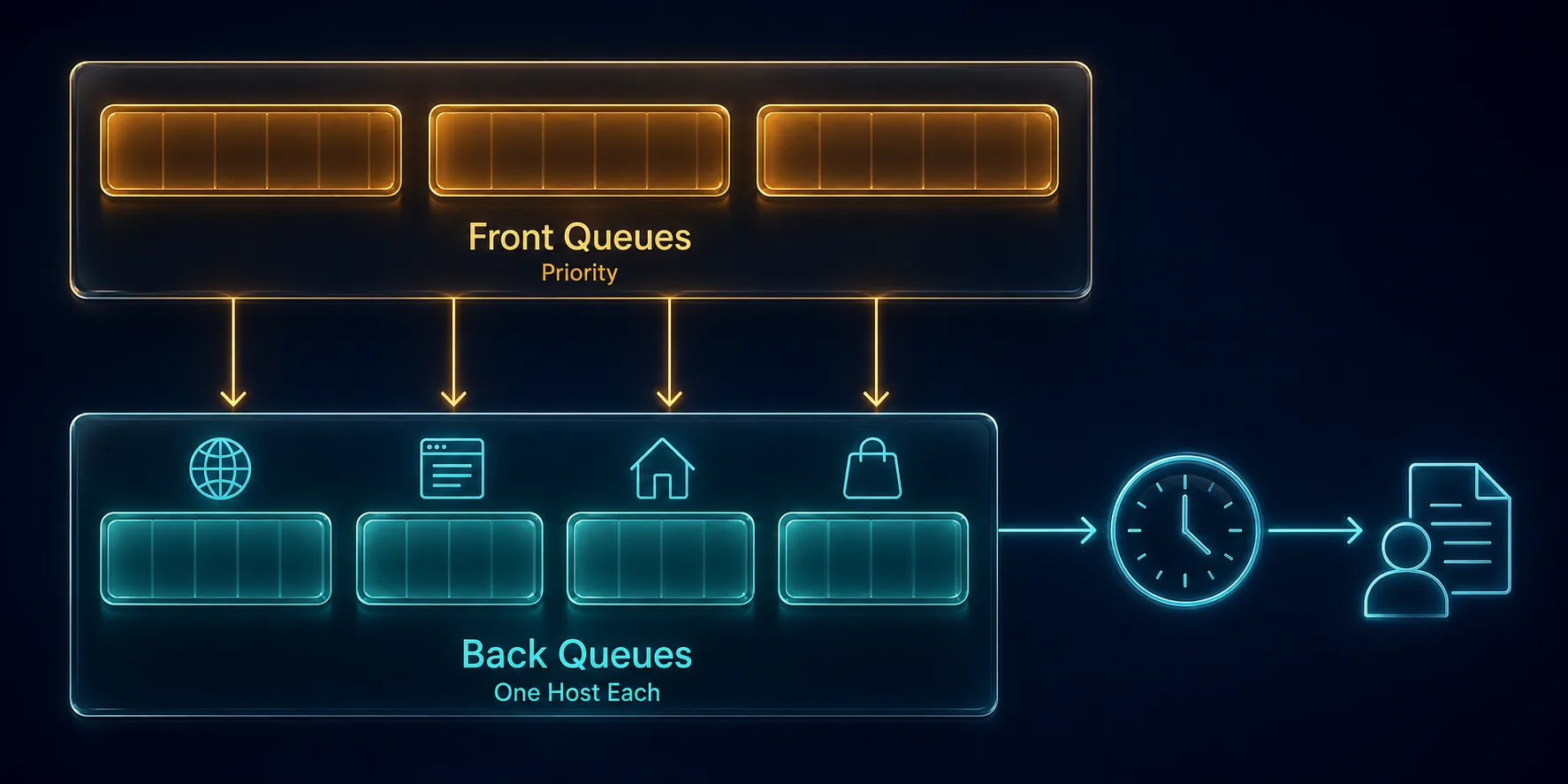
The classic solution, established by the Mercator crawler design and still the basis of most production systems, is to split the frontier into two layers that solve the two problems separately.
1Front Queues Decide What Matters
The front layer is a set of queues representing priority bands. When a URL is discovered it is scored and dropped into the band matching its importance. A high-value page goes in the top band, a low-value one further down. Selecting from the front layer is weighted, so higher bands are drained faster but lower bands still make progress rather than starving entirely.
2Back Queues Enforce Politeness
The back layer is where the crucial constraint lives: each back queue holds URLs for exactly one host. A worker is never handed an arbitrary URL, it is handed a back queue, and because that queue contains only one host the worker is structurally incapable of hammering multiple requests at that server faster than the queue is released.
A scheduler tracks the earliest time each back queue may next be accessed, usually in a heap ordered by next-available timestamp. When a worker finishes fetching, the host’s next-allowed time is pushed forward by the politeness delay, and the queue becomes eligible again only after that. Politeness stops being something you remember to implement and becomes a property of the data structure.
Prioritisation: Deciding What to Crawl First
Because you will never crawl everything, order is everything. Real crawlers blend several signals.
Breadth-first traversal is a surprisingly strong default. Crawling level by level from seed URLs naturally reaches important, well-linked pages early, because important pages tend to be linked from near the top of a site.
Link-based importance approximates the value of a page from how many and which pages point to it, in the spirit of PageRank. Freshness matters for re-crawling: a news homepage changes hourly and a documentation page changes yearly, so adaptive scheduling learns each URL’s change rate and revisits accordingly rather than re-crawling everything on a fixed cycle.
Business value usually overrides all of it. If you are building a price monitor, product pages outrank blog posts regardless of their link graph position. The honest advice is to start with breadth-first plus explicit business rules, and only add sophisticated scoring once you can measure that it helps.
Deduplication at Scale
Knowing whether you have already seen a URL sounds trivial until the seen-set contains billions of entries.
1Normalise Before You Compare
The same page is reachable through many URL spellings. Normalisation collapses them: lowercase the scheme and host, remove default ports, resolve relative paths, sort query parameters into a canonical order, strip tracking parameters such as utm_* and session identifiers, and decide a consistent policy on trailing slashes and fragments. Without this, one page enters your frontier a dozen times under different keys.
2Bloom Filters and Their Trade-Off
Storing billions of full URLs or even hashes in memory is impractical, so crawlers use a Bloom filter, a probabilistic structure that answers "have I seen this?" using a tiny fraction of the memory. The trade-off is precise and worth stating: a Bloom filter can produce false positives but never false negatives. It may occasionally claim you have seen a URL you have not, causing you to skip it, but it will never tell you a URL is new when it is not.
For crawling that asymmetry is exactly the right shape. Skipping a small fraction of pages is a minor loss, while re-crawling endlessly is a serious failure. Systems needing exactness back the filter with a persistent store consulted only on a positive hit.
3Content-Level Duplicates
URL deduplication does not catch the same content served at different addresses. Fingerprinting page content, often with a similarity hash, lets you detect near-duplicates and avoid storing thousands of copies of essentially identical pages.
Politeness, Delays, and Adaptive Backoff
Being a well-behaved crawler is both an ethical obligation and the most effective anti-blocking measure available.
Start with robots.txt, fetched and cached per host, honouring disallow rules and any Crawl-delay directive. Beyond that, apply a default per-host delay and cap concurrent connections to a single host at a small number, regardless of how many workers you are running overall.
The more advanced behaviour is adaptive. Treat the target’s responses as feedback: a 429 Too Many Requests or a 503 means slow down, so increase the host’s delay and back off exponentially. Rising response times suggest strain, so ease off before you are told to. Conversely, sustained fast responses can justify cautiously increasing your rate. A crawler that adjusts to the health of each host stays welcome far longer than one running a fixed rate, and it avoids the blocks discussed in how anti-bot systems detect automated browsers.
Distributing the Frontier Across Machines
One machine will not crawl the web, but distributing naively destroys the politeness guarantee you worked to build. If URLs for one host are spread across twenty workers, each worker independently believes it is being polite while the host receives twenty times the intended rate.
The standard fix is partitioning by host. Hash the hostname and use it to assign every URL for that host to exactly one worker or shard. Politeness state stays local to the worker that owns the host, so no coordination is needed on the hot path. A worker discovering a URL for a host it does not own simply forwards it to the owner.
This is a natural fit for a partitioned log such as Kafka, keyed by hostname, or a sharded Redis or database-backed queue. Consistent hashing lets you add and remove workers with minimal reshuffling. The trade-off is that a host with an enormous number of URLs becomes a hot partition, so very large sites sometimes need splitting by subdomain or path prefix.
Failures, Retries, and Poison URLs
At scale, failure is continuous rather than exceptional, so the queue has to encode a failure policy.
Distinguish failure classes rather than retrying blindly. Transient failures such as timeouts, connection resets, and 5xx responses deserve retries with exponential backoff and jitter. Permanent failures such as 404 or 410 should be recorded and never retried. Rate-limit responses are not really failures at all, they are instructions to slow down, and should adjust the host schedule rather than simply re-queueing.
Every URL needs a retry counter and a ceiling. Beyond that ceiling it moves to a dead letter queue for inspection instead of cycling forever. Without this, a handful of pathological URLs, the classic being an infinite calendar generating tomorrow’s date indefinitely, will consume a growing share of your capacity. Our guide on handling proxy timeouts and errors covers the retry patterns in more depth.
Persistence, Backpressure, and Recovery
Two more properties separate a prototype from a production crawler.
Durability means the frontier lives in something that survives a restart: a database, a persistent queue, or a checkpointed store. Crawls run for days or weeks, and losing the frontier means losing the crawl. Most systems accept at-least-once delivery and rely on deduplication to absorb the occasional repeat, because exactly-once is expensive and rarely worth it here.
Backpressure stops the frontier eating all your memory. Crawling is naturally amplifying, since one page yields many new links, so an unbounded frontier grows faster than you drain it. Bound the queue, and when it fills, stop accepting new discoveries or spill them to disk rather than expanding forever. Pair this with monitoring on frontier size, per-host queue depth, success and error rates, and crawl throughput, so you can see a problem developing rather than discovering it after a week of bad data.
Common Mistakes to Avoid
These are the failure patterns that show up again and again.
1Using One Global Queue
The root cause of most crawler blocking. Without per-host back queues, a burst of internal links guarantees you will flood one server. Partition by host from day one.
2Skipping URL Normalisation
Deduplication is only as good as your canonical form. Without stripping tracking parameters and sorting query strings, the same page enters your frontier repeatedly under different keys and your dedupe layer never sees a match.
3Retrying Everything Forever
Retrying a 404 wastes capacity, and unbounded retries let poison URLs dominate your crawl. Classify failures and enforce a retry ceiling with a dead letter queue.
4Keeping the Frontier in Memory
It works until the first crash or deploy, then you lose everything discovered so far. Persist it.
5Ignoring the Target’s Feedback
A fixed crawl rate ignores the clearest signal you get. Rising latency and 429 responses are the site telling you to slow down, and adapting keeps you crawling where a fixed rate gets you blocked.
Queue design also determines whether a crawler can carry session state at all, which is the subject of our companion guide to stateless vs stateful scraping architecture.
Frequently Asked Questions
The Bottom Line
At scale, the queue is the crawler. Fetching pages is a solved problem; deciding which page to fetch next, from which worker, at what moment, without overwhelming anyone or repeating yourself, is the actual engineering.
The design that works is consistent across production systems: a two-layer frontier where front queues handle priority and back queues enforce one host each, deduplication built on strict URL normalisation plus a Bloom filter, adaptive politeness driven by the target’s own responses, host-based partitioning to distribute without losing those guarantees, and a durable store with bounded backpressure so nothing is lost and nothing grows unbounded.
Build those pieces deliberately and a crawler scales from thousands of pages to hundreds of millions without changing shape. To get the network layer right alongside it, see why web scraping needs proxies and our guide to rotating proxies, or compare providers in our proxy directory.
Keep Reading
More articles you might enjoy