How to Choose a Proxy Provider: Checklist for 2026
Pool size and price per GB don’t pick a good proxy provider. This checklist covers success rate, true cost per request, traffic expiry, trials, sourcing and support.
Most people pick a proxy provider by the biggest number on the homepage.
Seventy million IPs. One hundred and ninety-five countries. A price per GB that looks like a typo. Then the first real job runs, half the requests come back blocked, and the bill is double what the calculator promised.
The problem isn’t that those numbers are fake. It’s that none of them tell you how the network behaves on your target sites, or what you pay for the requests that fail.
This guide gives you a practical checklist for how to choose a proxy provider: the questions that matter, the red flags in the fine print, and the one billing detail that changes the maths more than any discount.
- Pool size and headline success rates make a shortlist, not a decision.
- Failed requests usually cost the same traffic as successful ones.
- Effective cost per successful request beats the price per GB.
- Trial and refund terms vary a lot, and some cancel each other out.
- For residential IPs, sourcing and KYC are business risks worth asking about.
Why Pool Size Is the Wrong Place to Start
Pool size is a marketing number, not a quality number. It counts every IP a provider has ever seen, across every country, over some time window. You’ll only ever touch a small slice of it.
What matters is how many clean IPs exist in the country and city you need, at the hour you run your jobs. A pool of tens of millions means little if your target is Spanish retail sites and the Spanish slice is thin or already burned.
So flip the order. Start with your job, then judge providers against it. The big numbers become a tiebreaker, not the headline.
Step Zero: Write Down What Your Project Needs
You can’t compare providers until you know what you’re buying for. Five minutes here saves weeks of switching later.
Answer these before you open a single pricing page:
- Targets: which sites, and how hard are they? A public API and a sneaker drop are different worlds.
- Proxy type: rotating residential, ISP, datacenter or mobile. Our guide to residential vs datacenter proxies covers which fits which job.
- Volume: roughly how many GB or how many IPs per month.
- Location: country only, or state, city and ZIP?
- Sessions: a new IP per request, or the same IP for a login flow?
Write the answers down. Every check below gets scored against this list, not against the provider’s homepage.
The Proxy Provider Checklist
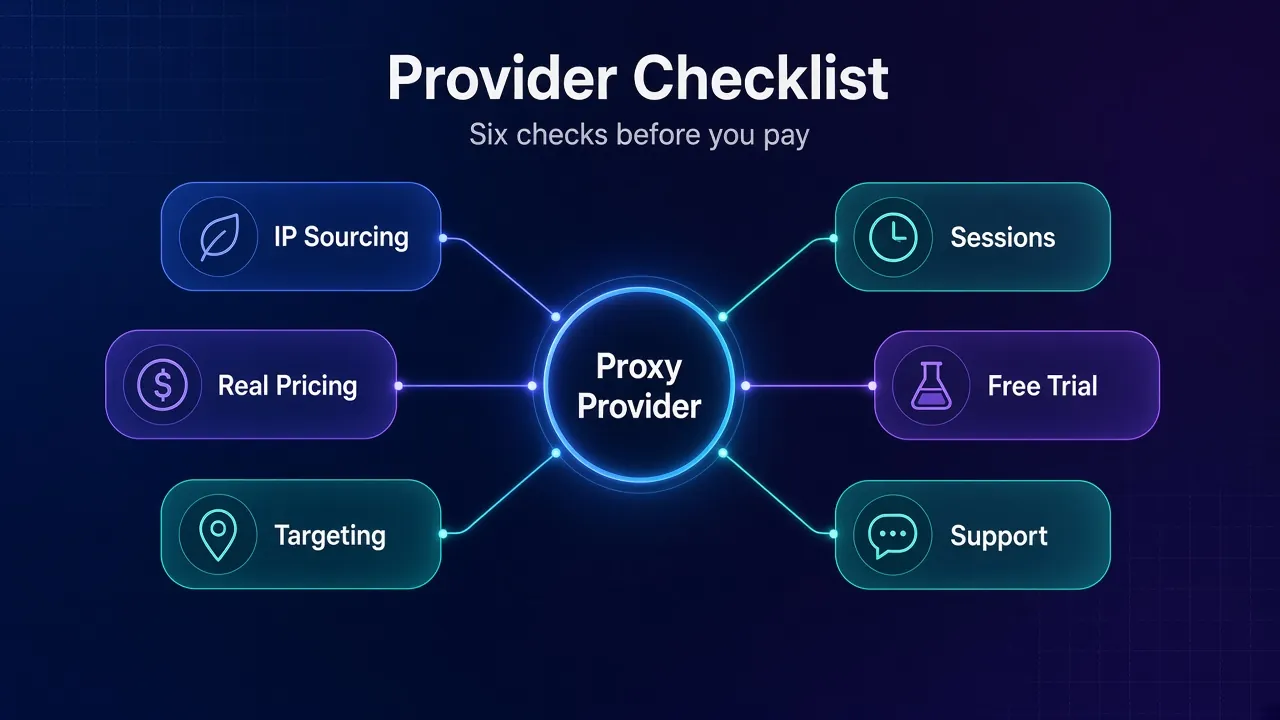
Eight checks cover almost every way a provider can disappoint you. Here they are at a glance, with the answer that should make you close the tab.
| Check | What to ask | Red flag |
|---|---|---|
| Pool in your geo | How many IPs in my country and city? | Only a global total, no breakdown |
| Success rate | Can I test on my own target URLs? | No trial, or trial blocks your targets |
| Pricing model | Per GB, per IP, or credits? What counts as traffic? | Billing rules you can’t find in writing |
| Expiry and minimums | Does unused traffic roll over? | Monthly expiry plus a high minimum |
| Targeting and sessions | City targeting? Max sticky time? | Rotating only, or targeting as a paid add-on you didn’t expect |
| Protocols and auth | HTTP(S), SOCKS5, user:pass, IP whitelist? | One protocol, no whitelist option |
| Sourcing and KYC | Where do residential IPs come from? | Vague answers about consent |
| Support | Who answers when success rates drop? | Bot-only chat, no docs |
1Pool Size Claims: Ask About Your Country, Not the Planet
Good providers publish per-country numbers. IPRoyal’s residential proxy page, for example, lists IP counts by top location, and Webshare’s pricing page does the same. That’s far more useful than one giant total.
During a trial, check it yourself. Rotate a few hundred times in your target country and count how many unique IPs you get back. Lots of repeats in a small window tells you the local pool is shallower than the headline.
2Success Rate on Your Targets, Not Their Benchmark
Every provider quotes a success rate. It’s usually measured against easy targets under ideal conditions, which is why most of them look nearly identical on paper.
The only number that counts is yours: the share of requests that return the page you wanted, on the sites you actually scrape. Our guide on how to test proxy speed, latency and success rate walks through a test you can run in an afternoon.
Our take: a provider that won’t let you test against named sites before paying is asking you to trust the brochure. Don’t.
3Pricing Model and What You Pay Per Successful Request
The price per GB is only half the bill. The other half is how many requests fail. Here’s the detail most buyers miss: failed requests usually cost the same traffic as successful ones.
Oxylabs says it plainly on its residential pricing page (checked November 2026): you’re billed for both request and response traffic, regardless of the HTTP status code returned.
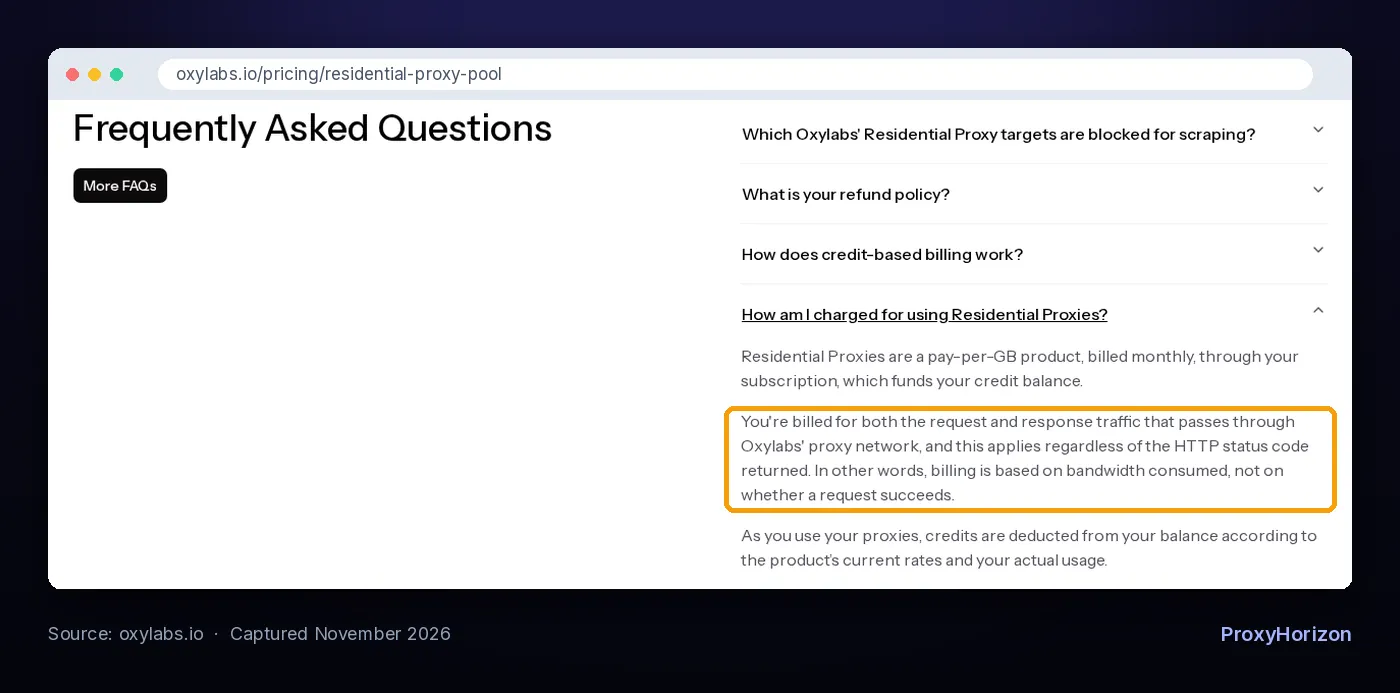
That’s not a gotcha unique to one company. It’s how bandwidth billing works across the industry. It just means a block page, a CAPTCHA or a redirect loop all land on your invoice.
So compare providers on effective cost: price per GB divided by your measured success rate. A cheap network with a poor success rate can cost more than a pricier one that gets through.
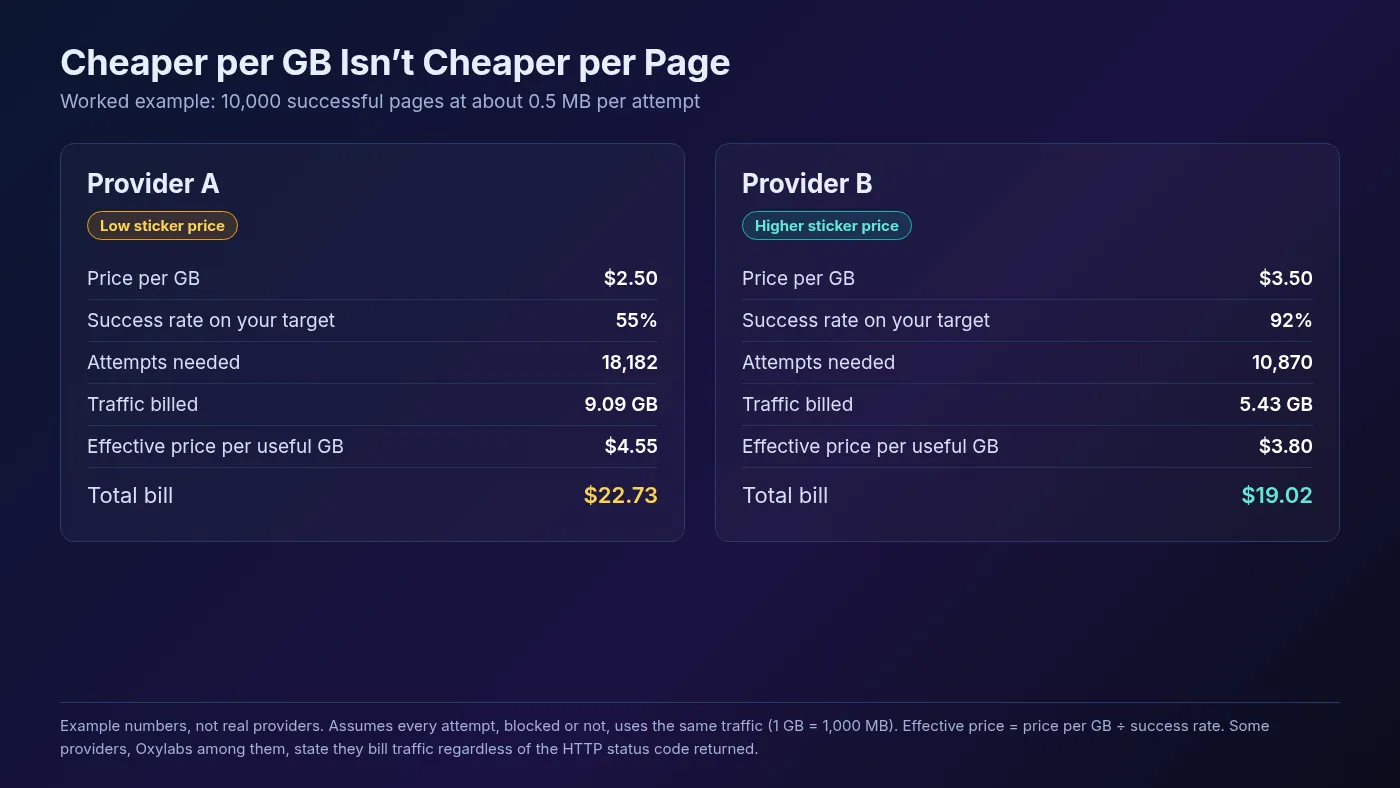
In this example, Provider A looks about 29% cheaper per GB. After the failed attempts are counted, it’s the more expensive option for the same 10,000 pages. If you want to estimate your own volume first, our proxy bandwidth calculator guide shows the maths.
4Traffic Expiry, Minimums and Tax
Two plans with the same price per GB can cost very different amounts by year end. The difference hides in three places.
- Expiry: Oxylabs states that unused credits expire at the end of the billing cycle unless they carry over as part of an upgrade. IPRoyal, by contrast, says its residential traffic never expires.
- Commitment: monthly subscriptions usually give a lower rate than pay-as-you-go. Decodo lists pay-as-you-go residential at $4/GB, against $3.75/GB to $2.75/GB on monthly plans.
- Tax: Decodo shows its prices plus VAT, and Oxylabs notes VAT may apply. Depending on where you’re billed, that changes the real number.
If your usage is spiky, expiring traffic punishes you. If it’s steady, a monthly plan is usually the better deal.
5Targeting and Session Control
Country targeting is standard. City, state, ZIP and ASN targeting is where providers differ, and where some charge extra. Read how proxy geo-targeting works before you pay for precision you don’t need.
Sessions matter just as much. A crawler wants a fresh IP per request. A checkout or login flow needs the same IP for minutes or hours. IPRoyal, for instance, advertises sticky sessions of up to 7 days. Match the maximum to your flow using our guide to sticky vs rotating sessions.
6Protocols, Authentication and Concurrency
Most tools speak HTTP(S). Some, like certain antidetect browsers or non-web clients, need SOCKS5. Check both are offered on the proxy type you’re buying, not just somewhere in the catalogue.
Authentication options matter on servers. Username and password is flexible. IP whitelisting is handy for tools that can’t send credentials. And look for any concurrency cap, because a limit on parallel connections can throttle a scraper more than any rate limit.
7IP Sourcing and KYC
For residential and mobile proxies, how the IPs are sourced is a business risk, not a footnote. Those IPs belong to real people’s devices, and the consent behind them varies a lot between networks.
Ask how devices join the pool, what owners get in return, and how they opt out. Our guide to how residential proxies are sourced lists the exact questions to send a provider.
A know-your-customer (KYC) check at signup is also a good sign, even if it slows you down. Oxylabs, for example, publishes a KYC policy. Providers that vet customers tend to have cleaner IPs, because fewer abusers burn them.
8Support and Documentation
Proxy problems rarely happen at convenient times. When your success rate drops overnight, you want a human who can see the network, not a chatbot reading the FAQ back to you.
Test this during the trial. Open one real ticket with a specific question and time the reply. Then check the docs: clear code samples, an API for usage, and a status page are signs of a provider that expects technical customers.
Free Trials and Refunds: Read the Fine Print
A trial is only useful if it lets you test what you’ll actually run. The terms vary more than most buyers expect, so here’s how four well-known providers describe theirs on their own pricing pages, checked November 2026.
| Provider | Try before buying | Refund terms | Residential traffic expiry |
|---|---|---|---|
| Decodo | 3-day free trial with 100 MB on residential | 14-day money-back on the first purchase, if you used no trial and under 20% of the plan’s traffic | Monthly subscription plans |
| Oxylabs | $5 in free welcome credits | Self-service purchases are non-refundable | Unused credits expire at cycle end |
| IPRoyal | Pay-as-you-go, no contract | Not stated on its residential page | Traffic never expires |
| Webshare | Free plan: 10 shared proxies, 1 GB a month, no card | Within 2 days, only under strict usage limits | Monthly plans by GB |
Notice the trap in the Decodo terms: using the free trial rules out the money-back option. Pick one route on purpose. If 100 MB is too little to test your targets, a small first purchase with the refund window may tell you more.
Webshare’s refund is similar in spirit. It applies only if you cancel within 2 days of payment and used less than 1 GB on proxy server plans, or 0.1 GB on rotating residential. A refund window is a safety net, not a testing budget.
We picked these four because their terms are public and clear, not as a ranking. For ranked picks, see our list of the best residential proxy providers.
How to Run a Trial That Tells You Something
A trial where you load one IP-check page proves nothing. Here’s a short process that does.
- Pick 3-5 real target URLs, including your hardest one.
- Use identical settings on every provider: same country, headers, concurrency and timing.
- Send a few hundred requests per provider and log status code, response size and time.
- Count real successes: a 200 with the content you expected, not a 200 that’s secretly a CAPTCHA page.
- Check the dashboard afterwards and compare billed traffic with what you logged.
- Work out effective cost for each, then decide.
Step 5 is the one people skip. It’s also where you learn whether the provider counts traffic the way you assumed.
Pricing Traps That Catch First-Time Buyers
These are the mistakes we see most often, and each one has a simple fix.
- Buying the biggest plan for the best per GB rate. A large monthly plan with expiring traffic wastes money if you only use half. Start small, measure, then scale.
- Ignoring failed-request traffic. Retries, block pages and heavy pages all eat bandwidth. Block images and fonts where you can.
- Assuming targeting is free. Some providers include city targeting, others charge more for it. Decodo says its residential plans include advanced targeting, so check each provider’s page.
- Treating free proxies as a trial. Public free proxy lists are not the same network you’d pay for, and they come with real privacy risk.
The uncomfortable truth: cheap proxies get expensive once bans, retries and failed jobs enter the chat.
Which Proxy Type Should You Actually Pay For?
Match the spend to the target, not to the fear of being blocked. Many jobs never need premium residential IPs.
| Your situation | Usually the right fit | What to prioritize |
|---|---|---|
| Public data, lenient sites | Datacenter | Price per IP, unlimited bandwidth |
| Protected e-commerce or SERP scraping | Rotating residential | Success rate, effective cost |
| Managing logged-in accounts | ISP or sticky residential | Session length, IP stability |
| Mobile-first apps and social platforms | Mobile | Carrier coverage, sourcing |
| Tight budget, small project | Shared datacenter or pay-as-you-go | No expiry, low minimums |
If budget is the main constraint, start with our roundup of the cheapest private proxies. You can also browse and filter providers in the ProxyHorizon proxy directory.
Frequently Asked Questions
The Bottom Line on Choosing a Proxy Provider
The best proxy provider is the one that gets through on your targets at the lowest cost per successful request, with terms you’ve actually read. Pool size, global country counts and headline success rates help you build a shortlist. They don’t make the decision.
Our take: shortlist two or three providers that fit your proxy type and location, run the same small test on each, and compare effective cost and billed traffic side by side. The winner is often not the cheapest sticker price.
Your next step: pick your hardest target URL and run the trial process above this week, before you commit to any monthly plan.
Keep Reading
More articles you might enjoy