How to Manage a Team in an Antidetect Browser (2026)
Roles, folder access, session locks and audit logs: how to run an antidetect browser team in Multilogin, GoLogin, AdsPower and Dolphin Anty without losing accounts to your own people.
Most agencies don’t lose accounts to detection. They lose them to their own team.
One shared login, ten people, two hundred browser profiles. Someone edits a fingerprint “to fix it,” a freelancer leaves with the password, and two people open the same profile at once and wipe its cookies.
Antidetect browser team features exist to stop exactly that. Roles, folder access, session locks and action logs turn a fragile shared account into a workspace where everyone holds only the keys they need.
This guide shows how team management actually works in Multilogin, GoLogin, AdsPower and Dolphin Anty, the access model we’d use for a small agency, and the one setting most teams forget until a profile breaks.
- Replace shared logins with team seats so each person signs in with their own account.
- Use four access levels: owner, manager, operator and launch-only.
- Scope access by client folder, not by individual profile.
- Block parallel launches, since opening one profile on two devices can lose its data.
- Review action logs weekly and plan offboarding the day someone joins.
Why One Shared Login Stops Working
A shared login gives every person full control and leaves no record of who did what. That’s fine for a solo operator. It falls apart the moment a second person joins.
Think about what a shared password really hands over. Billing, every client’s profiles, proxy settings, the trash bin and the export button. One tired click can delete a profile that took three weeks to warm up.
Offboarding is the other trap. When a contractor leaves, you have to change the password, re-log every teammate and hope nobody saved it somewhere. Team seats fix that, because each person signs in with their own account and you remove one person, not everyone.
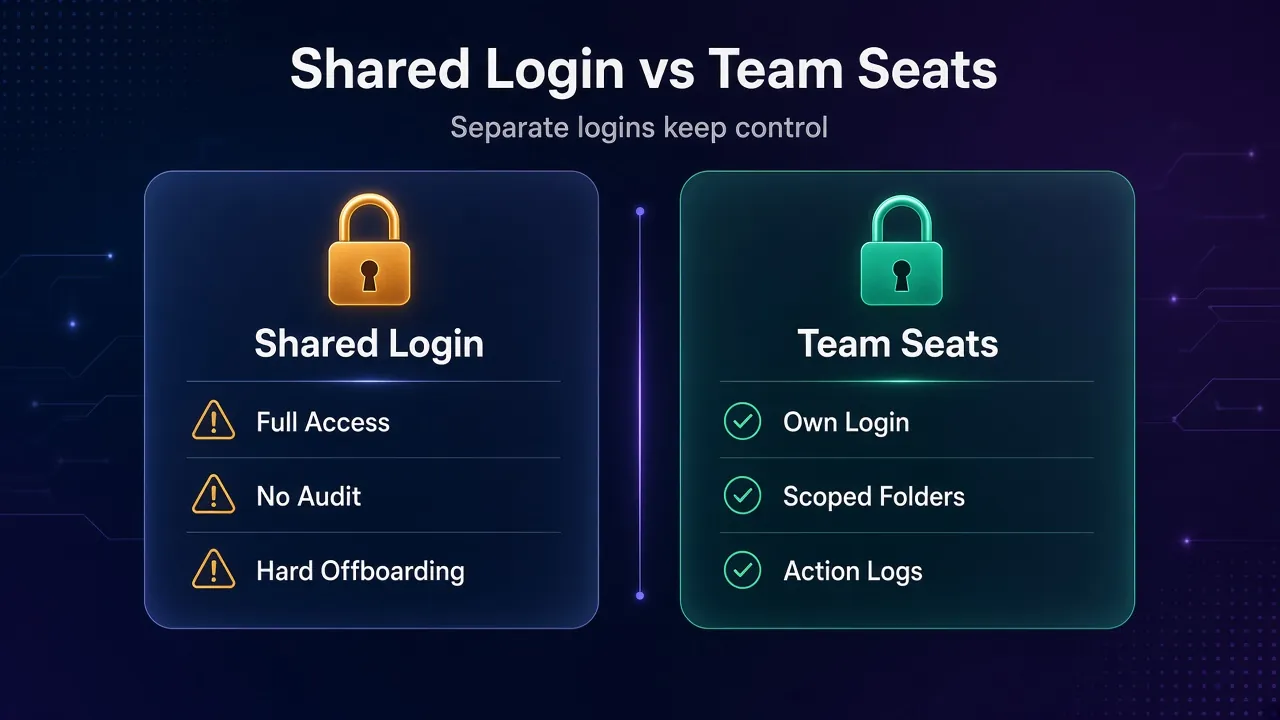
GoLogin puts the benefit plainly in its team members docs: teammates work with your profiles “without sharing your account password or login credentials.” Every major antidetect browser now works this way.
The Four Access Levels Every Team Needs
Almost every antidetect browser team setup boils down to four levels: owner, manager, operator and launch-only. The names differ by tool, but the jobs are the same.
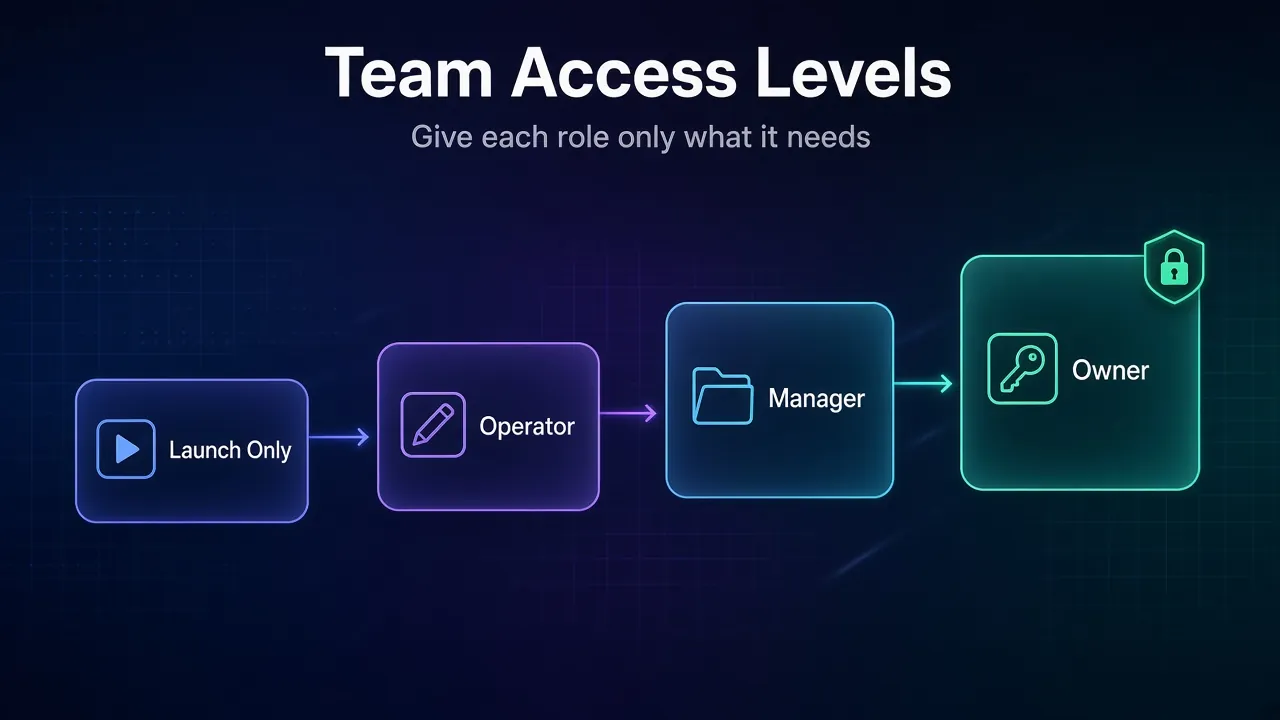
- Owner: billing, plan changes and the power to promote managers. Keep this to one or two people.
- Manager: sees every folder, invites and removes the people below them, but can’t touch the subscription.
- Operator: creates, edits and runs profiles, but only in the folders assigned to them.
- Launch-only: opens assigned profiles and does the work inside. No editing fingerprints, proxies or settings.
The launch-only level is the one most teams skip, and it’s the most useful. A VA posting content or answering messages never needs to change a profile’s proxy. If they can’t, they can’t break it.
Our take: default every new hire to launch-only for their first two weeks. Promote when there’s a reason, not because it’s easier than answering a question.
How Roles Compare in Multilogin, GoLogin, AdsPower and Dolphin Anty
Here’s how the four levels map to each tool’s actual role names, based on their official help pages checked on November 1, 2026.
| Level | Multilogin | GoLogin | AdsPower | Dolphin Anty |
|---|---|---|---|---|
| Owner | Owner | Workspace owner | Team owner / Administrator | Admin |
| Manager | Manager | Workspace full access | Manager | Teamlead |
| Operator | Operator | Can edit or Folder full access | Employee (with edit permissions) | User with edit rights |
| Launch-only | Starter | Can run | Employee (limited permissions) | User with launch-only rights |
| Access scope | Assigned folders | Workspace, folders or single profiles | Authorized groups or profiles | Shared folders or single profiles |
Disclosure: ProxyHorizon may earn a commission if you buy through some links on this page.
1Multilogin
Multilogin has the cleanest role ladder of the four: Owner, Manager, Operator and Starter. Its roles page, updated August 2026, spells out each permission.
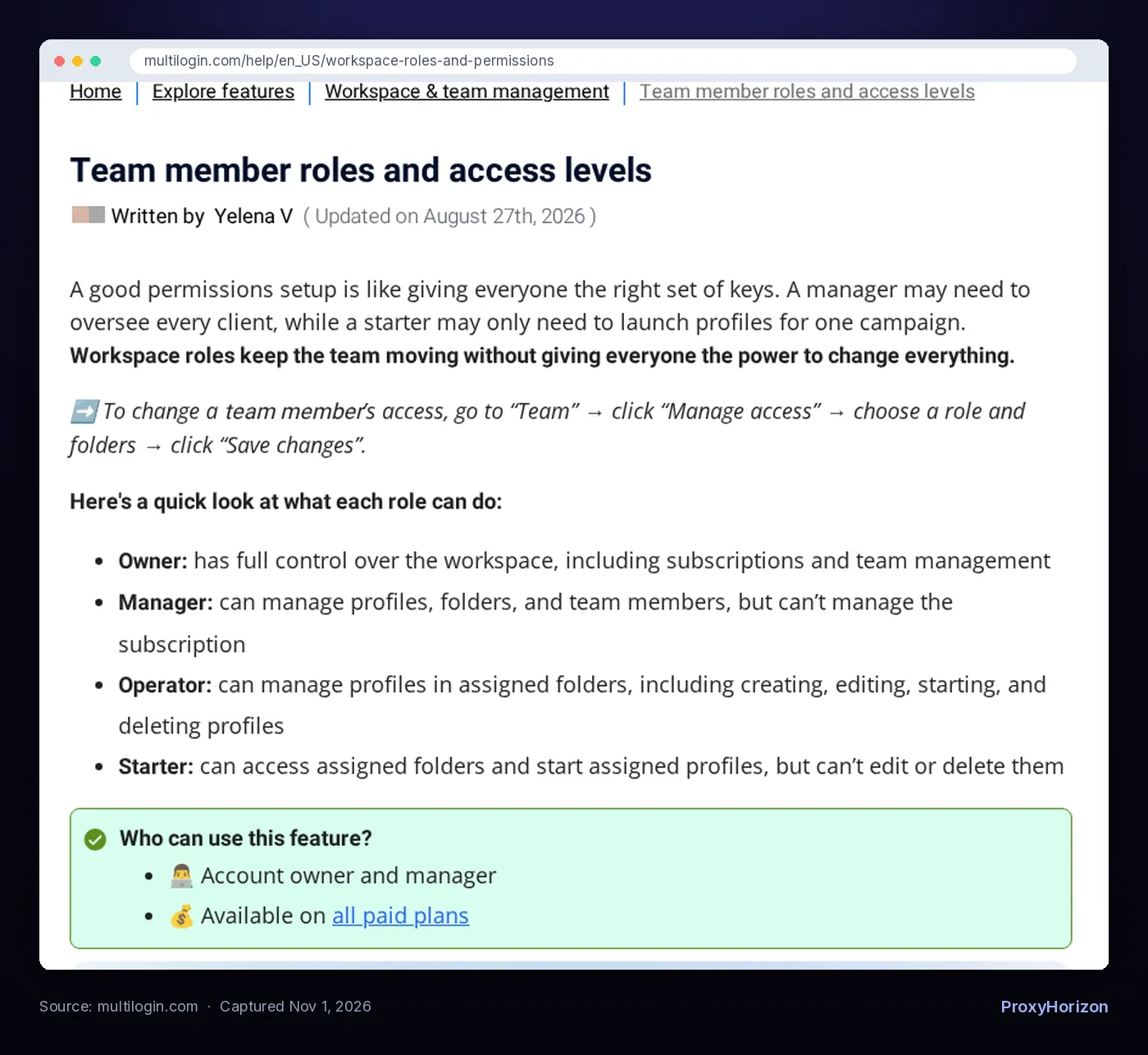
A few details matter more than the role names. Only the owner can make someone a manager. Operators can move profiles to the trash and restore them, but can’t permanently delete them. Starters can start and stop assigned profiles and nothing else.
One catch for plan shopping: the roles page lists teamwork on all paid plans, while Multilogin’s teamwork overview mentions Pro 10 and higher. Confirm on your plan before you build your process around it.
2GoLogin

GoLogin builds its permissions from two choices: what someone can reach (the whole workspace or selected folders) and what they can do (Can run, Can edit or Full access).
Only workspace-wide full access can share folders and invite new members. Folder members can’t manage folders at all, which is exactly what you want for a contractor. GoLogin also lets you share a single profile for one-off jobs.
Seats are the cost to watch. Each invited person uses one team member slot. GoLogin says Business, Enterprise and Custom plans include one seat, and the Professional plan can buy them. Our GoLogin pricing breakdown covers the plans.
3AdsPower

AdsPower uses three roles, Administrator, Manager and Employee, and adds member groups on top. Everyone in a member group shares the same function permissions, so you set rules once for “Posting VAs” instead of ten times.
Two settings stand out in its members guide. You can cap how many profiles a member can access, and you can choose between internal accounts the team controls and external members invited by email.
That choice matters at offboarding. The team can reset passwords on internal accounts, but not on external ones, where the email belongs to the member. Our AdsPower pricing guide has the full plan details.
4Dolphin Anty
Dolphin Anty uses Admin, Teamlead and User. The Teamlead is a neat middle layer: they manage only the users an admin assigns to them, which suits agencies split into small pods.
Where Dolphin goes furthest is per-folder rights. When you share a folder, you choose from eight permissions, including start, edit, delete, share and move profiles. Its docs give the classic example: let an employee view and launch profiles without editing or deleting anything.
Team users are available on the Base, Team and Enterprise plans, according to Dolphin’s teamwork docs.
Organize by Folder, Not by Person
Give access to folders, never to a long list of individual profiles. Per-profile sharing feels precise on day one and turns into chaos by month three.
Multilogin’s help page uses an agency with five clients as its example. Someone working on Client A shouldn’t be able to open, move or edit Client B’s profiles. Folder access keeps each person in their lane.
The structure that scales is simple:
- One folder per client or project. Add a sub-split by platform if a client has many accounts.
- A “Warm-up” folder for new profiles that only senior operators touch.
- A “Quarantine” folder for restricted or flagged accounts, so nobody keeps using them by accident.
- Tags and notes for status, like the proxy region or the last checkpoint, so handovers don’t depend on memory.
Moving a person to a new client then means changing one folder assignment. Every profile in that folder comes along, already set up with its one-proxy-per-profile pairing.
Check before you buy: in Multilogin, browser profiles and cloud phones have separate folder trees. A client folder you create for browser profiles won’t appear under cloud phones automatically.
Stop Two People From Opening the Same Profile
The fastest way to corrupt a profile is to run it on two devices at once. This is the setting most teams forget.
Dolphin Anty’s profile activity docs are blunt about it: if the same profile is open on several devices at the same time, data sync may break and some data inside the profile may be lost. That data includes the cookies and logins you built.
Each tool handles it differently:
- Multilogin shows an active session lock when a profile runs on another device. You can unlock and take over, but its help page warns that this may interrupt your teammate’s session or unsaved work.
- Dolphin Anty has parallel launch blocking, plus launch indication that shows who opened a profile and on which device. Only the admin can enable it, it needs cloud sync, and full details need the Team plan or higher.
Common mistake: treating “Unlock” as a fix. It’s a takeover. Make it a team rule to message the person first, then unlock.
A quick fingerprint test after any takeover also tells you whether the profile still matches its proxy and settings.
Audit Trails: What Each Tool Logs
Logs turn “who broke this?” from an argument into a two-minute lookup. They’re also how you spot a compromised member account before it does damage.
AdsPower has the broadest logging. Its action logs cover logins (with IP and success), the IPs used to open profiles, how profiles were opened, profile edits, group changes, proxy changes, RPA processes and tags. AdsPower says edits made through its Local API are logged too.
Dolphin Anty keeps a per-profile history. It records launches, session ends, cookie imports and exports, transfers, access right changes, and proxy, status, tag and note edits, with filters by user and period.
| What you want to know | Where to look |
|---|---|
| Who changed this profile’s proxy? | AdsPower action logs (Proxies, Profiles) or Dolphin profile history |
| Did someone log in from a strange IP? | AdsPower login log |
| Who exported cookies? | Dolphin profile history |
| Who is in this profile right now? | Multilogin session lock or Dolphin launch indication |
Real-world tip: review the logs weekly for one thing only, unexpected edits to fingerprints and proxies. Those are the changes that quietly kill accounts.
Onboarding and Offboarding Without Losing Accounts
Plan the exit on the day someone joins. It’s the part of team management nobody thinks about until a contractor disappears with access.
For onboarding, a short checklist works:
- Invite them with their own email. Never hand out the owner login.
- Start at launch-only, scoped to one client folder.
- Set a profile limit where the tool supports it. AdsPower and Dolphin Anty both do.
- Turn on two-factor authentication. AdsPower offers 2FA for all logins.
Offboarding is where the tools differ. Dolphin Anty can automatically transfer a removed user’s profiles to the admin, with tags, proxies, notes and settings intact. In AdsPower, deleting a member is permanent and can only be undone by adding them again.
Warning: before removing anyone, check who created the profiles they use. Move anything they own into a team folder first, so their work stays with the team.
What Team Seats Actually Cost
Seats are a real line item, and they scale with headcount, not profiles. Here’s what each vendor publishes, checked November 1, 2026.
| Tool | How team members are priced |
|---|---|
| Multilogin | Teamwork is tied to paid plans; check your plan’s member limit |
| GoLogin | One seat included on Business, Enterprise and Custom; seats can be bought on Professional |
| AdsPower | Members are an add-on, the same $5 member price on Professional and Business |
| Dolphin Anty | Extra users on Base, Team and Enterprise plans |
AdsPower’s subscription page states the $5 member price for both packages. Billing period discounts change often, so confirm the current rate on the checkout page.
Our take: don’t buy a seat for everyone who touches the work. A copywriter who drafts posts doesn’t need a profile. Seats are for people who actually open browsers.
A Setup Blueprint for a Five-Person Agency
Say you run social accounts for four clients with five people: you, a lead, two VAs and a part-time freelancer.
- You: owner. Billing and promotions only.
- The lead: manager. All folders, handles invites and the weekly log review.
- Two VAs: launch-only, each scoped to two client folders.
- The freelancer: launch-only on one folder, or a single shared profile for a short job.
Only two people can change a fingerprint or proxy. Nobody else can delete anything permanently. If the freelancer leaves, you remove one member and nothing else changes.
That’s the whole point. For help picking the tool that fits this structure, see our list of the top anti-detect browsers for multi-account management, or our picks for affiliate marketing teams.
Frequently Asked Questions
Give Everyone the Smallest Key
Team management in an antidetect browser isn’t about the tool with the most roles. It’s about one habit: every person gets the smallest set of keys that lets them do their job.
Multilogin has the clearest role ladder, Dolphin Anty the finest folder rights, AdsPower the deepest logs and GoLogin the simplest seat model. Any of them works if you scope by folder, block parallel launches and review edits weekly.
Your next step: create one client folder, invite one teammate at launch-only and run a week like that. Then compare more options in our antidetect browser directory.
Keep Reading
More articles you might enjoy