BeautifulSoup Web Scraping Tutorial for Beginners (2026)
Build your first BeautifulSoup scraper step by step: fetch pages with Requests, pick a parser, extract fields with CSS selectors, follow pagination politely and save the results to CSV.

BeautifulSoup is usually the first Python scraping library people learn, and for good reason. It turns messy HTML into something you can search with a few readable lines of code.
The catch is that most beginner tutorials stop at printing one title. Real jobs need clean fields, every page of results, a file you can open in a spreadsheet, and a scraper that doesn’t hammer the site.
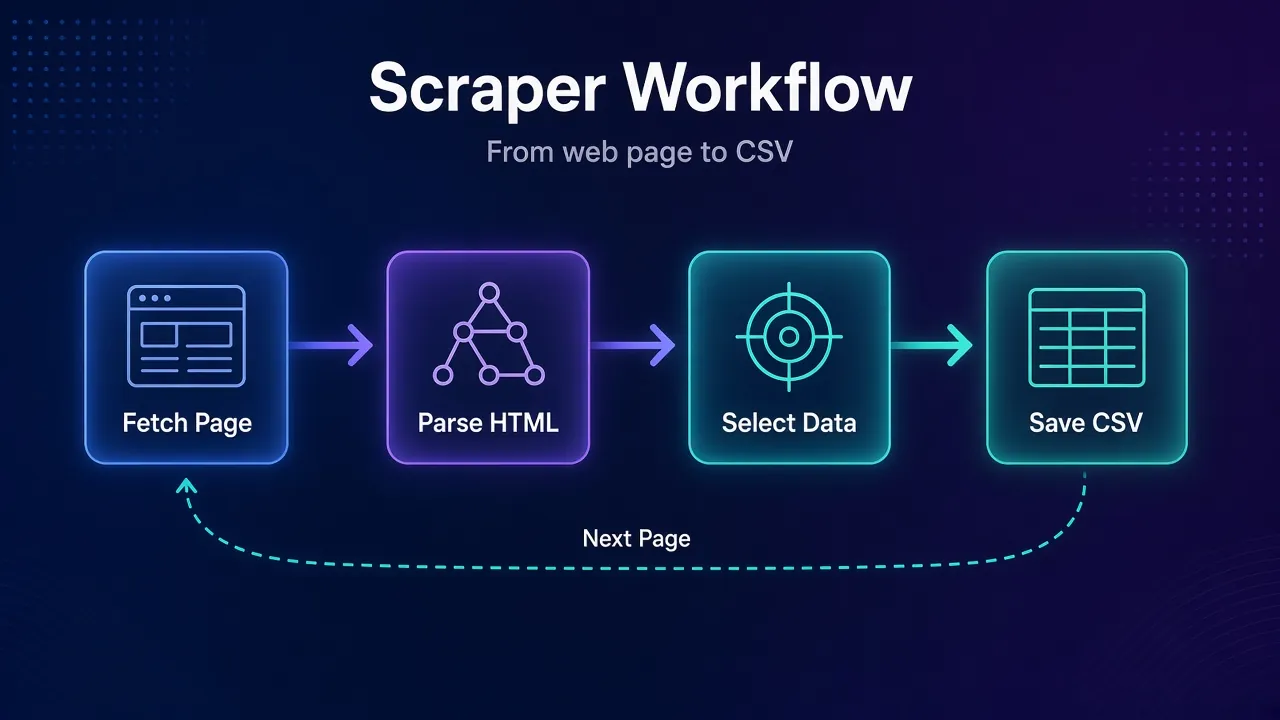
This tutorial builds exactly that. You’ll fetch pages with Requests, parse them with BeautifulSoup, pull data with selectors, follow pagination, add polite delays and save everything to a CSV. Every snippet was run against beautifulsoup4 4.15.0 and Requests 2.34.2 in October 2026.
- BeautifulSoup parses HTML; Requests downloads it. A basic scraper needs both.
- Pass resp.content, not resp.text, so BeautifulSoup detects the page’s encoding correctly.
- Use select() and select_one() with CSS selectors, and search inside each item’s element.
- Follow the next-page link with urljoin(), cap the page count and sleep between requests.
- Save with csv.DictWriter, and check robots.txt and the site’s terms before scraping.
What Is BeautifulSoup?
BeautifulSoup (the beautifulsoup4 package, imported as bs4) is a Python library that parses HTML and XML into a tree of objects. You then search that tree by tag name, class, attribute or CSS selector.
It doesn’t download anything. That job belongs to an HTTP client such as Requests. So a basic scraper always has two halves: Requests fetches the page, and BeautifulSoup reads it.
If you’re new to the idea of scraping itself, start with our explainer on what web scraping is. This guide assumes you just want to get a working scraper running.
Install BeautifulSoup and Requests
At the time of writing, beautifulsoup4 on PyPI is at version 4.15.0 (released June 7, 2026) and Requests is at 2.34.2, which needs Python 3.10 or newer. Install both in a virtual environment:
python -m venv .venv
source .venv/bin/activate
python -m pip install beautifulsoup4 requests
On Windows, activate the environment with .venv\Scripts\activate instead.
1Which Parser Should You Use?
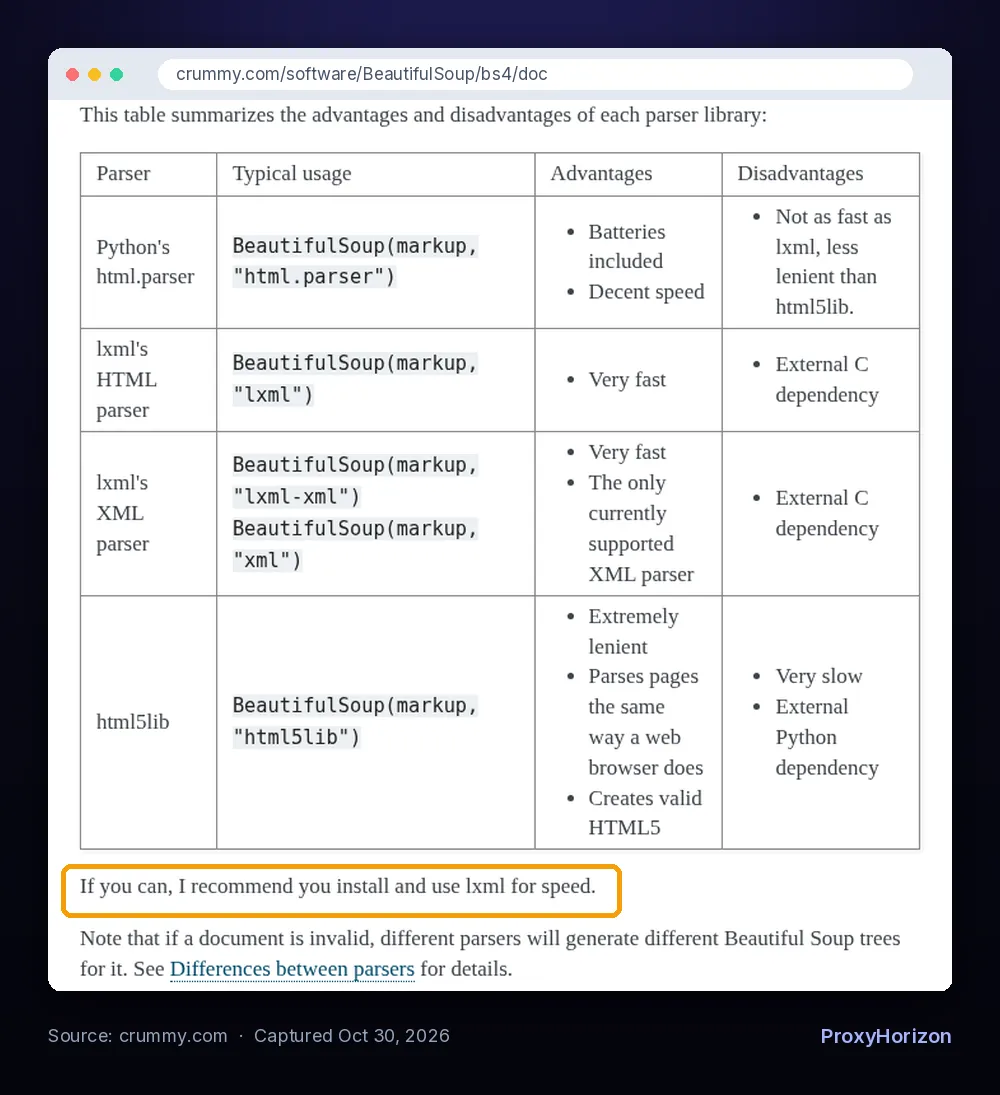
BeautifulSoup hands the actual parsing to a parser library. You pick one as the second argument, and the official documentation compares the main options:
html.parser: built into Python, decent speed, nothing extra to install.lxml: very fast, but it’s an external C dependency (pip install lxml).html5lib: extremely lenient and parses pages the way a browser does, but very slow.
The docs recommend lxml for speed when you can install it. For learning, html.parser is fine, and it’s what we use below. One caution from the same page: on broken HTML, different parsers can build different trees, so pick one and stick with it.
Step 1: Inspect the Page Before You Write Code
We’ll scrape Books to Scrape, a sandbox store built for practice. We’ll take its Mystery category, which spreads 32 books across two pages.
Open the page in Chrome or Firefox, right-click a book and choose Inspect. You’ll see that each book sits in an <article class="product_pod"> element containing:
- an
<h3>with a link whosetitleattribute holds the full book name - a
<p class="price_color">with the price - a
<p class="star-rating Four">, where the second class is the rating as a word - a
<p class="availability">with the stock status
At the bottom, the “next” button lives in <li class="next">. Those five patterns are all the scraper needs. Spending two minutes in DevTools first saves a lot of guessing later.
Step 2: Fetch the Page With Requests
Start with a single request and check that it worked:
import requests

URL = "https://books.toscrape.com/catalogue/category/books/mystery_3/index.html"
HEADERS = {"User-Agent": "Mozilla/5.0 (compatible; bs4-tutorial/1.0; +you@example.com)"}

resp = requests.get(URL, headers=HEADERS, timeout=10)
resp.raise_for_status()
print(resp.status_code)  # 200
Two habits are worth building now. Always pass a timeout, because Requests waits forever by default. And call raise_for_status(), so a 404 or 503 fails loudly instead of giving you an empty result. A descriptive User-Agent also helps; our guide to HTTP headers for web scraping explains what sites look at.
Step 3: Parse the HTML and Find Elements
Now hand the page to BeautifulSoup:
from bs4 import BeautifulSoup

soup = BeautifulSoup(resp.content, "html.parser")

print(soup.find("h1").get_text())                            # Mystery
print(len(soup.find_all("article", class_="product_pod")))   # 20
Notice resp.content (raw bytes) rather than resp.text. This page doesn’t declare a character set in its Content-Type header, so Requests guesses ISO-8859-1 and the pound sign comes out as £47.82. Given the bytes, BeautifulSoup detects the page as UTF-8 and returns £47.82. We hit this exact bug while testing.
1find() and find_all()
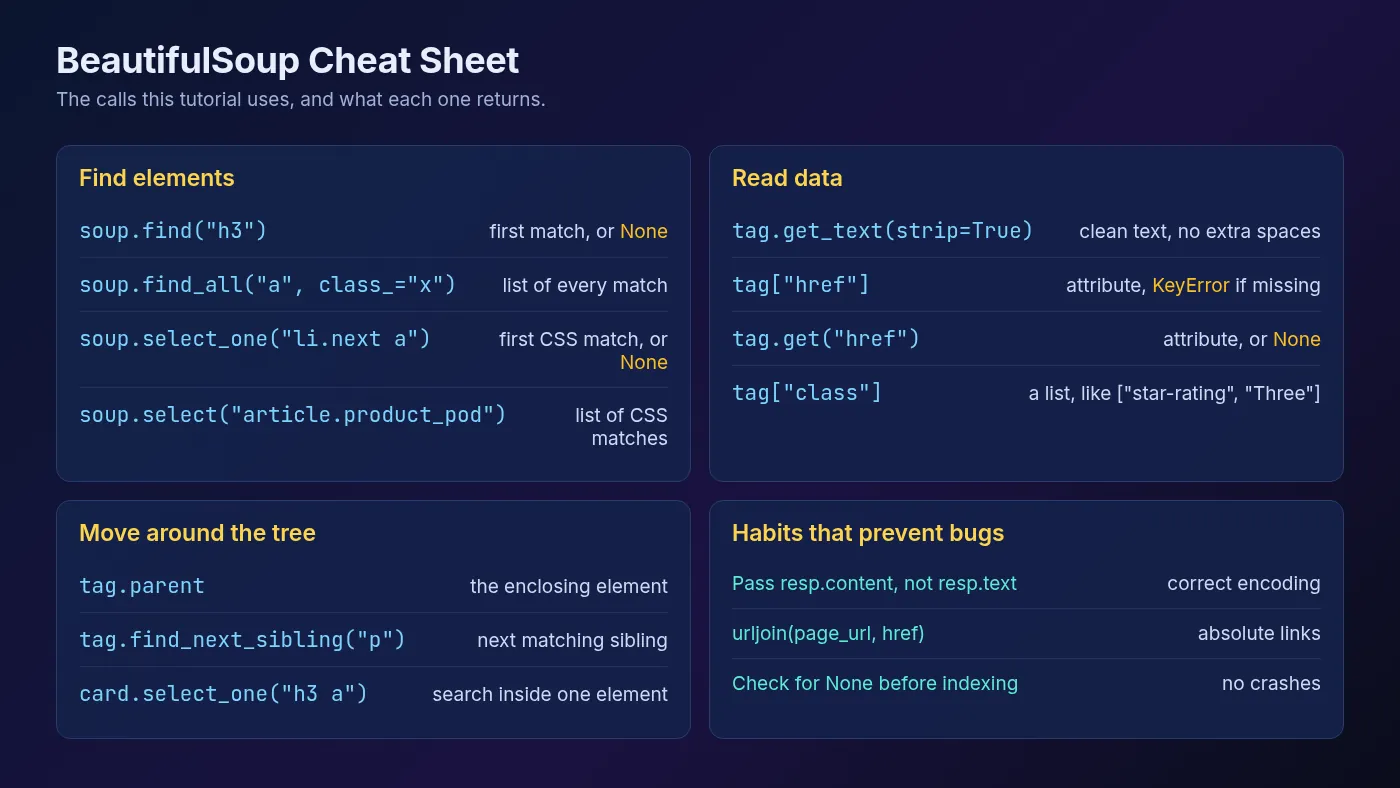
find() returns the first matching element, or None if nothing matches. find_all() returns a list of every match. Use class_ with a trailing underscore, because class is a reserved word in Python.
card = soup.find("article", class_="product_pod")

link = card.h3.a
print(link["title"])   # Sharp Objects
print(link["href"])    # ../../../sharp-objects_997/index.html
print(card.find("p", class_="star-rating")["class"])   # ['star-rating', 'Four']
Square brackets read an attribute. They raise a KeyError when it’s missing, while tag.get("href") returns None instead. Also note that class comes back as a list, since an element can have several classes.
2select() and select_one() With CSS Selectors
If you know CSS, select() and select_one() are often easier to read. They work like find_all() and find(), but take a CSS selector. The docs note this support comes from the Soup Sieve package, which installs alongside BeautifulSoup.
for card in soup.select("article.product_pod"):
    title = card.select_one("h3 a")["title"]
    price = card.select_one("p.price_color").get_text(strip=True)
    print(title, price)
Calling select_one() on card rather than soup searches inside that one book only. That’s how you keep each title matched to its own price.
Step 4: Extract Clean Fields From Each Item
Raw HTML text is full of line breaks and spaces. The availability paragraph on this site, for example, returns '\n\n \n In stock\n \n'. get_text(strip=True) trims that, or you can test for a phrase as we do below.
Wrap the extraction in a function that returns a list of dictionaries, plus the URL of the next page:
from urllib.parse import urljoin

RATINGS = {"One": 1, "Two": 2, "Three": 3, "Four": 4, "Five": 5}


def parse_page(html, page_url):
    soup = BeautifulSoup(html, "html.parser")
    books = []
    for card in soup.select("article.product_pod"):
        link = card.select_one("h3 a")
        rating_tag = card.select_one("p.star-rating")
        rating_word = [c for c in rating_tag["class"] if c != "star-rating"][0]
        books.append({
            "title": link["title"],
            "price": card.select_one("p.price_color").get_text(strip=True),
            "rating": RATINGS.get(rating_word),
            "in_stock": "In stock" in card.select_one("p.availability").get_text(),
            "url": urljoin(page_url, link["href"]),
        })
    next_link = soup.select_one("li.next a")
    next_url = urljoin(page_url, next_link["href"]) if next_link else None
    return books, next_url
Three details make this reliable. The rating is turned from a class name into a number. Product links are relative (../../../sharp-objects_997/index.html), so urljoin() turns them into full URLs. And next_url becomes None on the last page, which is how the loop will know when to stop.
Step 5: Follow Pagination With Polite Delays
Rather than hard-coding page numbers, follow the “next” link until there isn’t one. Add a max_pages cap so a site change can’t send you into an endless loop:
import time


def scrape(start_url, max_pages=50, delay=1.0):
    session = requests.Session()
    session.headers.update(HEADERS)
    url, all_books, pages = start_url, [], 0
    while url and pages < max_pages:
        resp = session.get(url, timeout=10)
        resp.raise_for_status()
        books, url = parse_page(resp.content, resp.url)
        all_books.extend(books)
        pages += 1
        print(f"Page {pages}: {len(books)} books")
        time.sleep(delay)
    return all_books
A Session reuses the connection and keeps your headers on every request. The time.sleep(delay) line is the polite part: one request per second is gentle on a small site.
For bigger jobs, randomize the delay slightly and back off when you see 429 or 503 responses. Our guide to rate limiting in web scraping covers backoff and the Retry-After header in detail.
Step 6: Save the Results to CSV
Python’s built-in csv module writes the dictionaries straight to a file. Add this and a main block, and the scraper is complete:
import csv


def save_csv(rows, path="books.csv"):
    with open(path, "w", newline="", encoding="utf-8") as f:
        writer = csv.DictWriter(f, fieldnames=["title", "price", "rating", "in_stock", "url"])
        writer.writeheader()
        writer.writerows(rows)


if __name__ == "__main__":
    books = scrape("https://books.toscrape.com/catalogue/category/books/mystery_3/index.html")
    save_csv(books)
    print(f"Saved {len(books)} books to books.csv")
Put all the pieces in one file called scraper.py and run python scraper.py. Our test run printed this:
Page 1: 20 books
Page 2: 12 books
Saved 32 books to books.csv
And the first rows of books.csv looked like this:
title,price,rating,in_stock,url
Sharp Objects,£47.82,4,True,https://books.toscrape.com/catalogue/sharp-objects_997/index.html
"In a Dark, Dark Wood",£19.63,1,True,https://books.toscrape.com/catalogue/in-a-dark-dark-wood_963/index.html
The newline="" argument stops blank lines appearing between rows on Windows, and DictWriter quotes titles that contain commas for you. If you plan to open the file in Excel, encoding="utf-8-sig" helps it display the pound sign correctly.
Scrape Responsibly: Robots.txt and Terms
Books to Scrape exists for practice. Real sites have rules, and checking them is part of the job. Python can read a site’s robots.txt for you:
from urllib.robotparser import RobotFileParser

rp = RobotFileParser("https://example.com/robots.txt")
rp.read()
print(rp.can_fetch("*", "https://example.com/products/"))
If can_fetch() returns False, leave that path alone. Also read the site’s terms of service, avoid personal data, and keep your request rate low. Our guide to web scraping legal risk explains how robots.txt, terms and the law fit together.
When BeautifulSoup Isn’t Enough
BeautifulSoup only sees the HTML the server sends. If a page builds its content with JavaScript, your selectors find nothing, even though the data shows up in your browser.
A quick test: view the page source (not DevTools) and search for a value you can see on screen. If it’s missing, the content is rendered client-side. Our guide on how to scrape JavaScript-rendered websites shows how to find the hidden JSON API or use a headless browser.
For crawling thousands of pages with retries and concurrency built in, a framework is the better fit. Our Scrapy tutorial picks up where this one ends.
Adding a Proxy to Your BeautifulSoup Scraper
A single IP sending steady requests is easy for a site to rate-limit or block. Because BeautifulSoup only parses, proxies are configured on the Requests side. With a session, it’s two lines:
import os

PROXY = f"http://{os.environ['PROXY_USER']}:{os.environ['PROXY_PASS']}@gate.example-proxy.com:7777"
session.proxies.update({"http": PROXY, "https": PROXY})
Keep credentials in environment variables, never in the script. Our full guide to using proxies with Python Requests covers authentication, SOCKS5 and rotation. For a broader view of the Python stack, see our web scraping with Python tutorial, and browse the proxy directory if you need a pool.
Common BeautifulSoup Errors and Fixes
| Error or symptom | Likely cause | What to try |
|---|---|---|
AttributeError: 'NoneType' object has no attribute ... | find() or select_one() matched nothing | Check the selector in DevTools, test for None before using the result |
KeyError on tag["href"] | The attribute doesn’t exist on that element | Use tag.get("href") and handle None |
Characters like £ or ’ | Requests guessed the wrong encoding | Pass resp.content to BeautifulSoup instead of resp.text |
Empty list from select() | Content is loaded by JavaScript, or the selector has a typo | Search the page source for the data; switch approach if it’s not there |
| Links that don’t open | Relative URLs like ../page.html | Build full URLs with urljoin(page_url, href) |
| 403 or 429 responses | Too fast, a bare default User-Agent or a flagged IP | Slow down, set real headers, then consider proxies |
Frequently Asked Questions
The Bottom Line
A useful BeautifulSoup scraper is only about 50 lines. Requests fetches the page, BeautifulSoup parses the bytes, CSS selectors pull each field, and a loop follows the next link until there isn’t one.
The habits matter more than the syntax: inspect before you code, pass resp.content, use urljoin(), check for None, sleep between requests and respect robots.txt.
Get the scraper working on a practice site first, then point it at your real target one change at a time. Once you outgrow it, move on to proxies, then to Scrapy.
Keep Reading
More articles you might enjoy