CSS Selectors vs XPath for Web Scraping (2026 Guide)
CSS selectors or XPath? See when each one wins for web scraping, with tested side-by-side examples, the truth about speed, and selector patterns that survive site redesigns.
Every scraper lives or dies by its selectors. Pick the wrong one and your script quietly returns None the morning after a site pushes a small design change.
Most “CSS vs XPath” articles stop at a syntax table. That’s the easy part. The useful questions are when each one is genuinely the better tool, whether XPath is really slower, and how to write selectors that keep working after a redesign.
This guide answers all three. Every selector below was run against the Books to Scrape practice site with parsel 1.12.1, cssselect 1.6.0 and lxml 6.1.3 in October 2026.
- Use CSS selectors by default: they’re shorter, readable and match classes correctly.
- Use XPath to match text, read a value next to a label, climb to a parent or query XML.
- In parsel and lxml, CSS is translated to XPath, so speed differences are negligible.
- Anchor on stable attributes and labels, not positions or long DevTools paths.
- Test selectors in DevTools with querySelectorAll() and $x() before writing code.
What Are CSS Selectors and XPath?
CSS selectors are the patterns stylesheets use to target elements, like p.price_color or ul.breadcrumb > li. Browsers expose them through document.querySelectorAll(), and almost every scraping library accepts them. If you’re new to the field, our explainer on what web scraping is covers the basics.
XPath (XML Path Language) is a query language for addressing parts of an XML document. MDN describes it as a path notation, much like a URL, for navigating a document’s tree, and it works on HTML too. An XPath looks like //p[@class="price_color"].
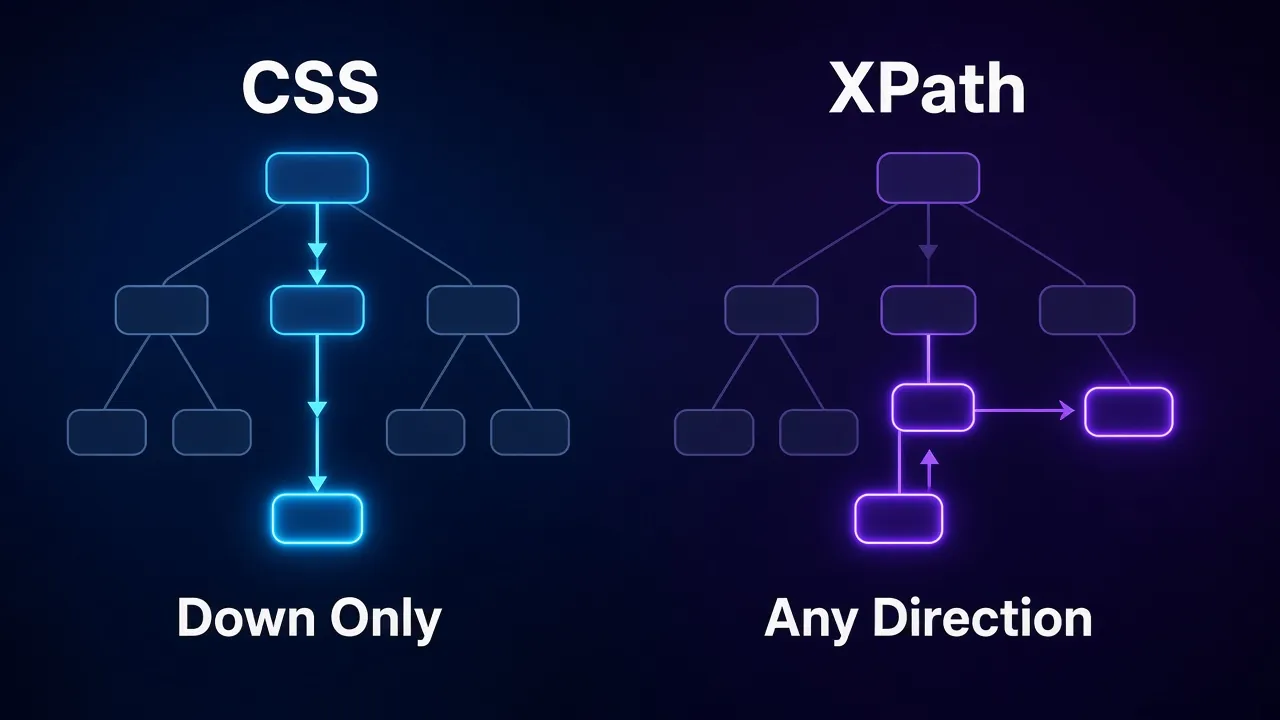
Both do the same core job: point at elements in the page’s tree. The difference is how far they can travel. CSS mostly walks downward from ancestors to descendants. XPath can move in any direction, including up to parents and sideways to siblings, and it can filter on text.
CSS vs XPath at a Glance
| Feature | CSS selectors | XPath |
|---|---|---|
| Readability | Short and familiar to anyone who knows web development | More verbose, especially for class matching |
| Select by class | .price_color handles multi-class elements correctly | Needs contains() tricks to match one class among several |
| Match by visible text | Not in standard CSS | contains(., "next"), text()="UPC" |
| Select a parent or ancestor | Possible with :has() in modern engines | Native with .. and ancestor:: |
| Siblings | Following siblings only (+ and ~) | Both directions (following-sibling::, preceding-sibling::) |
| Return text or attribute values | Only through extensions like parsel’s ::text and ::attr() | Native with text() and @href |
| BeautifulSoup support | Yes, via select() | No (use lxml or parsel) |
| XML feeds and namespaces | Limited | Built for it |
The Same Selectors Side by Side
The quickest way to feel the difference is to run both on one page. Scrapy’s selector engine, parsel, accepts CSS and XPath on the same object, so it’s ideal for comparing them:
import requests
from parsel import Selector

HEADERS = {"User-Agent": "Mozilla/5.0 (compatible; selector-guide/1.0)"}
URL = "https://books.toscrape.com/catalogue/category/books/mystery_3/index.html"

resp = requests.get(URL, headers=HEADERS, timeout=10)
resp.raise_for_status()
sel = Selector(text=resp.content.decode("utf-8"))

print(sel.css("p.price_color::text").get())                # £47.82
print(sel.xpath('//p[@class="price_color"]/text()').get())  # £47.82
Same element, same result. For simple targets like this, the choice is mostly about which syntax you find easier to read. The table below shows how common scraping tasks look in each, all tested on the same Mystery category page.
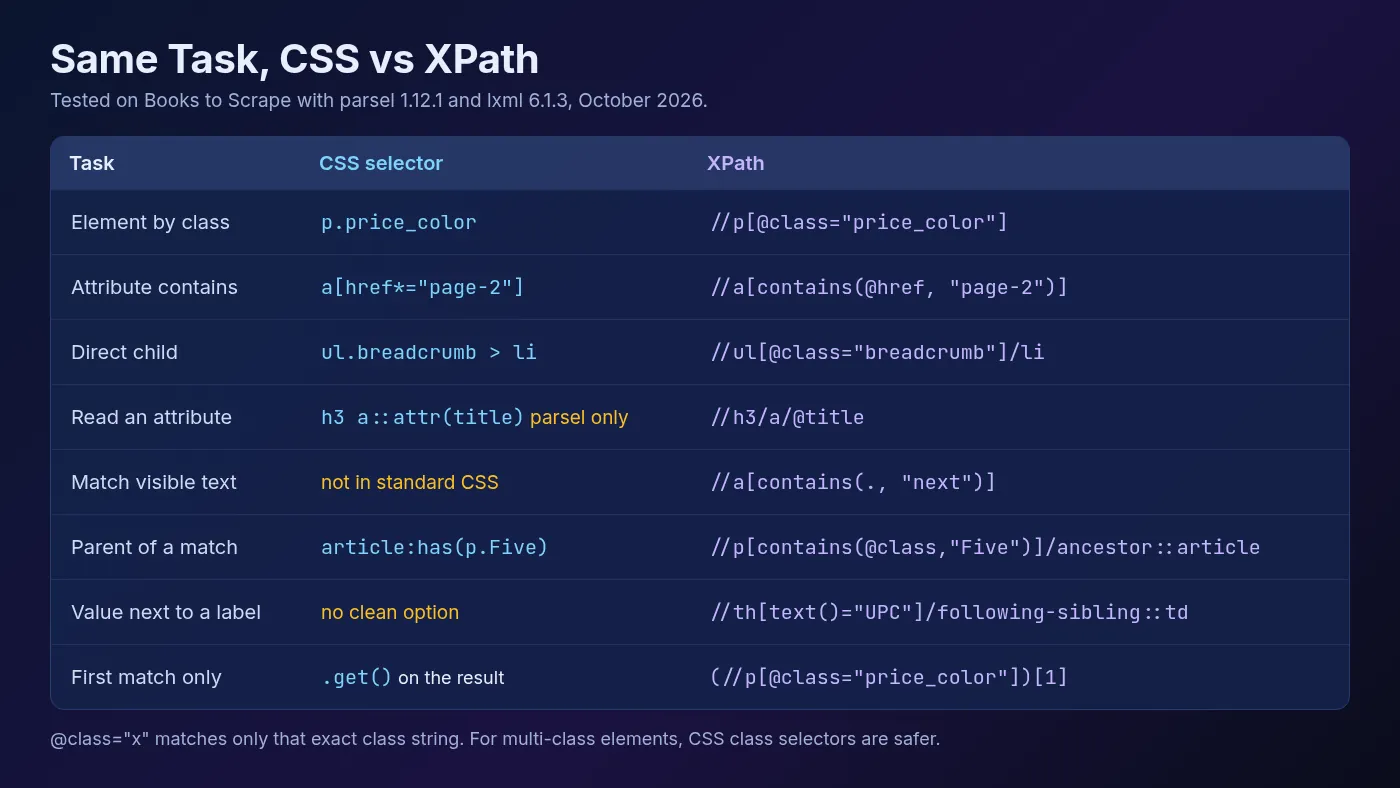
One gotcha hides in the first row. //p[@class="price_color"] only matches when the class attribute is exactly that string. On the same page, //p[@class="star-rating"] matches nothing, because those elements read class="star-rating Four". The CSS selector p.star-rating finds all 20.
When CSS Selectors Win
1Selecting by Class
Class matching is CSS’s home turf. The Scrapy documentation spells out the problem: the correct XPath for “has this class” is contains(concat(' ', normalize-space(@class), ' '), ' someclass '). A plain contains(@class, "price") is shorter but can also match unrelated classes such as price-old.
The docs’ advice is to select by class with CSS and switch to XPath only when you need it. Parsel lets you chain the two:
for book in sel.css("article.product_pod"):
    title = book.xpath(".//h3/a/@title").get()
    price = book.css("p.price_color::text").get()
    print(title, price)  # Sharp Objects £47.82
Note the leading dot in .//h3. Without it, the XPath searches the whole document instead of the current book, a mistake the Scrapy docs call out by name.
2Readability and Team Code
Most developers already know CSS. A selector like li.next a needs no explanation in a code review, while its XPath twin takes a second read. On a team, that matters more than any small feature gap.
3BeautifulSoup and Browser Tools
If you scrape with BeautifulSoup, CSS is the only selector language built in. Its select() method runs on the Soup Sieve package, and there’s no XPath method at all. Our BeautifulSoup tutorial uses CSS throughout for that reason.
Modern CSS has also closed part of the gap. The :has() pseudo-class, which selects an element based on what it contains, has been available across major browsers since December 2023, according to MDN.
On the Python side, cssselect 1.6.0 (released October 9, 2026) supports :has() with any relative selector list. So article.product_pod:has(p.star-rating.Five) returns the three five-star books on our test page.
When XPath Wins
1Matching Visible Text
Standard CSS can’t select an element by its text. XPath can. When a “Next” link has no useful class, this still finds it:
sel.xpath('//a[contains(., "next")]/@href').get() # 'page-2.html'Use . rather than text() inside contains(). The Scrapy docs explain why: . includes the text of child elements, so a link like <a>Go to <strong>Next Page</strong></a> still matches.
2Finding a Value Next to a Label
This is the pattern that makes XPath worth learning. Product pages often show specs in a table with no classes on the cells. On Books to Scrape, the product page lists UPC, price, tax and availability in plain <th> and <td> pairs.
The CSS version, table.table-striped tr:nth-child(1) td, works today but depends on the row order. The XPath version finds the label first and then steps sideways to its value:
page = requests.get("https://books.toscrape.com/catalogue/sharp-objects_997/index.html",
                    headers=HEADERS, timeout=10)
p = Selector(text=page.content.decode("utf-8"))


def field(label):
    return p.xpath("normalize-space(//th[text()=$label]/following-sibling::td)",
                   label=label).get()

print(field("UPC"))           # e00eb4fd7b871a48
print(field("Availability"))  # In stock (20 available)
If the site reorders the rows or adds a new one, this keeps working. The $label variable is an XPath feature parsel supports, so you never build queries by pasting strings together.
3Going Up the Tree
Sometimes the easiest element to find is a child, and the data you want sits in its container. XPath climbs with ancestor:::
sel.xpath('//p[contains(@class, "Five")]/ancestor::article//h3/a/@title').getall()That returns the titles of every five-star book. :has() can do the same job in CSS, but only where the engine supports it, and the XPath reads as a plain path.
4Positions, Feeds and Namespaces
XPath also handles position precisely, once you know one trap. //li[1] means “every li that’s first in its parent”, which returned 5 elements on our page. (//li)[1] means “the first li in the document” and returned exactly 1.
For XML sources such as sitemaps, RSS and Atom feeds, XPath is the natural fit. Parsel can register namespaces or strip them with remove_namespaces() so plain paths work.
Is XPath Slower Than CSS?
In Python, the speed question mostly disappears. Parsel and lxml don’t run CSS directly: the cssselect library translates each CSS selector into an XPath 1.0 expression, and lxml runs that. Here’s what article.product_pod p.price_color becomes:
descendant-or-self::article[@class and contains(@class, 'product_pod') and
contains(concat(' ', normalize-space(@class), ' '), ' product_pod ')]/descendant::p[...]
We timed 2,000 runs of that query on the Books to Scrape page. lxml’s cssselect() took about 0.14 ms per call, the pre-translated XPath about 0.07 ms, and BeautifulSoup’s select() about 0.68 ms. These are numbers from one machine, not a benchmark suite.
The takeaway: the gap between CSS and XPath is a fraction of a millisecond, while the network request for the page takes far longer. Your parsing library matters more than your selector syntax. Pick whichever expresses the target most clearly. Our web scraping with Python tutorial shows where parsing fits in the wider stack.
Selector Patterns That Survive Redesigns
A selector breaks when it depends on something the site changes. The fix is to anchor on what changes least. These habits apply to both syntaxes:
- Anchor on meaning, not layout. Prefer stable hooks like
id,name,itemprop,aria-labelordata-*attributes over position.[itemprop="price"]outlivesdiv > div:nth-child(3) > span. - Scope to the item container. Select each product card first, then search inside it. That keeps titles paired with the right prices and makes a broken field easy to spot.
- Avoid long absolute chains. Copying “full XPath” from DevTools gives you something like
/html/body/div[2]/div[1]/..., which breaks the moment a wrapper is added. - Skip generated class names. Hashed names from CSS-in-JS tools tend to change on every deploy. Look for a readable class or attribute nearby.
- Use labels instead of row numbers. The
following-siblingpattern above survives reordering.nth-child()doesn’t. - Match one class, not the whole attribute. Use CSS class selectors, or
contains()carefully in XPath, so an added class doesn’t break the match.
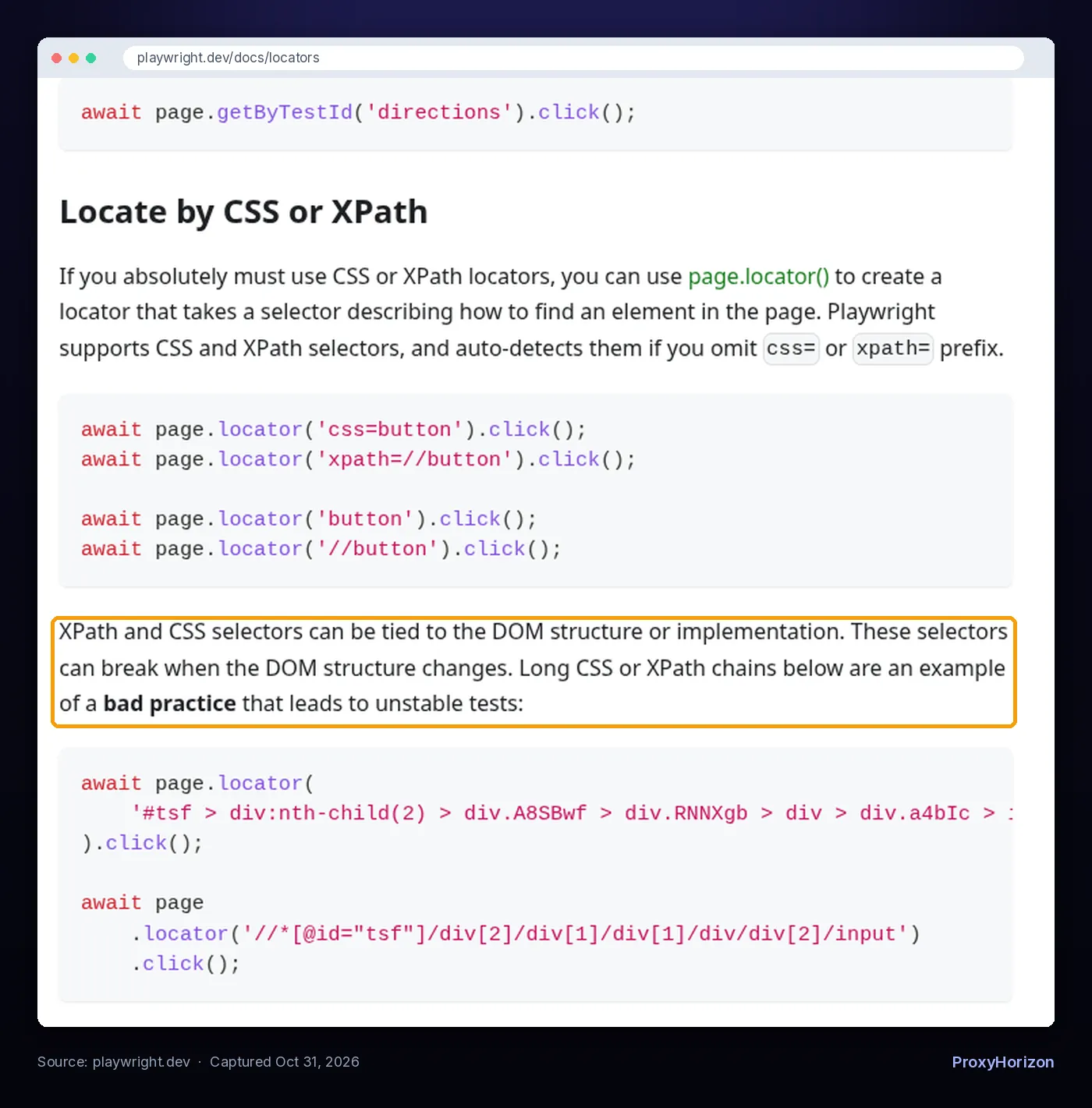
Playwright’s own documentation makes the same point. It warns that CSS and XPath tied to the DOM structure can break when that structure changes, and shows long chains as a bad practice.
1Add Fallbacks and Fail Loudly
Even good selectors break eventually. A small helper that tries several selectors in order buys you time, and logging a None tells you the day it happens:
def first(node, *queries):
    for q in queries:
        result = node.xpath(q) if q.startswith(("/", "(", ".")) else node.css(q)
        value = result.get()
        if value and value.strip():
            return value.strip()
    return None

price = first(sel, "span.price::text", "p.price_color::text",
              '//p[contains(@class, "price")]/text()')
print(price)  # £47.82 (the first selector misses, the second matches)
If every selector suddenly returns nothing, check the response before rewriting them. A 403 page, a CAPTCHA or a JavaScript-only shell contains none of your elements. Our guide to scraping JavaScript-rendered websites covers the second case, and steady blocks are usually a sign to slow down or route through a proxy pool.
How to Test Selectors in Your Browser
Test selectors in DevTools before they go into code. Open the Console on the target page and run:
document.querySelectorAll("article.product_pod p.price_color").length  // CSS
$x('//th[text()="UPC"]/following-sibling::td')                        // XPath
Chrome’s Console Utilities reference documents $x(path), which returns an array of elements matching an XPath expression. In the Elements panel, Ctrl+F (Cmd+F on Mac) also accepts both CSS selectors and XPath.
One caveat: DevTools shows the page after JavaScript has run. Your HTTP-based scraper sees the raw HTML. If a selector works in the console but not in your script, the content is probably rendered client-side.
Which Should You Use With Each Tool?
- BeautifulSoup: CSS only, through
select()andselect_one(). For XPath, parse the page with lxml or parsel instead. - Scrapy and parsel: both, on the same object. Use CSS for classes and structure, then chain XPath for text, labels and parents. Our Scrapy tutorial shows them inside a full spider.
- Selenium: both. The Selenium docs list CSS selector and XPath among its eight traditional locator strategies, alongside id, name, class name, tag name and link text. See our guide to web scraping with Selenium.
- Playwright: both work through
page.locator(), which auto-detects the syntax. The Playwright docs recommend role, text and test-id locators first, and note that XPath doesn’t pierce shadow DOM while other locators do. Our Playwright web scraping guide covers these locators in practice.
Frequently Asked Questions
The Bottom Line
Use CSS selectors by default. They’re shorter, easier to review and handle classes correctly, and with :has() they can now reach parents too.
Switch to XPath when you need what CSS can’t do cleanly: matching text, finding a value next to its label, climbing to an ancestor or querying XML feeds. In Scrapy and parsel, you don’t have to choose; chain them.
Whichever you use, anchor on stable attributes, scope to the item container, avoid long position-based chains and test in DevTools first. That’s what keeps a scraper running after the next redesign.
Keep Reading
More articles you might enjoy