The Best Use Cases of Apify in 2026
The best use cases of Apify: Google Maps leads, price monitoring, social media data, AI and RAG content, agent access via MCP, reviews and SEO tracking, plus costs and when to skip it.
Most people find Apify through one specific problem: pulling leads from Google Maps, tracking a competitor’s prices, collecting Instagram data. Then they discover it can do a dozen other jobs, and the question becomes which of those it’s actually good at.
That’s a fair question, because Apify isn’t one tool. It’s a marketplace of more than 70,000 ready-made scrapers and automation tools, called Actors, plus the cloud platform that runs them. Some Apify use cases are close to perfect fits. Others are better handled by a simpler API, a workflow tool, or your own code.
This guide goes through the use cases where Apify earns its place, with the Actors people use for each, how costs behave, and where it’s the wrong choice. Figures come from Apify’s own pricing page and website as of September 2026. We may earn a commission if you sign up through our links.
- Apify is strongest when a ready-made Actor already exists for your target: Google Maps, social platforms, e-commerce, search results and websites for AI.
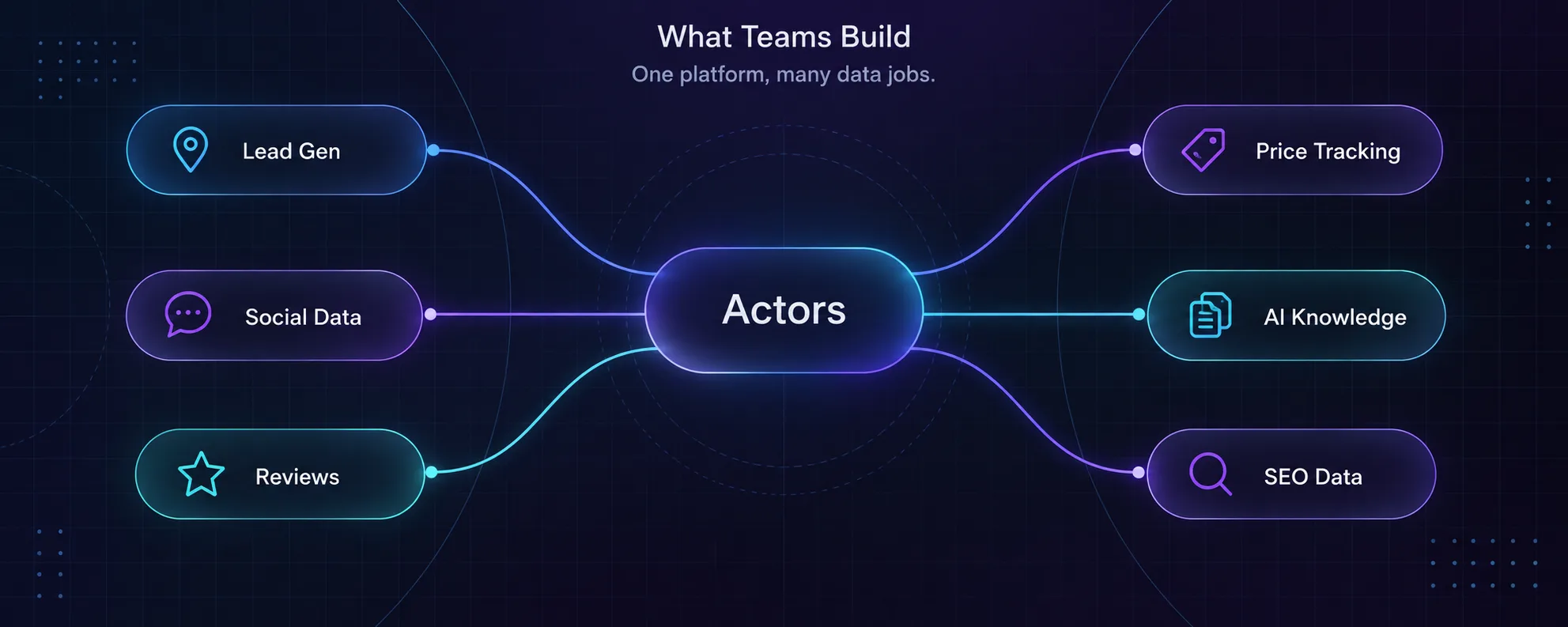
- The best-fit use cases are lead generation, price monitoring, social media data, AI and RAG content, review tracking and SEO data.
- Its Apify MCP server lets AI assistants and agents call Actors directly for live web data.
- Costs depend on the Actor’s pricing model: pay per result, pay per event, pay per usage or monthly rental.
- Skip Apify for one-off pages, fully custom logged-in flows, or simple app-to-app automation with no scraping.
How Apify Works in Two Minutes
An Actor is a packaged program that runs in Apify’s cloud. You give it input, such as a search term, a list of URLs or a location, and it returns structured results in a dataset you can export as JSON, CSV or Excel, or send straight to another app.
You can run Actors built by Apify and its community from Apify Store, or write your own. Runs can be scheduled, triggered through the API, or connected to tools like Zapier, n8n, Google Sheets, Slack and Google Drive. Apify also offers an MCP server, so AI assistants and agents can call Actors directly.
Pricing comes in two layers. Apify plans start with a free tier that includes $5 of monthly usage, then Starter at $19/month, Scale at $199 and Business at $999, each with prepaid usage equal to the plan price. On top of that, each Actor has its own pricing model: pay per result or event, pay per platform usage, or a monthly rental. Our Apify pricing guide explains how the two layers combine.
The Best Apify Use Cases in 2026
1Local Lead Generation From Google Maps
This is Apify’s most popular use case for a reason. The Google Maps Scraper turns a search like “dentists in Austin” into a spreadsheet of businesses with names, addresses, phone numbers, websites, ratings, review counts and opening hours. Agencies and B2B sales teams use it to build local prospect lists in minutes.
Best for: marketing agencies, local-service sales teams, market mappers. Watch out for: contacting businesses you’ve scraped still has to follow email and privacy law in your market, especially in the EU. For the proxy side of this job, see our guide to the best proxies for Google Maps scraping.
2E-commerce Price and Product Monitoring
Retailers and brands use Apify to track competitor prices, stock levels, product listings and new launches across marketplaces and online stores. Apify’s E-commerce Scraping Tool and a range of marketplace-specific Actors return clean product data you can compare over time.
Schedule a daily run, send the results to a spreadsheet or database, and you have a pricing dashboard without building a scraper. Best for: online retailers, brands policing resellers, pricing analysts. Our guide to scraping e-commerce sites safely covers the traps.
3Social Media Monitoring and Influencer Research
Instagram, TikTok, Facebook, YouTube and X are among the hardest sites to scrape yourself, which makes them some of Apify’s best use cases. Maintained Actors collect public profiles, posts, hashtags, comments and engagement numbers, and the maintainers keep them working when platforms change.
Marketers use this for influencer vetting, campaign tracking, trend spotting and competitor content analysis. We compared the strongest options in our guide to the best Apify Actors for scraping social media.
4Feeding AI and RAG Pipelines
Apify’s Website Content Crawler crawls a site and returns clean text or Markdown ready to chunk, embed and load into a vector database. Teams use it to build chatbots on their own documentation, give support bots knowledge of help-center articles, and assemble research corpora.
Because it’s an Actor, you can schedule it to re-crawl and keep your knowledge base current. If you’re weighing it against an API built specifically for this job, see Firecrawl vs Apify.
5Giving AI Agents Live Web Access
This use case has grown fast. Through the Apify MCP server, AI assistants and agents can discover and run Actors directly. An agent asked to “find the top-rated coffee shops near this address and summarise their reviews” can call the Google Maps Scraper itself instead of guessing from stale training data.
The appeal is breadth: one connection gives an agent access to thousands of tools. The catch is cost control, because an agent can trigger far more runs than a human would. Set spending limits before you connect one. For the wider picture, see our guide to agentic browsers for AI automation.
6Review and Reputation Monitoring
Businesses with many locations, and the agencies that manage them, use Apify to collect reviews from Google Maps and major review sites on a schedule. That feeds sentiment analysis, alerts for negative reviews, and comparisons against competitors in the same area.
Review data is structured and repetitive, which is exactly what Actors handle well. Run weekly, compare with last week, and flag what changed.
7SEO and Search Results Tracking
Apify’s Google Search Results Scraper returns organic results, ads, “People also ask” questions and related searches for any query and location. SEO teams use it for rank tracking, SERP feature monitoring and keyword research without paying for a full SEO suite.
Better alternative if: you need millions of searches a day, where a dedicated SERP API may be cheaper per request. Our guide to the best proxies for scraping Google Search covers the do-it-yourself route.
8Market Research and Competitor Intelligence
Job postings, company pages, product launches, pricing pages and news mentions all say something about where a competitor is heading. Apify lets research teams collect these signals on a schedule and combine them in one dataset.
This is less about any single Actor and more about Apify’s strength as a platform: running several Actors on schedules, storing the results, and pushing them into your reporting tools. Our guide to the best proxies for market research covers the network side.
9Job Market and Hiring Data
Recruiters, HR analytics teams and job-market researchers use Apify to collect public job postings from job boards and company career pages. Tracked over time, that data shows which roles competitors are hiring for, how salaries move, and which skills are in demand in a given city.
Job listings change daily and appear on many sites, which makes scheduled Actors a good fit. Watch out for: some professional networks strictly prohibit scraping in their terms, so stick to public job boards and company sites, and never build databases of individual candidates without a lawful basis.
10Real Estate and Travel Listings
Property investors, rental analysts and travel companies use Apify to monitor listings, asking prices, rental rates and availability across listing sites. A weekly scrape of one neighbourhood shows how prices and supply are moving far faster than published reports.
Travel businesses do the same with hotel and short-term rental prices to set their own rates. These sites often use strong bot protection, so check that the Actor you choose is actively maintained, and expect residential proxy costs on larger runs.
How to Pick the Right Actor
For popular sites, Apify Store often lists several Actors that claim to do the same job. They are not equal. Check these before committing a budget:
| Check | What good looks like | Red flag |
|---|---|---|
| Maintainer | Apify itself or a developer with many maintained Actors | A single Actor from an unknown account |
| Last update | Updated recently | No updates in many months on a site that changes often |
| Pricing model | Clear per-result or per-event pricing | Unclear costs you can only find by running it |
| Ratings and issues | Good ratings, issues answered | Unanswered reports of broken runs |
| Output fields | Exactly the fields you need, documented | Fields missing or inconsistent between runs |
| Test run | A small run returns clean, complete data | Partial results, timeouts or blocked pages |
Always run a small test before a full job. It costs a few cents and tells you more than any listing page. If two Actors both pass, pick the one with the clearer pricing, since predictable cost matters more than a slightly lower rate when a job runs every day.
Turning Scraped Data Into Action
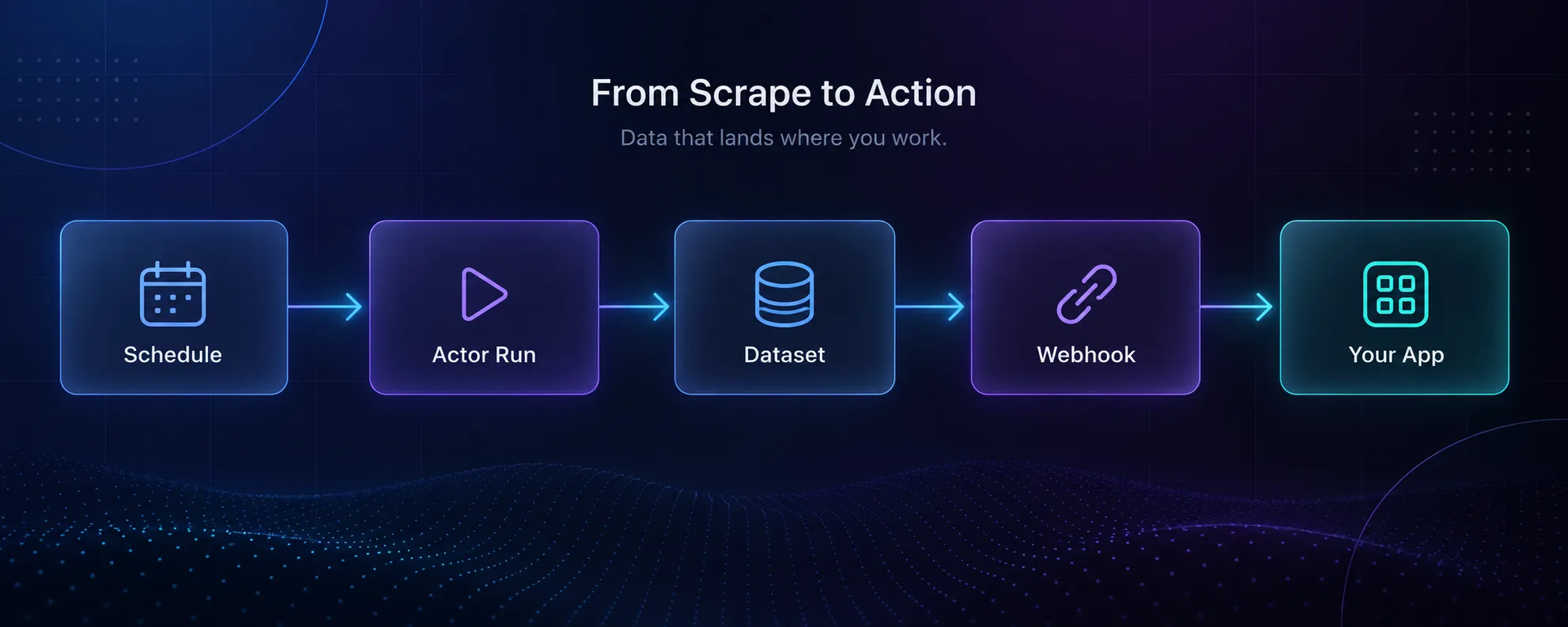
Scraped data is only useful once it reaches the place your team works. Apify’s integrations handle that last step:
- Google Sheets and Google Drive for teams that live in spreadsheets.
- Zapier and n8n to trigger follow-up workflows, like adding new leads to a CRM. Our n8n review covers that side.
- Slack for alerts when a price drops or a negative review appears.
- Webhooks and the API to push results into your own app or database.
The most successful setups we see are small and specific: one scheduled Actor, one destination, one decision it supports. Start there before building anything bigger.
What Each Use Case Costs
| Use case | Typical pricing shape | What drives cost |
|---|---|---|
| Google Maps leads | Usually pay per result or event | Number of places and details requested |
| Price monitoring | Per result or compute usage | Products tracked times run frequency |
| Social media data | Usually pay per result | Posts or profiles collected, plus proxy use |
| AI and RAG content | Compute usage | Pages crawled and whether they need a browser |
| AI agent access | Whatever each Actor charges | How often the agent decides to run tools |
| Review monitoring | Per result | Reviews collected per run |
| SERP tracking | Per result | Keywords times locations times frequency |
Two habits keep costs predictable. Check each Actor’s pricing model on its Store page before running it at scale, and test with a small input first. Residential proxy traffic is billed separately on some jobs, and Apify lists it at $8 per GB on Starter, falling to $7 on Business.
When Apify Is the Wrong Choice
Apify is flexible, but it isn’t always the simplest or cheapest answer.
- One-off pages: for a few pages, a simple scraping API or even copy and paste is faster than setting up an Actor.
- Pure app-to-app automation: if no scraping is involved, a workflow tool like n8n or Zapier on its own is enough. See n8n vs Zapier.
- Fully custom logged-in flows: you can build your own Actor, but at that point you’re writing a browser automation project anyway. Our Firecrawl vs Playwright guide covers that choice.
- Private personal data: no tool makes collecting personal data lawful. Public, aggregate business data is the safe zone.
Strengths and Weaknesses for These Use Cases
- More than 70,000 ready-made Actors, many maintained
- Scheduling, storage and exports built in
- Integrations with Sheets, Zapier, n8n and Slack
- MCP server gives AI agents live web access
- Free tier with $5 of monthly usage
- Community Actors vary in quality and upkeep
- Two pricing layers make costs harder to predict
- Residential proxy traffic adds cost on some jobs
- Overkill for one-off pages or no-scrape automation
Verdict
Apify is at its best when a well-maintained Actor already exists for your target and you need the job to run on a schedule.
Common Mistakes
1Choosing an Actor by Name Alone
Several Actors often cover the same site. Check the maintainer, recent update history, pricing model and user ratings before committing. An abandoned Actor breaks silently the next time the site changes.
2Running at Full Scale on Day One
Test every Actor with a small input first. It shows you the real cost per result and the data quality before you spend your monthly usage.
3Collecting Data Nobody Uses
A daily scrape with no destination is just a bill. Decide where the data goes and what decision it supports before you schedule anything.
4Letting Agents Run Unsupervised
Connecting an AI agent through MCP without spending limits invites surprise costs. Cap usage, and review which Actors the agent actually calls.
Frequently Asked Questions
Where to Start
Pick the one use case with the clearest payoff for your team, usually lead generation, price monitoring or keeping an AI knowledge base current. Find a well-maintained Actor for it, run a small test on the free plan, and connect the output to the tool your team already uses.
Once that single workflow saves time every week, add the next one. Apify rewards small, specific automations far more than ambitious ones built all at once. For more detail on the platform itself, read our Apify review.
Keep Reading
More articles you might enjoy