How to Store and Clean Scraped Data (2026 Guide)
Raw scraped data is always messy. Here’s a tested five-step pipeline to normalize, validate, deduplicate and store it, plus how to choose between CSV, SQLite, PostgreSQL and Parquet.
Scraping the data is the easy part. Trusting it is harder.
Your scraper ran all night and collected 200,000 rows. Then you open the file and find the same product five times, prices stored as “$1,299.00” and “1299”, blank titles, and a stray non-breaking space that makes two identical names refuse to match.
That’s normal. Raw scraped data is always messy, and every rerun adds more mess. The real question is where you clean scraped data and how you store it so the next run doesn’t undo the work.
This guide walks through a five-step pipeline: archive, normalize, validate, deduplicate and upsert. Every code sample was run in November 2026 on Python 3.13 with pandas 3.1.0, Pydantic 2.14.2 and SQLite 3.46.1. Stick around for the dedup trap, because the most common one-liner quietly deletes good data.
- Archive raw scraped data as JSON Lines before cleaning, so fixes never need a rescrape.
- Normalize text, prices and URLs first, then validate every record against a schema.
- Quarantine failed rows and watch the failure rate to catch layout changes early.
- Deduplicate on a stable key and merge rows, because keep=“last” can delete good data.
- Store with upserts: SQLite for one scraper, PostgreSQL for many writers, Parquet for history.
Why Scraped Data Is Always Messy
Websites are built for human eyes, not for your database. A price that reads fine on screen arrives as text with currency symbols, thousands separators and sometimes a “From” in front of it.
Three things make the mess worse over time:
- Duplicates. The same product shows up on page 2 and page 3, under two category paths, or with tracking parameters like
?utm_source=adsin the URL. - Layout drift. A site redesign moves an element, your selector returns nothing, and blank values start flowing in without a single error.
- Reruns. Every scheduled crawl re-collects rows you already have. Without a plan, each run appends another copy.
If you’re new to how scrapers collect pages in the first place, our explainer on what web scraping is covers the basics. Everything below assumes you already have raw records and want them clean.
The Five-Step Pipeline That Keeps Data Clean
Clean data comes from order, not cleverness. Each step fixes one kind of problem, and the order matters: you can’t spot duplicates reliably until values are normalized, and you shouldn’t store anything that failed validation.
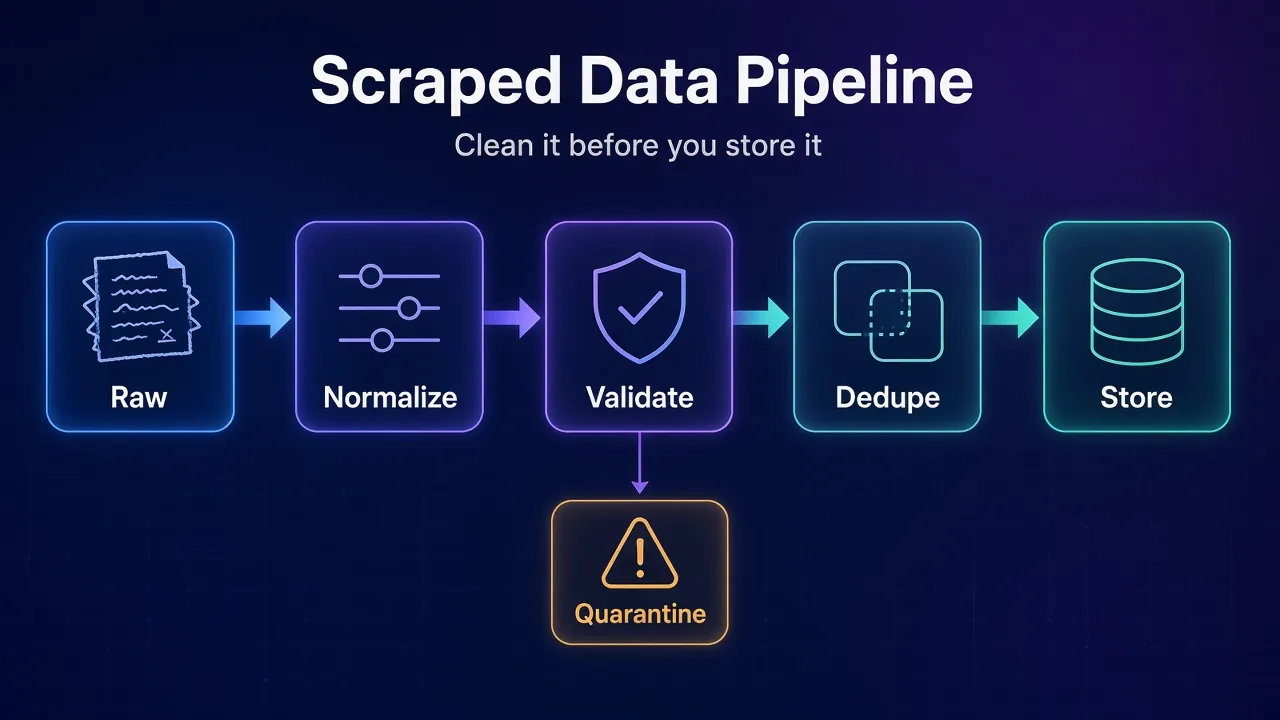
- Archive the raw data exactly as scraped.
- Normalize text, numbers, dates and URLs into one consistent format.
- Validate each record against a schema and quarantine the failures.
- Deduplicate on a stable key, merging rather than blindly dropping.
- Store with an upsert, so reruns update rows instead of copying them.
Step 1: Keep the Raw Data Before You Touch It
Save the raw output first, untouched. If your cleaning code has a bug, you can fix it and rerun the pipeline without scraping the site again.
JSON Lines is the best format for this. Each line is one valid JSON value, files are UTF-8, and the spec recommends compressing them with gzip as .jsonl.gz. Because every line stands alone, you can append safely during a crawl, and a crash only costs you the last line.
Add two fields to every raw record: the source URL and a scraped_at timestamp in UTC. You’ll need both later, for deduplication and for answering “when did this price change?”
Real-world tip: refetching pages costs proxy bandwidth and raises your block risk. A raw archive means a cleaning fix never needs a single new request.
Step 2: Normalize Text, Prices and URLs
Normalization turns “the same thing written five ways” into one value. Do it before validation and dedup, or neither will work properly.
These helpers cover the problems we see most: invisible whitespace, accents stored two different ways, prices as text and URLs padded with tracking parameters.
import re
import unicodedata
from decimal import Decimal, InvalidOperation
from urllib.parse import urlsplit, urlunsplit, parse_qsl, urlencode

TRACKING = {"utm_source", "utm_medium", "utm_campaign", "gclid", "fbclid"}

def clean_text(s):
    s = unicodedata.normalize("NFKC", s or "")   # turns \xa0 into a space, merges accents
    s = re.sub(r"\s+", " ", s).strip()
    return s or None                             # empty string becomes a real null

def parse_price(s):
    s = (s or "").strip()
    currency = "USD" if "$" in s else "EUR" if "€" in s else None
    num = re.sub(r"[^\d,.]", "", s)
    if not num:
        return None, currency
    if "," in num and "." in num:                # 1,299.00
        num = num.replace(",", "")
    elif "," in num and len(num.split(",")[-1]) == 2:   # 49,90
        num = num.replace(",", ".")
    else:
        num = num.replace(",", "")
    try:
        return Decimal(num), currency
    except InvalidOperation:
        return None, currency

def canonical_url(u):
    p = urlsplit(u.strip())
    query = sorted((k, v) for k, v in parse_qsl(p.query) if k not in TRACKING)
    path = p.path.rstrip("/") or "/"
    return urlunsplit((p.scheme.lower(), p.netloc.lower(), path, urlencode(query), ""))
Run against a few messy inputs, they behave like this:
print(clean_text("  Wireless\u00a0Mouse  "))   # Wireless Mouse
print(parse_price("$1,299.00"))                # (Decimal('1299.00'), 'USD')
print(parse_price("€49,90"))                   # (Decimal('49.90'), 'EUR')
print(parse_price("Call for price"))           # (None, None)
print(canonical_url("https://SHOP.example.com/p/123/?utm_source=ads&color=red"))
# https://shop.example.com/p/123?color=red
A few details matter more than they look. Python’s unicodedata.normalize("NFKC", ...) converts a non-breaking space into a regular one and makes “é” typed as one character equal to “e” plus a combining accent. The Python docs warn that strings which look identical may not compare equal until they’re normalized.
Prices go into Decimal, not float, so 49.90 stays exactly 49.90. And empty strings become real nulls. A blank title stored as "" passes most “is it missing?” checks, which is exactly how bad rows sneak through.
Common mistake: guessing the decimal separator. The parse_price rule above treats a comma followed by exactly two digits as a decimal. That suits most European prices, but check it against your real targets, because some sites format numbers in ways no single rule can read.
Step 3: Validate Before Anything Reaches Storage
Validation is the step most scrapers skip, and the one that catches layout drift. When a selector breaks, it rarely throws an error. It returns None, and a schema is what notices.
Pydantic lets you describe what a good record looks like, then sorts every row into “good” or “quarantine”:
from decimal import Decimal
from pydantic import BaseModel, Field, HttpUrl, ValidationError

class Product(BaseModel):
    url: HttpUrl
    title: str = Field(min_length=1)
    price: Decimal = Field(gt=0)
    currency: str | None = None
    in_stock: bool | None = None
    scraped_at: str

def validate(records):
    good, quarantine = [], []
    for rec in records:
        try:
            good.append(Product(**rec).model_dump(mode="json"))
        except ValidationError as e:
            quarantine.append({"record": rec, "errors": [err["msg"] for err in e.errors()]})
    return good, quarantine
Feed it one good row and one broken row (a product with no title and “Call for price” as its price), and you get one of each:
rows = [
    {"url": "https://shop.example.com/p/124", "title": "Café Grinder",
     "price": Decimal("49.90"), "currency": "EUR", "in_stock": False,
     "scraped_at": "2026-11-03T09:13:00Z"},
    {"url": "https://shop.example.com/p/125", "title": None, "price": None,
     "scraped_at": "2026-11-03T09:14:00Z"},
]
good, quarantine = validate(rows)
print(len(good), len(quarantine))
print(quarantine[0]["errors"])
Write the quarantine list to its own file instead of throwing it away. It’s your early warning system. If 2% of rows usually fail and tonight it’s 40%, the site changed its layout, and you know before anyone builds a report on bad data.
Our take: track the quarantine rate as a number in your logs. It’s the cheapest monitoring you’ll ever add to a scraper.
Step 4: Deduplicate Without Losing Good Data
Deduplication starts with a key: the field that says two records are the same thing. Product ID is ideal when the page exposes one. Otherwise the canonical URL from Step 2 works well, because it strips tracking parameters, lowercases the host and sorts the query string.
Here’s the catch most tutorials miss. The usual one-liner is drop_duplicates(subset="url", keep="last"). It keeps the newest row and deletes the rest, even when the newest row is the worse one.
import pandas as pd

df = pd.DataFrame([
    {"url": "https://shop.example.com/p/123?color=red", "price": "1299.00",
     "currency": "USD", "stock_qty": 14, "scraped_at": "2026-11-03T09:12:00Z"},
    {"url": "https://shop.example.com/p/123?color=red", "price": "1299",
     "currency": None, "stock_qty": None, "scraped_at": "2026-11-03T10:40:00Z"},
])
df["stock_qty"] = df["stock_qty"].astype("Int64")   # keeps 14 an integer, not 14.0
df = df.sort_values("scraped_at")

naive = df.drop_duplicates(subset="url", keep="last")       # loses currency and stock
merged = df.groupby("url", as_index=False).last()           # last non-null per column
print(naive[["currency", "stock_qty"]].to_string(index=False))
print(merged[["currency", "stock_qty"]].to_string(index=False))
When we ran this, the naive version kept the later scrape and lost both the currency and the stock count, printing NaN and <NA>. The groupby(...).last() version takes the last non-null value of each column, so it kept the new price and still returned USD and 14.
Note the Int64 line too. Pandas stores a whole-number column that contains a missing value as a float by default, so 14 becomes 14.0. The capital-I Int64 type keeps it an integer.
Better alternative if you track changes over time: store a hash of the fields you care about, such as title, price and stock. If the hash matches the stored row, skip the write. If it differs, record the change.
Step 5: Store With Upserts, Not Appends
An upsert inserts a row if it’s new and updates it if the key already exists. That one choice makes your scraper safe to rerun, retry and schedule.
SQLite and PostgreSQL both support it with INSERT ... ON CONFLICT. This version continues from the validated good list in Step 3:
import sqlite3

con = sqlite3.connect("products.db")
con.execute("""
CREATE TABLE IF NOT EXISTS products (
    url        TEXT PRIMARY KEY,
    title      TEXT NOT NULL,
    price      TEXT NOT NULL CHECK (CAST(price AS REAL) > 0),
    currency   TEXT,
    in_stock   INTEGER,
    first_seen TEXT NOT NULL,
    last_seen  TEXT NOT NULL
)""")

UPSERT = """
INSERT INTO products (url, title, price, currency, in_stock, first_seen, last_seen)
VALUES (:url, :title, :price, :currency, :in_stock, :scraped_at, :scraped_at)
ON CONFLICT(url) DO UPDATE SET
    title     = excluded.title,
    price     = excluded.price,
    currency  = COALESCE(excluded.currency, products.currency),
    in_stock  = excluded.in_stock,
    last_seen = excluded.last_seen
"""

with con:                                  # one transaction per batch
    con.executemany(UPSERT, good)
We ran the same batch twice on purpose:
with con:
    con.executemany(UPSERT, good)          # run the same batch twice
print(con.execute("SELECT COUNT(*) FROM products").fetchone())
print(con.execute("SELECT url, price, first_seen, last_seen FROM products").fetchall())
The table still held one row, not two. first_seen keeps the original timestamp while last_seen moves forward, which tells you when a product appeared and whether it’s still listed. The COALESCE line stops a blank currency in a later scrape from wiping a good one.
The same statement works in PostgreSQL. PostgreSQL’s INSERT documentation notes that ON CONFLICT DO UPDATE guarantees an atomic insert-or-update outcome even under high concurrency. It also raises an error if one statement tries to update the same row twice, so deduplicate each batch before you send it.
Notice the NOT NULL and CHECK constraints. They’re a second safety net after Pydantic. If buggy code ever tries to save a row without a title or with a zero price, the database refuses it.
CSV vs Database vs Warehouse: Where Should Scraped Data Live?
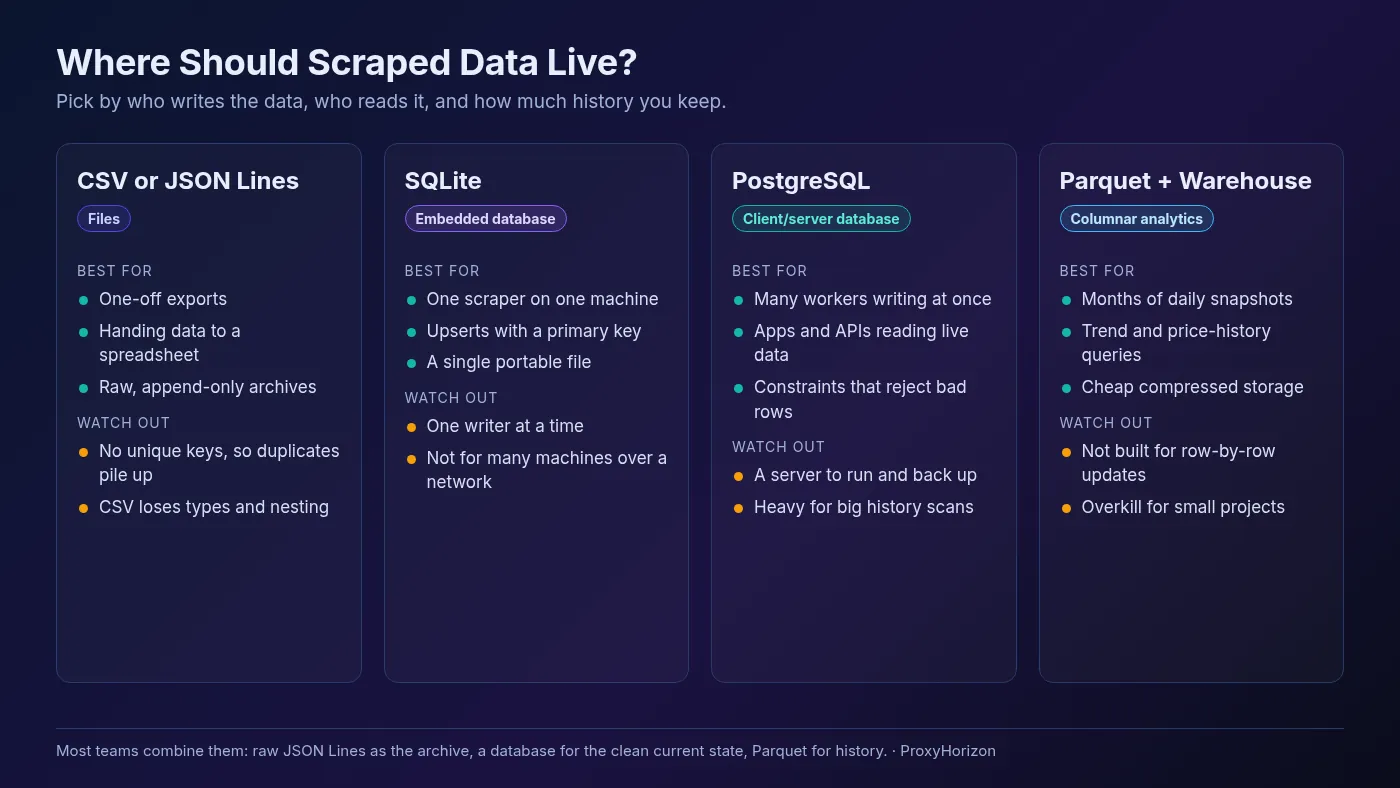
Pick storage by asking three questions: how many processes write at once, who reads the data, and how much history you keep. Size matters less than most people think.
| Option | Best for | Main limit |
|---|---|---|
| CSV | One-off exports, sharing with spreadsheet users | No types, no nesting, no unique keys |
| JSON Lines | Raw archives and append-only crawl output | No upserts; duplicates pile up |
| SQLite | One scraper on one machine, local analysis | One writer at a time |
| PostgreSQL | Many workers, apps and APIs reading live data | A server to run, secure and back up |
| Parquet + warehouse | Long price histories and analytics queries | Not built for frequent row-by-row updates |
SQLite is more capable than its reputation. Its own “Appropriate Uses” page says it supports unlimited simultaneous readers but only one writer at a time. Its checklist points to a client/server database when the data is separated from the application by a network, or when you have many concurrent writers.
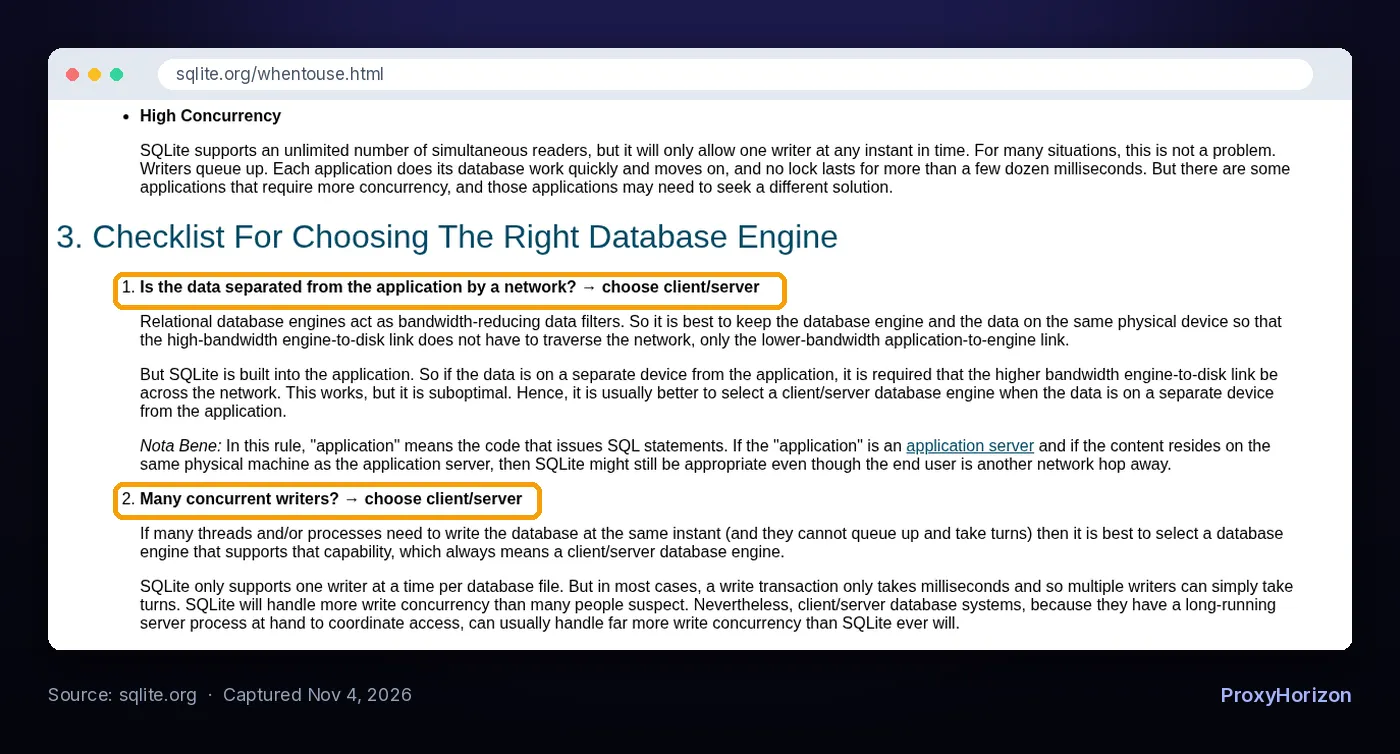
That maps neatly onto scraping. A single Scrapy or Playwright job on one server is fine with SQLite. Ten workers pulling from a shared crawler request queue and writing at once belong in PostgreSQL.
For history, look at Parquet. Apache Parquet is an open source, column-oriented file format built for efficient storage and retrieval, and tools like DuckDB read it directly.
A pandas DataFrame saves to it with one to_parquet() call once pyarrow is installed. Daily snapshots stored as Parquet make “show me this product’s price over 90 days” a fast query instead of a slog through files.
Our take: start with JSON Lines for raw data and SQLite for clean data. Move to PostgreSQL when a second machine starts writing, and add Parquet when history becomes the product. Our guide to web scraping at large scale covers what changes beyond that.
Where Cleaning Fits in Scrapy and Other Frameworks
If you use Scrapy, you don’t need a separate script. Scrapy’s item pipeline documentation lists exactly these jobs as typical uses: cleansing HTML data, validating fields, dropping duplicates and storing items in a database.
Each pipeline is a class with a process_item() method that returns the item or raises DropItem. You set the order in ITEM_PIPELINES with numbers, and lower numbers run first. So normalize at 100, validate at 200, dedupe at 300 and store at 800.
One trap from the same docs: a process_item() that modifies the item but forgets to return it passes None to the next stage. Our Scrapy and proxies tutorial shows a full project if you’re setting one up.
Using requests and BeautifulSoup instead? Run the same five functions after parsing. The BeautifulSoup tutorial ends with raw records, which is exactly where this pipeline starts.
Mistakes That Quietly Corrupt Scraped Datasets
None of these crash your scraper. That’s what makes them expensive: you find out weeks later, from a wrong chart.
- Cleaning in place. Overwriting raw files with cleaned ones means one bug destroys the only copy. Keep raw and clean separate.
- Storing prices as floats. Rounding errors creep into totals. Use
Decimalin Python andNUMERICin PostgreSQL. - Treating empty strings as values. Convert them to null before validation, or required-field checks pass on blanks.
- Local timestamps. Mixing time zones breaks “latest row wins” logic. Store UTC and convert only for display.
- Deduping on titles. Two different products can share a name. Use an ID or canonical URL.
- Keeping personal data you don’t need. Names, emails and phone numbers carry legal weight. Drop them during cleaning unless you have a clear lawful reason, as our web scraping legal risk guide explains.
If cleaning and storage feel like more work than the project deserves, there’s another route. Some data extraction APIs return structured JSON instead of raw HTML, which removes much of the parsing mess. You still need dedup and storage, but you start much closer to clean.
And if your raw data has gaps because pages failed to load, the problem is upstream. Blocked requests and CAPTCHAs show up as missing fields. Better proxy providers and polite pacing fix that at the source.
Frequently Asked Questions
The Bottom Line
Scraped data doesn’t get clean by accident. It gets clean because every row passes the same five steps: archive, normalize, validate, deduplicate and upsert.
The two habits that pay off fastest are a quarantine file and an upsert key. The first tells you the moment a site changes. The second makes every rerun safe, so you can schedule your scraper without worrying about duplicates.
Start small: JSON Lines for raw output, SQLite for the clean table, and the code above as your template. Run it on tonight’s crawl, check the quarantine rate tomorrow morning, and you’ll know whether your data is ready to trust.
Keep Reading
More articles you might enjoy