How to Use Firecrawl API with Python: Complete 2026 Tutorial
A complete Firecrawl Python SDK tutorial: setup, every endpoint, Pydantic schemas, async batches, pagination, webhooks and error handling, plus the cache default that quietly serves old pages.
Firecrawl’s Python SDK turns a URL into clean Markdown in four lines of code.
Copy the wrong four lines, though, and you get this:
TypeError: FirecrawlClient.scrape() got an unexpected keyword argument 'params'That’s what the v1-style code still shown in many tutorials does on the current SDK. We ran it to check. The fix takes seconds once you know the new names.
The harder parts take longer: crawls that run to thousands of pages, rate limits, and a default that quietly hands you cached pages. This tutorial covers the current SDK, firecrawl-py 4.50, from your first scrape to async batches, webhooks, Pydantic schemas and error handling.
- Install firecrawl-py, set FIRECRAWL_API_KEY and use the Firecrawl class. Old scrape_url(params=…) code breaks.
- Use scrape for single pages, map plus batch scrape or crawl for sites, search when you lack URLs, and the agent for open questions.
- Pass a Pydantic model as your JSON schema, then validate the result with the same model.
- The SDK retries server errors for you, but not rate limits, and it accepts cached pages unless you say otherwise.
Disclosure: we’re a Firecrawl affiliate, so we may earn a commission if you upgrade through our links. It doesn’t change the code, and we point out the SDK’s rough edges, too.
Set Up the Firecrawl Python SDK
1Get an API Key
Sign up at Firecrawl and copy the key from your dashboard. The free plan includes 1,000 credits a month with no card, and one credit buys one scraped page.
Firecrawl also offers keyless access to scrape, search, parse and interact, capped per IP address per day. Don’t build on it. When we tried a keyless scrape on October 10, 2026, it came back as a 403 saying our “IP address looks suspicious, so Firecrawl can’t be used without an API key from here.”
The SDK isn’t ready for it either. In firecrawl-py 4.50, calling Firecrawl() with no key raises ValueError: No API key provided, a bug that was still open on GitHub when we checked.
2Install the Python Package
The package on PyPI is called firecrawl-py, and you import it as firecrawl. Install it in a virtual environment, along with Pydantic for the schema examples:
python -m venv .venv
source .venv/bin/activate      # Windows: .venv\Scripts\activate
pip install firecrawl-py pydantic
The SDK supports Python 3.8 and up. Our examples use the int | None type syntax, so run them on Python 3.10 or newer.
3Keep Your Key Out of Your Code
The client reads FIRECRAWL_API_KEY from your environment, so you never paste the key into a script:
export FIRECRAWL_API_KEY="fc-your-key-here"from firecrawl import Firecrawl
firecrawl = Firecrawl() # reads FIRECRAWL_API_KEY from your environmentFirecrawl’s playground writes the same call for you. Pick an endpoint, click Get code and choose Python. The Python SDK docs list every option.
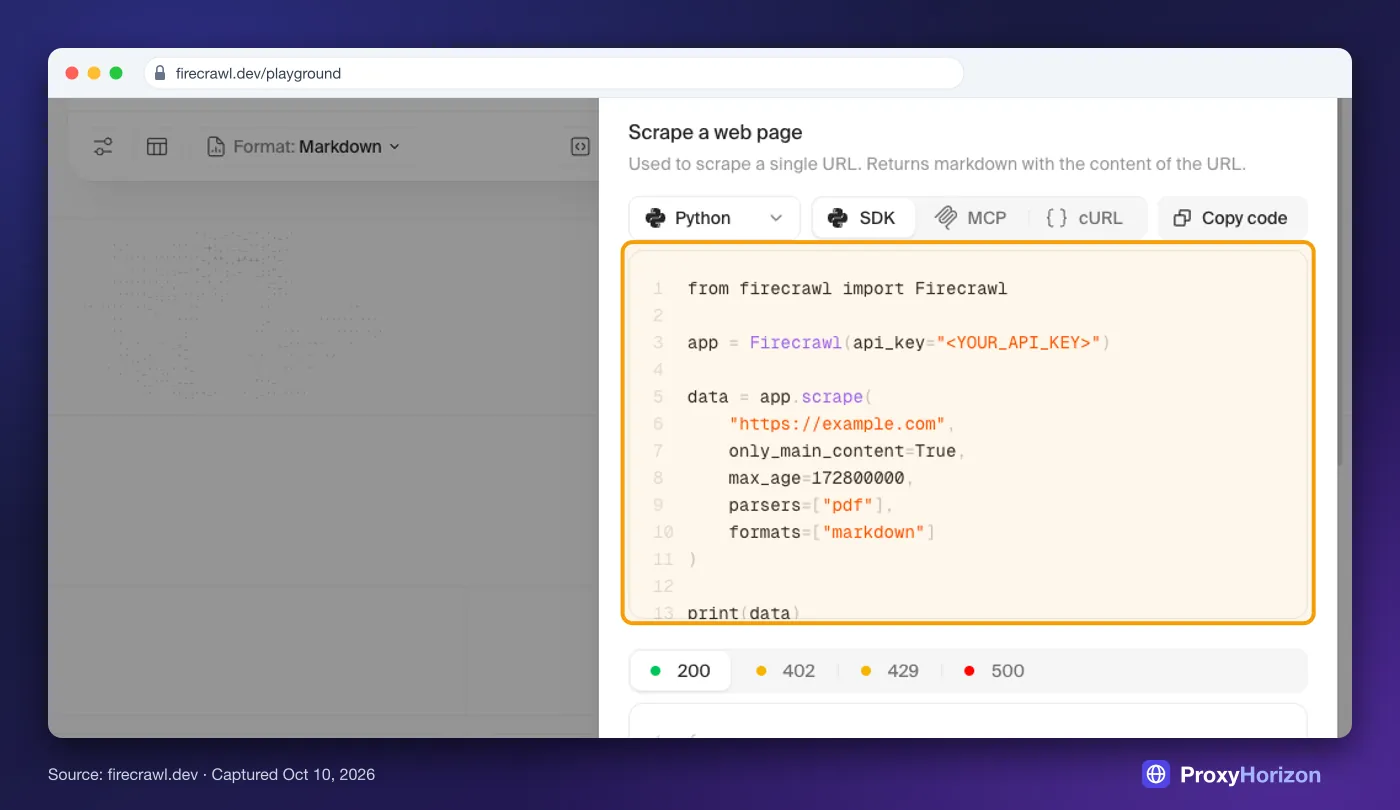
How we tested: without a working key we couldn’t send live requests, so we ran every snippet in this guide against firecrawl-py 4.50 with the network mocked. That catches wrong method names, parameters and response fields. It can’t tell you how a particular website behaves.
Scrape Your First Page
Scrape is the endpoint you’ll use most. Give it a URL and the formats you want back:
doc = firecrawl.scrape(
    "https://books.toscrape.com/catalogue/a-light-in-the-attic_1000/index.html",
    formats=["markdown"],
    only_main_content=True,
)

print(doc.metadata.title)
print(doc.metadata.status_code, "| credits used:", doc.metadata.credits_used)
print(doc.markdown[:300])
The result is a Document. Its markdown, html, links and json fields hold the formats you asked for. Its metadata carries the title, status code, credits used and whether the page came from cache.
Books to Scrape is a sandbox built for scraping practice, which makes it a safe first target. For the general basics, see our guide to web scraping with Python.
1The Defaults the SDK Sends for You
Here’s a detail most tutorials skip. When you leave options out, the Python SDK fills them in before the request goes out:
only_main_content=True, so menus, footers and sidebars are stripped.block_ads=Trueandremove_base64_images=True.max_age=14400000, so a cached copy up to four hours old is fine.skip_tls_verification=Trueandstore_in_cache=True.
That four-hour cache matters for prices and stock levels. A cached page still costs 1 credit, so set max_age=0 whenever you need today’s numbers:
doc = firecrawl.scrape(
    "https://books.toscrape.com/",
    formats=["markdown", "links", {"type": "screenshot", "full_page": True}],
    max_age=0,       # skip the cache and fetch a fresh copy
    wait_for=2000,   # give JavaScript two seconds to render
    location={"country": "US", "languages": ["en-US"]},
)

print(len(doc.links), "links found")
print(doc.screenshot)  # signed URL, expires after 24 hours
Pick the Right Output Format
Each format answers a different question, and two groups cost more than the rest:
| Format | What you get | Credits per page |
|---|---|---|
markdown | Clean text for LLMs and search | 1 |
html, rawHtml | Cleaned or untouched HTML | 1 |
links, images | Every link or image URL on the page | 1 |
screenshot | A signed image URL, valid for 24 hours | 1 |
summary | A short summary of the page | 1 |
branding, product | Brand colors and fonts, or product data | 1 |
json | Fields that match your schema | 5 |
query, question, highlights | Answers or passages for a prompt | 5 |
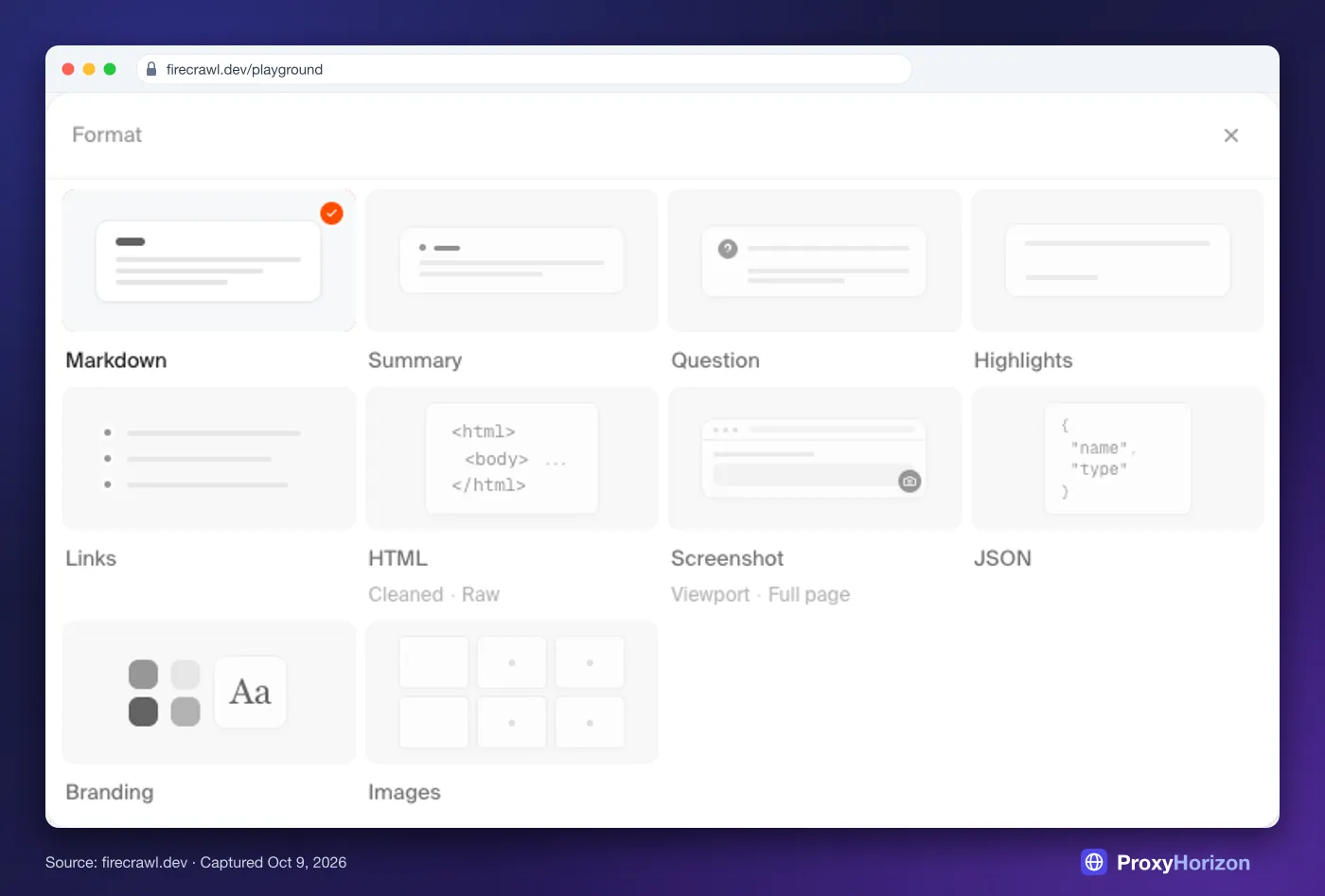
Markdown is the right default for anything an LLM reads next. We compared it with other formats in our test of scraping websites into Markdown.
Extract Structured Data with Pydantic
JSON mode is where Firecrawl saves you the most code. Describe the fields you want as a Pydantic model and pass the class as the schema. The SDK converts it to JSON Schema for you:
from pydantic import BaseModel

class Book(BaseModel):
    title: str
    price: float
    in_stock: bool
    rating: int | None = None

doc = firecrawl.scrape(
    "https://books.toscrape.com/catalogue/a-light-in-the-attic_1000/index.html",
    formats=[{
        "type": "json",
        "schema": Book,
        "prompt": "rating is the number of stars, from 1 to 5",
    }],
)

book = Book.model_validate(doc.json)
print(book.title, book.price, book.in_stock, book.rating)
Validating with the same model is the important half. If the page changes and you get a string where you expected a number, model_validate fails loudly instead of letting bad data into your database.
Cost: JSON costs 5 credits a page. Keep schemas short, since Firecrawl’s docs warn that 30 or more fields give less consistent results. The prompt is optional, but one line of guidance often fixes an ambiguous field.
Click, Type and Scroll Before the Scrape
Some pages only show data after you interact with them. Actions run in order before Firecrawl captures the page:
doc = firecrawl.scrape(
    "https://en.wikipedia.org/wiki/Main_Page",
    formats=["markdown"],
    actions=[
        {"type": "click", "selector": "input[name='search']"},
        {"type": "write", "text": "Web scraping"},
        {"type": "press", "key": "ENTER"},
        {"type": "wait", "milliseconds": 2000},
        {"type": "scroll", "direction": "down"},
        {"type": "screenshot"},
    ],
)

print(doc.metadata.url)  # the page the actions ended on
print(doc.actions)       # screenshot URLs and other action results
You can chain up to 50 actions per request, with no more than 60 seconds of total waiting, and actions don’t work on PDFs. For longer sessions, the interact endpoint keeps a live browser open after a scrape and bills by the minute: 2 credits a minute with code, or 7 with a prompt.
One trap there: interact() runs Node.js code unless you pass language="python".
Crawl a Whole Site
Crawl discovers and scrapes every reachable page under a URL. Always set a limit and filter the paths, because the default limit is 10,000 pages:
docs = firecrawl.crawl(
    "https://docs.firecrawl.dev",
    limit=50,
    include_paths=["^/features/.*"],
    sitemap="include",
    formats=["markdown"],
    poll_interval=5,
    timeout=600,
)

print(docs.status, f"{docs.completed}/{docs.total} pages,", docs.credits_used, "credits")
for page in docs.data:
    print(page.metadata.source_url)
Firecrawl checks your balance before a crawl starts. If your credits can’t cover the limit, you get a 402 straight away rather than a half-finished job. crawl() waits for the job, checking every poll_interval seconds, and timeout stops it from waiting forever.
Two behaviors catch people out. When that timeout fires, the SDK raises CrawlJobTimeoutError, but the crawl keeps running on Firecrawl’s side and keeps using credits. And a crawl that fails comes back without raising anything. Handle both:
from firecrawl import CrawlJobTimeoutError

try:
    docs = firecrawl.crawl("https://docs.firecrawl.dev", limit=500, timeout=300)
except CrawlJobTimeoutError as e:
    firecrawl.cancel_crawl(e.job_id)  # otherwise it keeps running, and billing
    raise

if docs.status != "completed":  # failed crawls come back without raising
print("Crawl ended as", docs.status)1Start Big Crawls in the Background
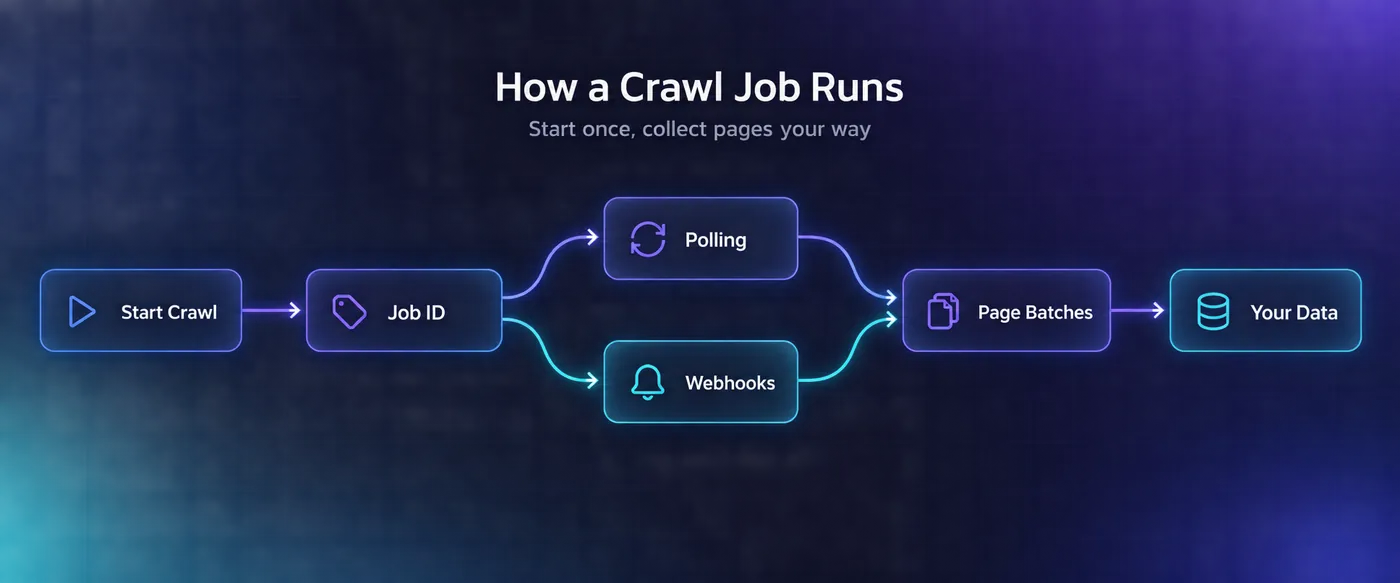
crawl() collects every page for you by default. For large sites, you may want more control: start the job, keep its ID and fetch results in pages, following the next link until it runs out:
from firecrawl.v2.types import PaginationConfig

job = firecrawl.start_crawl("https://docs.firecrawl.dev", limit=2000, formats=["markdown"])
print("Crawl started:", job.id)

# Later, or from another process:
status = firecrawl.get_crawl_status(
    job.id, pagination_config=PaginationConfig(auto_paginate=False)
)
pages = list(status.data)
while status.next:
    status = firecrawl.get_crawl_status_page(status.next)
    pages.extend(status.data)

print(status.status, len(pages), "pages collected so far")
Check status as well, since failed or cancelled crawls can still return a next link. Results stay available for 24 hours, so save them promptly. Our guide to scraping large websites with Firecrawl covers crawl strategy in more depth.
2Stream Pages to a Webhook
Polling works, but webhooks scale better. Firecrawl can call your endpoint as each page finishes, and again when the job starts, completes or fails:
job = firecrawl.start_crawl(
    "https://docs.firecrawl.dev",
    limit=500,
    formats=["markdown"],
    webhook={
        "url": "https://your-app.example.com/hooks/firecrawl",
        "events": ["page", "completed", "failed"],
        "metadata": {"project": "docs-index"},
    },
)
print("Pages will arrive at your webhook. Job:", job.id)
The four crawl events are started, page, completed and failed. Firecrawl only posts to HTTPS endpoints, expects a 2xx reply within 10 seconds and retries a failed delivery after 1, 5 and 15 minutes, so acknowledge fast and queue the work.
Verify every delivery before you trust it. The X-Firecrawl-Signature header carries an HMAC-SHA256 of the raw request body, made with the webhook secret in your account settings. Prefer a live progress bar? The SDK’s watcher() streams job status over a WebSocket instead.
Map a Site, Then Batch Scrape What You Need
Crawl scrapes everything it finds. When you only want some pages, map the site first. One map call lists the site’s URLs for 1 credit, and you pick what to scrape:
site = firecrawl.map("https://docs.firecrawl.dev", search="python", limit=100)
urls = [link.url for link in site.links]
print(len(urls), "matching URLs")

job = firecrawl.batch_scrape(urls[:20], formats=["markdown"], wait_timeout=300)
for page in job.data:
    print(page.metadata.source_url, len(page.markdown or ""))
Cost: 1 credit for the map plus 1 per page, so the example above costs 21 credits. Batch scrape takes wait_timeout, not timeout. Map can miss pages that aren’t linked or in the sitemap, so compare its count with your sitemap.
Search the Web and Scrape the Results
When you don’t have URLs yet, search finds them and can scrape each result in the same call:
results = firecrawl.search(
    "firecrawl python sdk pagination",
    limit=5,
    tbs="qdr:m",  # results from the past month
    scrape_options={"formats": ["markdown"]},
)

for page in results.web:
    print(page.metadata.title, "|", page.metadata.source_url)
Search costs 2 credits per 10 results, plus 1 for each page it scrapes. The tbs parameter filters by time, so qdr:d means the past day. Searching the research category, about 43M paper abstracts, has been free since August 2026.
Ask the Agent When You Only Have a Question
The agent endpoint researches a prompt on its own and returns data in your schema. Firecrawl’s docs call it the successor to the older extract():
from pydantic import BaseModel

class Crawler(BaseModel):
    name: str
    license: str
    github_stars: int | None = None

class CrawlerList(BaseModel):
    crawlers: list[Crawler]

result = firecrawl.agent(
    prompt="Find five open-source web crawlers written in Python, "
           "with their license and GitHub star count.",
    schema=CrawlerList,
    max_credits=300,
)

for crawler in CrawlerList.model_validate(result.data).crawlers:
    print(crawler.name, crawler.license, crawler.github_stars)
print("Credits used:", result.credits_used)
Most runs use a few hundred credits, and every account gets five free runs a day. Set max_credits on every call, because the default ceiling is 2,500. A run that hits the cap ends with a failed status and stop_reason set to credit_limit_reached, so check both before you use the data.
Our Firecrawl use cases guide shows when the agent beats a plain scrape and when it doesn’t.
Speed Things Up with AsyncFirecrawl
AsyncFirecrawl has the same methods as Firecrawl, but you await them. Pair it with a semaphore so you never go over your plan’s concurrency:
import asyncio
from firecrawl import AsyncFirecrawl

async def scrape_all(urls, max_concurrent=5):
    firecrawl = AsyncFirecrawl()
    limit = asyncio.Semaphore(max_concurrent)

    async def scrape_one(url):
        async with limit:
            return await firecrawl.scrape(url, formats=["markdown"])

    return await asyncio.gather(*(scrape_one(u) for u in urls), return_exceptions=True)

urls = [
    "https://books.toscrape.com/catalogue/page-1.html",
    "https://books.toscrape.com/catalogue/page-2.html",
    "https://books.toscrape.com/catalogue/page-3.html",
]
for url, result in zip(urls, asyncio.run(scrape_all(urls))):
    if isinstance(result, Exception):
        print("failed:", url, result)
    else:
        print("ok:", url, len(result.markdown or ""))
return_exceptions=True stops one failed URL from cancelling the rest. Jobs over your limit wait in a queue, and that wait counts against your timeout. Set max_concurrent to your plan’s limit, as listed in Firecrawl’s rate limits:
| Plan | Concurrent browsers | Scrape requests a minute | Crawl requests a minute |
|---|---|---|---|
| Free | 2 | 10 | 2 |
| Hobby | 5 | 100 | 20 |
| Standard | 25 | 500 | 100 |
| Growth | 50 | 5,000 | 1,000 |
| Scale | 100+ | 10,000 | 2,000 |
Handle Errors, Rate Limits and Retries
Every API error maps to a named exception, which keeps recovery code readable:
| Status | Exception | What to do |
|---|---|---|
| 400 | BadRequestError | Fix the parameters; a retry won’t help |
| 401 | UnauthorizedError | Check FIRECRAWL_API_KEY |
| 402 | PaymentRequiredError | Top up credits or upgrade |
| 403 | WebsiteNotSupportedError | Firecrawl refuses this site, so skip it |
| 408 | RequestTimeoutError | Raise the timeout or simplify the request |
| 429 | RateLimitError | Back off, then retry |
| 500 | InternalServerError | Retry a little later |
Here’s the catch. The SDK retries 502 errors and dropped connections on its own, three attempts by default, but it doesn’t retry rate limits. A 429 goes straight to your code, so wrap your scrapes in a backoff:
import time
from firecrawl import PaymentRequiredError, RateLimitError, WebsiteNotSupportedError

def scrape_with_backoff(url, attempts=5):
    for attempt in range(attempts):
        try:
            return firecrawl.scrape(url, formats=["markdown"])
        except RateLimitError:
            wait = 2 ** attempt
            print(f"Rate limited. Retrying in {wait}s")
            time.sleep(wait)
        except WebsiteNotSupportedError:
            print("Firecrawl doesn't support this site:", url)
            return None
        except PaymentRequiredError:
            raise SystemExit("Out of credits. Top up or upgrade, then rerun.")
    raise RuntimeError(f"Still rate limited after {attempts} tries: {url}")

doc = scrape_with_backoff("https://books.toscrape.com/")
Every exception in the table inherits from FirecrawlError, so catch that as a fallback. CrawlJobTimeoutError is the odd one out: it inherits from Python’s TimeoutError, so catch it separately.
The client also has no HTTP timeout by default. On long-running scripts, set one when you create it, for example Firecrawl(timeout=120), so a hung connection can’t stall your job. For sites that keep refusing a managed scraper, a self-run scraper with providers from our proxy directory is the usual next step.
Check Your Credits from Code
Two calls tell you where you stand before a big job:
usage = firecrawl.get_credit_usage()
print(usage.remaining_credits, "of", usage.plan_credits, "credits left")

concurrency = firecrawl.get_concurrency()
print(concurrency.concurrency, "of", concurrency.max_concurrency, "browsers in use")
Run the credit check before every large crawl, and log credits_used from each response. Our Firecrawl pricing breakdown shows what each plan costs per 1,000 credits.
Put It Together: A Docs Site to JSONL
This complete script maps a docs site, scrapes 50 matching pages in one batch and saves them as JSONL, one object per page. It makes a solid starting point for a RAG index:
import json
from firecrawl import Firecrawl, RateLimitError

firecrawl = Firecrawl()
SITE = "https://docs.firecrawl.dev"

# 1. List the pages first: one map call costs 1 credit
links = firecrawl.map(SITE, search="sdk", limit=200).links
urls = [link.url for link in links][:50]
print(f"Scraping {len(urls)} pages")

# 2. Scrape them in one batch job
try:
    job = firecrawl.batch_scrape(urls, formats=["markdown"], only_main_content=True)
except RateLimitError:
    raise SystemExit("Rate limited. Lower the batch size or wait a minute.")
if job.status != "completed":  # failed jobs come back without raising
    raise SystemExit(f"Batch ended as {job.status}")

# 3. Save one JSON object per page, keeping the source URL
with open("firecrawl_docs.jsonl", "w", encoding="utf-8") as f:
    for page in job.data:
        if not page.markdown:
            continue
        record = {
            "url": page.metadata.source_url,
            "title": page.metadata.title,
            "markdown": page.markdown,
        }
        f.write(json.dumps(record, ensure_ascii=False) + "\n")

print(f"Saved {len(job.data)} pages, {job.credits_used} credits used")
It costs about 51 credits: 1 for the map and 1 per page. To turn the JSONL into a searchable index, follow our Firecrawl RAG guide.
Mistakes That Break Firecrawl Scripts
1Copying Code from Old Tutorials
FirecrawlApp now points to the same client as Firecrawl, and scrape_url() survives only as a compatibility alias. Old calls that pass a params dictionary raise a TypeError, so pass options as keyword arguments instead.
2Reading Cached Prices as Fresh Ones
The SDK accepts cached pages up to four hours old by default. That’s fine for docs and articles. For prices, stock and news, set max_age=0.
3Crawling Without a Limit
A crawl without limit can run to 10,000 pages, and Firecrawl won’t start one your balance can’t cover. Set a limit and include_paths on every crawl.
4Mixing Up Timeout Units
timeout means milliseconds in scrape() and seconds in crawl(), where it caps the whole job. In a sync batch_scrape(), it’s the per-page limit and wait_timeout is the wait. Check the docstring before you set one.
5Letting One 429 Stop a Batch
Because rate limits aren’t retried for you, one unhandled RateLimitError stops a loop halfway. Add backoff, and keep your concurrency at or below your plan’s limit.
6Trusting JSON Without Validating It
LLM extraction is usually right and occasionally creative. Validate every JSON result against a Pydantic model before it reaches your database.
Frequently Asked Questions
Your Next Step
Start with one scrape and the Pydantic example on a page you actually care about. Once the output looks right, move to map plus batch scrape, then add backoff and a credit check before you scale.
Want the gentler version first? Our beginner’s Firecrawl walkthrough covers the basics, and if Firecrawl isn’t the right fit, our Firecrawl alternatives roundup covers the options.