What Is Proxy Geo-Targeting? Country, City and ASN Explained (2026)
Proxy geo-targeting picks where your exit IP is located. Learn how country, city and ASN filters work, why narrow targeting shrinks the pool, and when precision is worth it.

You point a scraper at a German shop and get prices in dollars. Or you check rankings for “plumber near me” and get results for a city two time zones away.
Both problems have the same fix: proxy geo-targeting. It tells your proxy provider which part of the world your exit IP should come from, so the website serves you the local version of the page.
This guide explains how country, city and ASN targeting work behind a proxy gateway, why every extra filter shrinks the pool you draw from, and when paying for precise targeting actually makes sense.
- Proxy geo-targeting chooses where your exit IP is located: region, country, state, city, ZIP, coordinates or network.
- Providers read the location from your username, password, a country entry point or a header.
- Every extra filter shrinks the pool, which can mean fewer unique IPs and more failed connections.
- Locations come from IP databases; MaxMind estimates 99.8% country accuracy but around 66% for US cities.
- Target the broadest level the website actually checks, and verify with an echo endpoint before you scale.
What Is Proxy Geo-Targeting?
Proxy geo-targeting means choosing the location of the IP address your requests leave from. You add a country, region, city or network filter to your proxy credentials, and the provider routes each request through an exit IP that matches it.
Websites read your IP to decide what to show you: language, currency, prices, search results, ads and even whether the content loads at all. Geo-targeting lets you see the page the way a local visitor would.
It’s mostly a feature of pooled proxies, like residential and mobile networks, where one backconnect gateway fronts millions of IPs in many countries. With a single static IP, the location is fixed when you buy it.
How Geo-Targeting Works Behind the Gateway
The provider keeps a record of where each exit IP is located. When your request arrives, the gateway reads your location filter and only picks from exits that match it.
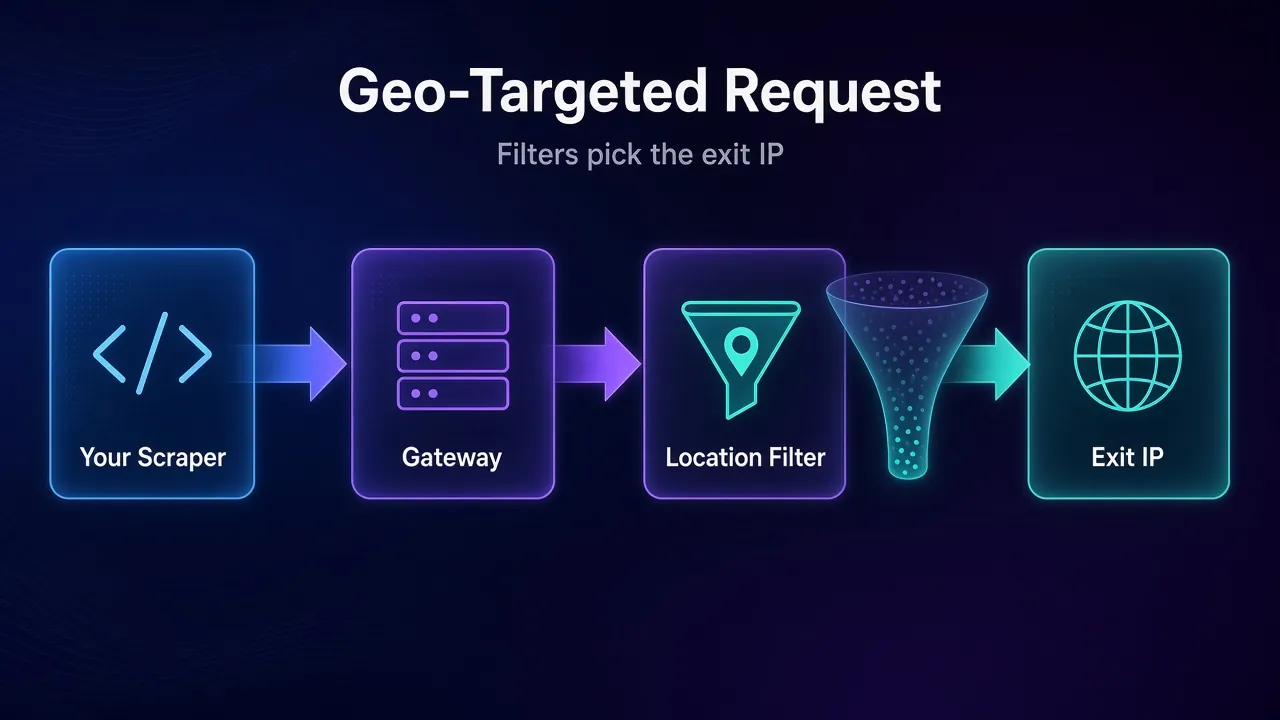
That location record comes from IP geolocation databases, not GPS. Oxylabs states in its location settings docs that it uses the MaxMind GeoIP2 database to assign country, state and city values to its exit nodes, updated weekly. It also warns that other IP databases may show different locations.
That warning matters more than it sounds. Your proxy is “in Paris” only according to the provider’s database. The website you’re visiting may use a different one.
How Do You Tell the Proxy Which Location to Use?
Most providers read the location from your credentials. The syntax differs, but the idea is the same everywhere:
- Username parameters: Bright Data uses
-country-us,-city-sanfranciscoand similar flags in the username. Oxylabs usescc-DEandcity-new_york. - Password parameters: IPRoyal puts location in the password, such as
_country-dk,it,ie, where its router randomly picks one of the listed countries. - Country entry points: Oxylabs runs country-specific hosts like
de-pr.oxylabs.io:30000, so no username changes are needed. - Headers: Oxylabs also accepts coordinates through an
X-Oxylabs-Geolocationproxy header, with a minimum 10-mile radius.
Here’s what a country plus city request looks like with Oxylabs’ documented format in cURL:
curl -x pr.oxylabs.io:7777 \
  -U "customer-USERNAME-cc-US-city-new_york:PASSWORD" \
  https://ip.oxylabs.io/location
If cURL proxy flags are new to you, our cURL proxy command guide covers -x, -U and debugging.
The Main Targeting Levels Explained
Providers offer a ladder of filters, from broad to very narrow. Here’s what each level does and who supports it, based on official docs checked October 29, 2026.
| Level | What it selects | Examples from provider docs |
|---|---|---|
| Region or continent | Any exit in a large area | Oxylabs cn-EU, IPRoyal _region-europe |
| Country | Exits in one country (ISO two-letter code) | Oxylabs cc-DE, Bright Data -country-de |
| State | US states | Oxylabs st-us_california, Bright Data -state-ny |
| City | Exits mapped to one city | Oxylabs city-new_york, Bright Data -city-paris |
| ZIP code | US ZIP codes only | Oxylabs postalcode-90210, Bright Data -zip- |
| Coordinates | Exits within a radius of a point | Oxylabs header, IPRoyal _geolocation- |
| ASN or ISP | Exits on one network | Oxylabs ASN-21928, Bright Data -asn-, IPRoyal _isp- |
1Country Targeting
Country is the workhorse. It covers most price, ad and search checks, and every major provider supports it. Oxylabs says its residential network covers over 195 locations, and Bright Data’s docs describe targeting across 195 countries.
It’s also the only option on some products. Bright Data’s configuration docs state that its datacenter and ISP proxies only support country targeting. If you need city-level IPs, you’re in residential or mobile territory.
2City and State Targeting
City targeting picks exits mapped to a named city. Both Oxylabs and Bright Data want the country included with the city, since many countries share city names. Bright Data adds that city names go in without spaces, as in -city-sanfrancisco.
State targeting is US-only at both providers. It’s a handy middle ground when a city is too narrow but a whole country is too broad, such as checking state-specific pricing or availability.
3ZIP Code and Coordinate Targeting
These are the narrowest location filters. Oxylabs and Bright Data both limit ZIP targeting to five-digit US ZIP codes.
Coordinate targeting picks exits near a latitude and longitude. IPRoyal’s location docs explain the trade-off clearly: by default, if no exit sits inside your radius, it uses the closest ones instead. Add the strict flag and the request fails rather than leaving the radius.
4ASN and ISP Targeting
ASN targeting is different. It doesn’t pick a place. It picks the network that owns the IP, identified by its Autonomous System Number. Our explainer on what an ASN is and why it matters for proxies covers the background.
You’d use it when a site treats traffic from one carrier or ISP differently, or when you need results as a specific broadband or mobile network’s customers see them.
Watch the interactions. Oxylabs notes that its ASN parameter is overridden if a country code is present. IPRoyal says its ISP filter should be chained to a city, and is only available with a verified ID after spending $1,000 or more.
Why Narrow Targeting Shrinks Your Pool
Every filter removes exits from the set the gateway can choose from. A country might have a deep pool. A single city has a fraction of it. One ISP in one city has a fraction of that.
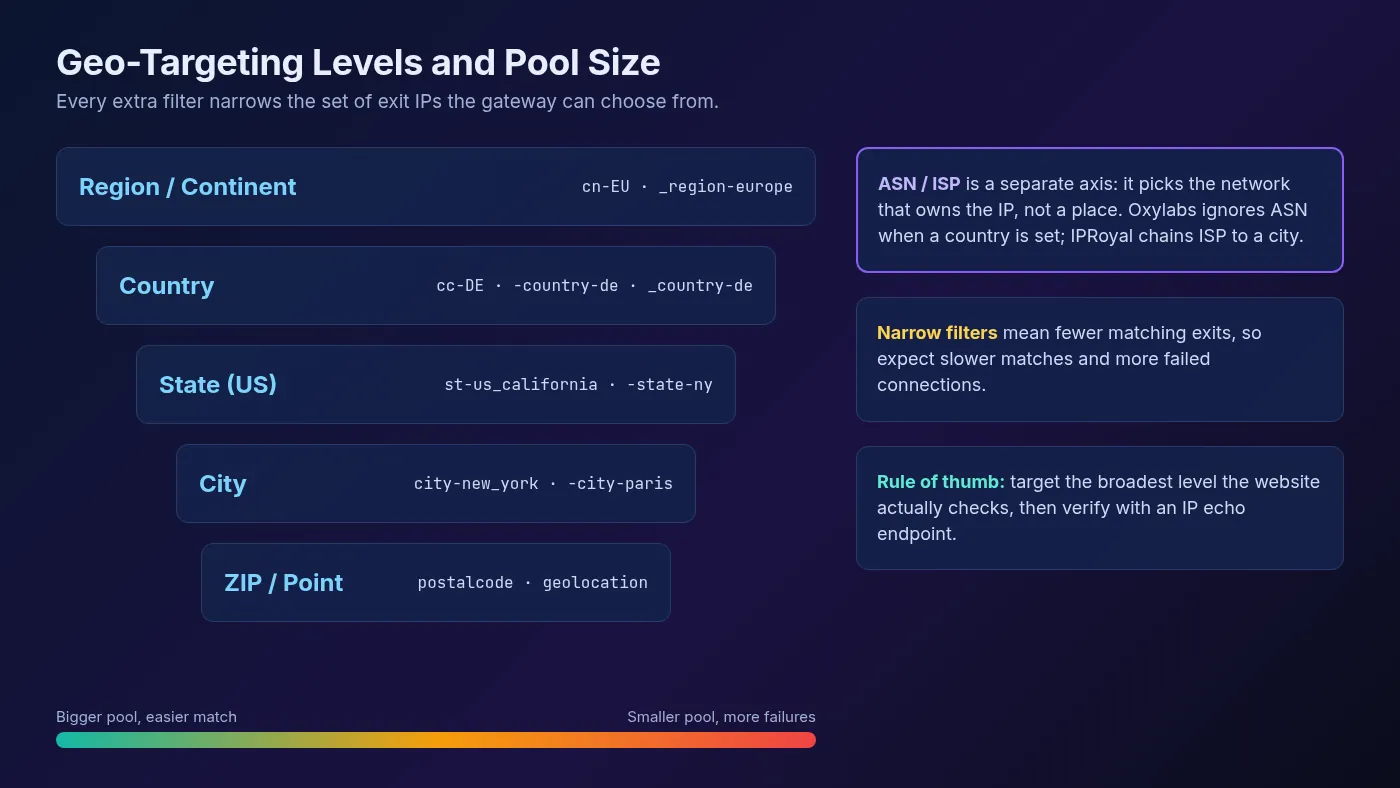
A smaller pool shows up in three ways:
- Fewer unique IPs. Rotation draws from a short list, so the same exits repeat more often on a busy crawl.
- Less stable sessions. Residential exits are real devices. When a sticky session’s device drops offline, a thin local pool has fewer replacements nearby.
- Failed or out-of-area matches. Depending on the provider and settings, a filter with no available exits either fails or falls back to the nearest match, as IPRoyal’s strict and non-strict coordinate modes show.
Providers rarely publish exact IP counts per city, so test before you commit. Send a batch of requests with your filter and count how many unique IPs and how many errors you get back.
How Accurate Is Proxy Geo-Targeting?
Country targeting is reliable. City targeting is a best estimate. That isn’t a provider problem, it’s how IP geolocation works.
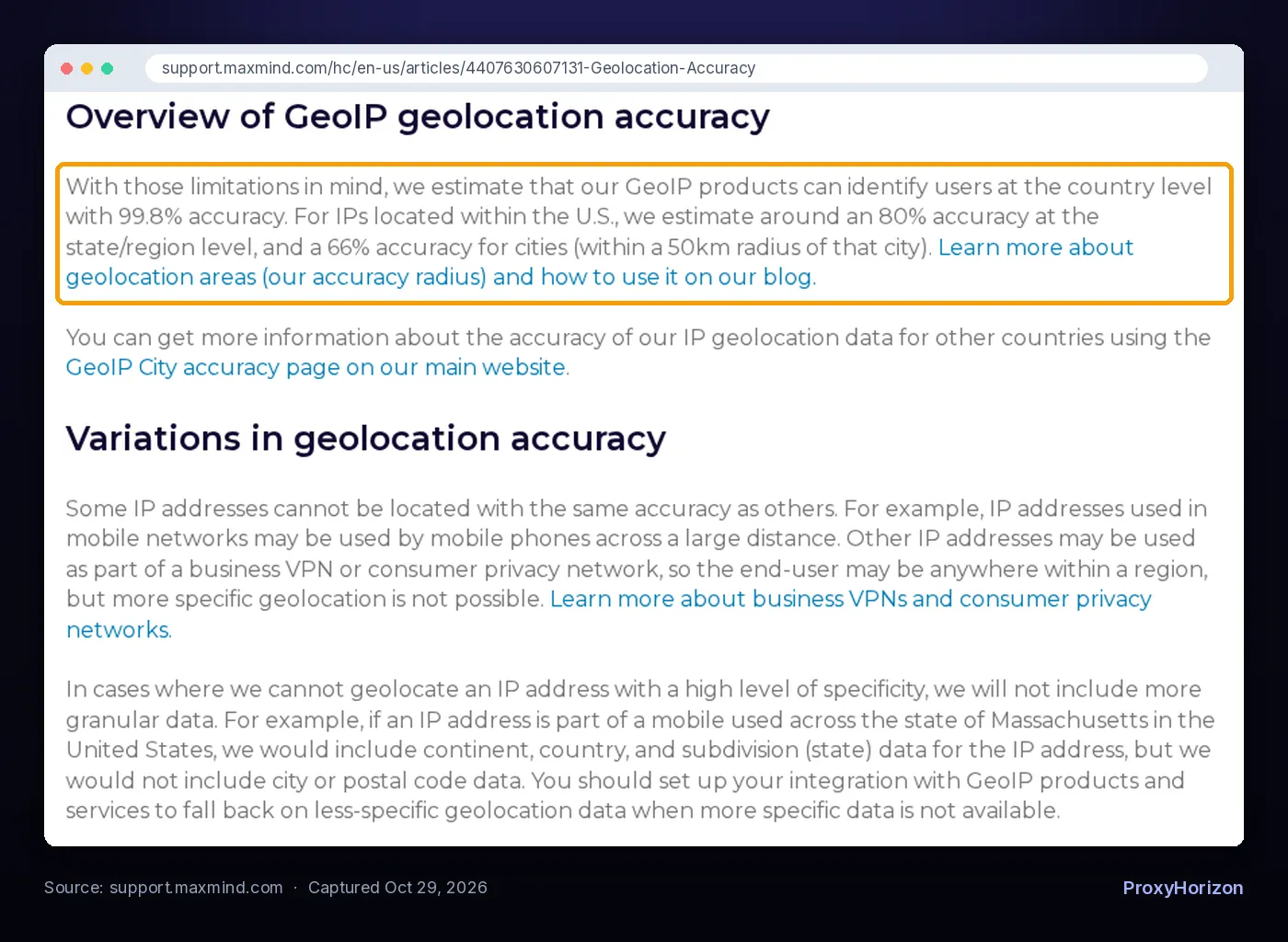
MaxMind, whose database Oxylabs uses, publishes its own geolocation accuracy estimates. It estimates 99.8% accuracy at the country level. For US IPs, it estimates around 80% at the state level and 66% for cities, within a 50 km radius.
MaxMind also notes that mobile network IPs can be used by phones across a large distance, and that it leaves out city data when it can’t locate an IP precisely. So a mobile exit tagged “Massachusetts” may have no city at all.
Then there’s the website’s side. If the target uses a different geolocation database, your “Chicago” IP might show up as a nearby suburb or another state entirely. When precision matters, check the exit IP against the same lookup the site uses.
How to Check Your Proxy’s Real Location
Don’t trust the filter. Verify it with a few quick checks:
- Use the provider’s echo endpoint. Oxylabs uses
ip.oxylabs.io/locationin its examples. Bright Data recommendsgeo.brdtest.com/welcome.txtfor checking exit geolocation. - Cross-check with a second database. Look up the same exit IP on a public geolocation service and compare country, region and city.
- Check the page itself. Load the target and confirm the currency, language and local results match what you asked for.
- Mind DNS. Bright Data’s DNS location mismatch article explains why DNS leak tools can show a different country than your exit IP, and recommends sending hostnames rather than pre-resolved IPs. Our guide to DNS leaks covers the general idea.
Run the location check on a sample of IPs, not just one. A filter that looks right on the first request can drift across a thousand.
When Is Precise Targeting Worth Paying For?
Precise targeting isn’t always available on every plan or product. Bright Data limits its datacenter and ISP proxies to country targeting, and IPRoyal gates ISP targeting behind ID verification and spend. Check what your plan includes, then use this to decide how deep to go:
| Use case | Usually enough | Why |
|---|---|---|
| Price and currency checks | Country | Most stores localize by country |
| Ad verification | Country, sometimes city | Campaigns are often geo-fenced by region or metro |
| Local SEO rankings | City | Map packs and local results change by city |
| Store or delivery availability | City or ZIP | Stock and delivery can vary by postcode |
| Carrier-specific content | ASN or ISP | The network matters more than the place |
| General scraping | Country or none | Extra filters only shrink the pool |
For example, price monitoring usually only needs country targeting, because that’s what decides currency and regional pricing. SEO monitoring is different: local search results can change from one city to the next, so city targeting earns its cost there.
If you’re only scraping public pages that look the same everywhere, skip geo-targeting entirely. You’ll get the largest pool and the fewest failures.
Common Geo-Targeting Mistakes
- Targeting a city when the site only checks country. You pay for precision you don’t use and shrink your pool for nothing.
- Forgetting the country with the city. Oxylabs and Bright Data both want the country included, since city names repeat across countries.
- Mixing ASN and country without reading the docs. At Oxylabs, the country code overrides the ASN.
- Leaking your real location elsewhere. Browser timezone, language headers and WebRTC can contradict the proxy’s location. A VPN or proxy only changes your IP, as our guide on whether a VPN hides your location explains.
- Expecting street-level precision. MaxMind says its data is never precise enough to identify a household or street address.
If you’re still picking a network, our roundup of the best residential proxy providers compares location coverage, and the proxy directory lists options side by side.
Frequently Asked Questions
Target the Level the Website Actually Checks
Proxy geo-targeting is a filter on the provider’s IP pool. Country targeting is broad, accurate and supported almost everywhere. City, ZIP, coordinate and ASN targeting are powerful, but each one shrinks the pool and leans harder on geolocation databases that are only estimates.
Start at the broadest level that gets you the right page, then go narrower only when the results prove you need it.
Our take: treat every location filter as a hypothesis. Test it with an echo endpoint and the target page before you scale.
Keep Reading
More articles you might enjoy