Does Telegram Have a Built-in Proxy? Explained (2026)
Does Telegram have a built-in proxy? Yes, it has native proxy support for SOCKS5 and MTProto, but not a free proxy server. Here is exactly what that means and how to use it.

Telegram has a reputation for being privacy-friendly and hard to block, which leads a lot of people to ask a simple question: does Telegram have a built-in proxy? Maybe you’ve seen a “connecting via proxy” message, or a channel handing out proxy links, and wondered whether Telegram just comes with this feature baked in.
The short answer is yes, but with an important nuance. Telegram has built-in proxy support, meaning the app can route your traffic through a proxy without any add-ons. What it doesn’t do is run a free proxy server for you; you still supply the server details. Understanding that distinction clears up a lot of confusion.
This guide explains exactly what Telegram’s built-in proxy feature is and isn’t, which proxy types it supports, whether it’s safe, how to turn it on, and when you should actually use it. Let’s clear it all up.
Does Telegram Have a Built-in Proxy?
Yes, Telegram has built-in proxy support. The app includes a native proxy feature in its settings that lets you route your Telegram connection through a proxy server, no third-party software, VPN, or plugins required. This is unusual: most apps expect you to configure proxies at the system level, but Telegram bakes the option right into its own settings menu.
The key nuance is the difference between proxy support and a proxy server. Telegram gives you the built-in ability to use a proxy, but it doesn’t automatically provide the actual server your traffic runs through. You supply that, whether it’s a SOCKS5 proxy from a provider, a public MTProto proxy shared in a channel, or one you host yourself. Think of Telegram as providing the socket; you bring the plug.
What "Built-in Proxy" Actually Means Here
When people say Telegram has a “built-in proxy,” they mean the app natively understands how to talk to proxy servers and gives you a clean interface to add and toggle them. You don’t need to route your whole device through anything, Telegram handles its own traffic through the proxy you specify, leaving the rest of your apps untouched. That app-level control is part of what makes the feature so convenient.
What it does not mean is that Telegram is a proxy or VPN in itself, or that it hides your IP by default. Out of the box, Telegram connects directly to its servers like any app. The proxy feature only kicks in once you add a server and switch it on. So Telegram provides the capability; the privacy or unblocking benefit depends entirely on the server you point it at.
The Two Proxy Types Telegram Supports Natively
Telegram’s built-in feature supports two different proxy protocols, and knowing the difference helps you choose the right one.
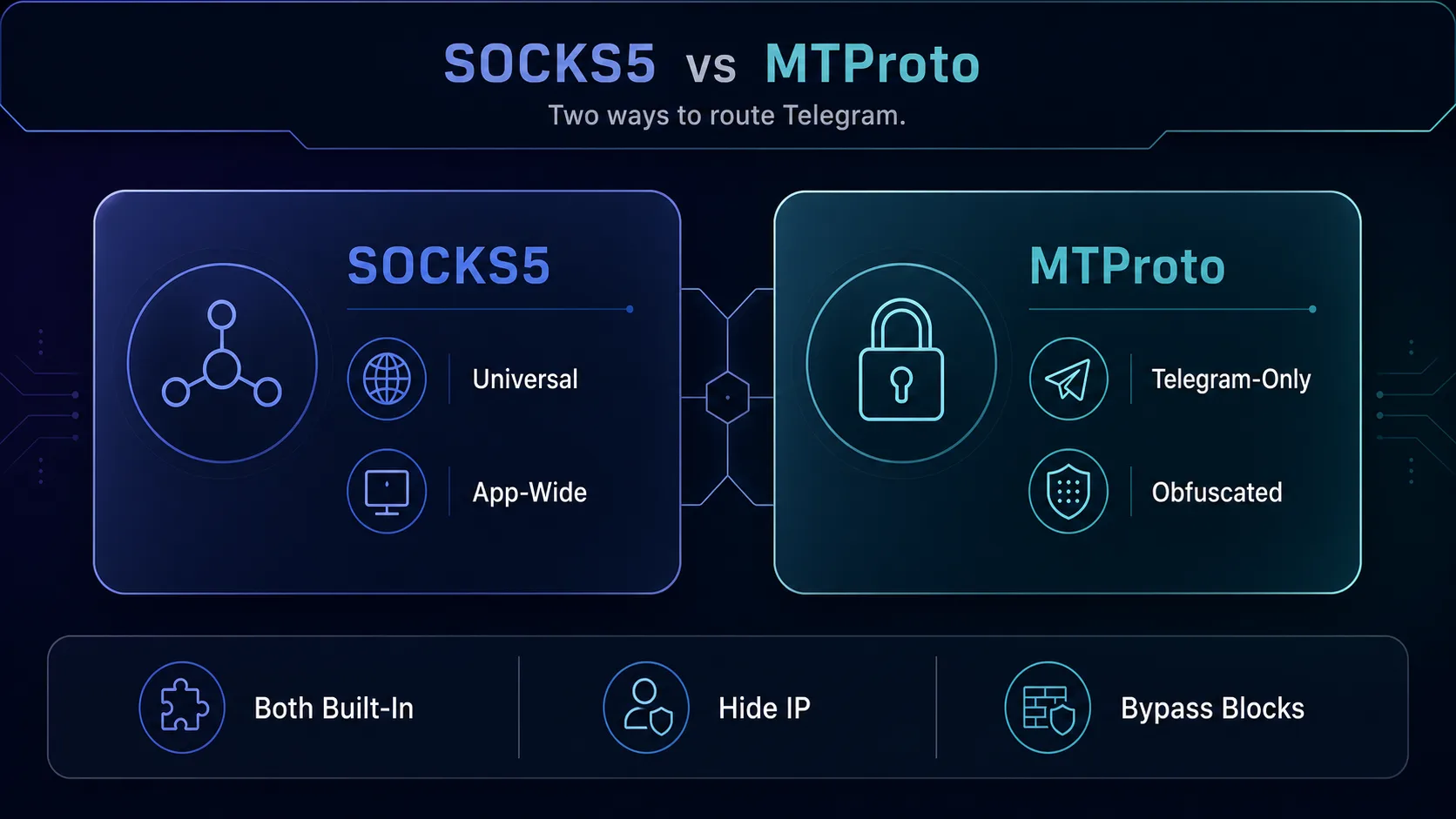
SOCKS5 is the universal proxy standard, the same kind sold by proxy providers and used across many apps. It’s the versatile choice for privacy, geo-targeting, and running multiple accounts, and you typically get it from a paid provider. MTProto is Telegram’s own protocol, and its special power is obfuscation: it disguises the connection so networks can’t easily tell a proxy is in use, which makes it excellent for beating censorship. For the full comparison, see our guides on SOCKS5 vs MTProto, SOCKS5 proxies for Telegram, and what an MTProto proxy is.
Does Telegram Provide Free Proxy Servers?
Not directly, and this is the most common misunderstanding. Telegram provides the built-in feature to use proxies and even releases free official software for anyone to run an MTProto proxy server, but it doesn’t operate a fleet of free proxy servers for users to connect to. The proxy links you see shared in channels are run by individual operators and communities, not by Telegram itself.
In some restricted regions, Telegram may surface a suggested proxy to help users stay connected during blocks, but these come from the broader ecosystem rather than being a guaranteed Telegram service. So if you want a reliable, private connection, you either find a trustworthy public MTProto proxy, self-host one with Telegram’s free software, or buy a quality SOCKS5 proxy from a provider. Telegram supplies the on-ramp, not the road.
How to Use Telegram’s Built-in Proxy Feature
Turning on the built-in proxy is quick once you have server details. Open Settings, go to Data and Storage (or Advanced on desktop), then tap Proxy Settings → Add Proxy. Pick your protocol (SOCKS5 or MTProto), enter the server address, port, and any credentials or secret, then toggle it on. Telegram shows a connection indicator when the proxy is active.
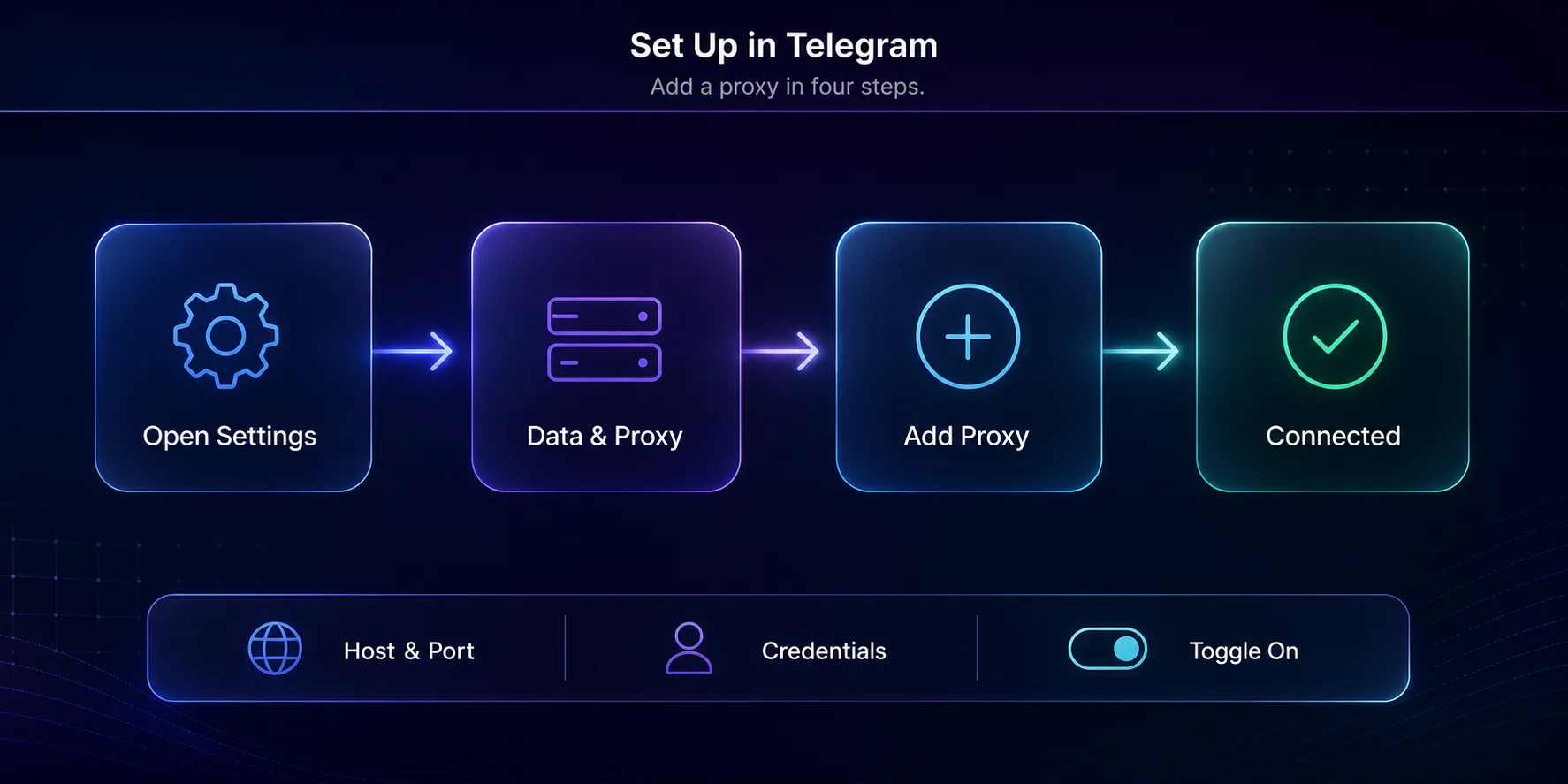
If someone shares an MTProto or SOCKS5 proxy as a link, tapping it opens Telegram and offers to add the proxy automatically, no manual entry needed. Just be sure any link or server comes from a source you trust. For a complete step-by-step walkthrough on both mobile and desktop, see our guide to using proxies in Telegram.
Built-in Proxy vs a VPN
It’s worth being clear on how Telegram’s built-in proxy differs from a VPN, because they’re often confused. Telegram’s proxy is app-level: it only reroutes Telegram’s traffic, leaving your browser and other apps connecting normally. A VPN is device-level: it encrypts and routes all your internet traffic through a tunnel, protecting everything at once.
That makes Telegram’s built-in proxy lighter and more targeted, ideal when you only care about Telegram itself and want to keep the rest of your connection fast and direct. A VPN is the better choice when you want whole-device privacy. Neither is strictly better; they solve different scopes of the same problem, and plenty of people use a proxy inside Telegram while running a VPN for everything else.
Is Telegram’s Built-in Proxy Safe?
The feature itself is safe, it’s built by Telegram and doesn’t weaken the app’s encryption. Your chats stay as protected as they always are, because the proxy only relays your already-encrypted traffic. The safety question really comes down to which server you connect to, since that operator handles your traffic path and can see metadata like your IP and connection timing.
A reputable paid SOCKS5 provider or a proxy you self-host is trustworthy; an anonymous free proxy from a random channel is a gamble. The rule is simple: the built-in feature is safe, but only as safe as the server you point it at. Choose sources you trust, and for account work or anything sensitive, favor a vetted provider over a public list. Our guide on whether authorities can track proxy users covers the metadata side in depth.
When You Should and Shouldn’t Use It
Use Telegram’s built-in proxy when you want to hide your IP within Telegram, access the app on a restricted network, run multiple accounts on separate IPs, or appear to connect from another country. It’s the easiest, most targeted way to do any of these, and it keeps the rest of your device connecting normally.
You probably don’t need it if you want privacy across your whole device (use a VPN instead), or if you’re on an open network with no blocking and no multi-account needs, in which case a direct connection is simplest. And avoid using shady free proxies for sensitive accounts. Match the tool to the job: for serious or account-related use, pair the built-in feature with a quality proxy from our roundup of the best proxies for Telegram.
Why Telegram Built Proxy Support In
Most apps leave proxy configuration to your operating system, so why did Telegram bake it right into its own settings? The answer is the app’s long-running battle with censorship. Telegram is blocked or restricted in a number of countries, and its team decided that keeping people connected shouldn’t depend on them installing extra tools. Building proxy support directly into the app means anyone can restore access with a few taps, even on a locked-down device.
This philosophy is also why Telegram released free MTProto proxy server software and made proxies shareable as one-tap links. The goal was to lower the barrier to circumvention as far as possible, so that a working proxy is never more than a link away. It’s a deliberate design choice that reflects Telegram’s positioning as a communication tool that’s hard to silence.
Troubleshooting the Built-in Proxy
If the built-in proxy won’t cooperate, a few checks usually solve it. When a proxy won’t connect at all, the server may be offline or the details mistyped, so double-check the address, port, and secret or credentials, then try a different server. If Telegram connects but feels painfully slow, the proxy is likely overloaded or far away, so switch to a closer or less crowded one.
A proxy that worked yesterday and fails today has often simply gone offline, which is common with free public servers, so keep a backup saved. And if nothing connects even without a proxy, confirm the block isn’t at the account or app level rather than the network. For deeper setup help, our full guide to using proxies in Telegram walks through every step.
On Android specifically, the menu paths and the settings that break proxies are covered in our Telegram proxy setup guide for Android. If you have an MTProto link, see how to add an MTProto proxy.
Frequently Asked Questions
The Bottom Line
Telegram does have a built-in proxy, but it’s proxy support, not a free proxy server. The app gives you a native, app-level feature to route Telegram through a SOCKS5 or MTProto server of your choosing, while leaving the rest of your device untouched. That’s genuinely useful for privacy, unblocking, and account management, but the benefit and the safety hinge entirely on the server you supply.
So take advantage of the built-in feature, just pair it with a trustworthy proxy: a self-hosted MTProto server, a vetted public one, or a quality SOCKS5 proxy from a provider. To pick the right protocol, see our SOCKS5 vs MTProto comparison, and to find a reliable server, check our roundup of the best proxies for Telegram.
Keep Reading
More articles you might enjoy